
Learning Objectives
By the end of this module, you will be able to:
- Explain what a variable is and identify common data types
- Write and call a simple function
- Use conditionals (if/else) to make decisions in code
- Use loops to repeat actions
- Read simple Python code and predict what it will do
Prerequisites
- A computer with internet access
- A terminal application (Terminal on macOS, Git Bash on Windows, terminal on Linux)
- Python 3 installed (python.org)
- Module 02 recommended for terminal skills
Estimated self-study time:
| Activity | Estimated Time |
|---|---|
| Reading | 25 to 35 minutes |
| Practice Exercises | 20 to 25 minutes |
| Total | 45 to 60 minutes |
Why Learn Programming Basics?
You don't need to become a software developer for this bootcamp. But you do need to be able to read code, because cloud infrastructure involves code everywhere:
- AWS Lambda functions are written in Python, JavaScript, or other languages
- Infrastructure-as-Code templates use programming concepts like variables and conditionals
- Automation scripts use loops to perform actions across multiple servers or accounts
- Configuration files follow structured formats that look like code
Think of it this way: you don't need to write a novel in French, but you need to be able to read a menu.
Concepts
Variables: Giving Names to Things
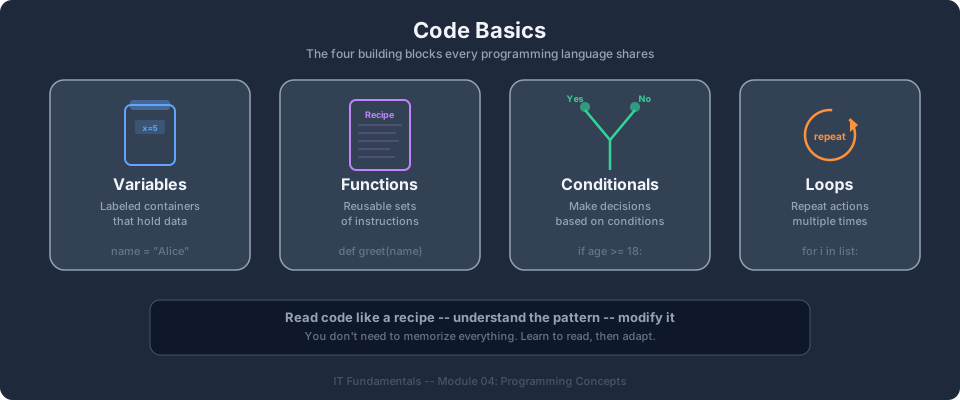
A variable is a name that points to a value. It's like putting a label on a box so you can find what's inside later.
Real-world analogy: Think of a variable like a labeled jar in your kitchen. The label says "Sugar" (that's the variable name). The sugar inside is the value. You can empty the jar and fill it with salt. The label stays the same, but the contents change.
# Creating variables (putting values in labeled jars)
server_name = "web-server-01"
cpu_count = 4
is_running = True
After this code runs:
server_namecontains the text"web-server-01"cpu_countcontains the number4is_runningcontains the valueTrue
Data Types: Different Kinds of Values
Just like the real world has different kinds of things (numbers, words, yes/no answers), programming has different data types:
| Data Type | What It Stores | Example | Real-World Analogy |
|---|---|---|---|
| String | Text | "us-east-1" | A name tag |
| Integer | Whole numbers | 8 | A house number |
| Float | Decimal numbers | 0.023 | A price tag |
| Boolean | True or False | True | A light switch (on/off) |
| List | An ordered collection | ["a", "b", "c"] | A shopping list |
| Dictionary | Key-value pairs | {"name": "Sam"} | A contact card |
# Strings: text wrapped in quotes
region = "us-east-1"
greeting = "Hello, welcome to AWS"

# Integers: whole numbers (no decimal point)
instance_count = 3
port = 443

# Floats: numbers with decimals
hourly_cost = 0.0116
cpu_usage = 78.5

# Booleans: only two possible values
is_encrypted = True
is_public = False

# Lists: ordered collections (like a shopping list)
availability_zones = ["us-east-1a", "us-east-1b", "us-east-1c"]
open_ports = [22, 80, 443]

# Dictionaries: key-value pairs (like a contact card)
instance = {
    "id": "i-1234567890abcdef0",
    "type": "t3.micro",
    "state": "running"
}
Real-world analogy for lists: A list is like a shopping list. It has items in a specific order, you can add items to the end, remove items, or check what's at position #3.
Real-world analogy for dictionaries: A dictionary is like a contact card. Each piece of information has a label (key) and a value: "name" = "Jane", "phone" = "555-0123", "email" = "jane@example.com".
Practice Exercise 1: Variables and Data Types
Open your terminal and start Python by typing python3. Then try creating these variables:
# Type these one at a time and press Enter
my_name = "your name here"
favorite_number = 42
likes_coffee = True
hobbies = ["reading", "hiking", "coding"]

# Now check what's inside each variable
print(my_name)
print(favorite_number)
print(likes_coffee)
print(hobbies)
print(type(my_name))       # Shows: <class 'str'>
print(type(favorite_number))  # Shows: <class 'int'>
Type exit() when you're done.
Functions: Reusable Recipes
A function is a named set of instructions that performs a specific task. You define it once, then use it whenever you need that task done.
Real-world analogy: A function is like a recipe. The recipe for "make coffee" has specific steps (boil water, add grounds, pour water, wait 4 minutes). Once you have the recipe, you can follow it any time you want coffee without re-inventing the process. You can also adjust ingredients (inputs), like switching to decaf.
# Defining a function (writing the recipe)
def make_greeting(name):
    message = f"Hello, {name}! Welcome to the AWS Bootcamp."
    return message

# Calling a function (following the recipe)
result = make_greeting("Alex")
print(result)  # Hello, Alex! Welcome to the AWS Bootcamp.

result2 = make_greeting("Jordan")
print(result2)  # Hello, Jordan! Welcome to the AWS Bootcamp.
Breaking it down:
defmeans "I'm defining a new function"make_greetingis the function's name (the recipe's title)nameis a parameter, an input the function needs (an ingredient)return messagesends a result back to whoever called the function (the finished dish)
Functions with Multiple Inputs
def calculate_monthly_cost(hourly_rate, hours_per_day, days):
    total = hourly_rate * hours_per_day * days
    return total

# EC2 t3.micro in us-east-1: $0.0104/hour
ec2_cost = calculate_monthly_cost(0.0104, 24, 30)
print(f"Monthly EC2 cost: ${ec2_cost:.2f}")  # Monthly EC2 cost: $7.49
Why Functions Matter in Cloud
In AWS Lambda, your entire application is a function. AWS calls your function when an event occurs (like a file being uploaded to S3):
def lambda_handler(event, context):
    # This function runs every time someone uploads a file
    file_name = event["Records"][0]["s3"]["object"]["key"]
    print(f"New file uploaded: {file_name}")
    return {"statusCode": 200}
You don't need to understand every detail here. The point is: functions are how cloud code is organized.
Practice Exercise 2: Functions
Open Python (python3) and try:
def double(number):
    return number * 2

print(double(5))    # What do you expect?
print(double(100))  # What do you expect?
print(double(0))    # What do you expect?

# Now write your own function:
def add_tax(price, tax_rate):
    return price + (price * tax_rate)

print(add_tax(100, 0.08))  # 100 + 8% tax = ?
print(add_tax(50, 0.10))   # 50 + 10% tax = ?
Conditionals: Making Decisions
Conditionals let your code choose different actions based on a condition. Think of it like a fork in the road.
Real-world analogy: "If it's raining, bring an umbrella. Otherwise, wear sunglasses." That's a conditional. The action depends on a condition being true or false.
# Simple if/else
temperature = 95

if temperature > 90:
    print("Warning: Server room too hot!")
elif temperature > 75:
    print("Temperature elevated, monitoring...")
else:
    print("Temperature normal")
How to read this:
- Check: is temperature greater than 90? If yes, print the warning and stop checking.
- Otherwise, check: is temperature greater than 75? If yes, print the monitoring message.
- Otherwise (neither condition was true), print "Temperature normal."
Comparison Operators
| Operator | Meaning | Example | Result |
|---|---|---|---|
== | Equal to | 5 == 5 | True |
!= | Not equal to | 5 != 3 | True |
> | Greater than | 10 > 5 | True |
< | Less than | 3 < 7 | True |
>= | Greater than or equal | 5 >= 5 | True |
<= | Less than or equal | 4 <= 3 | False |
A Cloud Example
instance_state = "stopped"

if instance_state == "running":
    print("Instance is healthy")
elif instance_state == "stopped":
    print("Instance is stopped - starting it now...")
elif instance_state == "terminated":
    print("Instance was deleted - cannot recover")
else:
    print(f"Unknown state: {instance_state}")
Practice Exercise 3: Conditionals
# Try this in Python:
age = 25

if age >= 18:
    print("You can vote")
else:
    print("Too young to vote")

# Now modify: change age to 15 and run again. What changes?

# Challenge: write a conditional that checks a variable called
# "storage_gb" and prints:
#   "Low storage" if under 10
#   "Moderate storage" if between 10 and 100
#   "High storage" if over 100
Loops: Repeating Actions
A loop runs the same code multiple times. Instead of writing the same instruction 100 times, you write it once inside a loop.
Real-world analogy: "For each item on my shopping list, pick it up and put it in the cart." You don't write separate instructions for each item. You write one instruction and repeat it for every item in the list.
For Loops (when you know what to loop over)
# Loop through a list of AWS regions
regions = ["us-east-1", "eu-west-1", "ap-southeast-1"]

for region in regions:
    print(f"Checking resources in {region}...")
Output:
Checking resources in us-east-1...
Checking resources in eu-west-1...
Checking resources in ap-southeast-1...
The code inside the loop runs once for each item in the list. The variable region takes on each value in turn.
While Loops (when you repeat until a condition changes)
# Keep checking until the server is ready
attempts = 0

while attempts < 5:
    print(f"Attempt {attempts + 1}: Checking if server is ready...")
    attempts = attempts + 1

print("Done checking")
Output:
Attempt 1: Checking if server is ready...
Attempt 2: Checking if server is ready...
Attempt 3: Checking if server is ready...
Attempt 4: Checking if server is ready...
Attempt 5: Checking if server is ready...
Done checking
A Cloud Example
# Tag all instances with the environment name
instances = ["i-abc123", "i-def456", "i-ghi789"]

for instance_id in instances:
    print(f"Tagging {instance_id} with Environment=Production")
In the real bootcamp, this would be an actual AWS API call. The pattern is the same: loop through a list of resources and perform an action on each one.
Practice Exercise 4: Loops
# Try this:
fruits = ["apple", "banana", "cherry", "date"]

for fruit in fruits:
    print(f"I like {fruit}")

# Now try: create a list of 3 city names and loop through them,
# printing "I want to visit [city]" for each one.

# Challenge: use a while loop to count from 1 to 10
count = 1
while count <= 10:
    print(count)
    count = count + 1
Putting It All Together
Here's a small program that combines variables, functions, conditionals, and a loop:
def check_instance_health(cpu_usage):
    """Check if an instance is healthy based on CPU usage."""
    if cpu_usage > 90:
        return "CRITICAL"
    elif cpu_usage > 70:
        return "WARNING"
    else:
        return "HEALTHY"

# Check multiple instances
instances = [
    {"id": "i-001", "cpu": 45},
    {"id": "i-002", "cpu": 82},
    {"id": "i-003", "cpu": 95},
    {"id": "i-004", "cpu": 23},
]

for instance in instances:
    status = check_instance_health(instance["cpu"])
    print(f"Instance {instance['id']}: CPU at {instance['cpu']}% - {status}")
Output:
Instance i-001: CPU at 45% - HEALTHY
Instance i-002: CPU at 82% - WARNING
Instance i-003: CPU at 95% - CRITICAL
Instance i-004: CPU at 23% - HEALTHY
Don't worry if this looks complex. By the time you reach this level in the bootcamp, you'll have seen these patterns dozens of times.
Instructor Notes
Estimated lecture time: 25 to 30 minutes
Common student questions:
-
Q: Which programming language should I learn? A: Python is the most common language for AWS Lambda functions and automation scripts. The bootcamp uses Python for code examples. If you already know JavaScript or another language, the concepts transfer directly.
-
Q: Do I need to memorize all of this? A: No. You need to recognize these concepts when you see them. You don't need to write code from scratch at this stage. You need to read code and understand what it does.
Teaching tips:
- Go slow. For career changers, this may be their first exposure to code. Give them time to type examples into Python and see the output.
- Use the real-world analogies heavily. "Recipe = function" and "shopping list = list" resonate with non-technical audiences.
- Emphasize that errors are normal. When someone gets a SyntaxError, celebrate it. They're learning to read error messages.
Pause points:
- After variables: have students create 3 variables of different types in Python
- After functions: have students modify the
calculate_monthly_costfunction to add a discount parameter - After conditionals: have students write an if/elif/else for a scenario they choose
Key Takeaways
- Variables store values with descriptive names so you can use them later
- Functions are reusable blocks of code. Define once, use many times.
- Conditionals (if/elif/else) let code make decisions based on conditions
- Loops repeat actions for every item in a collection or until a condition changes
- You don't need to write code from scratch. You need to read it and understand the pattern.
Part 2: APIs and JSON
Estimated time for Part 2: 30-45 minutes. If you are feeling overloaded after Part 1, take a break before continuing. These are two distinct skill areas and it is fine to do them on separate days.
Learning Objectives (Part 2)
By the end of this section, you will be able to:
- Explain what an API is in plain language
- Describe the four main HTTP methods (GET, POST, PUT, DELETE) and when each is used
- Read a JSON document and identify its structure
- Explain what a REST API is and how URLs map to resources
- Understand how the AWS Console, CLI, and SDKs all use APIs behind the scenes
What Is an API?
API stands for Application Programming Interface. That sounds technical, but the concept is simple:
An API is a way for one program to talk to another program.
Real-world analogy: Think of a restaurant. You (the customer) don't walk into the kitchen and cook your own food. Instead, you tell the waiter what you want (a request), the waiter takes it to the kitchen (the server), and the kitchen sends back your food (a response). The waiter is the API, a defined way to communicate between you and the kitchen.
In cloud computing:
- You (through the console, CLI, or code) send a request to AWS
- AWS processes the request (creates a server, stores a file, etc.)
- AWS sends back a response (success, failure, or the data you asked for)
Every single thing you do on AWS goes through an API. When you click "Create bucket" in the S3 console, the console makes an API call on your behalf. When you run aws s3 ls in the terminal, the CLI makes the same kind of API call. The tools are different; the API underneath is the same.
HTTP: The Language of the Web
APIs communicate using HTTP (Hypertext Transfer Protocol), the same protocol your browser uses to load web pages. You learned about HTTP in Module 03. Now we'll focus on how APIs use it.
HTTP Methods (Verbs)
HTTP methods tell the API what action you want to perform:
| Method | Action | Real-World Analogy | Example |
|---|---|---|---|
| GET | Read/retrieve data | Looking up a contact in your phone | Get a list of S3 buckets |
| POST | Create something new | Adding a new contact to your phone | Create a new EC2 instance |
| PUT | Update/replace something | Editing an existing contact's phone number | Update a security group rule |
| DELETE | Remove something | Deleting a contact from your phone | Terminate an EC2 instance |
These are sometimes called CRUD operations:
- Create = POST
- Read = GET
- Update = PUT
- Delete = DELETE
URLs as Resource Addresses
In a REST API, every resource has a URL (like an address):
https://api.example.com/users/123
        |                  |     |
        server             resource type
                                 specific resource (ID 123)
| URL | Meaning |
|---|---|
GET /users | Get all users |
GET /users/123 | Get user #123 |
POST /users | Create a new user |
PUT /users/123 | Update user #123 |
DELETE /users/123 | Delete user #123 |
The URL identifies WHAT you're talking about. The HTTP method says WHAT you want to do with it.
JSON: How APIs Exchange Data
When an API sends data back to you (or you send data to an API), it needs a format that both humans and computers can read. That format is JSON (JavaScript Object Notation).
Real-world analogy: JSON is like a standardized form. Instead of everyone describing their information in random paragraph form, JSON structures it with clear labels and values, like filling in form fields.
JSON Syntax
{
  "name": "Jane Smith",
  "age": 28,
  "is_active": true,
  "skills": ["Python", "AWS", "Docker"],
  "address": {
    "city": "Seattle",
    "state": "WA"
  }
}
The rules:
- Everything is wrapped in curly braces
{ } - Data is in key-value pairs:
"key": value - Keys are always strings (text in double quotes)
- Values can be: strings, numbers, booleans (true/false), arrays (lists in
[ ]), objects (nested{ }), or null - Items are separated by commas
- No trailing comma after the last item
- No comments allowed (unlike regular code)
Reading JSON: AWS Example
Let's read a real AWS-style JSON response. Suppose you ask AWS "tell me about this EC2 instance":
{
  "InstanceId": "i-1234567890abcdef0",
  "InstanceType": "t3.micro",
  "State": {
    "Code": 16,
    "Name": "running"
  },
  "Tags": [
    {
      "Key": "Name",
      "Value": "my-web-server"
    },
    {
      "Key": "Environment",
      "Value": "production"
    }
  ],
  "LaunchTime": "2024-01-15T08:30:00Z"
}
From this JSON, you can tell:
- The instance ID is
i-1234567890abcdef0 - It's a
t3.microinstance type - It's currently
running - It has two tags: one naming it "my-web-server" and one marking it as "production"
- It was launched on January 15, 2024
JSON in AWS: IAM Policies
One of the most important places you'll see JSON is in IAM policies (access control rules):
{
  "Version": "2012-10-17",
  "Statement": [
    {
      "Effect": "Allow",
      "Action": "s3:GetObject",
      "Resource": "arn:aws:s3:::my-bucket/*"
    }
  ]
}
This policy says: "Allow the holder of this policy to download (GetObject) any file from the S3 bucket called my-bucket." You'll write policies like this starting in Bootcamp Module 02.
Making a Real API Call
Let's make an actual API call using curl (a command-line tool for making HTTP requests). We'll use a free, public API:
curl https://api.open-meteo.com/v1/forecast?latitude=40.71&longitude=-74.01¤t_weather=true
This sends a GET request to a weather API asking for the current weather in New York City. The response will look something like:
{
  "current_weather": {
    "temperature": 22.5,
    "windspeed": 12.3,
    "winddirection": 180,
    "weathercode": 1,
    "time": "2024-06-15T14:00"
  }
}
What just happened:
curlsent an HTTP GET request to the URL- The weather API server received the request
- The server looked up the weather for those coordinates
- The server sent back JSON with the current conditions
This is the same pattern you'll use with AWS. Instead of asking a weather API about temperature, you'll ask the AWS API about your cloud resources.
Practice Exercise: Make an API Call
Open your terminal and try:
# Get current weather for your area (replace coordinates with your city)
curl "https://api.open-meteo.com/v1/forecast?latitude=40.71&longitude=-74.01¤t_weather=true"
# Get a random fact (different API)
curl "https://uselessfacts.jsph.pl/api/v2/facts/random?language=en"
Look at the JSON response. Can you identify:
- What are the keys?
- What are the values?
- Are there any nested objects?
- Are there any arrays?
REST APIs and Status Codes
REST (Representational State Transfer) is a set of conventions for how APIs should be organized. Most web APIs (including all AWS APIs) follow REST.
The key ideas:
- Resources have URLs. Every thing you can interact with has an address.
- HTTP methods express actions. GET to read, POST to create, PUT to update, DELETE to remove.
- Responses include status codes. 200 means success, 404 means not found, 500 means server error.
- Data is in JSON. Requests and responses use JSON format.
HTTP Status Codes (Quick Reference)
| Code | Meaning | When You'll See It |
|---|---|---|
| 200 | OK (success) | Your request worked |
| 201 | Created | You successfully created something |
| 400 | Bad Request | You sent invalid data |
| 401 | Unauthorized | You're not logged in |
| 403 | Forbidden | You're logged in but don't have permission |
| 404 | Not Found | The resource doesn't exist |
| 500 | Internal Server Error | Something broke on the server side |
Tip: A 403 in AWS almost always means an IAM permission is missing. You'll become very familiar with this one.
How AWS Uses APIs
Every interaction with AWS is an API call:
| How You Interact | What Happens Behind the Scenes |
|---|---|
| Click "Create Bucket" in the console | Console sends PUT request to https://s3.amazonaws.com/my-bucket |
Run aws s3 ls in the CLI | CLI sends GET request to the S3 list API |
Use boto3 in Python code | SDK sends the same API requests programmatically |
The console, CLI, and SDK are different interfaces to the same APIs. This is why learning the CLI is so valuable. You're directly seeing the API calls that the console hides behind buttons.
Practice Exercise: Read JSON
Look at this AWS-style JSON and answer the questions below:
{
  "Buckets": [
    {
      "Name": "company-logs-2024",
      "CreationDate": "2024-01-10T15:30:00Z"
    },
    {
      "Name": "website-assets",
      "CreationDate": "2024-03-22T09:15:00Z"
    },
    {
      "Name": "backup-database",
      "CreationDate": "2024-06-01T12:00:00Z"
    }
  ],
  "Owner": {
    "DisplayName": "admin-account",
    "ID": "abc123def456"
  }
}
Questions:
- How many S3 buckets are listed?
- What is the name of the oldest bucket?
- Who owns these buckets?
- What data type is "Buckets" (a string, number, object, or array)?
(Answers: 1. Three. 2. "company-logs-2024" (created January 10). 3. "admin-account". 4. Array, it's wrapped in [ ].)
Key Takeaways (Part 2)
- An API is how one program talks to another. AWS services are accessed through APIs whether you use the console, CLI, or code.
- HTTP methods (GET, POST, PUT, DELETE) express what action you want to perform on a resource.
- JSON is the standard format for sending and receiving data in cloud APIs. Get comfortable reading it.
- REST APIs combine URLs (addressing resources), HTTP methods (expressing actions), and JSON (structuring data) into a consistent pattern.
- Every click in the AWS Console is an API call behind the scenes.
Previous: Module 03, Networking and the Internet | Next: Module 05, JSON, YAML, and Configuration | IT Fundamentals Overview
AWS Bootcamp: From Novice to Architect Author: Samuel Ogunti License: CC BY-NC 4.0