
Learning Objectives
By the end of this module, you will be able to:
- Define cloud computing using the NIST framework and explain how each of the five essential characteristics applies to AWS services
- Compare on-premises infrastructure with cloud infrastructure across cost, scalability, maintenance, and risk dimensions
- Differentiate between Capital Expenditure (CapEx) and Operational Expenditure (OpEx) and articulate how cloud computing shifts the financial model
- Classify AWS services into the correct service model (IaaS, PaaS, SaaS) and explain the trade-offs of each
- Identify the appropriate cloud deployment model (public, private, hybrid, multi-cloud) for a given business scenario
- Apply the AWS Shared Responsibility Model to determine security ownership for resources across IaaS, PaaS, and SaaS boundaries
- Evaluate each of the six advantages of cloud computing and map them to concrete enterprise use cases
- Justify cloud adoption decisions using both technical and business reasoning
Prerequisites
- Basic IT knowledge: you understand what a server is, what an operating system does, and what networking means at a high level
- No prior cloud experience required
- No AWS account needed for this module (account setup happens in the lab)
Why This Matters
Every architectural decision you make in cloud starts with the principles in this module. When, three months from now, you are designing a multi-region disaster recovery strategy, or debating whether to use Lambda versus ECS for a workload, or explaining to a security auditor why a data breach is not AWS's fault, the mental models from this module are what you will reach for. This is not introductory fluff. This is the foundation that determines whether you build things correctly or spend months fixing misunderstandings.
I have watched teams burn six figures on over-provisioned infrastructure because they never internalized "stop guessing capacity." I have seen security incidents escalate because engineers assumed AWS patched their EC2 operating systems. These principles are not academic. They are the difference between a well-architected system and a costly mess.
Concepts
What Is Cloud Computing?
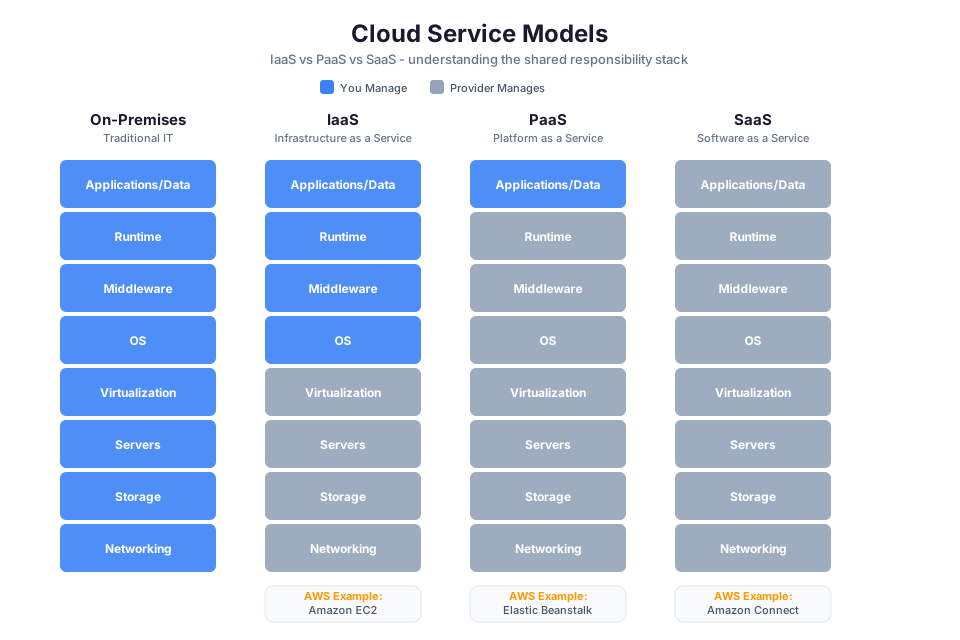
📊 Architecture Diagram: Cloud computing service models (IaaS, PaaS, SaaS) showing what the provider manages versus what you manage at each level.
Cloud computing is the on-demand delivery of IT resources over the internet with pay-as-you-go pricing. Instead of buying and maintaining physical data centers, you access compute, storage, databases, and networking from a cloud provider like AWS.
To understand what separates cloud from "renting someone's server," you need the NIST definition, which identifies five essential characteristics a service must exhibit to qualify as cloud computing.
The Five Essential Characteristics (NIST SP 800-145)
1. On-Demand Self-Service
You provision resources whenever you need them, without human intervention from the provider. No procurement tickets. No waiting for approvals. You open the AWS Management Console, call an API, or run a CLI command, and the resource exists within minutes.
AWS example: You launch an EC2 instance at 2 AM on a Saturday because traffic demands it. No one at AWS needs to approve this. In traditional IT, provisioning a server takes 6 to 16 weeks. On-demand self-service compresses that to minutes.
2. Broad Network Access
Resources are available over the network and accessed through standard mechanisms: HTTP/HTTPS APIs, standard protocols, and tools that work from any device with internet connectivity.
AWS example: You manage infrastructure through the AWS CLI from a laptop, through the console from a tablet, or through SDKs in your application code. The same APIs work regardless of location or device.
3. Resource Pooling
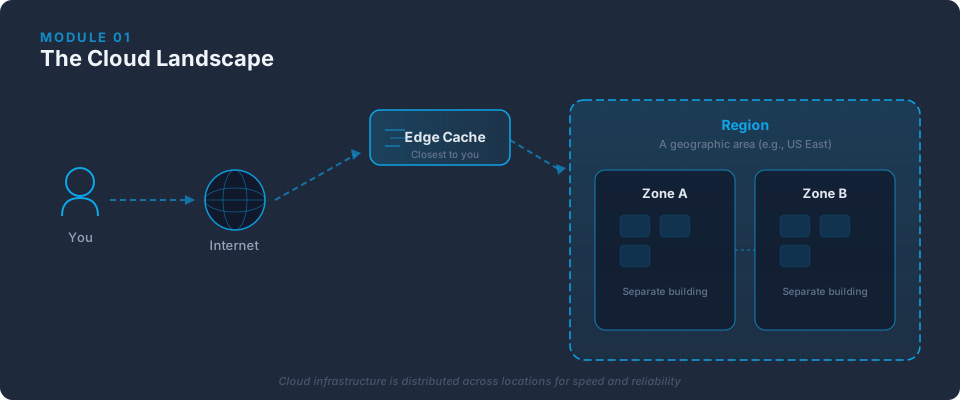
The provider's resources are pooled to serve multiple consumers using a multi-tenant model. Resources are dynamically assigned according to demand. You generally cannot control or know the exact physical location of resources, though you specify location at a higher abstraction (Region, Availability Zone).
AWS example: When you launch an EC2 instance, AWS places it on hardware with available capacity. Other customers' workloads may run on the same physical host, but you are completely isolated at the hypervisor level.
4. Rapid Elasticity
Capabilities scale rapidly outward and inward with demand. To the consumer, available resources appear virtually unlimited.
AWS example: An Auto Scaling group adds EC2 instances when CPU crosses 70% and removes them when it drops below 30%. Your application handles Black Friday at 10x normal volume, then scales back on Monday without intervention.
5. Measured Service
Resource usage is monitored, controlled, reported, and billed transparently. You see exactly what you consumed and what it cost.
AWS example: Your AWS bill itemizes GB-hours of S3 storage, millions of API calls, and hours each EC2 instance ran. You track this in real time through AWS Cost Explorer.
Tip: These five characteristics are testable knowledge for the AWS Cloud Practitioner and Solutions Architect exams. If a service does not exhibit all five, it is not cloud computing by the NIST definition, regardless of what marketing says.
On-Premises vs. Cloud
| Dimension | On-Premises | Cloud (AWS) |
|---|---|---|
| Upfront cost | High: servers, networking, facilities, power, cooling | Low to zero: pay only for what you consume |
| Time to provision | Weeks to months (procurement, shipping, installation) | Minutes (API call or console click) |
| Capacity planning | Guess peak demand 3-5 years out, buy hardware for that peak | Scale dynamically based on actual demand |
| Scaling speed | Manual: order hardware, install, configure | Automatic or on-demand within minutes |
| Maintenance burden | Your team: hardware failures, firmware updates, facility management | Provider handles physical infrastructure entirely |
| Usage | Typically 10-30% average (sized for peak, idle the rest) | Matches actual demand, pay for what you use |
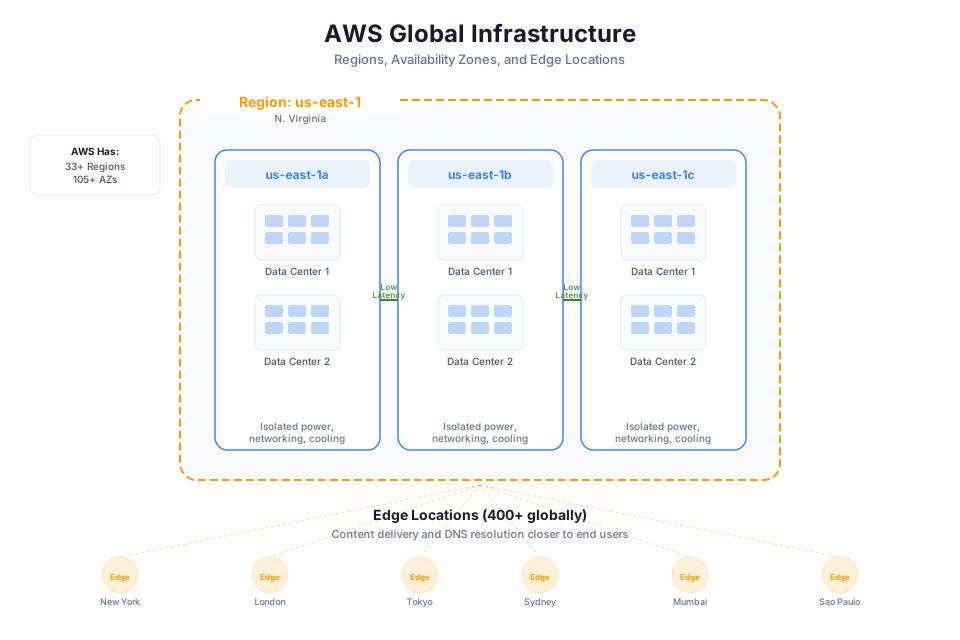
| Geographic reach | Requires building or leasing data centers globally | Deploy to 30+ Regions with configuration changes |
| Risk of over-provisioning | High: stuck with hardware you bought | Low: release resources you no longer need |
| Risk of under-provisioning | High: degraded performance during demand spikes | Low: scale out within minutes |
The on-premises model is not wrong for every case. But for the vast majority of enterprise workloads, cloud provides better economics, faster time to market, and lower operational risk.
The Economics: CapEx vs. OpEx
This is one of those concepts that seems simple on the surface but has deep implications for how organizations plan, budget, and operate.
Capital Expenditure (CapEx) is upfront spending on physical assets: servers, networking, storage, facilities. These depreciate over 3-5 years. You pay the full cost before deriving any value. If your demand estimate was wrong, you are stuck with the hardware.
Operational Expenditure (OpEx) is ongoing spending for services consumed. No upfront investment, no depreciation schedules. You pay monthly based on actual usage and can stop paying the moment you stop using the service.
Here is how I explain this to a CFO: The CapEx approach is buying a fleet of cars for your sales team ($500,000 upfront, depreciation over five years, locked in regardless of team size changes). The OpEx approach is ride-sharing: pay per trip, scale with actual usage, adjust month to month.
Cloud computing converts IT spending from CapEx to OpEx. This matters because:
- Cash flow: You do not tie up capital in depreciating hardware
- Flexibility: You can experiment with new workloads without large upfront bets
- Accuracy: Your costs track actual usage, making budgeting more predictable
- Speed: No procurement cycle means faster time to market for new initiatives
Warning: "OpEx" does not mean "cheaper." A workload that runs 24/7 at full capacity for five years might cost more on cloud than buying equivalent hardware. The value is in flexibility, speed, and risk reduction, not guaranteed savings in every scenario. This is why cost optimization (Module 15) is its own discipline.
Check Your Understanding: Your organization currently spends $2 million every three years on a data center hardware refresh. After migrating to AWS, the projected monthly bill is $60,000. Identify which model is CapEx, which is OpEx, and calculate the annual spend difference. More importantly: what non-financial benefits does the OpEx model provide that a simple dollar comparison misses?
Cloud Service Models
📊 Architecture Diagram: Cloud deployment models comparing public, private, and hybrid cloud architectures and their trade-offs.
The three primary service models determine how much of the technology stack you manage versus how much the provider manages. Think of it as a spectrum: more control means more operational burden; more provider management means less control but less work.
Infrastructure as a Service (IaaS)
IaaS gives you the fundamental building blocks: compute, storage, and networking. The provider manages the physical hardware and the virtualization layer. You manage everything from the operating system up.
This is maximum control. You choose the OS, install middleware, deploy applications, and handle patching and security configuration for everything above the hypervisor.
AWS IaaS examples:
- Amazon EC2: Virtual servers where you control the OS, software, and configuration
- Amazon EBS: Block storage volumes that you attach to EC2 instances
- Amazon VPC: Virtual network that you design, including subnets, route tables, and gateways
When to choose IaaS: You need fine-grained control over the runtime environment, have specific OS/kernel requirements, are migrating legacy workloads, or must satisfy compliance mandates that require controlling the full stack.
Platform as a Service (PaaS)
PaaS removes the burden of managing infrastructure. The provider handles the operating system, runtime, middleware, and scaling. You bring your application code and data. This is where most modern application teams want to operate.
AWS PaaS examples:
- AWS Elastic Beanstalk: Deploy web applications without managing servers; Beanstalk provisions EC2, load balancers, and auto-scaling for you
- AWS App Runner: Deploy containerized web apps from source code or container images with zero infrastructure configuration
- AWS Lambda: Run code without provisioning or managing servers; you supply only the function code and AWS handles compute, scaling, and availability
When to choose PaaS: You want to deploy quickly without managing infrastructure, your team is small, your application runs on standard runtimes, and you want automatic scaling and patching.
Software as a Service (SaaS)
SaaS delivers a complete, fully managed application. You use it through a browser or API. The provider manages everything: infrastructure, platform, application code, updates, and availability. You only configure settings and manage your data.
AWS SaaS examples:
- Amazon WorkSpaces: Fully managed virtual desktops
- Amazon Connect: Cloud contact center, ready to use through a browser
- Amazon QuickSight: Fully managed business intelligence and analytics service
When to choose SaaS: The functionality you need exists as a managed product and building it yourself would not differentiate your business.
The Responsibility Spectrum
| Layer | IaaS (EC2) | PaaS (Beanstalk) | SaaS (Connect) |
|---|---|---|---|
| Application code | You | You | Provider |
| Data | You | You | You (access controls) |
| Runtime/middleware | You | Provider | Provider |
| Operating system | You | Provider | Provider |
| Virtualization | Provider | Provider | Provider |
| Hardware/network | Provider | Provider | Provider |
As you move from IaaS to SaaS, your responsibility shrinks and the provider's grows. This connects directly to the Shared Responsibility Model later in this module.
Check Your Understanding: A startup with three developers needs to deploy a Python web application. They have no dedicated operations team and want to ship features fast. Which service model should they choose, and which specific AWS service would you recommend? What if the same startup grows to 50 engineers and needs custom kernel modules for their machine learning pipeline?
Cloud Deployment Models
📊 Architecture Diagram: The shared responsibility model showing AWS responsibilities (security of the cloud) versus customer responsibilities (security in the cloud).
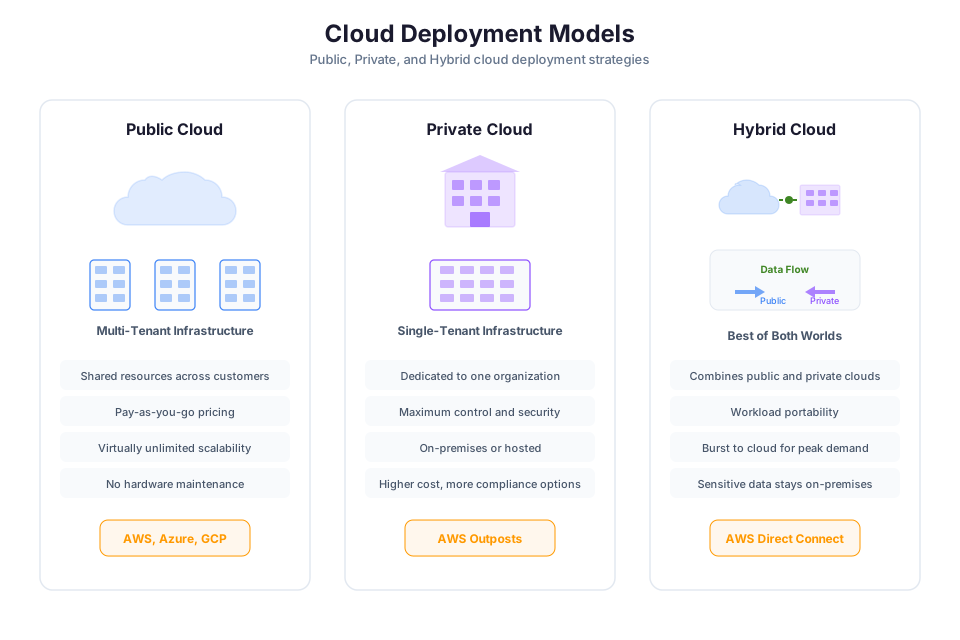
Service models tell you what you manage. Deployment models tell you where your infrastructure lives and who has access to the underlying resources.
Public Cloud
In a public cloud deployment, all infrastructure runs in the provider's data centers. You share the underlying physical hardware with other tenants (multi-tenant), but your resources are logically isolated. You never see or touch hardware. The provider manages all physical security and maintenance, and you benefit from their massive economies of scale.
Public cloud is the default choice for most workloads. It offers the fullest expression of the five NIST characteristics: true on-demand self-service, rapid elasticity, and measured service.
Private Cloud
A private cloud is cloud-like infrastructure that runs in a single organization's own data centers. It uses virtualization, automation, and self-service provisioning to mimic public cloud behavior, but it is owned and operated by one organization. You get full control over security and data residency, but you lose multi-tenant economies of scale.
AWS-adjacent example: Amazon EC2 Dedicated Hosts provide single-tenant physical servers where you control instance placement and have visibility into the underlying hardware. This gives organizations isolation at the physical host level rather than just the hypervisor level.
When private cloud makes sense: Regulatory requirements prohibiting multi-tenant environments. Extreme latency sensitivity. Legacy applications deeply coupled to specific hardware or hypervisor versions.
Hybrid Cloud
Hybrid cloud connects public cloud resources with on-premises infrastructure as a unified environment. True hybrid means workloads can move between environments and management is unified, not just "some stuff on-prem and some in cloud."
AWS hybrid services:
- AWS Outposts: AWS-managed hardware racks installed in your data center, running native AWS services locally
- AWS Snow Family: Physical devices for edge computing and data transfer in disconnected or bandwidth-constrained environments
- AWS Direct Connect: Dedicated private network connection from your data center to AWS
When hybrid makes sense: Gradual migration (you cannot move everything at once). Data sovereignty where certain data must stay on-premises while compute runs in cloud. Edge processing that feeds back into cloud analytics.
Multi-Cloud
Multi-cloud means using services from more than one cloud provider simultaneously (some workloads on AWS, others on Azure or Google Cloud).
When multi-cloud makes sense: Genuine best-of-breed requirements where one provider has a significantly better service for a specific workload. Regulatory mandate to avoid single-provider dependency. Acquisition of a company already operating on a different provider.
When multi-cloud does not make sense: As a hedge against provider failure (the operational overhead of managing multiple providers usually exceeds the resilience benefit). When the real motivation is political rather than technical.
Tip: I have seen more organizations fail at multi-cloud than succeed. The added complexity in networking, identity management, cost tracking, and operational tooling is substantial. Unless you have a concrete, measurable reason, start with one provider and go deep.
| Deployment Model | Where It Runs | Best For |
|---|---|---|
| Public cloud | Provider's data centers | Most workloads; full cloud economics |
| Private cloud | Your data centers (or dedicated infra) | Strict regulatory/compliance needs |
| Hybrid cloud | Both provider and your data centers | Gradual migration; data residency + cloud compute |
| Multi-cloud | Multiple providers | Genuine best-of-breed; regulatory diversification |
Check Your Understanding: A financial services firm must keep customer PII in their own data center due to regulatory requirements, but they want to use AWS for analytics workloads that process anonymized data. Which deployment model fits? What specific AWS services would enable this architecture?
The Shared Responsibility Model
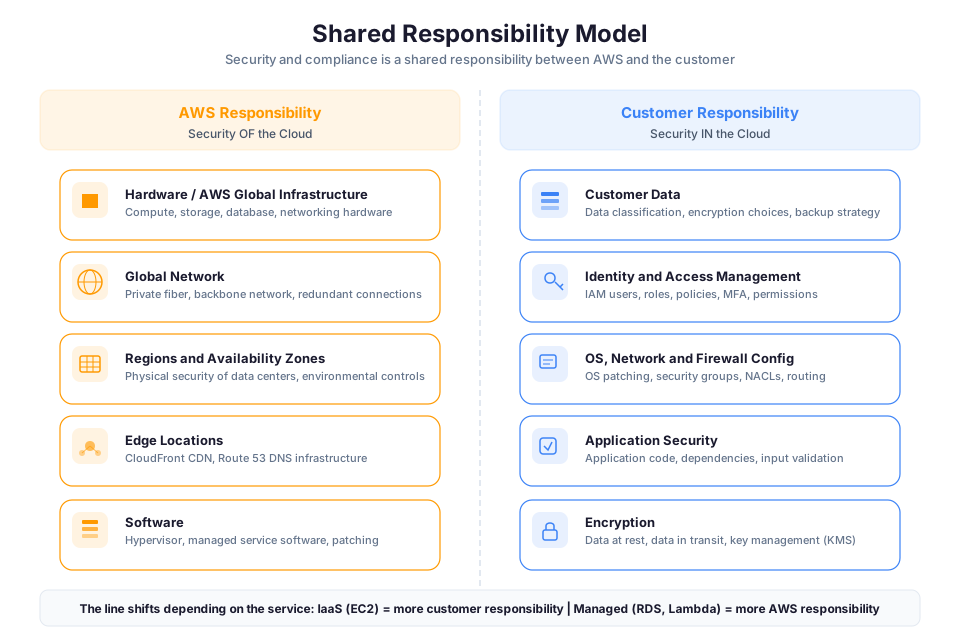
📊 Architecture Diagram: Key benefits of cloud computing including elasticity, pay-as-you-go pricing, global reach, and high availability.
This is the most important concept in this module. Misunderstanding the Shared Responsibility Model is the root cause of a staggering number of cloud security incidents. It is the contract that determines who is accountable when something goes wrong.
The AWS Shared Responsibility Model divides security into two domains:
Security OF the Cloud (AWS Responsibility)
AWS protects the infrastructure that runs all services. This includes:
- Physical security: Data center facilities, power, cooling, access controls, surveillance
- Hardware: Servers, storage, networking equipment, lifecycle management
- Virtualization layer: The hypervisor isolating your workloads from other customers
- Network infrastructure: Global backbone, inter-AZ connectivity, infrastructure-layer DDoS protection
- Managed service internals: For S3, DynamoDB, Lambda, etc., AWS also manages the OS and platform software
AWS undergoes continuous third-party audits (SOC 2, ISO 27001, FedRAMP) and publishes reports through AWS Artifact.
Security IN the Cloud (Customer Responsibility)
You are responsible for everything you put in the cloud and how you configure it:
- Identity and access management: Who can access what, under what conditions
- Data protection: Encryption at rest and in transit, key management, data classification
- Operating system configuration: Patches, hardening, firewall rules (for IaaS like EC2)
- Network configuration: Security groups, NACLs, VPC design, subnet isolation
- Application security: Input validation, authentication, secure coding practices
How Responsibility Shifts Across Service Models
The dividing line moves depending on which service model you are using:
| Responsibility | IaaS (EC2) | PaaS (RDS) | SaaS (Connect) |
|---|---|---|---|
| OS patching | Customer | AWS | AWS |
| Database engine updates | Customer | AWS | AWS |
| Network firewall rules | Customer | Customer | AWS |
| Data encryption config | Customer | Customer | Customer |
| IAM policies | Customer | Customer | Customer |
| Physical security | AWS | AWS | AWS |
IAM and data classification remain your responsibility regardless of service model. You never outsource the decision of who can access your data.
What Goes Wrong When You Do Not Understand This
Scenario 1: S3 bucket left public. Multiple organizations experienced breaches because they configured S3 buckets with public access. AWS's infrastructure was not breached. The customers misconfigured their own access controls. Security IN the cloud. Customer responsibility.
Scenario 2: Unpatched EC2 instance exploited. An organization fails to apply a critical OS patch for three months, and an attacker exploits the vulnerability. AWS does not patch your EC2 operating systems. Your responsibility under IaaS.
Scenario 3: Overly permissive IAM policy. A developer creates a role with "Action": "*", "Resource": "*" for testing convenience, then deploys it to production. An attacker who compromises any service using that role owns the entire account. IAM configuration is always your responsibility.
Warning: "We are in the cloud so security is handled" is a statement that precedes nearly every cloud security incident I have investigated. AWS secures the building. You secure what you put inside it and who you give the keys to.
Check Your Understanding: You deploy a PostgreSQL database on Amazon RDS. A critical security patch is released for the PostgreSQL engine. Who applies it? Now imagine you installed PostgreSQL yourself on an EC2 instance. Does the answer change? Make sure you can explain why before continuing.
The Six Advantages of Cloud Computing
AWS articulates six core advantages of cloud computing. These are not marketing slogans. Each one addresses a specific pain point that organizations face with traditional infrastructure.
1. Trade Capital Expense for Variable Expense
Instead of investing heavily in data centers before you know how you will use them, you pay only when you consume resources and only for how much you consume.
Enterprise scenario: A healthcare company needs to build a new patient portal. Traditional approach: spend $3 million on infrastructure before writing a single line of code. Cloud approach: start building immediately, pay proportional to actual usage. If the project is cancelled after three months, you have spent thousands rather than millions.
2. Benefit from Massive Economies of Scale
Because usage from hundreds of thousands of customers is aggregated in the cloud, providers like AWS can achieve higher economies of scale, which translates into lower pay-as-you-go prices.
Enterprise scenario: Your organization negotiates pricing for 100 servers from a hardware vendor. AWS purchases millions of servers. Their per-unit cost is dramatically lower than yours, and they pass some of that savings to you. You could never achieve the purchasing power that AWS has as an individual buyer.
3. Stop Guessing Capacity
When you make a capacity decision before deploying an application, you either sit on expensive idle resources or deal with limited capacity during demand spikes. Cloud computing lets you scale up or down within minutes based on actual need.
Enterprise scenario: A retail company builds infrastructure for Black Friday peak traffic. For 11 months, 70% of that capacity sits idle. With Auto Scaling on AWS, the infrastructure grows for Black Friday and shrinks on December 1st. You pay for peak capacity only during peak demand.
4. Increase Speed and Agility
New IT resources are a click away, reducing provisioning time from weeks to minutes. The cost of experimentation drops dramatically because you only pay for resources during the experiment.
Enterprise scenario: A development team wants to test a microservice architecture. On-premises: four weeks to provision a test environment. On AWS: spin up an identical environment in 20 minutes, run tests for three days, tear it down for under $200 total. They experimented that week instead of waiting a month.
5. Stop Spending Money Running and Maintaining Data Centers
Racking servers, managing power and cooling, handling hardware failures: none of this differentiates your product. It is undifferentiated heavy lifting. Cloud lets you redirect that effort toward building things customers care about.
Enterprise scenario: A fintech startup has 12 engineers. On-premises, 3 of them would spend significant time on infrastructure operations. On AWS, those same engineers build revenue-generating product features instead.
6. Go Global in Minutes
Traditional global expansion means leasing data center space, procuring hardware, and spending months on setup. With AWS, you deploy to a new Region with configuration changes.
Enterprise scenario: A US-based SaaS company wins a European contract requiring EU data residency. On-premises: 6-12 months to establish infrastructure. AWS: deploy to eu-west-1 (Ireland) within days. The architecture is identical; only the Region parameter changes.
Check Your Understanding: For each of the six advantages, identify which one would be most compelling to: (a) a CFO concerned about budget predictability, (b) a CTO frustrated by slow time-to-market, (c) a CISO worried about global compliance requirements. There may be overlap, and that is the point. These advantages reinforce each other.
Instructor Notes
Estimated delivery time: 75-90 minutes (lecture + discussion)
Teaching tips:
- Open with: "How many of you have waited more than two weeks for a server to be provisioned?" Use their frustration as the hook for on-demand self-service.
- For CapEx/OpEx, use the apartment vs. house analogy: renting (OpEx) means the landlord handles structural repairs; owning (CapEx) means everything is on you. Then complicate it: sometimes ownership is better. Cloud economics are nuanced.
- For the Shared Responsibility Model, draw a horizontal line on the board. Move it up for PaaS and SaaS to show how your responsibility shrinks. This visual sticks better than any table.
- The S3 public bucket scenario gets attention. Reference real breaches (Capital One 2019) to make the model feel urgent rather than theoretical.
Common misconceptions:
- "Cloud is always cheaper." A steady-state 24/7 workload might cost less on-premises in pure compute. The cloud advantage is agility, flexibility, and reduced operational burden.
- "Multi-cloud is always better for resilience." A well-architected multi-AZ, multi-Region deployment on one provider is often more resilient than a poorly managed multi-cloud setup.
- "PaaS means you have no responsibility." You still own your code quality, data, and IAM configuration.
- "The Shared Responsibility Model means AWS handles security." It means AWS handles SOME security. The name says "shared" for a reason.
Pause points:
- After NIST characteristics: ask students to name a "cloud" service that violates one characteristic. (Example: a host with 48-hour provisioning violates on-demand self-service.)
- After service models: give three workloads and ask students to classify as IaaS/PaaS/SaaS with justification.
- After Shared Responsibility: present a security incident and ask "whose fault is this?"
- After six advantages: ask each student which advantage is most compelling and why.
Key Takeaways
- Cloud computing is defined by five NIST characteristics: on-demand self-service, broad network access, resource pooling, rapid elasticity, and measured service. All five must be present.
- The CapEx-to-OpEx shift changes how organizations plan, experiment, and respond to demand. Flexibility and reduced risk often matter more than raw cost savings.
- Service models (IaaS, PaaS, SaaS) represent a spectrum of control vs. convenience. Choose based on team capabilities, compliance requirements, and acceptable operational burden.
- Deployment models (public, private, hybrid, multi-cloud) determine where infrastructure lives. Public cloud is the default; deviations should be driven by concrete requirements, not fear.
- The Shared Responsibility Model determines accountability for every security decision in cloud. Misunderstanding it is the leading cause of preventable cloud security incidents.
- The six advantages provide a business justification framework for explaining cloud value to non-technical stakeholders.
- Every concept here is referenced in later modules. IAM (Module 02) builds on Shared Responsibility. VPC (Module 03) builds on deployment models. Cost Optimization (Module 15) builds on CapEx/OpEx.
SAA-C03 Exam Alignment
Domain: Domain 1: Design Secure Architectures (30%), Domain 4: Design Cost-Optimized Architectures (20%)
Task Statements:
- Task 1.1: Design secure access to AWS resources
- Task 4.1: Design cost-optimized storage solutions
- Task 4.3: Design cost-optimized network architectures
Testable Knowledge from This Module:
- Identify the five NIST essential characteristics and determine whether a given service qualifies as cloud computing
- Map a workload to the correct service model (IaaS, PaaS, SaaS) based on operational requirements
- Determine which party is responsible for a specific security task under the Shared Responsibility Model
- Select the correct deployment model (public, private, hybrid) given compliance and latency constraints
- Explain how the CapEx-to-OpEx shift affects budgeting, experimentation speed, and risk
- Classify a given AWS service by its service model and identify customer responsibilities at that layer
- Identify which of the six cloud advantages applies to a specific business scenario
- Determine whether AWS or the customer is responsible for patching in IaaS vs. PaaS vs. SaaS
- Apply the Shared Responsibility Model to explain why a data breach is customer fault vs. AWS fault
- Recognize that data encryption configuration is always the customer's responsibility regardless of service model
- Explain why multi-tenant resource pooling does not compromise security due to hypervisor isolation
- Justify a cloud migration decision using both technical (elasticity, speed) and financial (OpEx flexibility) reasoning
Services Covered:
- Primary: EC2, S3, RDS, Lambda, Elastic Beanstalk, VPC
- Supporting: CloudFront, Auto Scaling, AWS Artifact, Cost Explorer
Edge Cases and Exam Traps
Tip: When the exam asks "who is responsible," always identify the service model first (IaaS/PaaS/SaaS), then apply the Shared Responsibility Model line for that model.
Common Traps:
| Trap | Why It's Wrong | Correct Answer |
|---|---|---|
| "AWS is responsible for patching the OS on RDS" means AWS patches everything on RDS | AWS patches the DB engine and OS, but you still configure security groups, manage IAM access, and enable encryption | Customer still owns network rules, access control, and encryption settings on RDS |
| "Cloud is always cheaper than on-premises" | A 24/7 steady-state workload running for 5 years may cost more in cloud; the value is flexibility and speed, not guaranteed savings | Cloud advantage is variable cost, elasticity, and reduced operational burden, not always lowest dollar amount |
| "Private cloud means your own hardware running Linux VMs" | Private cloud must exhibit the 5 NIST characteristics (self-service, elasticity, measured service); a basic VM farm is not cloud | Private cloud requires automation, self-service provisioning, and metering, not just virtualization |
| "The Shared Responsibility Model makes AWS liable for your data breaches" | AWS secures the infrastructure; misconfigured S3 buckets, open security groups, and weak IAM policies are your fault | Customer is responsible for configuration and access control of their resources |
| "SaaS means zero customer responsibility" | You still own IAM access decisions, data classification, and compliance for your data even in SaaS | Customer always controls who accesses what and how data is classified |
Subtle Distinctions:
- "Security OF the cloud" (AWS): physical hosts, hypervisor, network backbone. "Security IN the cloud" (customer): OS config, data, IAM, encryption.
- S3 is managed infrastructure (AWS patches it), but bucket policies and access settings are 100% your responsibility.
- Elastic Beanstalk is PaaS but you CAN still access the underlying EC2 instances; this means OS patching responsibility depends on whether you modify the managed platform.
- "Rapid elasticity" is not the same as "auto scaling." Elasticity is the NIST characteristic; Auto Scaling is one AWS implementation of it.
- "Measured service" means transparent billing, not just monitoring. It implies you can see exactly what you consumed and what it cost.
- Resource pooling means multi-tenancy at the physical layer, but logical isolation means your data is never accessible to other tenants.
- "On-demand self-service" means no human from the provider is involved, which disqualifies any service with mandatory manual provisioning steps.
- Hybrid cloud requires unified management between environments, not just "some stuff in cloud and some on-prem."
Watch Out For:
- Scenarios describing a "cloud service" that requires 48-hour provisioning requests: this violates on-demand self-service and is NOT cloud by NIST definition.
- Questions asking who patches the database engine on RDS vs. EC2-hosted databases: RDS is AWS responsibility, EC2 is yours.
- Questions that present multi-cloud as a default best practice for resilience: the exam favors multi-AZ and multi-Region within one provider over multi-cloud complexity.
Anti-Patterns:
- Choosing IaaS "for more control" when the team has no operations staff: PaaS or SaaS reduces undifferentiated work and is the better answer for small teams.
- Selecting hybrid cloud because "it sounds more resilient": hybrid adds complexity and is only correct when there is a concrete data residency or latency requirement.
- Using multi-cloud as a hedge against single-provider failure when the question describes no regulatory requirement for it: the operational overhead outweighs the theoretical benefit.