
Learning Objectives
By the end of this module, you will be able to:
- Describe the hierarchical structure of AWS global infrastructure: Regions, Availability Zones, Edge Locations, and specialized zones
- Apply the four-factor decision framework to select the appropriate AWS Region for a given workload
- Explain the physical and logical isolation properties of Availability Zones and why multi-AZ deployment is a production requirement
- Differentiate between Edge Locations, Local Zones, Wavelength Zones, and Outposts in terms of purpose and use case
- Identify when to use single-Region vs. multi-Region architectures based on availability and latency requirements
- Describe how the AWS private backbone network connects Regions and enables low-latency inter-AZ communication
- Explain the difference between opt-in Regions, default Regions, and GovCloud Regions
- Map infrastructure placement decisions to their downstream effects on latency, compliance, availability, and cost
Prerequisites
- Completion of Module 01: Cloud Computing Principles
- Familiarity with basic networking concepts (latency, data centers)
Why This Matters
Every architecture decision you will ever make on AWS begins with one question: where does this run?
The physical location of your infrastructure determines four things simultaneously:
- Latency to your end users (physics wins every time)
- Compliance with data sovereignty and regulatory requirements
- Availability during failures (how isolated are your redundant copies?)
- Cost (pricing varies by Region, sometimes by 20% or more)
As a Solutions Architect, you will never design a system in the abstract. You design it for a specific geographic reality. A healthcare application handling EU patient data has a fundamentally different infrastructure strategy than a gaming backend serving players in Southeast Asia. The services you choose matter, but where you place them matters first.
This module teaches you the WHERE before subsequent modules teach you the WHAT.
Concepts
The AWS Global Network
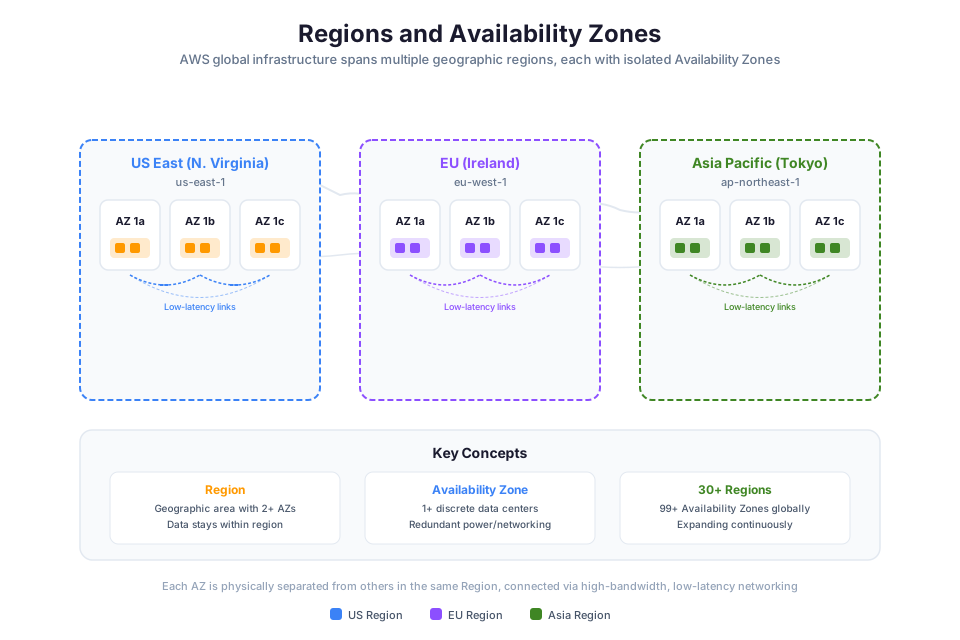
📊 Architecture Diagram: AWS global infrastructure showing Regions, Availability Zones, and edge locations distributed worldwide.
AWS operates one of the largest privately-owned networks on the planet. This is not the public internet. It is a purpose-built, redundant, global backbone that connects every Region to every other Region through multiple independent fiber paths.
The numbers as of 2025:
| Infrastructure Type | Count |
|---|---|
| Regions | 34+ |
| Availability Zones | 108+ |
| Edge Locations | 600+ |
| Local Zones | 30+ |
| Countries with infrastructure | 30+ |
AWS invests billions annually in physical infrastructure expansion. Why does this matter to you? Because this investment creates the foundation you build on. You do not need to negotiate with telecom carriers, lease dark fiber, or worry about undersea cable redundancy. That is handled at a layer below your concern. Your job is to understand what is available and use it correctly.
The private backbone means that traffic between Regions (for example, replicating a database from us-east-1 to eu-west-1) travels over AWS-owned fiber, not the public internet. This gives you predictable latency, higher throughput, and encryption in transit by default between AWS facilities.
Regions
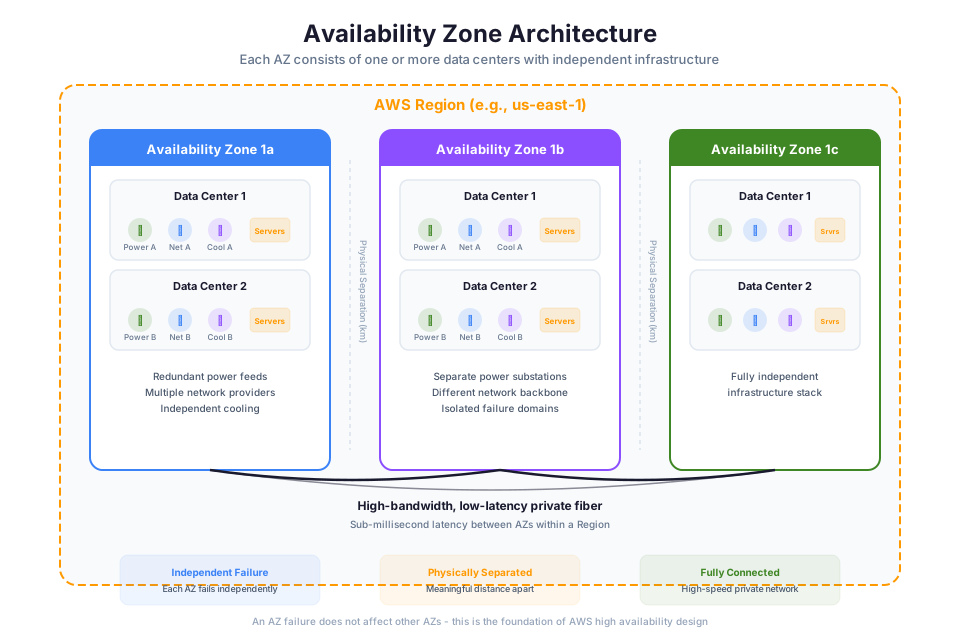
📊 Architecture Diagram: Availability Zone architecture showing physically separate data centers connected by low-latency links within a Region.
A Region is a geographic area containing multiple, physically separated data center clusters. Each Region is fully isolated from every other Region. No data replicates between Regions unless you explicitly configure it to do so.
Naming convention:
Regions follow the pattern {area}-{sub-area}-{number}:
| Region Code | Region Name | Location |
|---|---|---|
| us-east-1 | US East (N. Virginia) | Northern Virginia, USA |
| us-west-2 | US West (Oregon) | Oregon, USA |
| eu-west-1 | Europe (Ireland) | Dublin, Ireland |
| ap-southeast-1 | Asia Pacific (Singapore) | Singapore |
| sa-east-1 | South America (Sao Paulo) | Sao Paulo, Brazil |
How to Choose a Region
This is a decision framework you will use on every project. Evaluate these factors in priority order:
1. Compliance and Data Sovereignty
This overrides everything else. If regulation requires data to stay within a specific country, your Region choice is already made. GDPR, FedRAMP, HIPAA BAA eligibility, and national data residency laws all constrain where you can operate. No amount of latency optimization justifies a compliance violation.
2. Proximity to Users
Physics is non-negotiable. Light in fiber travels at roughly 200,000 km/s. A request from Tokyo to us-east-1 in Virginia adds approximately 80-100ms of round-trip latency just from propagation delay. If your users are in Tokyo, ap-northeast-1 eliminates that penalty.
3. Service Availability
Not every AWS service launches in every Region simultaneously. New services typically debut in us-east-1, then expand. If your architecture depends on a specific service (Amazon Bedrock, for instance), confirm it is available in your target Region before committing.
Check current service availability: AWS Regional Services List
4. Pricing
The same service can cost different amounts in different Regions. A t3.medium EC2 instance in us-east-1 might be 10-20% cheaper than the identical instance in ap-southeast-2 (Sydney). When compliance and latency do not constrain you, cost becomes the tiebreaker.
Tip: Run production workloads in the Region closest to your users. Run non-production workloads (dev, test, CI/CD) in whichever Region offers the best pricing, since latency does not matter for internal tools.
GovCloud Regions
AWS GovCloud (US) consists of two isolated Regions (us-gov-west-1 and us-gov-east-1) designed for U.S. government agencies, contractors, and organizations that handle controlled unclassified information (CUI). They meet FedRAMP High, ITAR, and DoD SRG compliance requirements. GovCloud Regions are operated by U.S. persons on U.S. soil and are not accessible from standard AWS accounts.
Opt-in Regions vs. Default Regions
Most Regions are enabled by default in your AWS account. However, some newer Regions require you to explicitly opt in before you can create resources there. This exists to prevent accidental resource creation in Regions you do not intend to use. Examples of opt-in Regions include af-south-1 (Cape Town), ap-east-1 (Hong Kong), and me-south-1 (Bahrain).
You can enable opt-in Regions from the Account Settings page in the AWS Management Console.
Availability Zones
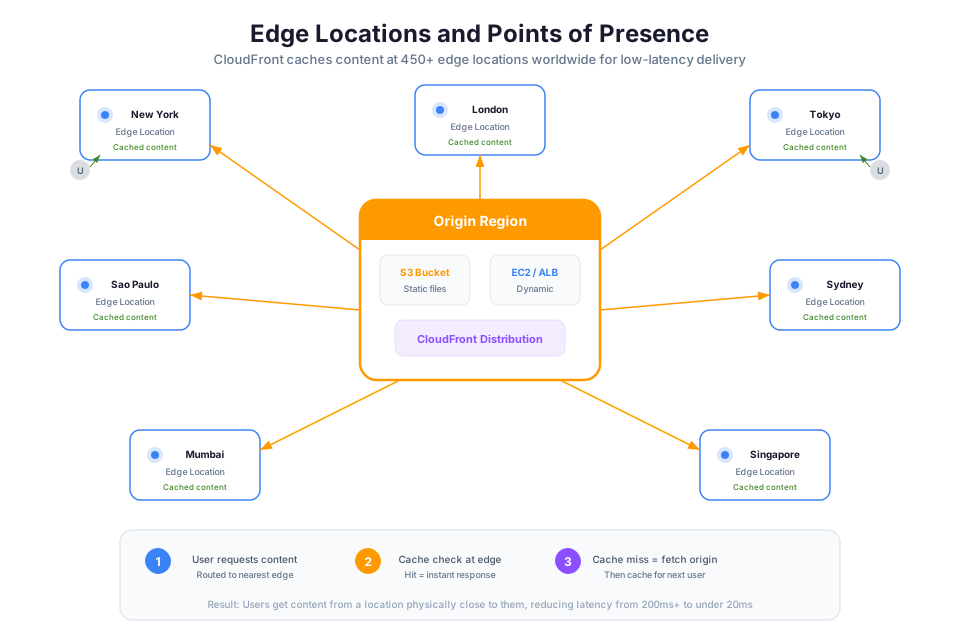
📊 Architecture Diagram: Edge locations and Points of Presence (PoPs) that bring content closer to end users for reduced latency.
An Availability Zone (AZ) is one or more discrete data centers within a Region, each with redundant power, networking, and connectivity. AZs are the fundamental building block of high availability on AWS.
Key properties of Availability Zones:
- Physical separation: AZs within a Region are located in distinct facilities, often kilometers apart. They sit on different flood plains, use independent power grids, and connect through separate network carriers.
- Low-latency interconnection: Despite physical separation, AZs within a Region connect through dedicated, high-bandwidth, low-latency fiber. Inter-AZ latency is single-digit milliseconds (typically 1-2ms).
- Independent failure domains: An AZ can experience a complete power failure, network partition, or natural disaster without affecting other AZs in the same Region.
AZ Naming
AZ identifiers look like us-east-1a, us-east-1b, us-east-1c. The letter suffix identifies the AZ within the Region.
Warning: AZ names are mapped differently per AWS account. Your
us-east-1amight be a physically different data center than another account'sus-east-1a. AWS randomizes this mapping to distribute load evenly. If you need to coordinate AZ placement across accounts (for example, shared VPC subnets), use AZ IDs (likeuse1-az1) which are consistent across accounts.
Why Multi-AZ is Mandatory for Production
This is not a suggestion. It is an architectural requirement.
A single AZ, no matter how well-engineered, is a single point of failure. AWS designs AZs to fail independently, which means deploying across two or more AZs gives you fault tolerance against an entire data center complex going offline.
Services like RDS, ELB, and ECS all offer built-in multi-AZ configurations. If you are deploying anything that matters to your business in a single AZ, you have made an architectural error.
| Deployment Pattern | AZs Used | Failure Tolerance | Use Case |
|---|---|---|---|
| Single AZ | 1 | None | Dev/test only |
| Multi-AZ (2) | 2 | Survives 1 AZ failure | Standard production |
| Multi-AZ (3) | 3 | Survives 1-2 AZ failures | Critical workloads |
Check Your Understanding: If us-east-1 has 6 AZs and you deploy your application across 3 of them, what is the maximum number of simultaneous AZ failures your application can survive while maintaining availability?
Edge Locations and Points of Presence
📊 Architecture Diagram: How to choose an AWS Region based on compliance, latency, service availability, and pricing considerations.
Edge Locations are AWS data centers positioned in major cities worldwide, far from any Region. They exist for one purpose: to bring content and services physically closer to end users.
Edge Locations host:
- Amazon CloudFront (CDN): Caches static and dynamic content at the edge
- Amazon Route 53 (DNS): Resolves DNS queries from the nearest edge
- AWS WAF: Filters malicious traffic at the edge before it reaches your origin
- Lambda@Edge / CloudFront Functions: Runs lightweight compute at the edge
With 400+ Edge Locations globally, AWS positions these in population centers where users actually are. Your origin server might be in us-east-1, but your cached content is served from an Edge Location in Mumbai, Johannesburg, or Buenos Aires.
Regional Edge Caches
Between your origin Region and the Edge Locations sits an intermediate tier: Regional Edge Caches. These are larger, higher-capacity caches that hold content longer than individual Edge Locations. When an Edge Location's cache expires, it checks the Regional Edge Cache before going all the way back to your origin. This reduces origin load and improves cache hit ratios for less-popular content.
How Edge Locations differ from AZs:
| Property | Availability Zone | Edge Location |
|---|---|---|
| Purpose | Run full compute, storage, databases | Cache content, resolve DNS, filter traffic |
| Services available | All regional services | CloudFront, Route 53, WAF, Lambda@Edge |
| Data persistence | Yes (EBS, S3, RDS) | Cache only (ephemeral) |
| Count per Region | 2-6 | N/A (independent of Regions) |
| Location strategy | Clustered within a Region | Distributed globally near users |
Local Zones
A Local Zone is an extension of an AWS Region placed in a large population center that does not have a full Region. Think of it as an AZ that AWS drops into a metro area where latency to the parent Region is too high for certain use cases.
Characteristics:
- Provides compute, storage, database, and other services with single-digit millisecond latency to users in that metro area
- Connected to the parent Region via AWS private network
- You manage resources using the same APIs and tools as any other AZ
- Must be explicitly opted in (not enabled by default)
Use cases:
- Real-time gaming servers that need sub-10ms latency to players in Los Angeles
- Media production and rendering workloads in content creation hubs
- Live video streaming with ultra-low latency
- Any application where the parent Region is too far from the user base
Currently, Local Zones exist in cities like Los Angeles, Houston, Miami, Boston, and over 30 other metro areas. Check the AWS Local Zones page for current availability.
Tip: Local Zones are not for general production workloads. They have a smaller subset of services compared to a full Region. Use them when latency to the nearest Region is the specific problem you are solving.
Wavelength Zones
Wavelength Zones embed AWS compute and storage inside telecommunications providers' 5G networks. The goal is extreme: deliver single-digit millisecond latency to mobile devices connected to that carrier's 5G network.
How it works:
Traffic from a 5G-connected device reaches the carrier's cell tower, then hits the Wavelength Zone directly without ever traversing the public internet or traveling to a Region. The compute happens at the edge of the mobile network itself.
Use cases:
- Autonomous vehicle decision-making that cannot tolerate network hops
- Augmented/virtual reality streaming
- Real-time industrial IoT processing
- Interactive live video and game streaming on mobile
When this matters vs. when it does not:
If your users connect over standard broadband, WiFi, or even 4G, Wavelength Zones provide no benefit. They are specifically optimized for the 5G carrier path. For most applications, a Regional deployment or a Local Zone provides sufficient latency. Wavelength is for the extreme edge of latency sensitivity on mobile networks.
AWS Outposts
Outposts is AWS infrastructure that runs in your own data center, co-location space, or on-premises facility. AWS ships you a physical rack (or a smaller 1U/2U server for the Outposts Servers form factor), installs it, and manages it. You get the same APIs, same tools, same services, but the hardware sits in your building.
Why it exists:
- Data residency: Some data absolutely cannot leave your facility (financial, healthcare, government)
- Low-latency local processing: Applications that must process data on-premises with sub-millisecond latency to local systems
- Hybrid consistency: Run the same application code and infrastructure-as-code templates across AWS Regions and your own facilities
What Outposts is NOT:
Outposts is not "private cloud." It is not you running AWS software on your own hardware. AWS owns, delivers, installs, and manages the hardware. It connects back to a parent Region for control plane operations. If the connection to the parent Region goes down, certain management operations become unavailable, though existing workloads continue to run.
Check Your Understanding: A financial services company needs to process trading data with sub-1ms latency to their existing on-premises systems, but also wants to use AWS services. The data cannot leave their facility due to regulation. Which infrastructure option is the best fit?
Choosing Your Infrastructure Strategy
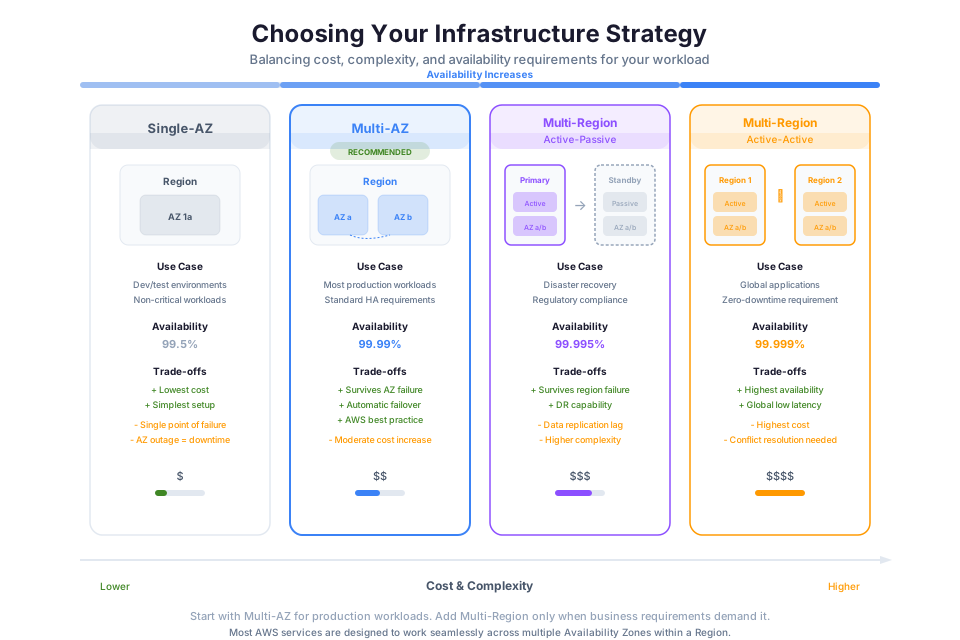
Not every application needs global distribution. Most do not. Here is how to think about infrastructure strategy based on requirements:
Single-Region, Multi-AZ
The default for most workloads.
Your application runs in one Region, deployed across two or more AZs. This gives you high availability against data center failures while keeping architecture simple and costs predictable.
- Recovery Time Objective (RTO): Minutes
- Latency: Optimized for one geographic area
- Complexity: Low
- Cost: Baseline
Multi-Region Active-Passive (Disaster Recovery)
A secondary Region stands by with replicated data but does not serve traffic. If the primary Region experiences a catastrophic failure (extremely rare, but possible), you fail over to the secondary.
- RTO: Minutes to hours (depending on automation)
- Latency: Optimized for one geographic area (primary)
- Complexity: Medium
- Cost: Baseline + standby infrastructure + data replication
Multi-Region Active-Active (Global Applications)
Multiple Regions serve traffic simultaneously. Users connect to the nearest Region. Data replicates bidirectionally. This is the architecture for global-scale applications like streaming platforms, social media, and financial trading systems.
- RTO: Near-zero (traffic routes around failure automatically)
- Latency: Optimized globally
- Complexity: High (conflict resolution, eventual consistency)
- Cost: Highest (full infrastructure in each Region)
Decision tree:
| Requirement | Strategy |
|---|---|
| Standard production, users in one geography | Single-Region, Multi-AZ |
| Compliance requires data in one country, need DR | Multi-Region Active-Passive |
| Users distributed globally, latency-sensitive | Multi-Region Active-Active |
| Cost-optimized, acceptable RTO of hours | Single-Region, Multi-AZ with backups to another Region |
Warning: Do not default to multi-Region for the sake of appearing sophisticated. Multi-Region active-active introduces significant complexity in data consistency, conflict resolution, and operational burden. Choose it when the requirements demand it, not as a resume-driven architecture decision.
Instructor Notes
- Start with a globe visualization showing AWS Regions and ask students to identify which Region they would use for different scenarios (EU healthcare app, U.S. government workload, gaming company in Southeast Asia)
- Demonstrate the Region selector in the AWS Console and show how the service list changes between Regions
- Use the AWS Global Infrastructure interactive map during the lesson
- The AZ ID vs. AZ name distinction is a common source of confusion in multi-account environments. Use a concrete example with two accounts showing different AZ name mappings to the same physical AZ ID
- Emphasize that multi-AZ is a day-one decision, not something you add later. Architecture choices made at the start compound throughout the lifecycle
- For the lab, students will use the AWS CLI to enumerate Regions, AZs, and Local Zones available to their account, then analyze latency differences using CloudFront distribution metrics
Key Takeaways
-
Regions are fully isolated. Data stays in a Region unless you explicitly move it. This is your primary tool for compliance and data sovereignty.
-
Availability Zones are your minimum unit of fault tolerance. Multi-AZ is not optional for production workloads. Period.
-
Edge Locations solve the latency problem for content delivery. They cache content close to users without requiring you to deploy full infrastructure in dozens of cities.
-
Local Zones, Wavelength Zones, and Outposts are specialized tools. Do not reach for them unless you have a specific latency, connectivity, or data residency requirement that a standard Region cannot satisfy.
-
Region selection is a requirements-driven decision, not a default. Always evaluate compliance, latency, service availability, and cost in that priority order.
-
The AWS private backbone is invisible but foundational. Inter-Region and inter-AZ traffic travels over AWS-owned infrastructure, giving you predictable performance without managing the network yourself.
-
Start simple, expand when requirements demand it. Single-Region Multi-AZ covers the vast majority of workloads. Add complexity only when you have a documented reason.
SAA-C03 Exam Alignment
Domain: Domain 1: Design Secure Architectures (30%), Domain 2: Design Resilient Architectures (26%)
Task Statements:
- Task 1.1: Design secure access to AWS resources
- Task 2.1: Design scalable and loosely coupled architectures
- Task 2.2: Design highly available and/or fault-tolerant architectures
Testable Knowledge from This Module:
- Apply the four-factor Region selection framework (compliance, latency, service availability, pricing) to choose the correct Region for a scenario
- Explain why AZ names differ between accounts and when to use AZ IDs for cross-account coordination
- Determine the minimum number of AZs required for a production workload (answer: 2, with 3 for critical)
- Differentiate between Edge Locations (caching/DNS), Local Zones (low-latency compute), Wavelength Zones (5G edge), and Outposts (on-premises AWS)
- Identify which services run at Edge Locations: CloudFront, Route 53, WAF, Lambda@Edge, CloudFront Functions
- Select single-Region multi-AZ vs. multi-Region active-passive vs. multi-Region active-active based on RTO and geographic requirements
- Explain that data never replicates between Regions unless explicitly configured
- Recognize that inter-AZ latency is single-digit milliseconds (1-2ms) over dedicated fiber
- Identify opt-in Regions and explain why they exist (prevent accidental resource creation)
- Describe how Regional Edge Caches reduce origin load by serving as an intermediate cache tier
- Explain that Outposts requires a connection to a parent Region for control plane operations
- Map infrastructure choices to their cost, latency, compliance, and availability trade-offs
Services Covered:
- Primary: CloudFront, Route 53, EC2 (placement), RDS (Multi-AZ), ELB
- Supporting: AWS Outposts, Local Zones, Wavelength Zones, Direct Connect, Snow Family
Edge Cases and Exam Traps
Tip: When the exam describes a latency or compliance requirement, mentally map it to the infrastructure hierarchy: Region for compliance, AZ for fault tolerance, Edge Location for content delivery latency.
Common Traps:
| Trap | Why It's Wrong | Correct Answer |
|---|---|---|
| "Deploy to 3 Regions for high availability" when users are in one country | Multi-Region adds cost and complexity with no benefit if users are local and no regulatory need exists | Single-Region Multi-AZ (2-3 AZs) is sufficient for HA when users are geographically concentrated |
| "Use a Local Zone for general production workloads" | Local Zones have a smaller subset of services and are designed for specific latency problems, not general hosting | Use a full Region for standard workloads; Local Zones only solve metro-level latency gaps |
| "AZ us-east-1a is the same physical location for all accounts" | AWS randomizes AZ name-to-physical-location mapping per account to distribute load | Use AZ IDs (e.g., use1-az1) when coordinating across accounts |
| "Edge Locations can run databases and persistent storage" | Edge Locations only cache content and run lightweight compute (Lambda@Edge, CloudFront Functions) | Edge Locations are ephemeral cache; use Regional services for persistent data |
| "Wavelength Zones benefit all mobile users" | Wavelength only helps 5G-connected devices on a specific carrier's network | Standard users on WiFi/4G/broadband get no benefit; use Regional or Local Zone instead |
Subtle Distinctions:
- AZ failure tolerance: deploying across 3 AZs survives up to 2 simultaneous failures, not 3. You need at least one AZ running.
- Edge Locations are NOT inside Regions. They are independently positioned in population centers worldwide.
- Local Zones are extensions of a parent Region (same APIs, same tools) while Wavelength Zones are embedded inside telecom carrier networks (different access path).
- Multi-Region active-passive: secondary Region has replicated data but does NOT serve traffic until failover. Active-active: both serve traffic simultaneously.
- "Go global in minutes" refers to deploying to another Region, not to Edge Locations. Edge Locations are managed by CloudFront and Route 53, not by you deploying resources.
- Inter-AZ traffic uses AWS private fiber (1-2ms latency). Inter-Region traffic also uses AWS backbone but has much higher latency due to physical distance.
- Outposts is NOT private cloud: AWS owns, ships, installs, and manages the hardware. You just host it in your facility.
- GovCloud is isolated from commercial Regions and requires separate accounts operated by U.S. persons on U.S. soil.
Watch Out For:
- A question describing "users in Tokyo experiencing 100ms latency to Virginia": the answer is deploy to ap-northeast-1, not "add more instances in us-east-1" or "use a bigger instance type."
- A scenario requiring data residency in Germany: the answer must include eu-central-1 (Frankfurt). No other Region satisfies this regardless of performance benefits elsewhere.
- Questions where a "single AZ deployment" is presented as acceptable for production: this is always wrong for production, even if it is cheaper.
- Scenarios asking about communication between AZs during failure: healthy AZs continue operating independently even if one AZ is completely down.
Anti-Patterns:
- Multi-Region active-active when the requirements only describe users in one geography and standard availability needs: this is over-engineering and the exam expects you to choose the simpler single-Region multi-AZ approach.
- Using Outposts when the scenario describes no data residency or sub-millisecond local latency requirement: Outposts is expensive and operationally complex without a concrete use case.
- Choosing Wavelength Zones for a web application serving desktop users on broadband: Wavelength provides zero benefit outside 5G carrier networks.