
Learning Objectives
By the end of this module, you will be able to:
- Explain what an AWS account represents as both a security boundary and a billing boundary
- Identify the unique relationship between an email address, an account ID, and the account alias
- Describe the root user's exclusive capabilities and articulate why it must be secured immediately after account creation
- Differentiate between the three categories of AWS Free Tier offerings and identify the specific limits for key services
- Configure billing alerts and AWS Budgets to prevent unexpected charges
- Compare the five AWS Support plans and recommend the appropriate tier based on organizational requirements
- Execute the Day-1 security checklist for a newly created AWS account
- Explain how consolidated billing works within AWS Organizations at a conceptual level
Prerequisites
- Completion of Module 02: AWS Global Infrastructure
- An active AWS account with console access
Why This Matters
The AWS account is your security boundary. Not the VPC. Not the IAM policy. The account itself.
Every resource you create, every dollar you spend, every permission you grant exists within the scope of a single AWS account. If you misunderstand this boundary, nothing else you build is safe. A compromised root user means total loss of control. An unmonitored billing configuration means a $10 experiment can become a $10,000 invoice overnight.
As a Solutions Architect, one of the first questions you ask when inheriting any environment is: "Who has root access, and what controls are in place?" If the answer is vague, you have found your first critical risk. This module teaches the administrative foundation that every secure, well-governed AWS environment requires.
Concepts
What Is an AWS Account?
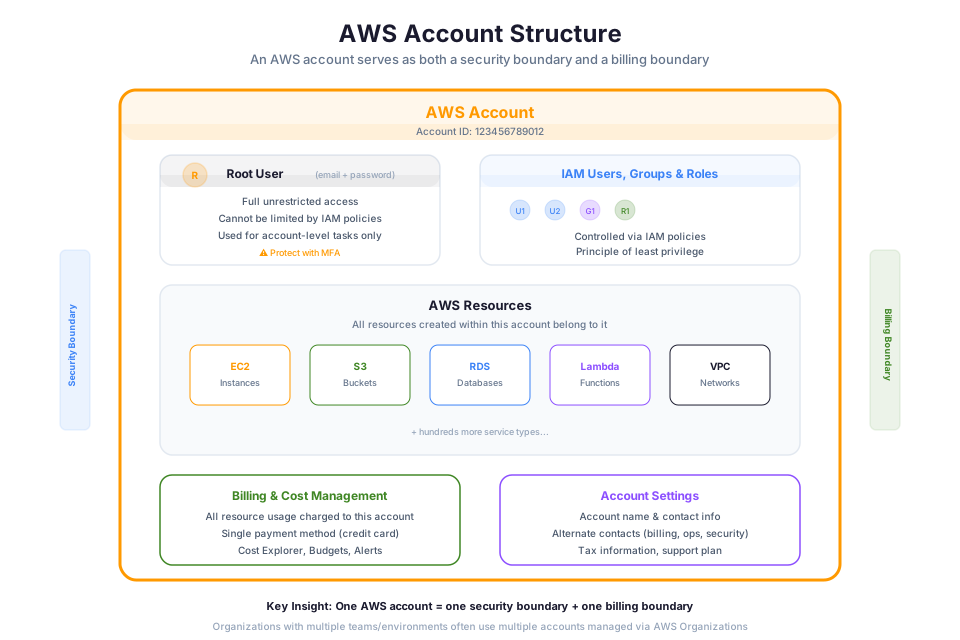
📊 Architecture Diagram: AWS account structure showing the root user, account ID, and the relationship between accounts and resources.
An AWS account is the fundamental unit of resource ownership, security isolation, and billing in AWS. It is not simply a login. It is a container that holds everything: your EC2 instances, your S3 buckets, your IAM users, your bill.
Security boundary: Resources in one account cannot access resources in another account unless you explicitly configure cross-account access. This isolation is enforced at the platform level. A security incident in Account A does not automatically compromise Account B.
Billing boundary: All charges within an account roll up to that account's payment method. One account, one bill (unless you use consolidated billing through AWS Organizations).
The Email-Account Relationship
Every AWS account is created with a single email address that serves as the root user login, receives billing and security notifications, cannot be shared across multiple accounts, and should be a distribution list (not a personal email) for organizational accounts.
Warning: If you lose access to the account email address, recovery becomes extremely difficult. Use a durable, organizational email for any account that matters.
Account ID and Alias
Every account receives a 12-digit account ID at creation (e.g., 123456789012). This number is permanent and globally unique. It appears in:
- Resource ARNs (Amazon Resource Names)
- Cross-account access policies
- The sign-in URL for IAM users:
https://123456789012.signin.aws.amazon.com/console
Because 12-digit numbers are hard to remember, you can set an account alias, a friendly name that replaces the account ID in your IAM sign-in URL:
https://my-company-prod.signin.aws.amazon.com/console
Account aliases must be globally unique across all AWS accounts.
Accounts and Organizations (Preview)
In enterprise environments, a single AWS account is rarely sufficient. AWS Organizations allows you to group multiple accounts under a management account, apply organization-wide policies, and consolidate billing. This is covered in depth in Phase 8. For now, understand that individual accounts are the building blocks of larger organizational structures.
Check your understanding: A company has three teams, each running different workloads. Why might they choose three separate AWS accounts instead of one shared account with IAM permissions separating the teams?
The Root User
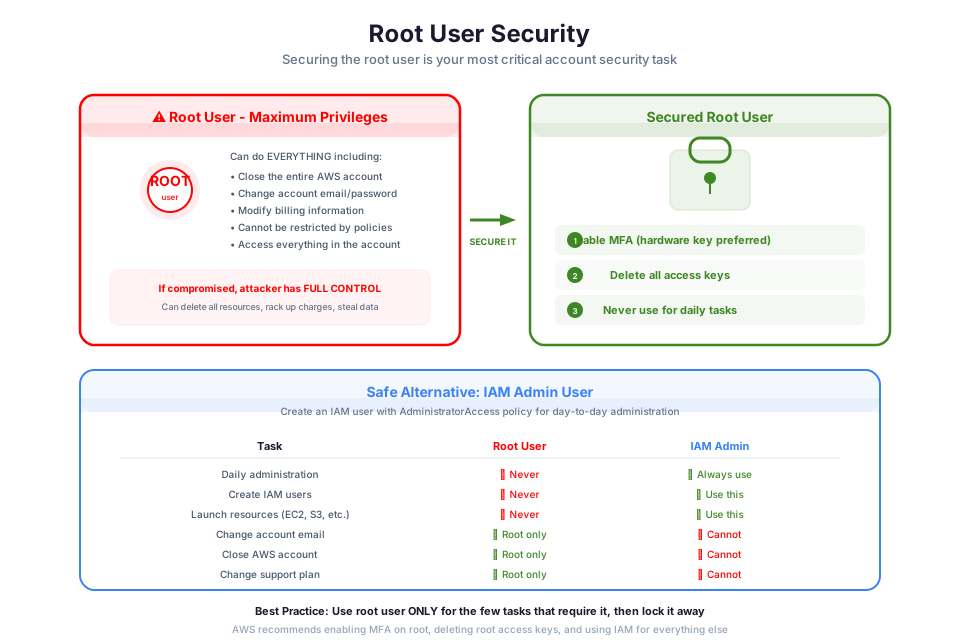
📊 Architecture Diagram: Root user security best practices including enabling MFA and avoiding daily use of root credentials.
The root user is the identity created when you first create an AWS account. It is authenticated by the account email and password set during creation. It has complete, unrestricted access to every resource and service in the account. No IAM policy can limit it. No permission boundary constrains it.
What Only the Root User Can Do
Most AWS tasks can be performed by IAM users with appropriate permissions. However, a small set of operations are exclusively reserved for the root user:
| Root-Only Action | Why It Exists |
|---|---|
| Close the AWS account | Prevents accidental account deletion by IAM users |
| Change the account name, email, or root password | Protects the fundamental identity of the account |
| Change or cancel the AWS Support plan | Financial commitment that only the account owner should alter |
| Restore IAM user permissions | Recovery mechanism when all IAM admins are locked out |
| Enable MFA delete on S3 buckets | Prevents even admins from permanently deleting S3 data |
| Register as a seller in the Reserved Instance Marketplace | Financial commitment tied to the account |
| Configure an S3 bucket for MFA-protected API access | Additional data protection control |
| Edit or delete an S3 bucket policy that denies all principals | Break-glass recovery for misconfigured policies |
This is a deliberately short list. AWS designed it this way so you rarely need the root user.
Why You Must Lock It Down on Day 1
The root user cannot be restricted by IAM policies. If an attacker gains root credentials, they can delete every resource, create backdoor IAM users, change the account email to lock you out permanently, spin up expensive compute for crypto mining, and access all data, including encrypted content, if they rotate KMS keys. There is no recovery path that does not involve AWS Support intervention, time, and potential data loss.
Step-by-Step: Securing the Root User
Complete these actions immediately after creating any AWS account:
-
Enable MFA on the root user. Use a hardware security key (FIDO2) or virtual MFA app (not SMS). Navigate to IAM > Security Credentials > Assign MFA device. MFA documentation
-
Delete root access keys if they exist. Root should never have programmatic access. Navigate to IAM > Security Credentials > Access keys. Deactivate and delete any that exist. Access key documentation
-
Create an IAM admin user. Attach the
AdministratorAccessmanaged policy. Log out of root. Log in as this admin. IAM admin setup -
Store root credentials securely. Place the password in a hardware-encrypted vault or secrets manager requiring multi-person authorization to retrieve.
-
Never use root again for daily operations. Log in as root only for the specific tasks listed in the table above.
Warning: Using root for daily work is the single most dangerous practice in AWS account management. Every month, AWS sees accounts compromised because the root user had active access keys posted in a GitHub repository or stored in a shared spreadsheet.
Common Mistakes
- Using root to create resources because "it's easier than setting up IAM"
- Sharing root credentials via email or chat
- Skipping MFA because "it's just a test account" (attackers love unprotected accounts with billing enabled)
- Reusing a password from another service
AWS Free Tier
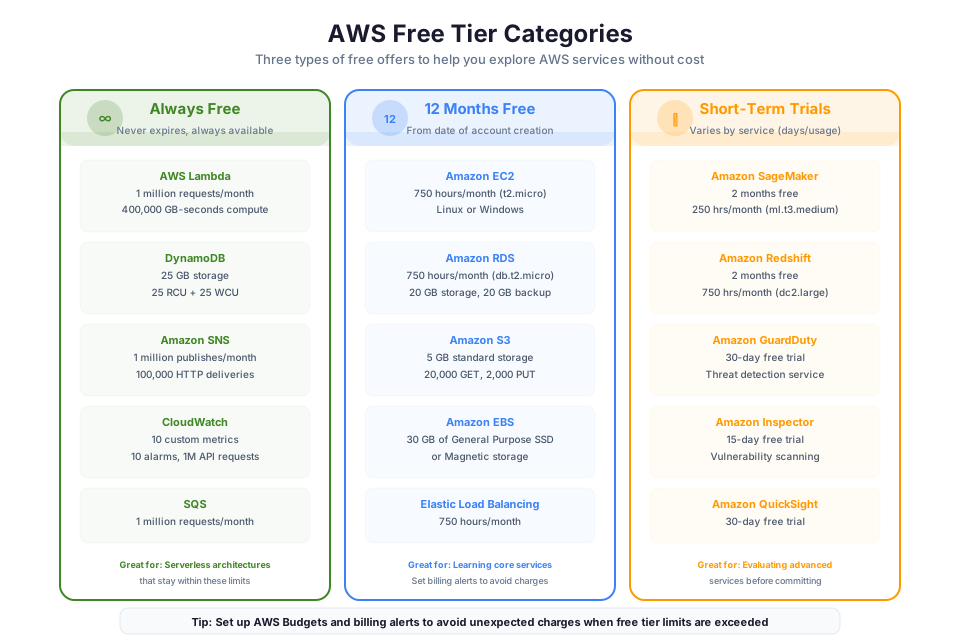
📊 Architecture Diagram: AWS account billing boundaries and how each account acts as an isolation container for resources.
The AWS Free Tier lets you use specific services at no charge within defined limits. Understanding these limits precisely prevents surprise bills.
Three Categories
| Category | Duration | Example |
|---|---|---|
| Always Free | Never expires | 1 million Lambda requests/month, 25 GB DynamoDB storage |
| 12 Months Free | First 12 months after account creation | 750 hours/month EC2 t2.micro or t3.micro, 5 GB S3 standard storage |
| Short-Term Trials | Service-specific (30-90 days typically) | Amazon Inspector 15-day trial, Amazon Detective 30-day trial |
Key Services and Limits
| Service | Free Tier Limit | Category | Common Billing Trigger |
|---|---|---|---|
| EC2 | 750 hrs/month (t2.micro or t3.micro, Linux/Windows) | 12 Months | Running a larger instance type, or multiple instances exceeding 750 total hours |
| S3 | 5 GB standard storage, 20,000 GET, 2,000 PUT requests | 12 Months | Storing large datasets, high request volume |
| RDS | 750 hrs/month (db.t2.micro, db.t3.micro, or db.t4g.micro, Single-AZ) | 12 Months | Multi-AZ deployment, larger instance class |
| Lambda | 1M requests + 400,000 GB-seconds compute/month | Always Free | Exceeding compute time with memory-heavy functions |
| DynamoDB | 25 GB storage, 25 RCU, 25 WCU | Always Free | Provisioned capacity beyond free limits |
| CloudWatch | 10 custom metrics, 10 alarms, 1M API requests | Always Free | More than 3 dashboards, detailed monitoring |
Monitoring Free Tier Usage
Navigate to Billing Dashboard > Free Tier to see your usage against each limit as a percentage. AWS also sends email alerts when you approach 85% of a Free Tier limit (if billing alerts are enabled).
To enable Free Tier usage alerts:
- Navigate to Billing > Billing Preferences
- Check "Receive Free Tier Usage Alerts"
- Confirm the email address for notifications
Tip: Set up a billing alarm (covered in the next section) on Day 1, even if you plan to stay within Free Tier. Services like NAT Gateways, Elastic IPs not attached to running instances, and forgotten EBS volumes are not covered by Free Tier and accumulate charges silently.
Common Mistakes That Lead to Unexpected Charges
- Leaving a NAT Gateway running ($0.045/hour = ~$32/month regardless of traffic)
- Public IPv4 addresses ($0.005/hour per address = ~$3.60/month each, charged whether attached or not since February 2024)
- Launching a t2.small instead of t2.micro (no Free Tier coverage for the small)
- Running instances in multiple Regions (Free Tier limits are global, not per-Region)
- Not terminating lab resources after completing exercises
AWS Billing & Cost Management
📊 Architecture Diagram: Setting up account-level protections including alternate contacts, billing alerts, and account recovery options.
AWS billing operates on a pay-as-you-go model. Charges vary by service: per second, per hour, per request, or per gigabyte.
The Billing Dashboard
The Billing Dashboard provides:
- Month-to-date charges broken down by service
- Forecasted end-of-month charges based on current usage trends
- Free Tier usage tracking with percentage indicators
- Bills with line-item detail for every charge
- Payment methods and tax settings
AWS Budgets
AWS Budgets lets you set custom spending thresholds and receive alerts when actual or forecasted costs exceed your limits. You can create cost budgets (dollar thresholds), usage budgets (service consumption), and reservation budgets (RI usage).
Your first budget should be a simple cost budget: navigate to Billing > Budgets > Create budget, select "Cost budget," set a monthly amount ($10 for a learning account), add alert thresholds at 50%, 80%, and 100%, then configure email notifications.
Tip: AWS Budgets is free for the first two budgets. For a learning account, two budgets (one at $5, one at $20) provide adequate protection.
Cost Allocation Tags
Cost allocation tags are key-value pairs attached to resources that appear in billing reports. They answer: "Which project, team, or environment caused this charge?"
| Tag Key | Example Value | Purpose |
|---|---|---|
| Environment | production, staging, development | Separate costs by environment |
| Project | website-redesign | Attribute costs to a specific initiative |
| Team | data-engineering | Chargeback to the responsible team |
| Owner | jsmith | Identify who created the resource |
At enterprise scale, tags are non-negotiable. Without them, a $50,000/month bill is just a number. With them, you trace every dollar to the workload that generated it.
Consolidated Billing with Organizations
When multiple accounts are grouped under AWS Organizations, all charges roll up to the management account's payment method. This provides a single bill, volume discounts across combined usage (e.g., S3 tiered pricing), and simplified financial management. Expanded in Phase 8.
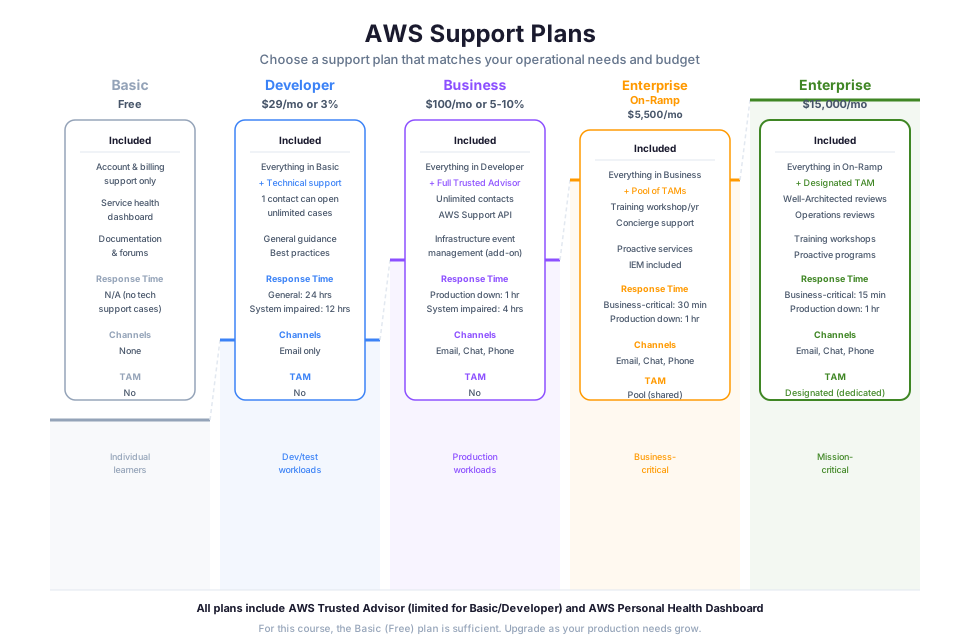
AWS Support Plans
AWS offers five support tiers with escalating response times, access channels, and advisory services.
| Plan | Monthly Cost | Response Time (Critical) | Channels | Key Feature |
|---|---|---|---|---|
| Basic | Free | No technical support | Documentation, forums, Trusted Advisor (core checks) | Included with every account |
| Developer | $29 or 3% of usage | 24 business hours (general guidance), 12 business hours (system impaired) | Business-hours email, 1 contact | Suitable for experimentation and development |
| Business | $100+ or 10% of usage (first $10K) | 1 hour (production system down) | 24/7 phone, chat, email; unlimited contacts; full Trusted Advisor | Production workload minimum |
| Enterprise On-Ramp | $5,500+ | 30 minutes (business-critical down) | Everything in Business + pool of TAMs, Concierge for billing | Growing organizations with production dependencies |
| Enterprise | $15,000+ | 15 minutes (business-critical down) | Designated TAM, Infrastructure Event Management, Well-Architected reviews | Mission-critical workloads, large-scale operations |
Decision Framework
| Organization Profile | Recommended Plan | Reasoning |
|---|---|---|
| Individual learner or hobbyist | Basic or Developer | Low risk, no production dependency |
| Startup with production workload | Business | 24/7 phone access, 1-hour response for outages |
| Mid-size company, multiple accounts | Enterprise On-Ramp | TAM pool for guidance, 30-min response |
| Large enterprise, regulated industry | Enterprise | Designated TAM, proactive architecture reviews, fastest response |
Check your understanding: A financial services company runs their trading platform on AWS. Their system generates $2 million in revenue per hour. Which Support plan should they choose, and why does the cost of the plan become irrelevant compared to the cost of downtime?
Account Best Practices (The Day-1 Checklist)
When you create a new AWS account, complete these steps before doing anything else. Treat this as a security prerequisite, not optional housekeeping.
| Step | Action | Why |
|---|---|---|
| 1 | Enable MFA on root user | Prevents credential-only account takeover |
| 2 | Create an IAM admin user or role | Establishes least-privilege pattern from the start |
| 3 | Set up billing alarm at $5 and $20 | Catches runaway costs before they become serious |
| 4 | Enable billing alerts and Free Tier alerts | Ensures you receive notifications before charges escalate |
| 5 | Enable CloudTrail in all Regions | Creates an audit log of every API call in the account |
| 6 | Set a strong IAM password policy | Enforces minimum length and complexity requirements |
| 7 | (Optional) Enable AWS Config | Records resource configuration changes for compliance auditing (detailed in Phase 8) |
Enabling CloudTrail
AWS CloudTrail records every API call made in your account: who made the call, from what IP, at what time, and what happened. Without CloudTrail, you have no forensic capability if something goes wrong. It provides 90 days of event history for free. For long-term retention, create a trail that delivers logs to S3. Enable it in all Regions so that activity in any Region is captured.
Setting the IAM Password Policy
Navigate to IAM > Account settings > Password policy. Configure minimum 14-character length and require mixed case plus numbers and symbols. Note: NIST SP 800-63B recommends against mandatory periodic password rotation unless there is evidence of compromise, as forced rotation often leads to weaker passwords. If your organization's compliance framework requires rotation, set it to 90 days and prevent reuse of the last 24 passwords. Otherwise, enforce strong passwords with MFA rather than relying on expiration.
Tip: These six required steps take approximately 15 minutes to complete. Those 15 minutes are the difference between a hardened account and one that is trivially compromisable. The lab for this module walks you through each step hands-on.
Instructor Notes
Estimated lecture time: 60 minutes
Common student questions:
-
Q: Can I have multiple root users on one account? A: No. Each account has exactly one root user, tied to the account's email address. For shared administration, create IAM users or roles with appropriate permissions.
-
Q: What happens if I exceed Free Tier limits? A: You are charged standard on-demand rates for usage beyond Free Tier limits. There is no automatic cutoff. This is why billing alarms are essential from Day 1.
-
Q: Is the Developer support plan worth $29/month for a learner? A: For most learners, Basic (free) is sufficient. Developer is worthwhile if you want to ask AWS technical questions or have a small production workload.
-
Q: Can I change my account email address later? A: Yes, but it requires root login and MFA verification. Plan your email address choice carefully during account creation.
Teaching tips:
- Open the Billing Dashboard live. Students retain billing concepts better when they see real interface elements rather than screenshots.
- Show Trusted Advisor checks on Basic vs. Business plans side by side. The visual difference makes the value proposition concrete.
- Use the physical-key analogy for root: master key to a building. Lock it in a safe, use floor-specific keys daily.
- Connect CloudTrail to a security narrative: "If someone deletes your production database at 3 AM, CloudTrail tells you who, when, from where, and how."
Pause points:
- After root user: ask students to list three consequences of a compromised root user that could not happen with a compromised IAM admin.
- After Free Tier: scenario with three t2.micro instances. Do they exceed Free Tier? (Yes: 3 x 750 = 2,250 hours exceeds the 750/month global limit.)
- After Support plans: present two fictional companies and ask students to recommend a plan with justification.
Key Takeaways
- An AWS account is simultaneously a security boundary and a billing boundary. Treat it as the outermost perimeter of your environment.
- The root user has unrestricted access and cannot be limited by IAM. Secure it with MFA on Day 1, delete access keys, and never use it for daily operations.
- AWS Free Tier has three categories (Always Free, 12 Months Free, Trials). Know the limits for services you use and set billing alarms to catch overages early.
- AWS Budgets and billing alarms are your financial guardrails. A $5 alarm costs nothing to set up and can save you hundreds in unexpected charges.
- Support plan selection is a risk decision. Match the plan to your organization's tolerance for downtime and need for technical guidance.
- The Day-1 checklist (MFA, IAM admin, billing alarm, CloudTrail, password policy) takes 15 minutes and establishes the security foundation for everything you build afterward.
SAA-C03 Exam Alignment
Domain: Domain 1: Design Secure Architectures (30%), Domain 4: Design Cost-Optimized Architectures (20%)
Task Statements:
- Task 1.1: Design secure access to AWS resources
- Task 1.2: Design secure workloads and applications
- Task 4.4: Design cost-optimized database solutions
Testable Knowledge from This Module:
- Identify actions that only the root user can perform (close account, change account email, enable MFA delete on S3, restore IAM permissions)
- Explain why root user access keys should be deleted immediately and never used for daily operations
- Describe AWS account as both a security boundary and a billing boundary simultaneously
- Differentiate between Always Free, 12 Months Free, and Trial categories of the AWS Free Tier
- State the specific Free Tier limits for EC2 (750 hours/month t2.micro or t3.micro), S3 (5 GB), and Lambda (1M requests)
- Configure AWS Budgets to alert at specified cost thresholds and explain that the first 2 budgets are free
- Explain how consolidated billing aggregates usage across accounts for volume discounts
- Identify that CloudTrail provides 90 days of event history for free and logs every API call
- Select the appropriate AWS Support plan based on response time requirements and business criticality
- Describe the purpose of cost allocation tags for attributing charges to projects, teams, or environments
- Recognize that Free Tier limits are global (not per-Region) and running instances in multiple Regions counts against a single limit
- Explain that account aliases must be globally unique across all AWS accounts
Services Covered:
- Primary: IAM (root user), AWS Budgets, CloudTrail, AWS Organizations
- Supporting: Cost Explorer, AWS Artifact, Trusted Advisor, AWS Support
Edge Cases and Exam Traps
Tip: When the exam mentions "root user," the correct answer almost always involves restricting its use. The only valid reasons to log in as root are the 8 specific root-only tasks.
Common Traps:
| Trap | Why It's Wrong | Correct Answer |
|---|---|---|
| "Use the root user to create resources because it has full access" | Root should never be used for daily operations; its unrestricted power is a liability, not a convenience | Create an IAM admin user with AdministratorAccess and use that for administrative work |
| "Free Tier provides 750 hours per instance" | The 750-hour limit is global across all instances in the account, not per instance | Running 3 t2.micro instances = 2,250 hours/month, far exceeding the 750-hour Free Tier limit |
| "An IAM admin user can do everything root can do" | Only root can close the account, change the account email, enable S3 MFA delete, or restore IAM permissions when all admins are locked out | IAM admin has almost full power but cannot perform the 8 root-only tasks |
| "Basic Support includes 24/7 phone access to AWS engineers" | Basic Support provides no technical support cases at all; only documentation, forums, and 7 core Trusted Advisor checks | Phone support starts at Business plan ($100+/month); 24/7 access requires Business tier or higher |
| "CloudTrail must be explicitly enabled to see any API history" | CloudTrail records 90 days of management event history automatically in every account since 2019 | Free 90-day history is automatic; creating a trail is needed only for long-term retention or data events |
Subtle Distinctions:
- Account ID (12 digits, permanent, in ARNs) vs. account alias (friendly name, changeable, for sign-in URL). Both are globally unique.
- Root user cannot be restricted by IAM policies, but CAN be restricted by SCPs in member accounts of an Organization.
- "Closing an account" (root-only, permanent after 90 days) vs. "suspending a member account" (Organizations feature, different process).
- AWS Budgets alerts you but does NOT automatically stop services when the budget is exceeded. You still get charged.
- Consolidated billing enables volume pricing tiers across accounts (e.g., combined S3 storage hits cheaper per-GB rates faster) but does not merge the accounts themselves.
- Cost allocation tags only appear in billing reports AFTER you activate them in the Billing console. Tagging a resource is not enough.
- Enterprise Support provides a designated TAM (one person assigned to you). Enterprise On-Ramp provides a pool of TAMs (not a single dedicated person).
- Public IPv4 addresses cost $0.005/hour ($3.60/month) whether attached to a running instance or not (since February 2024).
Watch Out For:
- A scenario where "all IAM administrators are locked out of the account": the correct recovery path involves the root user, which is why root must always have MFA and secure credential storage.
- Questions about preventing unexpected charges on a learning account: the answer involves both billing alarms AND understanding that Free Tier limits are global, not per-Region or per-instance.
- Scenarios describing a company needing 15-minute response time for critical production outages: this requires Enterprise Support ($15,000+/month), not Business Support (1-hour response for production-down).
Anti-Patterns:
- Leaving the root user without MFA "because it is just a test account": attackers specifically target unprotected accounts because billing is enabled and they can spin up expensive compute for cryptocurrency mining.
- Creating one shared AWS account for multiple teams and relying solely on IAM to separate them: accounts are the security boundary, not IAM. Separate accounts provide stronger isolation, independent blast radius, and cleaner billing attribution.
- Relying on Free Tier limits as cost protection: Free Tier has no automatic cutoff. Exceeding limits silently incurs on-demand charges until you notice.