
Learning Objectives
By the end of this module, you will be able to:
- Explain the role of AWS Identity and Access Management (IAM) as the authentication and authorization layer for every AWS API call
- Create IAM users with appropriate credential types and describe why each person should have their own identity
- Design IAM user groups that reflect organizational roles and attach policies to simplify permission management at scale
- Analyze the structure of an IAM policy document and identify the Effect, Action, Resource, and Condition elements within any given statement
- Distinguish between AWS managed policies, customer managed policies, inline policies, resource-based policies, and permission boundaries
- Trace the IAM policy evaluation logic from implicit deny through explicit allow and explicit deny to determine the outcome of an access request
- Apply the principle of least privilege when designing permissions, starting from zero access and adding only what is required
- Configure multi-factor authentication (MFA) on IAM users and write policy conditions that enforce MFA for sensitive operations
Prerequisites
- Completion of Module 03: The AWS Account & Root User
- An AWS account with console access (free tier is sufficient)
- Familiarity with JSON syntax (objects, arrays, key-value pairs)
Why This Matters
IAM is the most important service in AWS. That is not an opinion. It is the architectural reality.
Every single API call you make, whether launching an EC2 instance, reading from S3, or querying DynamoDB, passes through IAM for evaluation. IAM decides whether the call proceeds or gets rejected with an Access Denied error. There is no bypassing it, no workaround, no alternative path.
A misconfigured IAM policy has exactly two outcomes, and both are bad. If the policy is too restrictive, your team is locked out and cannot do their work. If the policy is too permissive, you have a security breach waiting to happen. The 2019 Capital One breach, which exposed 100 million credit applications, started with an overly permissive IAM role on an EC2 instance behind a misconfigured WAF. The attacker exploited the WAF misconfiguration to perform an SSRF attack against the instance metadata service (IMDSv1), obtaining the role's temporary credentials. Those credentials had far more access than necessary. The attacker did not exploit a zero-day vulnerability. They exploited sloppy IAM combined with missing network-layer protections.
As a Solutions Architect, you will spend more time reasoning about IAM than any other service. Getting it right is not optional. This module gives you the foundation to get it right from day one.
Concepts
IAM: The Gatekeeper of Everything
📊 Architecture Diagram: IAM users as individual identities with unique credentials for programmatic and console access.
AWS Identity and Access Management (IAM) is a global service, available in every AWS Region simultaneously with no additional cost. It controls two distinct concerns:
- Authentication: Proving who you are (credentials, MFA)
- Authorization: Determining what you are allowed to do (policies, permissions)
Think of it like building security. Authentication is the badge reader at the front door. It confirms your identity. Authorization is the access control list that determines which floors and rooms your badge opens. You might be authenticated as an employee, but that does not mean you can walk into the server room.
Three critical facts about IAM that trip up newcomers:
- IAM is global. Unlike most AWS services, IAM is not scoped to a Region. A user created in IAM exists everywhere. A policy attached in IAM applies everywhere.
- IAM is free. There is no charge for creating users, groups, roles, or policies. The cost comes from the AWS resources those identities consume.
- IAM evaluates every API call. Whether you click a button in the console, run a CLI command, or call the SDK from application code, IAM intercepts and evaluates the request before it reaches the target service.
Key insight: The AWS Management Console is a web application that makes API calls on your behalf. When you click "Launch Instance," the console calls the
ec2:RunInstancesAPI. IAM evaluates that call identically to a CLI or SDK call. There is no special console privilege.
IAM Users
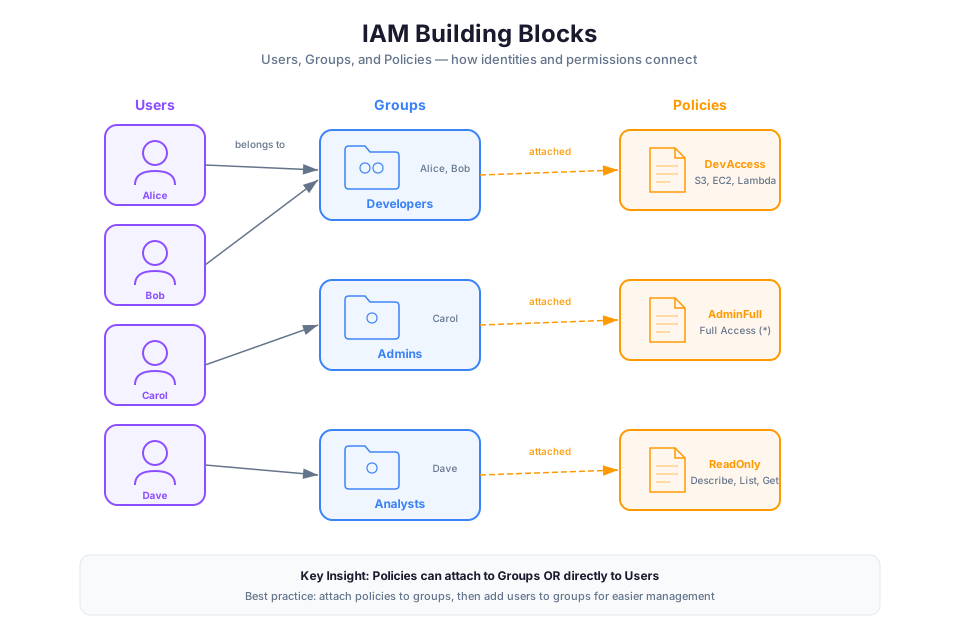
📊 Architecture Diagram: IAM groups organizing users who share common permissions, simplifying policy management at scale.
An IAM user represents a person or application that interacts with AWS. Each user has a unique name within the AWS account and can be granted its own credentials and permissions.
Two Credential Types
IAM users can have two types of credentials:
| Credential Type | Purpose | Access Method | Expiration |
|---|---|---|---|
| Console password | Sign in to the AWS Management Console | Browser-based login | Optional rotation policy |
| Access keys (Access Key ID + Secret Access Key) | Programmatic access via CLI, SDK, or API | Terminal, code, scripts | No automatic expiration (manual rotation) |
A user can have both credential types, one type, or neither. A human developer who uses both the console and CLI needs both. An application that only calls APIs needs only access keys. An IAM user that exists solely for permission grouping might have no credentials at all.
One User Per Person
Every individual who accesses your AWS account must have their own IAM user. Sharing credentials between people destroys accountability. When three engineers share one set of access keys and someone accidentally deletes a production database, CloudTrail logs show which access key was used, but you cannot determine which human pressed enter.
This is not a guideline. It is a security requirement. The AWS Well-Architected Framework states this explicitly under the Security Pillar.
Root User vs. IAM Admin User
In Module 03, you learned about the root user. The root user has unrestricted access to everything in the account and cannot be limited by IAM policies. An IAM admin user (one with the AdministratorAccess policy attached) has nearly the same power but with critical differences:
| Capability | Root User | IAM Admin User |
|---|---|---|
| Change account email/name | Yes | No |
| Close the AWS account | Yes | No |
| Change the support plan | Yes | No |
| Enable MFA on root | Yes | No |
| Create/delete account-level S3 policies | Yes | No |
| Restricted by IAM policies | No | Yes |
| Restricted by SCPs | Yes (member accounts) | Yes |
| Should be used for daily work | Never | Yes (until you implement roles) |
The correct pattern: lock the root user away with MFA, create an IAM admin user, and use that for administrative tasks. You will learn an even better pattern (IAM roles with federated identity) in Module 05.
Access Key Best Practices
Access keys are long-lived credentials. If they are compromised, an attacker has persistent access until you deactivate them. Follow these rules:
- Never embed access keys in source code. Not in application code, not in config files checked into git, not in Lambda environment variables. Use IAM roles instead (Module 05).
- Rotate access keys regularly. AWS recommends rotation every 90 days. Use
aws iam create-access-keyandaws iam delete-access-keyto rotate. - Delete unused access keys. If a user has not used their keys in 90 days, deactivate them. Use the IAM Credential Report to find stale keys.
- Prefer IAM roles over access keys. For applications running on AWS (EC2, Lambda, ECS), attach an IAM role. The role provides temporary credentials that rotate automatically.
Warning: If you find access keys in a public GitHub repository, treat it as a breach. Immediately deactivate the keys, audit CloudTrail for unauthorized activity, and rotate any resources the keys could access. AWS actively scans public repositories and may notify you, but do not rely on that.
IAM User Groups
📊 Architecture Diagram: IAM policy structure showing the JSON document format with Effect, Action, Resource, and Condition elements.
An IAM user group is a collection of IAM users. Groups let you specify permissions for multiple users at once, which simplifies permission management as your team grows.
Instead of attaching the same three policies to each of your 15 developers individually (which means 45 policy attachments to manage), you create a "Developers" group, attach the three policies to the group, and add all 15 developers to it. When a new developer joins, you add them to the group. When they leave, you remove them. The policies never need to change.
Group Rules and Limitations
- Groups cannot be nested. You cannot put a group inside another group. Keep your group structure flat.
- A user can belong to multiple groups. A developer who also handles billing might be in both the "Developers" group and the "BillingTeam" group. They inherit permissions from both.
- Groups are NOT identity principals. You cannot reference a group in a resource-based policy's
Principalelement. Groups exist solely for permission management, not for identity-based trust. - There is no default group. New IAM users do not automatically belong to any group. You must explicitly add them.
- Maximum 10 groups per user, 300 groups per account (default limits, increasable via support request).
Real-World Group Design
A well-designed group structure mirrors your organizational roles:
| Group Name | Typical Policies | Members |
|---|---|---|
| Administrators | AdministratorAccess | Lead engineers, platform team |
| Developers | PowerUserAccess + deny on IAM changes | Application developers |
| DatabaseAdmins | Custom RDS/DynamoDB full access | DBA team |
| ReadOnlyAuditors | ReadOnlyAccess | Security auditors, compliance team |
| BillingTeam | Billing + CostExplorerAccess | Finance, management |
| SecurityEngineers | SecurityAudit + GuardDuty/Inspector access | Security team |
Tip: Name your groups by function, not by team name. Teams reorganize. Functions persist. "DatabaseAdmins" is clear in 2 years. "AlphaTeam" is meaningless to the person who inherits your account.
IAM Policies: The Permission Language
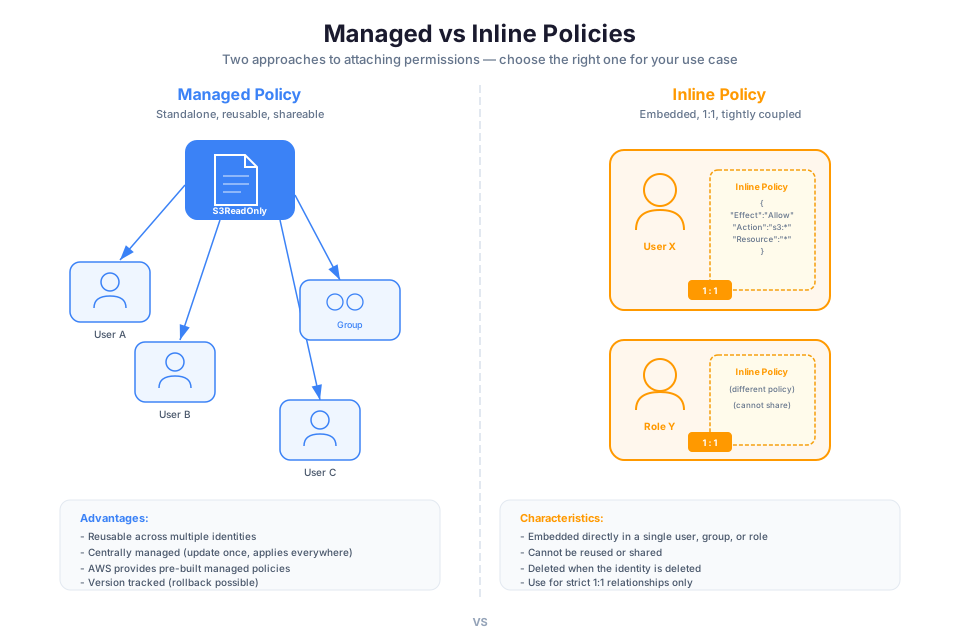
📊 Architecture Diagram: Policy evaluation logic showing how AWS determines whether a request is allowed or denied across multiple policies.
An IAM policy is a JSON document that defines permissions. Policies are the core of IAM. Everything else (users, groups, roles) exists to organize and attach policies.
Policy Document Structure
Every policy document has this structure:
{
  "Version": "2012-10-17",
  "Statement": [
    {
      "Sid": "DescriptiveStatementName",
      "Effect": "Allow",
      "Action": "s3:GetObject",
      "Resource": "arn:aws:s3:::my-bucket/*",
      "Condition": {
        "StringEquals": {
          "s3:prefix": "home/"
        }
      }
    }
  ]
}
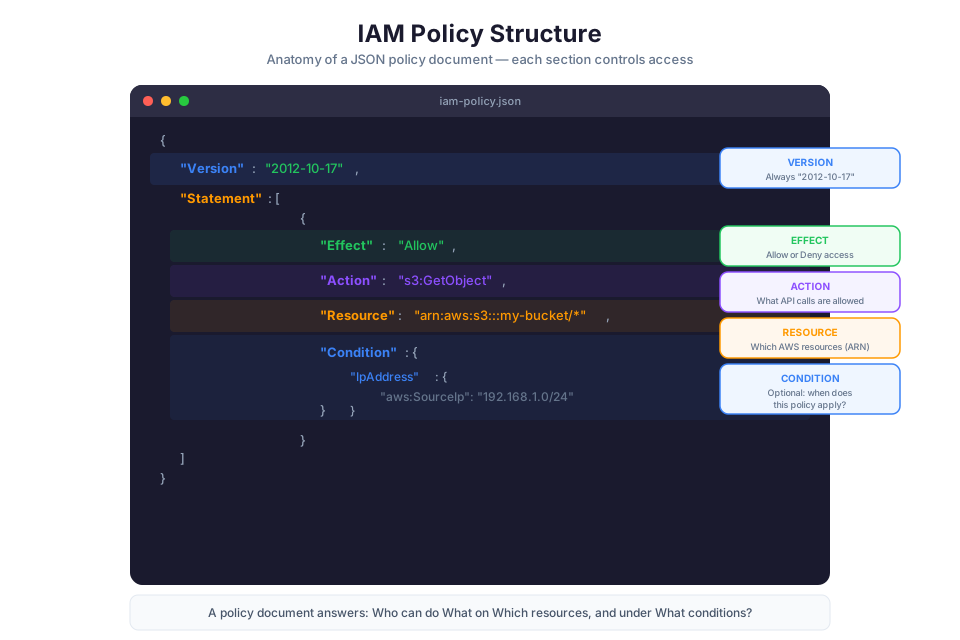
- Version: Always use
"2012-10-17". This is the current policy language version. The older"2008-10-17"version lacks features like policy variables. There is no newer version. - Statement: An array of one or more permission statements. Each statement grants or denies specific access.
The Four Key Elements
Each statement in a policy contains these elements:
Effect (required): Either "Allow" or "Deny". There are no other options. If a statement does not explicitly allow something, it is implicitly denied.
Action (required): The specific API operations the statement applies to. Actions follow the format service:ActionName:
"Action": "s3:GetObject"
"Action": ["s3:GetObject", "s3:PutObject"]
"Action": "s3:*"
"Action": "ec2:Describe*"
Wildcards are supported. s3:* means all S3 actions. ec2:Describe* means all EC2 actions that start with "Describe" (read-only operations).
Resource (required for identity-based policies): The specific AWS resources the statement applies to, expressed as Amazon Resource Names (ARNs):
arn:aws:service:region:account-id:resource-type/resource-id
Examples:
"Resource": "arn:aws:s3:::my-bucket"
"Resource": "arn:aws:s3:::my-bucket/*"
"Resource": "arn:aws:ec2:us-east-1:123456789012:instance/i-1234567890abcdef0"
"Resource": "*"
Note the S3 distinction: arn:aws:s3:::my-bucket refers to the bucket itself (for operations like s3:ListBucket), while arn:aws:s3:::my-bucket/* refers to the objects inside the bucket (for operations like s3:GetObject).
Condition (optional): Additional constraints that must be true for the statement to apply. Conditions use operators and context keys:
"Condition": {
  "IpAddress": {
    "aws:SourceIp": "203.0.113.0/24"
  },
  "Bool": {
    "aws:MultiFactorAuthPresent": "true"
  }
}
Common condition operators: StringEquals, StringLike, IpAddress, Bool, DateGreaterThan, NumericLessThan.
A Complete Policy Example
Here is a real-world policy that allows a developer to manage objects in a specific S3 bucket, but only from the corporate network and only if MFA is active:
{
  "Version": "2012-10-17",
  "Statement": [
    {
      "Sid": "AllowS3BucketAccess",
      "Effect": "Allow",
      "Action": [
        "s3:GetObject",
        "s3:PutObject",
        "s3:DeleteObject",
        "s3:ListBucket"
      ],
      "Resource": [
        "arn:aws:s3:::project-artifacts",
        "arn:aws:s3:::project-artifacts/*"
      ],
      "Condition": {
        "IpAddress": {
          "aws:SourceIp": "10.0.0.0/8"
        },
        "Bool": {
          "aws:MultiFactorAuthPresent": "true"
        }
      }
    }
  ]
}
Reading this line by line:
- Effect: Allow. This statement grants permission.
- Action: Four specific S3 operations. The user can read, write, delete objects, and list the bucket contents. They cannot change bucket policies, enable versioning, or perform any other S3 action.
- Resource: Two ARNs. The bucket itself (for
ListBucket) and all objects within it (forGetObject,PutObject,DeleteObject). - Condition: Two conditions that must BOTH be true. The request must come from the
10.0.0.0/8IP range AND the user must have authenticated with MFA.
Check your understanding: What happens if this user tries to call
s3:GetObjectfrom their home IP address (outside the corporate range)? Answer: Access denied. The condition fails, so the Allow statement does not apply. With no applicable Allow, the default deny takes effect.
Types of Policies
📊 Architecture Diagram: Best practices for IAM users and groups including least privilege, password policies, and access key rotation.
IAM supports several policy types, each designed for a specific use case:
| Policy Type | Attached To | Managed By | Use Case |
|---|---|---|---|
| AWS Managed | Users, groups, roles | AWS | Quick start, common permission sets |
| Customer Managed | Users, groups, roles | You | Custom permissions specific to your organization |
| Inline | Single user, group, or role | You | Strict 1:1 relationship; policy lives and dies with the identity |
| Resource-based | The resource itself | You | Cross-account access, S3 bucket policies, SQS queue policies |
| Permission Boundaries | Users or roles | You | Maximum permissions ceiling for delegated administration |
AWS Managed Policies
AWS creates and maintains these policies. Examples include AdministratorAccess, ReadOnlyAccess, PowerUserAccess, and service-specific policies like AmazonS3FullAccess. They are convenient for getting started but tend to be overly broad for production use.
Customer Managed Policies
You create these policies in your account. They support versioning (up to 5 versions), so you can update a policy and roll back if something breaks. Customer managed policies are reusable across multiple identities. This is what you should use for production workloads.
Inline Policies
An inline policy is embedded directly within a single user, group, or role. It has a strict 1:1 relationship with the identity. When you delete the identity, the policy is deleted too. Use inline policies when you need to guarantee that a permission is never accidentally attached to the wrong identity.
Resource-based Policies
These are attached to the resource (S3 bucket, SQS queue, KMS key) rather than the identity. They specify who (which principal) can access the resource. Resource-based policies are the primary mechanism for granting cross-account access without assuming a role.
Permission Boundaries
A permission boundary sets the maximum permissions that an identity-based policy can grant to a user or role. Even if the identity policy says "Effect": "Allow" on all actions, the permission boundary limits what actually takes effect. This is critical for delegated administration: you can let junior admins create IAM roles without risking that they create overpermissioned ones.
Policy Evaluation Logic
Understanding how IAM evaluates policies is essential for both designing permissions and troubleshooting access issues. The logic is deterministic and follows a specific order.
The Three Rules
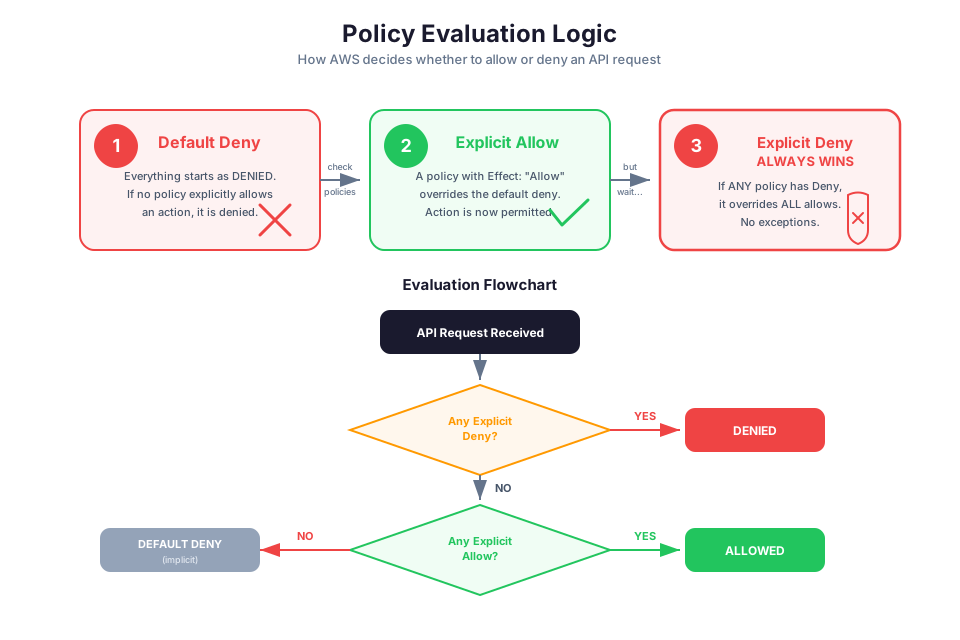
- Default deny. Everything starts denied. If no policy explicitly allows an action, it is denied.
- Explicit Allow overrides implicit deny. An Allow statement in any applicable policy grants access (unless there is an explicit Deny).
- Explicit Deny ALWAYS wins. A Deny statement overrides any number of Allow statements. There is no way to override an explicit Deny.
The order in which policies are evaluated does not matter. IAM collects all applicable policies, identifies all Allow and Deny statements, and applies the three rules above. If there is even one explicit Deny that matches the request, access is denied regardless of how many Allow statements also match.
The Full Evaluation Flow
When multiple policy types exist, IAM evaluates them in this order:
1. Organization Service Control Policies (SCPs)
        ↓ (must Allow)
2. Permission Boundaries
        ↓ (must Allow)
3. Identity-based Policies (user/group/role policies)
        ↓ (must Allow)
4. Resource-based Policies
        ↓ (can independently Allow for same-account)
For access to be granted, the request must be allowed at each applicable layer. Think of it as a series of gates: each gate must open for the request to pass through.
- SCPs (Module 05+ topic): Set maximum permissions for an entire AWS account within an Organization.
- Permission boundaries: Set maximum permissions for a specific user or role.
- Identity policies: Grant specific permissions to the user/group/role.
- Resource policies: Can independently grant access for same-account requests (for cross-account, both the identity policy and resource policy must allow).
Troubleshooting Access Denied
When a user gets "Access Denied," trace the evaluation chain:
- Is there an explicit Deny anywhere? (SCP, boundary, identity policy, resource policy) If yes, stop. Denied.
- Is there a relevant SCP that does not include an Allow for this action? If yes, stop. Denied.
- Is there a permission boundary, and does it Allow this action? If boundary exists and does not Allow, stop. Denied.
- Does the identity policy or resource policy explicitly Allow this action? If neither does, denied.
Tip: Use the IAM Policy Simulator to test policies before attaching them. It shows you exactly which statement allows or denies a given action, which is far faster than trial and error.
The Principle of Least Privilege
Least privilege means granting only the permissions required to perform a task and nothing more. It sounds simple. In practice, it is the discipline that separates secure AWS environments from breached ones.
What Least Privilege Looks Like in Practice
| Anti-pattern | Least Privilege Alternative |
|---|---|
"Action": "*", "Resource": "*" | Specify exact actions and exact resource ARNs |
Using AdministratorAccess for developers | Custom policy with specific services and actions |
"Action": "s3:*" on all buckets | s3:GetObject and s3:PutObject on the one bucket they need |
| "We'll tighten it later" | Start tight, loosen only when there is a documented need |
The Progression
The practical path to least privilege:
- Start with zero permissions. New users and roles have no access by default.
- Add AWS managed policies for initial functionality during development.
- Monitor actual usage with IAM Access Analyzer and CloudTrail.
- Generate a scoped policy from actual activity. Access Analyzer can analyze CloudTrail logs and generate a policy that includes only the actions the identity actually used.
- Replace the broad policy with the generated, scoped policy.
- Continue monitoring and refine as requirements change.
The Cost of Ignoring Least Privilege
Using AdministratorAccess because "it works" is technical debt with interest. When credentials are compromised, the blast radius is your entire AWS account. A properly scoped policy limits the blast radius to a single bucket, a single table, a single function.
Warning: The IAM Credential Report and Access Advisor show which permissions a user has actually used. If a user has S3 full access but has only ever called
s3:GetObjecton one bucket, their policy is too broad. Fix it.
Multi-Factor Authentication (MFA)
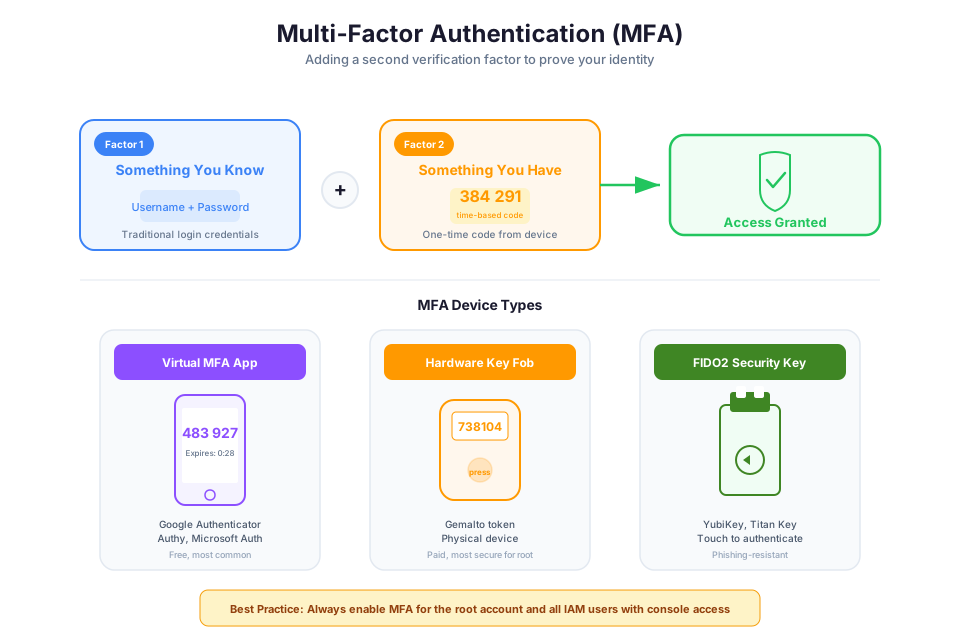
Multi-factor authentication adds a second verification factor beyond the password. Even if an attacker obtains a user's password, they cannot sign in without the second factor. MFA is non-negotiable for any account that matters.
MFA Device Types
| Device Type | Examples | Mechanism | Best For |
|---|---|---|---|
| Virtual MFA (TOTP) | Google Authenticator, Authy, 1Password | Time-based one-time password (6-digit code) | Most IAM users |
| Hardware TOTP token | Gemalto token | Physical device generating codes | High-security environments |
| FIDO2 security key | YubiKey, Titan Security Key | Cryptographic challenge-response | Phishing-resistant authentication |
MFA Requirements
- Root user: MFA is mandatory. AWS now enforces this for accounts created after a certain date. If your root user does not have MFA, stop reading and go enable it now.
- IAM admin users: Strongly recommended. Any user with elevated privileges should have MFA.
- All console users: Recommended. The cost is negligible (free virtual MFA apps) and the protection is significant.
- Programmatic-only users: Not applicable (access keys do not support MFA at sign-in, but you can require MFA in policy conditions).
MFA Conditions in Policies
You can require MFA for sensitive operations using the aws:MultiFactorAuthPresent condition key:
{
  "Version": "2012-10-17",
  "Statement": [
    {
      "Sid": "DenyAllExceptListingWithoutMFA",
      "Effect": "Deny",
      "NotAction": [
        "iam:CreateVirtualMFADevice",
        "iam:EnableMFADevice",
        "iam:ListMFADevices",
        "iam:ResyncMFADevice",
        "sts:GetSessionToken"
      ],
      "Resource": "*",
      "Condition": {
        "BoolIfExists": {
          "aws:MultiFactorAuthPresent": "false"
        }
      }
    }
  ]
}
This policy denies all actions (except those needed to set up MFA) when MFA is not active. It forces users to authenticate with MFA before they can do anything meaningful. Attach it to a group, and every member must use MFA.
Check your understanding: Why does this policy use
"Effect": "Deny"withNotActioninstead of"Effect": "Allow"on specific actions? Answer: Because an explicit Deny cannot be overridden by any Allow in other policies. If we used Allow-based logic, another attached policy could grant access without MFA. The Deny approach guarantees enforcement regardless of what other policies exist.
Instructor Notes
Estimated lecture time: 90 minutes
Common student questions:
-
Q: If groups cannot be referenced as principals, how do I give a group access to an S3 bucket? A: You cannot use a group ARN in the bucket policy's Principal element. Instead, attach an identity-based policy to the group that allows
s3:GetObjecton that bucket. The mechanism is identity policy rather than resource policy, but the outcome is the same. See the IAM documentation on principals. -
Q: What is the difference between
"Action": "s3:*"and"Action": "*"? A:"s3:*"allows all S3 actions but nothing in other services."*"allows all actions in all services. The first is overly broad within S3. The second is a blank check on your entire AWS account. -
Q: When should I use inline policies vs. customer managed policies? A: Use customer managed policies by default. They are reusable, versionable, and easier to audit. Use inline policies only when you need an absolute guarantee that a policy cannot be accidentally attached to a different identity. In practice, this is rare.
-
Q: Can I undo an explicit Deny? A: No. An explicit Deny is final. The only way to "undo" it is to remove or modify the Deny statement itself. This is by design. It allows security teams to enforce boundaries that cannot be overridden by developer-controlled policies.
Teaching tips:
- Start by asking: "What is the most powerful service in AWS?" Collect answers (EC2, S3, Lambda). Then reveal: it is IAM. Every other service depends on IAM for access control. This reframes IAM from "boring admin overhead" to "the most critical security service."
- When explaining policy evaluation, use a courtroom analogy. The default state is "guilty" (denied). The defense (Allow statements) must prove innocence. But if the prosecution (Deny statements) presents evidence, the verdict is always guilty, regardless of how strong the defense was.
- Build a policy live on screen. Start with an empty document, add each element one by one, and explain what happens at each step. Then test it in the Policy Simulator.
- For the MFA section, show students the actual IAM credential report for a demo account. Point out users without MFA and unused access keys. This makes the risk tangible.
Pause points:
- After IAM Users: ask students why you should never use the root user for daily operations (answer: root cannot be restricted, is not tracked as a named identity, and compromised root means total account loss).
- After Groups: present a scenario with 50 developers, 5 DBAs, and 3 auditors. Ask how many policy attachments you need with groups vs. without (answer: with groups, ~10 attachments to 3 groups; without groups, ~58 individual attachments).
- After Policy Evaluation: give a scenario where a user has an Allow for
s3:*in their identity policy but an SCP that does not include S3. Ask if the user can access S3 (answer: no, the SCP blocks it because access requires Allow at every layer). - After MFA: ask what happens if a user with the MFA-enforcement policy loses their phone (answer: they cannot do anything except the MFA setup actions; an administrator must deactivate their MFA device so they can register a new one).
Key Takeaways
- IAM is a global, free service that evaluates every AWS API call. It handles both authentication (proving identity) and authorization (checking permissions). There is no AWS operation that bypasses IAM.
- Each person must have their own IAM user for accountability. Use console passwords for human access, access keys for programmatic access, and prefer IAM roles over long-lived access keys whenever possible.
- IAM groups simplify permission management by letting you attach policies once and have all group members inherit the permissions. Groups cannot be nested and cannot be used as principals in resource-based policies.
- IAM policies are JSON documents with four key elements: Effect (Allow/Deny), Action (which API calls), Resource (which ARNs), and Condition (additional constraints). Master the policy language and you master IAM.
- Policy evaluation follows a deterministic flow: default deny, explicit Allow overrides implicit deny, explicit Deny always wins. Multiple policy types (SCPs, boundaries, identity, resource) must all permit access for the request to succeed.
- Least privilege is not a suggestion. Start with zero permissions, monitor actual usage, generate scoped policies from activity, and never accept
"Action": "*", "Resource": "*"in production. - MFA is mandatory for root, essential for console users, and enforceable via policy conditions for sensitive operations. A password alone is not sufficient security for any meaningful AWS access.