
Learning Objectives
By the end of this module, you will be able to:
- Explain why IAM Roles with temporary credentials are preferred over IAM Users with long-lived access keys for granting permissions
- Construct an IAM Role with both a trust policy (who can assume) and a permission policy (what they can do), and describe how these two policies interact
- Describe the function of AWS Security Token Service (STS) and the components of temporary credentials (Access Key ID, Secret Access Key, Session Token)
- Configure service roles and instance profiles to grant EC2 instances and Lambda functions access to AWS resources without storing credentials
- Implement cross-account access using IAM Roles with external IDs to prevent the confused deputy problem
- Differentiate between SAML 2.0 federation, Web Identity Federation, and custom identity brokers, and identify when to use each
- Explain how IAM Identity Center (formerly AWS SSO) centralizes human access across multiple AWS accounts using Permission Sets
- Apply a decision framework to select the correct identity pattern (service role, cross-account role, federation, Identity Center) for a given scenario
Prerequisites
- Completion of Module 04: IAM - Users, Groups & Policies (IAM Users, Groups, policy structure, least privilege, and the policy evaluation logic)
- Familiarity with JSON policy documents (Effect, Action, Resource, Condition)
- An AWS account with console access (free tier is sufficient)
Why This Matters
In Module 04 you learned how to write IAM policies and attach them to Users and Groups. That is the foundation. But here is what separates a beginner from a practitioner: if you are creating IAM Users with access keys for your applications, you are doing it wrong.
Access keys are long-lived secrets. They get committed to GitHub repositories. They get embedded in Docker images. They sit in plaintext on developer laptops for years. Every single major cloud breach you have read about in the news started with a leaked access key. AWS reports that exposed credentials are the number one attack vector for account compromise.
Roles solve this problem by eliminating the secret entirely. When an EC2 instance assumes a role, it receives temporary credentials that expire automatically. There is nothing to leak, nothing to rotate, nothing to store. The credentials refresh themselves in the background without any action from your application code.
Beyond security, roles unlock capabilities that Users simply cannot provide:
- Cross-service access (Lambda reading from DynamoDB, EC2 writing to S3)
- Cross-account access (a CI/CD account deploying to production)
- Federation (letting your corporate Active Directory users access AWS without creating IAM Users for each person)
- Centralized access management across dozens or hundreds of AWS accounts
This module teaches you how modern AWS environments actually work. The pattern you will see in every well-architected production account is the same: IAM Identity Center for humans, IAM Roles for machines, IAM Users for almost nothing.
Concepts
Why Roles Exist
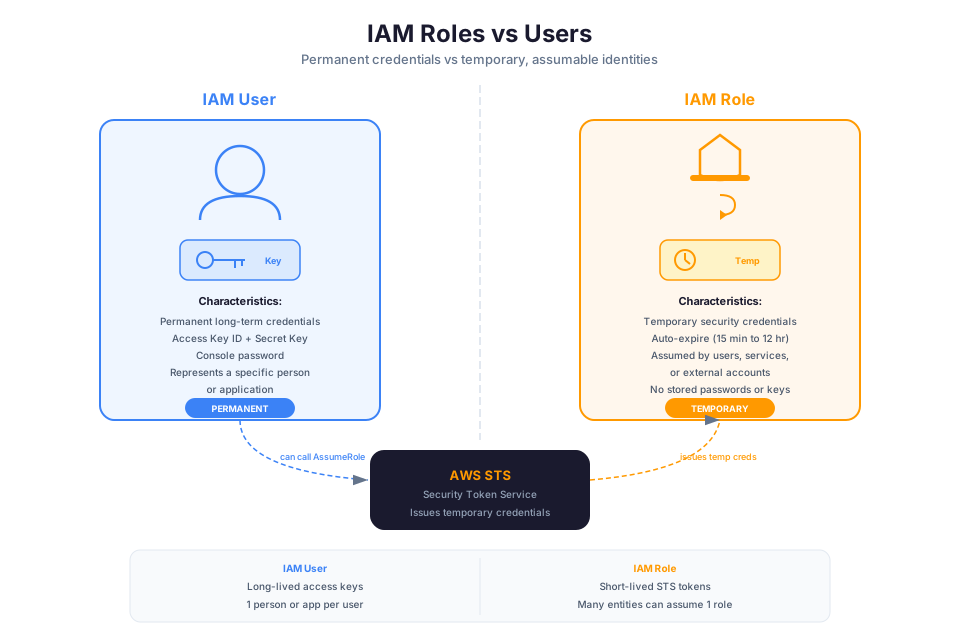
📊 Architecture Diagram: IAM roles as temporary credential providers that services, users, or applications can assume without permanent keys.
The problem with long-lived credentials is straightforward. An IAM User's access key consists of two strings: an Access Key ID and a Secret Access Key. Once generated, these strings are valid until you explicitly revoke them. That creates several failure modes:
- Keys get committed to version control (GitHub's secret scanning catches thousands of AWS keys daily)
- Keys get embedded in container images and shared across teams
- Keys never get rotated because nobody remembers which applications depend on them
- Keys get copied to personal machines and survive employee departures
- Keys grant permanent access with no automatic expiration
The solution is temporary credentials that expire automatically. Instead of a permanent badge, you get a contractor pass that stops working at the end of the day. Even if someone intercepts the credentials, they are useless within hours (or minutes, depending on configuration).
Roles vs. Users:
| Characteristic | IAM User | IAM Role |
|---|---|---|
| Credentials | Permanent access keys (until revoked) | Temporary credentials (expire automatically) |
| Who uses it | A specific person or application | Anyone or anything that the trust policy permits |
| Credential storage | You store them somewhere | AWS delivers them automatically via STS |
| Rotation | Manual (your responsibility) | Automatic (credentials refresh before expiration) |
| Attack window | Unlimited (until discovered and revoked) | Limited to session duration (15 min to 12 hours) |
| Cross-account | Requires sharing keys (terrible idea) | Built-in via trust policy |
The mental model: a User is WHO you are. A Role is WHAT you can temporarily become. An EC2 instance is not a person, so it should not have a User. It assumes a Role for the duration of its work, then the credentials vanish.
Anatomy of an IAM Role
📊 Architecture Diagram: Trust policies defining who is allowed to assume a role and under what conditions.
Every IAM Role has two critical components that must both be configured correctly for the role to function:
1. Trust Policy (Who can assume this role)
The trust policy is a resource-based policy attached to the role that specifies which principals (AWS services, accounts, users, or federated identities) are allowed to call sts:AssumeRole on this role. Without a trust policy that permits assumption, the role is useless.
2. Permission Policy (What the role can do once assumed)
The permission policy is an identity-based policy (the same JSON structure you learned in Module 04) that defines what actions the assumed role can perform. This is attached to the role just like you attached policies to Users and Groups.
How they work together:
┌─────────────────────────────────────────────────┐
│                  IAM Role                         │
│                                                   │
│  Trust Policy          Permission Policy          │
│  ─────────────         ──────────────────         │
│  "Who can              "What can they             │
│   assume me?"           do once they              │
│                         have my credentials?"     │
│                                                   │
│  Principal:            Actions:                   │
│  - EC2 service         - s3:GetObject             │
│  - Account 123456      - s3:PutObject             │
│  - SAML provider       - dynamodb:Query           │
│                                                   │
└─────────────────────────────────────────────────┘
A role without a trust policy cannot be assumed by anything. A role without a permission policy can be assumed but cannot do anything. You need both.
Example: Trust policy allowing EC2 to assume a role
{
    "Version": "2012-10-17",
    "Statement": [
        {
            "Effect": "Allow",
            "Principal": {
                "Service": "ec2.amazonaws.com"
            },
            "Action": "sts:AssumeRole"
        }
    ]
}
This trust policy says: "The EC2 service is permitted to assume this role on behalf of EC2 instances." No other principal (no User, no Lambda function, no external account) can assume this role.
Example: Permission policy granting S3 read access
{
    "Version": "2012-10-17",
    "Statement": [
        {
            "Effect": "Allow",
            "Action": [
                "s3:GetObject",
                "s3:ListBucket"
            ],
            "Resource": [
                "arn:aws:s3:::my-application-bucket",
                "arn:aws:s3:::my-application-bucket/*"
            ]
        }
    ]
}
When an EC2 instance assumes this role, it can read objects from my-application-bucket and nothing else. The permission expires when the session ends.
Session duration controls how long the temporary credentials remain valid. The default is 1 hour, configurable between 15 minutes and 12 hours depending on the assumption method. When credentials approach expiration, the AWS SDK automatically refreshes them by calling STS again.
AWS Security Token Service (STS)
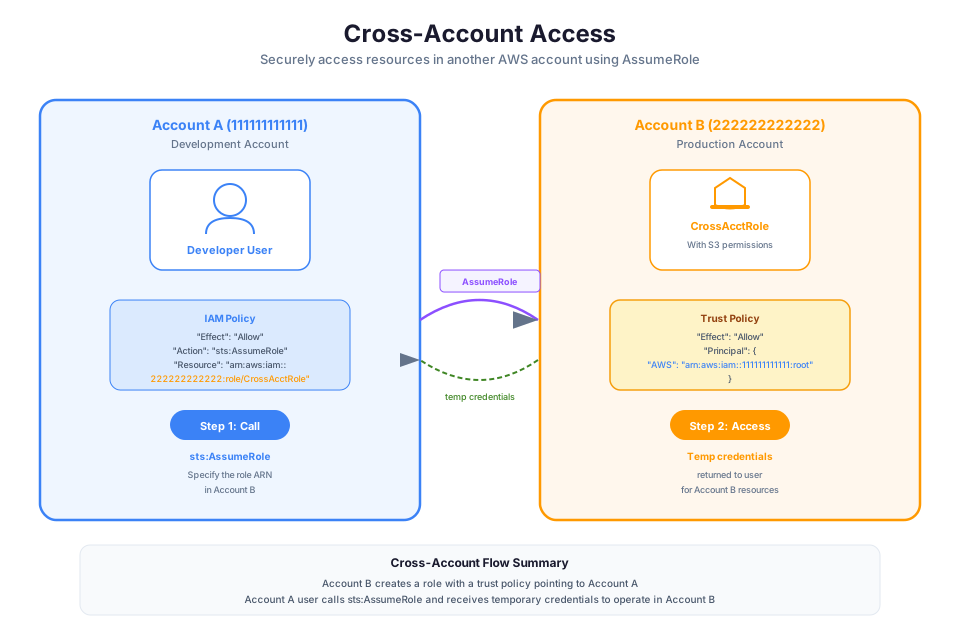
📊 Architecture Diagram: Cross-account access using IAM roles to securely share resources between AWS accounts.
AWS Security Token Service (STS) is the service that issues temporary security credentials. Every time anything assumes a role in AWS, STS is involved behind the scenes.
What STS returns (three components):
| Component | Purpose | Example |
|---|---|---|
| Access Key ID | Identifies the temporary session (starts with ASIA) | ASIAXYZ123ABC456DEF |
| Secret Access Key | Signs API requests (never transmitted after issuance) | wJalrXUtnFEMI/K7MDENG/bPxRfiCYEXAMPLEKEY |
| Session Token | Proves the credentials are temporary (must be included with every request) | FwoGZXIvYXdz... (long string) |
Permanent IAM User access keys start with AKIA. Temporary STS credentials start with ASIA. This distinction helps you identify which type of credential is in use during auditing.
Session duration limits:
| Assumption Method | Minimum | Maximum | Default |
|---|---|---|---|
| AssumeRole (role chaining) | 15 minutes | 1 hour | 1 hour |
| AssumeRole (direct) | 15 minutes | 12 hours | 1 hour |
| AssumeRoleWithSAML | 15 minutes | 12 hours | 1 hour |
| AssumeRoleWithWebIdentity | 15 minutes | 12 hours | 1 hour |
| GetSessionToken (MFA) | 15 minutes | 36 hours | 12 hours |
Key STS API calls:
- AssumeRole: Used by IAM Users, roles, or AWS services to assume a role in the same or different account
- AssumeRoleWithSAML: Used by corporate identity providers (Active Directory) to exchange a SAML assertion for temporary credentials
- AssumeRoleWithWebIdentity: Used by web/mobile applications to exchange a token from an OIDC provider (Google, Facebook) for temporary credentials
- GetSessionToken: Used by IAM Users to get temporary credentials with MFA verification
How temporary credentials flow through the SDK/CLI:
When your application uses the AWS SDK, the credential provider chain automatically detects available credentials. For EC2 instances with an instance profile, the SDK retrieves temporary credentials from the Instance Metadata Service, uses them for API calls, and refreshes them before they expire. Your application code never handles credentials directly.
# These two commands produce different Access Key ID prefixes
aws sts get-caller-identity
# Using permanent credentials: "Arn": "arn:aws:iam::123456789012:user/developer"
# AccessKeyId starts with AKIA

# After assuming a role:
aws sts get-caller-identity
# Using temporary credentials: "Arn": "arn:aws:sts::123456789012:assumed-role/MyRole/session-name"
# AccessKeyId starts with ASIA
Service Roles (EC2 Instance Profiles)
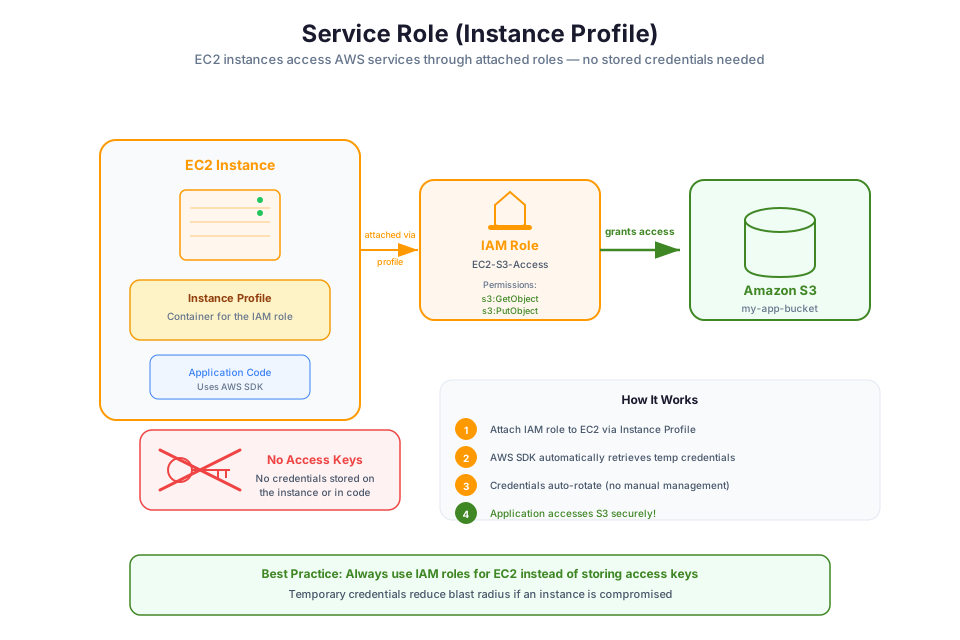
📊 Architecture Diagram: Service-linked roles that AWS services use to perform actions on your behalf with predefined permissions.
A service role lets an AWS service act on your behalf. The most common example is an EC2 instance that needs to read from S3 or write to DynamoDB. Instead of embedding access keys in the application, you attach a role to the instance.
Instance Profiles: the mechanism for EC2
An instance profile is a container that holds an IAM Role and makes it available to an EC2 instance. When you create a role for EC2 in the console, AWS creates the instance profile automatically. When using the CLI or CloudFormation, you create them separately.
How the Instance Metadata Service (IMDS) delivers credentials:
Every EC2 instance has access to the Instance Metadata Service at http://169.254.169.254. When a role is attached, the IMDS endpoint at /latest/meta-data/iam/security-credentials/<role-name> returns the temporary credentials. The AWS SDK queries this endpoint automatically.
# On an EC2 instance, the SDK retrieves credentials from:
curl http://169.254.169.254/latest/meta-data/iam/security-credentials/MyEC2Role
Response contains the Access Key ID, Secret Access Key, Session Token, and Expiration timestamp. The SDK handles all of this transparently.
IMDSv2 (why it matters for security):
IMDSv2 requires a session token obtained via a PUT request before metadata can be accessed. This prevents Server-Side Request Forgery (SSRF) attacks, where an attacker tricks your application into making requests to the metadata endpoint and extracting credentials. The 2019 Capital One breach exploited exactly this vulnerability using IMDSv1.
# IMDSv2 requires a token first (prevents SSRF)
TOKEN=$(curl -X PUT "http://169.254.169.254/latest/api/token" \
    -H "X-aws-ec2-metadata-token-ttl-seconds: 21600")

curl -H "X-aws-ec2-metadata-token: $TOKEN" \
    http://169.254.169.254/latest/meta-data/iam/security-credentials/MyEC2Role
Warning: Always enforce IMDSv2 on your instances. Set
HttpTokenstorequiredin your launch template. IMDSv1 is a known attack vector and should be disabled in production.
Common service roles:
| Service | Role Purpose | Trust Principal |
|---|---|---|
| EC2 | Instance accessing S3, DynamoDB, SQS | ec2.amazonaws.com |
| Lambda | Function accessing DynamoDB, S3, SNS | lambda.amazonaws.com |
| ECS Task | Container accessing AWS services | ecs-tasks.amazonaws.com |
| CodeBuild | Build environment accessing ECR, S3 | codebuild.amazonaws.com |
| CloudFormation | Stack creating/managing resources | cloudformation.amazonaws.com |
Why this is always better than access keys on the instance:
There is no scenario in which storing access keys on an EC2 instance is the correct choice. Service roles provide automatic rotation, no secrets to manage, fine-grained permissions, and CloudTrail logging of every API call made with the role credentials. If someone asks you to put access keys on an instance, the answer is always "use an instance profile instead."
Cross-Account Roles
📊 Architecture Diagram: Federation and identity providers allowing external identities (SAML, OIDC) to assume IAM roles.
Cross-account access allows a principal in one AWS account to assume a role in another account. This is the standard pattern for multi-account architectures.
The pattern:
Account A (Target: 111111111111)          Account B (Source: 222222222222)
┌────────────────────────────┐            ┌────────────────────────────┐
│                            │            │                            │
│  Role: CrossAccountAudit   │◄───────────│  User or Role in           │
│                            │  assumes   │  Account B                 │
│  Trust Policy:             │            │                            │
│  "Allow 222222222222"      │            │  IAM Policy:               │
│                            │            │  "Allow sts:AssumeRole     │
│  Permission Policy:        │            │   on role in Account A"    │
│  "Allow read-only access"  │            │                            │
└────────────────────────────┘            └────────────────────────────┘
Trust policy specifying an external account:
{
    "Version": "2012-10-17",
    "Statement": [
        {
            "Effect": "Allow",
            "Principal": {
                "AWS": "arn:aws:iam::222222222222:root"
            },
            "Action": "sts:AssumeRole",
            "Condition": {
                "StringEquals": {
                    "sts:ExternalId": "unique-external-id-12345"
                }
            }
        }
    ]
}
External ID and the confused deputy problem:
The confused deputy problem occurs when a trusted third party is tricked into acting on behalf of an unauthorized entity. For example, a SaaS vendor has a role in your account. An attacker gives the vendor their own account number, and the vendor assumes the role in YOUR account thinking it is acting on behalf of the attacker.
The External ID prevents this. It is a secret value that only you and the trusted party know. The trust policy requires the caller to present the correct External ID when assuming the role. An attacker who does not know the External ID cannot trick the vendor into accessing your account.
Real-world use cases:
- Shared services account: A logging account that pulls CloudTrail data from all member accounts
- Security audit account: A security team account with read-only roles in every production account
- CI/CD deployment: A build account that assumes a deployment role in production to release new code
- Third-party vendor access: A SaaS product that needs read access to your S3 bucket for integration
Step-by-step cross-account setup:
- In the target account (A): create a role with a trust policy that references the source account (B)
- In the target account (A): attach permission policies defining what the role can do
- In the source account (B): grant the User or Role permission to call
sts:AssumeRoleon the target role ARN - From the source account (B): call
sts:AssumeRolewith the target role ARN and External ID
Identity Federation
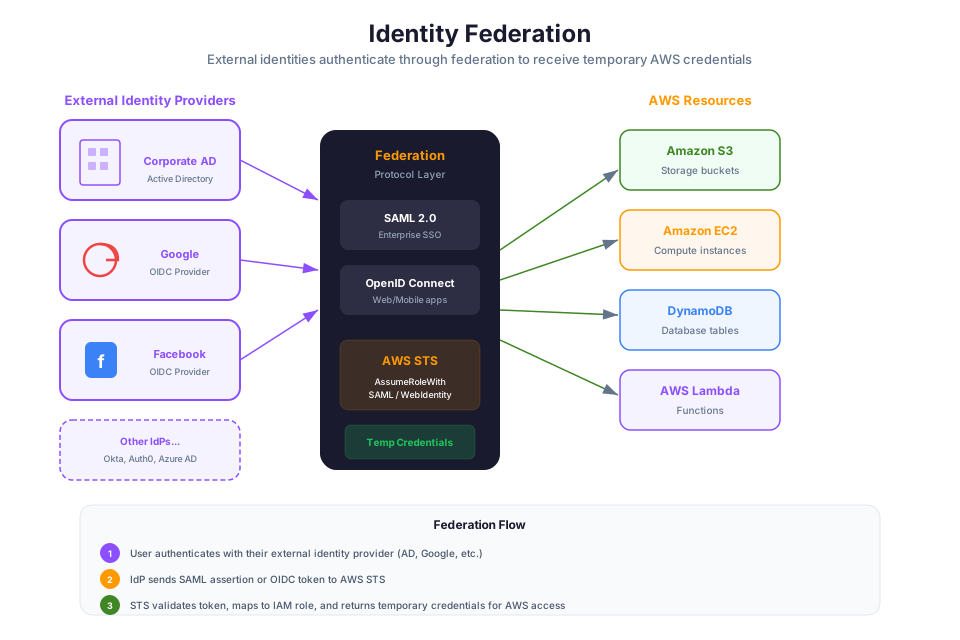
Federation lets users from OUTSIDE AWS authenticate and receive temporary AWS credentials without needing an IAM User in the AWS account. This is essential for organizations that already have an identity provider (Active Directory, Okta, Google Workspace) and do not want to duplicate user accounts in IAM.
SAML 2.0 Federation (Corporate Identity Provider)
SAML 2.0 federation connects your corporate Active Directory (or any SAML-compliant IdP) to AWS. Users authenticate against Active Directory, receive a SAML assertion, and exchange it for temporary AWS credentials via sts:AssumeRoleWithSAML.
Flow: User → Corporate IdP (AD FS, Okta, Azure AD) → SAML assertion → AWS STS → Temporary credentials → AWS Console or CLI
Web Identity Federation (Public Identity Providers)
Web Identity Federation allows users who authenticate with public providers (Google, Facebook, Amazon, Apple) to receive temporary AWS credentials. This is primarily used in mobile and web applications where users sign in with their social accounts and need access to AWS resources (like uploading photos to S3).
AWS strongly recommends using Amazon Cognito as an intermediary rather than calling STS directly, because Cognito handles token refresh, unauthenticated access, and multiple providers through a unified interface.
Custom Identity Broker
For legacy systems that do not support SAML or OIDC, you can build a custom identity broker that authenticates users against your proprietary system and then calls sts:GetFederationToken or sts:AssumeRole to obtain temporary credentials. This is the most flexible but most work-intensive approach.
When to use which:
| Federation Method | Source Identity | Use Case |
|---|---|---|
| SAML 2.0 | Corporate AD, Okta, Azure AD | Enterprise employees accessing AWS Console/CLI |
| Web Identity (Cognito) | Google, Facebook, Amazon, Apple | Mobile/web app users accessing AWS resources |
| Custom Identity Broker | Proprietary/legacy systems | Organizations with non-standard identity systems |
| IAM Identity Center | Corporate directory + AWS Organizations | Multi-account enterprise access (preferred) |
IAM Identity Center (formerly AWS SSO)
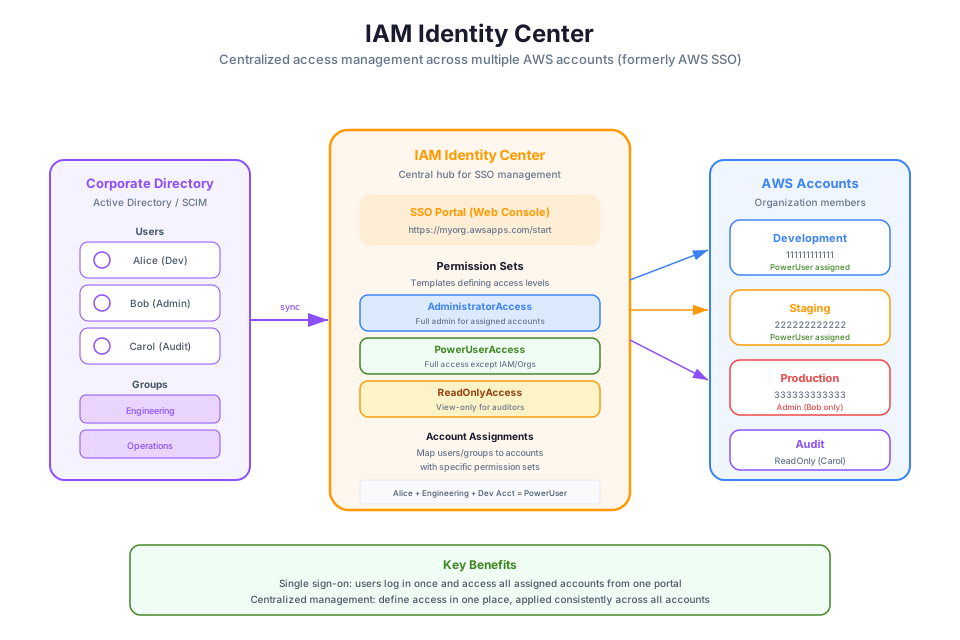
IAM Identity Center is the modern, recommended way to manage human access to multiple AWS accounts. It replaced the older pattern of creating IAM Users in every account or setting up complex SAML federation per account.
What it solves:
Without Identity Center, an organization with 50 AWS accounts would need to either create IAM Users in each account (nightmare to manage) or configure SAML federation individually for each account (complex and brittle). Identity Center provides a single configuration point for all accounts.
How it works:
- Identity Center connects to your identity source (Active Directory, Okta, or its own built-in directory)
- You create Permission Sets that define access levels (e.g., "AdministratorAccess", "ReadOnlyAccess", "DeveloperAccess")
- You assign users/groups from your directory to specific accounts with specific Permission Sets
- Users log in to a single portal and see all accounts and roles available to them
- Behind the scenes, Identity Center creates IAM Roles in each account and handles the SAML federation automatically
Permission Sets:
A Permission Set is a collection of IAM policies that defines a level of access. When assigned to a user for a specific account, Identity Center creates a corresponding IAM Role in that account. Permission Sets can use AWS managed policies, customer managed policies, or inline policies.
Identity Source (AD/Okta)
    │
    ▼
IAM Identity Center
    │
    ├── Permission Set: "AdminAccess" ──► Account A: creates admin role
    ├── Permission Set: "AdminAccess" ──► Account B: creates admin role
    ├── Permission Set: "ReadOnly"    ──► Account C: creates readonly role
    └── Permission Set: "DevAccess"   ──► Account D: creates dev role
Integration with AWS Organizations:
Identity Center requires AWS Organizations and operates at the organization level. It can manage access to all member accounts from a single location in the management account (or a delegated administrator account).
The modern recommendation:
| Access Type | Solution |
|---|---|
| Humans accessing AWS Console/CLI | IAM Identity Center |
| Applications on EC2/ECS/Lambda | Service Roles (instance profiles, task roles, execution roles) |
| Cross-account service access | Cross-Account Roles |
| External vendors needing access | Identity Center (preferred) or Cross-Account Role with External ID |
Tip: If you are building a new AWS environment today, set up IAM Identity Center from day one. The effort to configure it initially is far less than the effort to migrate dozens of IAM Users and access keys later.
Choosing the Right Identity Pattern
Use this decision framework when determining how to grant access:
| Scenario | Correct Pattern | Why |
|---|---|---|
| Human accessing AWS Console | IAM Identity Center | Centralized, federated, multi-account |
| Application running on EC2 | Instance Profile (service role) | Automatic credential delivery via IMDS |
| Application running on ECS | ECS Task Role | Container-level credential isolation |
| Lambda function | Execution Role | Automatic per-invocation credentials |
| Another AWS account needs access | Cross-Account Role | Trust policy + External ID |
| External contractor (human) | IAM Identity Center or SAML federation | No IAM User creation needed |
| Mobile app user uploading to S3 | Cognito + Web Identity Federation | Scoped temporary credentials per user |
| CI/CD pipeline deploying | Cross-Account Role from build account | Temporary credentials, scoped to deployment |
| Application running outside AWS | Federation or cross-account role | No long-lived AWS credentials stored externally |
The golden rule: If you are creating an IAM User in 2025, you should stop and ask yourself whether a role or Identity Center would be more appropriate. The answer is almost always yes. The only remaining valid use cases for IAM Users are:
- The root account (which is technically not an IAM User but requires long-lived credentials)
- Break-glass emergency access (a single User with MFA, used only when Identity Center is unavailable)
- Programmatic access from on-premises systems that truly cannot support federation (increasingly rare)
Check your understanding: Your company has 30 AWS accounts managed by AWS Organizations. Developers currently have IAM Users in each account they need to access. The security team wants to eliminate all access keys and centralize access management. What solution would you recommend, and what are the steps to implement it?
Instructor Notes
Estimated lecture time: 90 minutes
Common student questions:
-
Q: If roles are better, why do IAM Users still exist? A: IAM Users predate roles and remain for backward compatibility. They are still valid for human access in single-account environments without an identity provider, and for break-glass emergency access. But for any greenfield deployment or multi-account environment, Identity Center and roles are the correct choices. See the IAM best practices documentation for current AWS recommendations.
-
Q: What happens if temporary credentials expire while my application is running? A: The AWS SDKs automatically refresh credentials before they expire. The SDK detects that credentials are approaching expiration and makes a new call to STS (or the IMDS for EC2 instances) to obtain fresh credentials. Your application code does not need to handle this. If the refresh fails (for example, the role was deleted), the next API call returns an
ExpiredTokenException. See the credential provider chain documentation for details. -
Q: Can a role assume another role (role chaining)? A: Yes. A principal can assume Role A, and then use those temporary credentials to assume Role B. However, role chaining limits the session duration to a maximum of 1 hour regardless of the role's configured maximum. This is a common pattern in cross-account access where an intermediary role is involved.
-
Q: What is the difference between Identity Center and SAML federation? A: Identity Center uses SAML federation under the hood but abstracts away the complexity. With raw SAML federation, you configure trust between each AWS account and your IdP individually. Identity Center does this once and manages all accounts centrally. For new deployments, always prefer Identity Center. See the IAM Identity Center documentation for architecture details.
Teaching tips:
- Start by showing students a real leaked AWS key incident (the news is full of them). This motivates why roles exist before you explain the mechanism.
- Draw the trust policy and permission policy side by side. Students often conflate them. Emphasize that the trust policy answers WHO and the permission policy answers WHAT. Neither works without the other.
- When covering instance profiles, SSH into an EC2 instance and run
curlagainst the IMDS endpoint to show credentials being delivered in real time. Then show howaws sts get-caller-identityreturns the assumed-role ARN. This makes the invisible mechanism visible. - For cross-account roles, use a two-account demo if possible. Have students assume a role from one account into another and observe the caller identity change.
- When explaining Identity Center, show the SSO portal and how a single login gives access to multiple accounts with different permission levels.
Pause points:
- After "Why Roles Exist": ask students to name three risks of storing access keys on an EC2 instance. (Answers: key leakage if instance is compromised, no automatic rotation, keys survive instance termination and may be in backups/snapshots)
- After "Anatomy of a Role": show a trust policy and permission policy and ask students to identify who can assume the role and what they can do.
- After "Cross-Account Roles": present a scenario where a security team needs read-only access to CloudTrail logs in 10 production accounts. Ask students to design the role architecture.
- After "Identity Center": ask why creating an IAM User per developer per account is problematic at scale. (Answers: credential sprawl, no centralized offboarding, inconsistent permissions, no MFA enforcement across accounts)
Key Takeaways
- IAM Roles provide temporary credentials through STS, eliminating the security risks of long-lived access keys. Every role requires both a trust policy (who can assume) and a permission policy (what they can do).
- Service roles (instance profiles for EC2, task roles for ECS, execution roles for Lambda) are the correct way to grant AWS services access to other resources. Never store access keys on compute resources.
- Cross-account roles enable secure multi-account architectures by allowing principals in one account to assume roles in another, with External IDs preventing the confused deputy problem.
- Identity federation (SAML 2.0, Web Identity, custom brokers) lets external users obtain temporary AWS credentials without IAM Users, connecting corporate directories and public identity providers to AWS.
- IAM Identity Center is the recommended solution for managing human access across multiple AWS accounts, using Permission Sets assigned through AWS Organizations.
AWS Bootcamp: From Novice to Architect Author: Samuel Ogunti License: CC BY-NC 4.0