
Learning Objectives
By the end of this module, you will be able to:
- Identify the four main hardware components of a computer (CPU, RAM, storage, network interface) and describe their roles
- Define the purpose of an operating system and distinguish between Windows, macOS, and Linux
Prerequisites
- A computer with internet access
- A terminal application (Terminal on macOS, Git Bash on Windows, terminal on Linux)
- No prior IT Fundamentals modules required
Estimated self-study time:
| Activity | Estimated Time |
|---|---|
| Reading | 10 to 15 minutes |
| Lab | 5 to 8 minutes |
| Quiz | 3 to 5 minutes |
| Total | 18 to 28 minutes |
Concepts
How Computers Work
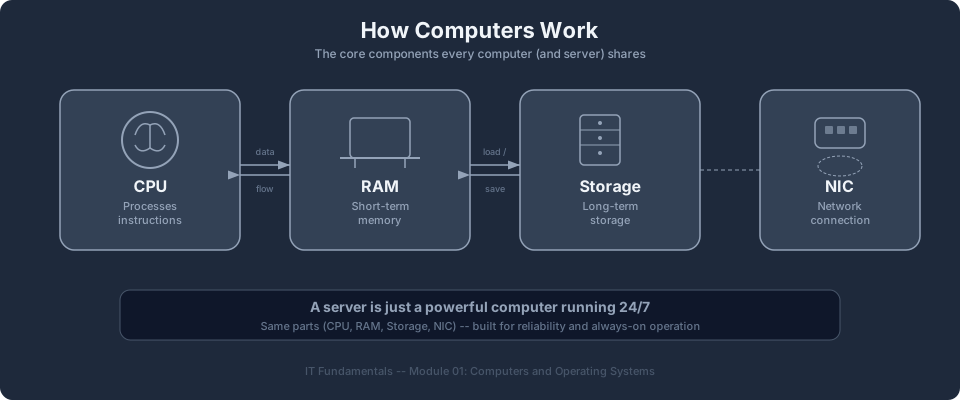
A computer is a machine that processes instructions. Every computer, from a laptop to a cloud server, has the same fundamental components working together.
Hardware Components
| Component | Purpose | Analogy |
|---|---|---|
| CPU (Central Processing Unit) | Executes instructions and performs calculations | The brain of the computer |
| RAM (Random Access Memory) | Stores data temporarily while programs are running | A desk where you spread out papers you are working on |
| Storage (SSD or HDD) | Stores data permanently, even when the computer is off | A filing cabinet for long-term storage |
| Network Interface | Connects the computer to other computers via a network | A mailbox for sending and receiving messages |
When you run a program, the operating system loads it from storage into RAM, and the CPU executes the instructions. When the program finishes (or you close it), the RAM is freed for other programs.
Real-world example: When you open Chrome with 20 tabs, each tab uses RAM. When you run out of RAM, your computer slows down because the OS starts swapping data to the much slower storage disk. This is the exact same concept when you choose a cloud server size. More RAM means more programs can run simultaneously without slowdowns.
Check your understanding: A cloud server (EC2 instance) needs to run a database that stores 50 GB of data and processes thousands of queries per second. Which two hardware components matter most for this workload? (Answer: Storage for the 50 GB of data, and RAM for fast query processing.)
Bits, Bytes, and Data Sizes
Computers store all data as binary digits (bits), which are either 0 or 1.
| Unit | Size | Example |
|---|---|---|
| Bit | 1 or 0 | A single on/off switch |
| Byte | 8 bits | A single character (the letter "A") |
| Kilobyte (KB) | 1,024 bytes | A short text file |
| Megabyte (MB) | 1,024 KB | A high-resolution photo |
| Gigabyte (GB) | 1,024 MB | A feature-length movie |
| Terabyte (TB) | 1,024 GB | A large database or video library |
Understanding data sizes matters in cloud computing because you pay for storage, data transfer, and memory allocation based on these units.
Bootcamp connection: Understanding CPU, RAM, and storage prepares you for selecting EC2 instance types in Module 04: Compute (EC2). In Module 15: Cost Optimization, you will learn that you pay for compute, storage, and memory, so knowing these components helps you make cost-effective decisions.
Operating Systems
An operating system (OS) sits between the hardware and the programs you run. It handles the behind-the-scenes work of allocating CPU time, managing memory, organizing files, and coordinating network connections so that your applications can focus on their job.
What the OS Does
- Manages CPU time, allocating processing power to running programs
- Manages memory, deciding which programs get how much RAM
- Manages storage, organizing files into directories and controlling read/write access
- Manages networking, handling connections to other computers
- Provides a user interface (graphical or command line) for interacting with the computer
Common Operating Systems
| OS | Used For | Cloud Relevance |
|---|---|---|
| Windows | Desktops, enterprise servers | Windows Server runs on cloud instances (EC2) |
| macOS | Apple desktops and laptops | Common developer workstation; not used as a server OS in the cloud |
| Linux | Servers, cloud instances, containers | The dominant OS in cloud computing; most cloud servers run Linux |
Linux is the most important OS to understand for cloud computing. The majority of cloud servers, containers, and serverless environments run on Linux. You do not need to be a Linux expert, but you need to be comfortable with the Linux command line.
The File System
Every OS organizes data into a hierarchical file system of directories (folders) and files.
Linux/macOS file system:
/                    (root directory)
├── home/            (user home directories)
│   └── student/     (your home directory)
│       ├── documents/
│       └── projects/
├── etc/             (system configuration files)
├── var/             (variable data: logs, databases)
└── tmp/             (temporary files)
Windows file system:
C:\                  (root of the C drive)
├── Users\           (user home directories)
│   └── student\     (your home directory)
│       ├── Documents\
│       └── Projects\
├── Program Files\   (installed applications)
└── Windows\         (operating system files)
Key differences: Linux uses forward slashes (/) and is case-sensitive (File.txt and file.txt are different files). Windows uses backslashes (\) and is case-insensitive.
Bootcamp connection: Understanding operating systems prepares you for choosing Amazon Machine Images (AMIs) in Module 04: Compute (EC2). In Module 10: Containers (ECS), you will learn that containers run on Linux, so familiarity with Linux concepts is essential.
Instructor Notes
Estimated lecture time: 15 to 20 minutes
Common student questions:
-
Q: Do I need to learn Linux before the bootcamp? A: You do not need to be a Linux expert. You need to be comfortable with basic command-line navigation (cd, ls, mkdir, cat) and running commands. AWS CloudShell provides a Linux terminal in the browser, so you do not need to install Linux on your computer.
-
Q: Why do hardware specs matter for cloud computing? A: When you provision cloud resources, you choose instance types based on CPU, RAM, and storage. Understanding these components helps you select the right instance type for your workload and avoid overpaying for resources you do not need.
Teaching tips:
- Start with the "How Computers Work" section to level-set the class. Some students may find it too basic, but it ensures everyone shares the same vocabulary (CPU, RAM, storage, network).
- For the OS section, ask students which operating system they are currently using. Most will say Windows or macOS. Use this as a bridge to explain why Linux dominates cloud computing.
Pause point:
- After the OS section, ask students: "Why does Linux dominate cloud computing?" Expected answers include: open source (no licensing fees at scale), lightweight (runs without a graphical interface), highly customizable, and stable for long-running server workloads.
Key Takeaways
- Computers process instructions using CPU, RAM, and storage. Cloud servers use the same hardware components, managed by a cloud provider.
- An operating system manages hardware resources and provides services for applications. Linux is the dominant OS in cloud computing, so familiarity with it is essential.
Next: Module 02, The Command Line | IT Fundamentals Overview
AWS Bootcamp: From Novice to Architect Author: Samuel Ogunti © 2026 Algorithmic Muse Technology LLC. All rights reserved.