
Learning Objectives
By the end of this module, you will be able to:
- Explain how the TCP/IP model organizes network communication into four layers
- Identify common networking concepts including IP addresses, DNS, ports, and protocols
- Describe how HTTP requests and responses work between a browser and a web server
Prerequisites
- A computer with internet access
- A terminal application (Terminal on macOS, Git Bash on Windows, terminal on Linux)
- Module 02 recommended for terminal skills (
curlis used in the lab)
Estimated self-study time:
| Activity | Estimated Time |
|---|---|
| Reading | 15 to 20 minutes |
| Lab | 10 to 12 minutes |
| Quiz | 3 to 5 minutes |
| Total | 28 to 37 minutes |
Concepts
Networking Fundamentals
Networking is how computers communicate with each other. Every cloud service, every website, and every API call depends on networking. Understanding the basics here will make the VPC, security group, and load balancer concepts in the bootcamp much easier to grasp.
The TCP/IP Model
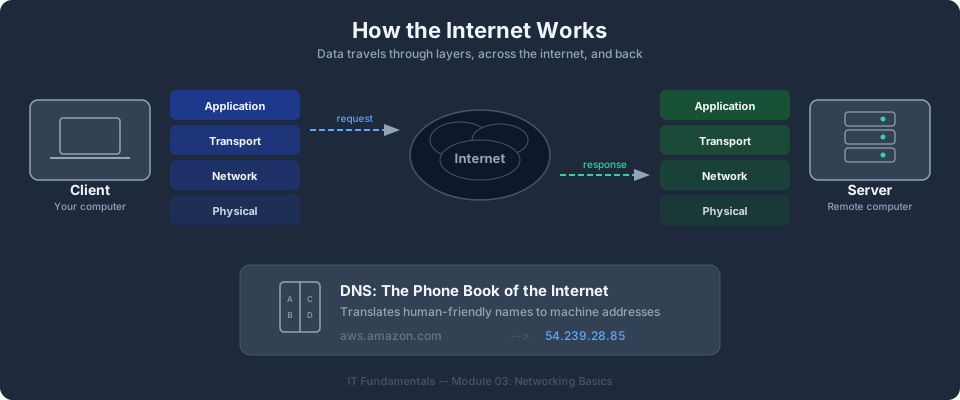
The TCP/IP model organizes network communication into four layers. Each layer has a specific job, and data passes through all four layers when traveling between computers.
| Layer | Name | Purpose | Example Protocols |
|---|---|---|---|
| 4 | Application | Provides network services to applications | HTTP, HTTPS, DNS, SSH, FTP |
| 3 | Transport | Ensures reliable (or fast) delivery of data | TCP (reliable), UDP (fast) |
| 2 | Internet | Routes data between networks using IP addresses | IP, ICMP |
| 1 | Network Access | Handles physical transmission of data | Ethernet, Wi-Fi |
When you type a URL in your browser, the request travels down through all four layers on your computer, across the network, and back up through all four layers on the server.
IP Addresses
An IP address is a unique numerical label assigned to every device on a network. It is how computers find each other.
IPv4 addresses are written as four numbers separated by dots, each ranging from 0 to 255:
192.168.1.100
10.0.0.1
172.16.0.50
Private IP addresses are used within local networks and are not routable on the public internet:
| Range | Class | Common Use |
|---|---|---|
| 10.0.0.0 to 10.255.255.255 | Class A | Large networks, cloud VPCs |
| 172.16.0.0 to 172.31.255.255 | Class B | Medium networks |
| 192.168.0.0 to 192.168.255.255 | Class C | Home and small office networks |
Public IP addresses are assigned by internet service providers and are routable on the public internet. When you access a website, your request goes from your private IP, through your router's public IP, across the internet to the server's public IP.
Tip: In the AWS bootcamp, you will create Virtual Private Clouds (VPCs) using these private IP ranges. Understanding CIDR notation (like
10.0.0.0/16) comes in Module 03, but knowing that10.x.x.xis a private range is the foundation.
DNS (Domain Name System)
DNS translates human-readable domain names (like www.example.com) into IP addresses (like 93.184.216.34). Without DNS, you would need to memorize IP addresses for every website.
The DNS resolution process:
- You type
www.example.comin your browser - Your computer asks a DNS resolver: "What is the IP address for www.example.com?"
- The resolver queries DNS servers (root, TLD, authoritative) to find the answer
- The resolver returns the IP address
93.184.216.34to your computer - Your browser connects to that IP address
Ports
A port is a number (0 to 65535) that identifies a specific service running on a computer. Think of the IP address as a building's street address and the port as the apartment number.
| Port | Protocol | Service |
|---|---|---|
| 22 | TCP | SSH (secure remote access) |
| 80 | TCP | HTTP (web traffic, unencrypted) |
| 443 | TCP | HTTPS (web traffic, encrypted) |
| 3306 | TCP | MySQL database |
| 5432 | TCP | PostgreSQL database |
| 3389 | TCP | RDP (Windows remote desktop) |
When you configure security groups in AWS (Module 03), you will specify which ports to open and which to block. Understanding ports now makes that configuration intuitive.
TCP vs. UDP
| Feature | TCP (Transmission Control Protocol) | UDP (User Datagram Protocol) |
|---|---|---|
| Reliability | Guaranteed delivery; retransmits lost packets | No guarantee; packets may be lost |
| Speed | Slower (overhead for reliability) | Faster (no overhead) |
| Use cases | Web browsing, email, file transfer, APIs | Video streaming, gaming, DNS lookups |
| Connection | Connection-oriented (handshake first) | Connectionless (send and forget) |
Most cloud services use TCP because reliability matters more than speed for API calls, database queries, and web requests.
Bootcamp connection: Understanding networking fundamentals prepares you for configuring Virtual Private Clouds (VPCs), subnets, and security groups in Module 03: Networking Basics.
How the Internet Works
When you type a URL into your browser and press Enter, a series of steps happens in milliseconds.
HTTP Request/Response Cycle
- DNS lookup. The browser resolves the domain name to an IP address.
- TCP connection. The browser establishes a TCP connection to the server (three-way handshake).
- HTTP request. The browser sends an HTTP request to the server:
GET /index.html HTTP/1.1 Host: www.example.com - Server processing. The server receives the request, processes it, and prepares a response.
- HTTP response. The server sends back an HTTP response:
HTTP/1.1 200 OK Content-Type: text/html <html>...</html> - Rendering. The browser renders the HTML into the page you see.
HTTP Methods
HTTP defines several methods (also called verbs) that indicate the desired action:
| Method | Purpose | Example |
|---|---|---|
| GET | Retrieve data | Load a web page, fetch a list of users |
| POST | Create new data | Submit a form, create a new user |
| PUT | Replace existing data | Update an entire user record |
| PATCH | Partially update data | Change just the user's email address |
| DELETE | Remove data | Delete a user account |
HTTP Status Codes
The server's response includes a status code that tells the client what happened:
| Code Range | Category | Common Codes |
|---|---|---|
| 200-299 | Success | 200 OK, 201 Created, 204 No Content |
| 300-399 | Redirect | 301 Moved Permanently, 302 Found |
| 400-499 | Client error | 400 Bad Request, 401 Unauthorized, 403 Forbidden, 404 Not Found |
| 500-599 | Server error | 500 Internal Server Error, 502 Bad Gateway, 503 Service Unavailable |
Tip: When troubleshooting cloud applications, HTTP status codes are your first clue. A 403 means a permissions problem. A 502 means the server behind a load balancer is not responding. A 504 means a timeout.
HTTPS and TLS
HTTPS is HTTP with encryption. When you see the padlock icon in your browser, the connection uses TLS (Transport Layer Security) to encrypt all data between your browser and the server. This prevents anyone on the network from reading or modifying the traffic.
In cloud computing, you will configure TLS certificates on load balancers and API endpoints to serve traffic over HTTPS.
Bootcamp connection: Understanding HTTP and DNS prepares you for configuring Application Load Balancers (ALBs) and Route 53 in Module 07: Load Balancing and DNS. In Module 09: Serverless (Lambda), you will build APIs that handle HTTP requests through API Gateway.
Instructor Notes
Estimated lecture time: 20 to 25 minutes
Common student questions:
-
Q: How much networking do I need to know? A: You need to understand IP addresses, ports, DNS, and the difference between TCP and UDP. Module 03 of the bootcamp covers VPCs and subnets in detail, building on the networking basics covered here.
-
Q: What is the difference between HTTP and HTTPS? A: HTTPS is HTTP with TLS encryption. All data between the browser and server is encrypted, preventing eavesdropping. In the bootcamp, you will configure TLS certificates on load balancers to serve traffic over HTTPS. Port 80 is HTTP (unencrypted) and port 443 is HTTPS (encrypted).
Teaching tips:
- Draw the TCP/IP layers on the whiteboard and trace a web request through all four layers. This visual makes the abstract model concrete.
- When troubleshooting, HTTP status codes are your first clue. Walk through a few examples: 403 means permissions, 404 means not found, 502 means the backend is down.
Pause point:
- After the networking section, ask students which port SSH uses (22).
Key Takeaways
- Networking is how computers communicate. IP addresses identify devices, ports identify services, and DNS translates names to addresses.
- HTTP is the protocol that powers the web and cloud APIs. Understanding request methods (GET, POST, PUT, DELETE) and status codes (200, 403, 404, 500) is fundamental.
Previous: Module 02, The Command Line | Next: Module 04, APIs and Programming Basics | IT Fundamentals Overview
AWS Bootcamp: From Novice to Architect Author: Samuel Ogunti © 2026 Algorithmic Muse Technology LLC. All rights reserved.