
Learning Objectives
By the end of this module, you will be able to:
- Explain the anatomy of a command (command, flags, arguments) and what the shell prompt tells you
- Use the command line to navigate the file system, create files, and run basic commands
- Use pipes and redirection to combine commands and save output
- Use built-in help tools (
man,--help) to learn about unfamiliar commands
Prerequisites
- A computer with internet access
- A terminal application (Terminal on macOS, Git Bash on Windows, terminal on Linux)
- Module 01 recommended but not required
Tip: On Windows, use Git Bash or Windows Subsystem for Linux (WSL) for command consistency with macOS and Linux. The commands in this module and the bootcamp labs assume a Unix-style terminal.
Estimated self-study time:
| Activity | Estimated Time |
|---|---|
| Reading | 20 to 25 minutes |
| Lab | 10 to 12 minutes |
| Quiz | 3 to 5 minutes |
| Total | 33 to 42 minutes |
Concepts
The Command Line
The command line (also called the terminal or shell) lets you interact with the computer by typing text commands instead of clicking icons. Cloud computing relies heavily on the command line because most cloud servers do not have a graphical interface.
Why the Command Line Matters
- Cloud servers typically run "headless" (no graphical interface), so you manage them through the command line
- The AWS CLI (Command Line Interface) is a command-line tool for managing AWS resources
- Automation scripts and infrastructure-as-code tools use command-line commands
- The command line is faster than a graphical interface for many tasks once you learn the basics
Command Anatomy
Before getting into specific commands, let's understand the structure of every command you will type. Every command follows the same basic pattern:
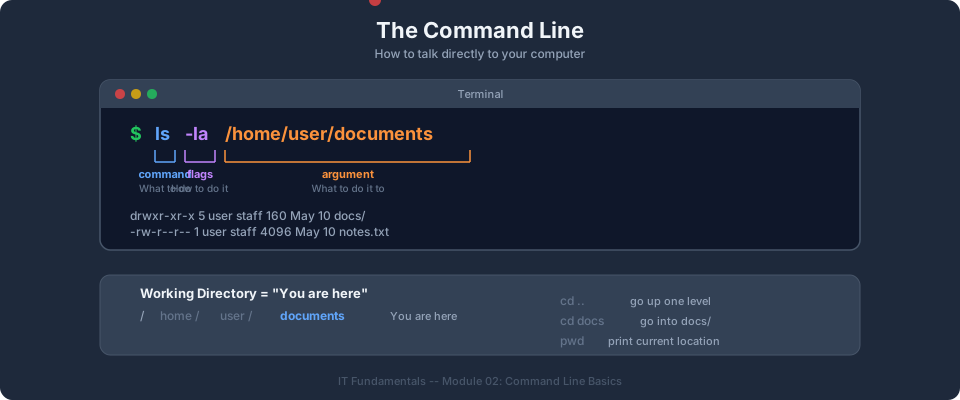
command -flags arguments
Here is a real example, broken down:
ls  -la  /home/student/projects
│    │    │
│    │    └── Argument: what to act on (a directory path)
│    └── Flags: modify the behavior (-l = long format, -a = show hidden files)
└── Command: the program to run (ls = list files)
- Command is the program you want to run. Examples:
ls,cd,mkdir,cat. - Flags (also called options) modify how the command behaves. They usually start with a dash (
-). A single dash followed by letters (-la) is shorthand for multiple flags (-land-a). Double-dash flags use full words (--all). - Arguments tell the command what to act on. This is usually a file name, directory path, or search term.
Not every command needs flags or arguments. For example, pwd works on its own because it prints your current directory.
Understanding the Shell Prompt
When you open a terminal, you see something like this:
student@laptop:~/projects$
This is your shell prompt, and each piece tells you something:
| Part | Meaning |
|---|---|
student | Your username (who is logged in) |
@laptop | The hostname (which machine you are on) |
~/projects | Your current directory (~ is shorthand for your home directory) |
$ | You are a regular user (# means you are the root/admin user) |
The prompt tells you where you are before every command. This becomes especially important when you connect to remote cloud servers, because the prompt tells you which machine you are working on.
Check your understanding: Look at this prompt:
admin@web-server:/var/log$. What is the username? What machine are you on? What directory are you in? Are you a regular user or root?Answer: Username is "admin", the machine is "web-server", you are in the /var/log directory, and you are a regular user ($ prompt, not #).
Absolute vs. Relative Paths
When you tell a command where to find a file, you give it a path. There are two types of paths, and understanding the difference prevents a lot of confusion.
Absolute paths start from the root of the file system (/). They describe the full location of a file, no matter where you currently are.
/home/student/projects/index.html
/etc/nginx/nginx.conf
/var/log/syslog
Absolute paths always start with /. They work the same way regardless of your current directory, just like a full street address works no matter where you are standing.
Relative paths start from your current directory. They describe where a file is relative to where you are right now.
./index.html          # A file in the current directory (./ means "right here")
../documents/notes.txt # Go up one directory (..), then into "documents"
projects/app.js        # Go into the "projects" folder from here
Here is a practical comparison. Suppose you are currently in /home/student/:
| What you want | Absolute path | Relative path |
|---|---|---|
| A file in your current directory | /home/student/file.txt | ./file.txt or file.txt |
| A file in a subdirectory | /home/student/projects/app.js | projects/app.js |
| A file in the parent directory | /home/file.txt | ../file.txt |
When to use which:
- Use absolute paths in scripts and configuration files (they always work, no matter where the script runs)
- Use relative paths for quick, everyday navigation in the terminal (less typing)
Check your understanding: You are in
/home/student/projects. What is the relative path to/home/student/documents/notes.txt?Answer:
../documents/notes.txt(go up one level with.., then intodocuments).
Essential Commands
These commands work on Linux, macOS, and Windows (using Git Bash or WSL).
Tip: On Windows, use Git Bash or Windows Subsystem for Linux (WSL) so that the commands below work the same way as on macOS and Linux. PowerShell and Command Prompt use different syntax for many operations.
Navigation:
pwd                    # Print working directory (where am I?)
ls                     # List files in the current directory
ls -la                 # List all files including hidden ones, with details
cd documents           # Change directory to "documents"
cd ..                  # Go up one directory
cd ~                   # Go to your home directory
File operations:
mkdir my-project       # Create a new directory
touch index.html       # Create an empty file
cp file.txt backup.txt # Copy a file
mv old.txt new.txt     # Rename (move) a file
rm file.txt            # Delete a file (no undo)
rm -r my-folder        # Delete a directory and its contents
cat file.txt           # Display file contents
Searching and filtering:
grep "error" log.txt   # Search for "error" in a file
find . -name "*.txt"   # Find all .txt files in the current directory tree
Tip: Use the up arrow key to recall previous commands. Use Tab to auto-complete file and directory names. These two shortcuts will save you significant typing.
Pipes and Redirection
So far, each command has done one job on its own. But the real power of the command line comes from combining commands together. This is done with pipes and redirection.
Pipes (|)
A pipe takes the output of one command and sends it as input to another command. Think of it like an assembly line: one worker finishes a task and passes the result to the next worker.
command1 | command2
The | character (called "pipe") connects the two commands.
Redirection (> and >>)
Redirection sends the output of a command to a file instead of displaying it on the screen.
>writes output to a file (creates the file if it does not exist, overwrites it if it does)>>appends output to the end of a file (creates the file if it does not exist, adds to it if it does)
Practical Examples
Example 1: Search through command output
You want to look at running processes but only care about ones related to "node":
ps aux | grep "node"
ps aux lists all running processes. The pipe sends that list to grep, which filters it to show only lines containing "node".
Example 2: Save command output to a file
You want to save a list of all files in your project to a text file:
ls -la > file-list.txt
Instead of printing to the screen, the output is written to file-list.txt. If the file already exists, it is overwritten.
Example 3: Append to a log file
You want to add a timestamp to a log file every time you run a command, without erasing previous entries:
date >> activity-log.txt
Each time you run this, the current date and time are added to the end of activity-log.txt.
Example 4: Chain multiple pipes
You want to find all .conf files and count how many there are:
find /etc -name "*.conf" 2>/dev/null | wc -l
find locates all .conf files, 2>/dev/null hides error messages (for directories you cannot access), and wc -l counts the number of lines (which equals the number of files found).
Bootcamp connection: The AWS CLI uses the same command structure. For example,
aws s3 lsfollows the pattern ofcommand subcommand action. Pipes and redirection are used constantly with AWS commands. For instance,aws ec2 describe-instances | grep "InstanceId"lists all your EC2 instances and filters for just the instance IDs. Understanding command anatomy, pipes, and redirection now will make the AWS CLI feel natural.
Check your understanding: What does this command do?
cat access.log | grep "404" | wc -lAnswer: It reads the file
access.log, filters for lines containing "404" (which typically means "page not found" errors), and then counts how many of those lines there are. In other words, it counts the number of 404 errors in the log file.
Getting Help
You do not need to memorize every command and every flag. The command line has built-in help tools that you can use anytime.
The man Command (Manual Pages)
man opens the manual page for any command. It gives you a detailed explanation of what the command does, all of its flags, and examples.
man ls         # Open the manual for the ls command
man grep       # Open the manual for grep
Navigating a man page:
- Press Space to scroll down one page
- Press b to scroll up one page
- Press q to quit and return to the terminal
- Press / followed by a search term to search within the page
The --help Flag
Most commands support a --help flag that prints a shorter, quicker summary than the full man page.
ls --help      # Show a brief summary of ls options
grep --help    # Show a brief summary of grep options
This is often faster than man when you need a quick reminder of what flags are available.
Tip: When you encounter an unfamiliar command in a tutorial or lab, try running
command --helpfirst for a quick overview, orman commandfor the full details. Building the habit of checking help pages is more valuable than memorizing commands.
Common Mistakes (and How to Avoid Them)
Everyone makes these mistakes when learning the command line. Knowing about them in advance will save you frustration.
Spaces in filenames
If a file or folder name contains spaces, the shell interprets each word as a separate argument.
# This FAILS - the shell thinks you mean two files: "my" and "project"
cd my project

# These WORK - quotes or a backslash tell the shell to treat spaces as part of the name
cd "my project"
cd my\ project
Best practice: Avoid spaces in file and folder names. Use dashes (my-project) or underscores (my_project) instead.
Forgetting quotes around special characters
Many characters have special meaning in the shell (*, ?, $, !, spaces). When you want to use them literally, wrap your text in quotes.
# This searches for any file starting with any character
grep * file.txt

# This searches for the literal asterisk character
grep "*" file.txt
Running dangerous commands without double-checking
Some commands are destructive and have no undo:
rm -r /        # NEVER run this - it deletes everything from the root directory
rm -rf *       # Deletes everything in the current directory without asking
Best practice: Before running rm, double-check your current directory with pwd and double-check the file name. Consider using ls first to verify what you are about to delete.
Case sensitivity
Linux and macOS file systems are case-sensitive. File.txt, file.txt, and FILE.txt are three different files.
cat File.txt   # Opens File.txt
cat file.txt   # Opens file.txt (a completely different file)
Commands are also case-sensitive. LS is not the same as ls.
Check your understanding: A student runs
cd my documentsand gets an error. What went wrong, and how should they fix it?Answer: The space between "my" and "documents" makes the shell think these are two separate arguments. The student should use
cd "my documents"orcd my\ documents. Even better, rename the folder tomy-documentsto avoid this issue in the future.
Instructor Notes
Estimated lecture time: 20 to 25 minutes
Common student questions:
-
Q: Do I need to memorize all the commands? A: No. Focus on the most common ones:
pwd,ls,cd,mkdir,cat, andrm. You will use them so often that they become second nature. Keep a reference sheet handy for less common commands. -
Q: Should I use Git Bash or PowerShell on Windows? A: Git Bash is recommended for this module and the bootcamp. It provides a Unix-style terminal that matches the commands used on macOS and Linux. PowerShell uses different syntax for many operations, which can cause confusion when following along with examples.
-
Q: What is the difference between
>and>>? A:>overwrites the file (replaces all content), while>>appends to the file (adds to the end). A common beginner mistake is using>when you meant>>, accidentally erasing the file's contents. When in doubt, use>>.
Teaching tips:
- The command-line section works best as a live demo. Open a terminal, navigate around, create files, and let students follow along. Muscle memory matters more than memorization here.
- Emphasize that
rmhas no undo. This is a common mistake for beginners. Encourage students to double-check filenames before pressing Enter. - When teaching pipes, build up complexity gradually. Start with
ls | grep, then addwc -l. Let students see each piece before combining them. - For the common mistakes section, have students intentionally make the mistakes in a safe directory so they see the error messages firsthand. Recognizing error messages is an important skill.
Pause points:
- After the Command Anatomy section, ask students to open a terminal and identify their shell prompt. What is their username? What directory are they in?
- After the Essential Commands section, ask students to run
pwdandls. - After the Pipes section, ask students to run
ls -la | grep ".txt"in a directory with some text files.
Key Takeaways
- Every command follows the pattern:
command -flags arguments. Understanding this structure makes learning new commands much easier. - The command line is essential for cloud computing because most cloud servers have no graphical interface. Learn
cd,ls,mkdir,cat,grep, andrm. - Absolute paths (
/home/student/file.txt) start from the root and always work. Relative paths (./file.txt) start from your current directory and are faster to type. - Pipes (
|) and redirection (>,>>) let you combine commands and save output, making you much more productive. - When you encounter an unfamiliar command, use
manor--helpto learn about it. Building the habit of reading help pages is more valuable than memorizing every flag.
Previous: Module 01, Computers and Operating Systems | Next: Module 03, Networking and the Internet | IT Fundamentals Overview
AWS Bootcamp: From Novice to Architect Author: Samuel Ogunti © 2026 Algorithmic Muse Technology LLC. All rights reserved.