
Learning Objectives
By the end of this module, you will be able to:
- Distinguish between authentication and authorization and explain the principle of least privilege
- Explain multi-factor authentication (MFA) and the three authentication factors
- Identify common security threats (phishing, brute force, social engineering) and how to defend against them
- Describe the difference between symmetric and asymmetric encryption
- Explain the shared responsibility model at a high level
- Apply a personal security hygiene checklist to protect your accounts and devices
Prerequisites
- A computer with internet access
- A terminal application (Terminal on macOS, Git Bash on Windows, terminal on Linux)
- Module 02 recommended for terminal skills (lab uses terminal commands)
Estimated self-study time:
| Activity | Estimated Time |
|---|---|
| Reading | 20 to 25 minutes |
| Lab | 5 to 8 minutes |
| Quiz | 3 to 5 minutes |
| Total | 28 to 38 minutes |
Concepts
Security Fundamentals
Security is a thread that runs through every module of the AWS Bootcamp. Understanding these basics now will make the IAM, encryption, and network security concepts much easier.
Every time you log in to an account, make an online purchase, or connect to Wi-Fi, security systems are working behind the scenes. In cloud computing, security is not someone else's job. It is part of every decision you make as a builder and operator.
Authentication vs. Authorization
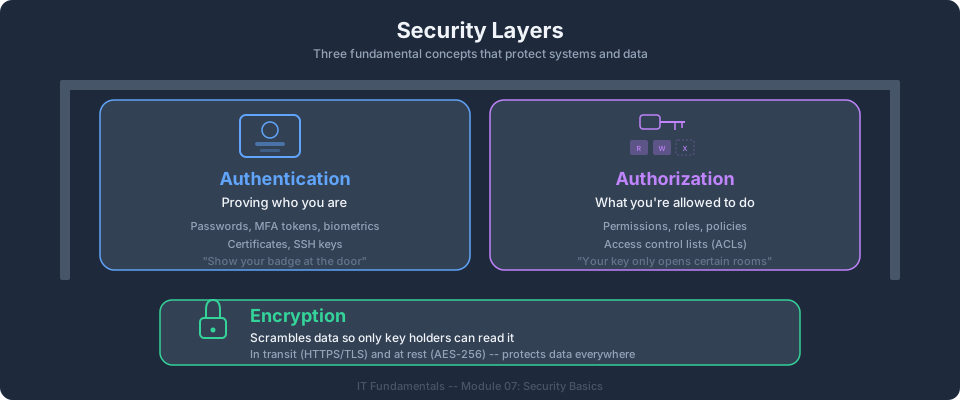
These two concepts are the foundation of all security systems. They sound similar but do very different things.
| Concept | Question It Answers | Example |
|---|---|---|
| Authentication | "Who are you?" | Logging in with a username and password |
| Authorization | "What are you allowed to do?" | An IAM policy that grants read-only access to S3 |
Authentication happens first (prove your identity), then authorization determines what you can access.
An analogy: Think of a hotel. When you check in and show your ID, that is authentication (proving you are a registered guest). The key card you receive only opens your room, not every room in the hotel. That is authorization (limiting what you can access).
Check your understanding: You badge into your office building (the door verifies your ID badge). Once inside, you can enter the break room but not the server room. Which part is authentication and which is authorization?
Answer: Badging into the building is authentication (verifying your identity). Being allowed into the break room but not the server room is authorization (determining what you can access based on your role).
Multi-Factor Authentication (MFA)
A password alone is not enough to keep an account secure. Passwords get stolen, guessed, and leaked in data breaches. Multi-factor authentication (MFA) adds an extra layer of protection by requiring two or more forms of verification.
The Three Authentication Factors
| Factor | Category | Examples |
|---|---|---|
| Something you know | Knowledge | Password, PIN, security question |
| Something you have | Possession | Phone (for a text code), hardware security key, authenticator app |
| Something you are | Biometrics | Fingerprint, face recognition, iris scan |
MFA requires at least two different factors. Using a password (something you know) plus a code from your phone (something you have) is MFA. Using two passwords is not MFA because both are the same factor type (something you know).
Why MFA Matters
If an attacker steals your password, they still cannot access your account without your second factor. This one safeguard blocks the vast majority of account takeover attacks. Major data breaches often begin with a single compromised account that did not have MFA enabled.
Bootcamp connection: In the AWS Bootcamp, one of the very first things you will do is enable MFA on your AWS root account and IAM users. AWS strongly recommends MFA for all accounts, and you will configure this in Module 02: IAM and Security.
Common Threats
Understanding common attack methods helps you recognize and avoid them. You do not need to be a security expert, but you do need to know what to watch out for.
Phishing
Phishing is a fake message (usually email) designed to trick you into revealing sensitive information or clicking a malicious link. The message often looks like it comes from a trusted source (your bank, your employer, AWS).
How to spot phishing:
- The sender's email address does not match the organization (e.g.,
support@amaz0n-security.cominstead ofsupport@amazon.com) - The message creates urgency ("Your account will be suspended in 24 hours!")
- Links in the message go to unfamiliar or misspelled websites
- The message asks for your password, credit card number, or other sensitive data via email
Defense: Never click links in suspicious emails. Go directly to the website by typing the address in your browser. When in doubt, contact the organization through a known, official channel.
Brute Force Attacks
A brute force attack tries every possible password combination until it finds the right one. Automated tools can try millions of combinations per second.
Defense: Use long, complex passwords (12+ characters). Account lockout policies that limit failed attempts also help. MFA makes brute force attacks nearly useless because the attacker would also need your second factor.
Social Engineering
Social engineering is manipulating people into giving up confidential information. It exploits trust and human nature rather than technology.
Examples:
- Calling a help desk and pretending to be an employee who forgot their password
- Leaving a USB drive labeled "Salary Data" in a parking lot, hoping someone plugs it in
- Sending a message pretending to be a manager asking for login credentials
Defense: Verify requests through a separate channel. If someone calls claiming to be from IT and asks for your password, hang up and call IT directly using a known number.
Credential Stuffing
When a website gets breached, stolen usernames and passwords are often published online. Attackers take these leaked credentials and try them on other websites, betting that people reuse the same password across multiple accounts.
Defense: Never reuse passwords. Use a unique password for every account. A password manager makes this practical.
Check your understanding: You receive an email that appears to be from AWS saying "Your account has been compromised. Click here to reset your password immediately." The email address is
alert@aws-security-notice.com. What should you do?Answer: Do not click the link. The email address is not from a legitimate AWS domain. Go directly to aws.amazon.com by typing it in your browser, sign in normally, and check for any real alerts. This is likely a phishing attempt.
Password Best Practices
Passwords are still the most common form of authentication, so using them well matters.
What makes a strong password:
- At least 12 characters long (longer is better)
- A mix of uppercase, lowercase, numbers, and symbols
- Not a common word, phrase, or pattern (no
Password123!orqwerty) - Not based on personal information (no birthdays, pet names, or addresses)
Password managers are tools that generate, store, and fill in strong, unique passwords for every account. You only need to remember one primary password (for the password manager itself). Popular options include 1Password, Bitwarden, and the built-in password managers in most web browsers.
Rules to live by:
- Never reuse a password across multiple accounts
- Never share passwords via email, text, or chat
- Never write passwords on sticky notes attached to your monitor
- Change passwords immediately if you learn a service has been breached
Bootcamp connection: In the AWS Bootcamp, you will create IAM users with passwords and access keys. The password policies you configure in Module 02: IAM and Security enforce many of these best practices automatically (minimum length, complexity requirements, rotation).
Encryption
Encryption converts readable data (plaintext) into unreadable data (ciphertext) using a key. Only someone with the correct key can decrypt it back to plaintext.
Encryption at Rest vs. In Transit
- Encryption at rest: Protects data stored on disk (S3 objects, database records, EBS volumes)
- Encryption in transit: Protects data moving across a network (HTTPS, TLS, VPN connections)
Both are important. Encryption at rest protects your data if someone gains physical access to a hard drive or storage device. Encryption in transit protects your data from being intercepted while traveling across the internet.
Symmetric vs. Asymmetric Encryption
There are two fundamental approaches to encryption, and understanding the difference helps you grasp how many cloud services work.
Symmetric encryption uses the same key to encrypt and decrypt data.
Analogy: Think of a padlock where you and your friend both have a copy of the same combination. You lock a box with the combination, and your friend opens it with the same combination. The challenge is sharing the combination securely in the first place.
- Advantage: Fast. Good for encrypting large amounts of data.
- Challenge: You must securely share the key with the other person. If someone intercepts the key, they can decrypt everything.
- Example: AES (Advanced Encryption Standard), used by AWS KMS for encrypting data at rest.
Asymmetric encryption uses a pair of keys: a public key and a private key. Data encrypted with the public key can only be decrypted with the private key, and vice versa.
Analogy: Think of a mailbox. Anyone can drop a letter through the slot (encrypt with your public key), but only you have the key to open the mailbox and read the letters (decrypt with your private key).
- Advantage: You never need to share your private key. The public key can be shared with anyone.
- Challenge: Slower than symmetric encryption.
- Example: RSA and TLS (used for HTTPS connections). When you visit a website with a padlock icon, asymmetric encryption is used to establish the secure connection.
In practice, most systems use both: asymmetric encryption to securely exchange a symmetric key, then symmetric encryption for the actual data transfer. This combines the security of asymmetric with the speed of symmetric.
Check your understanding: Why can't you use symmetric encryption to securely communicate with a website you have never visited before?
Answer: With symmetric encryption, both sides need the same key. If you have never communicated with the website before, there is no secure way to share that key. An attacker could intercept the key during the initial exchange. Asymmetric encryption solves this because the website can share its public key openly, and only the website's private key can decrypt what you send.
SSH Keys as Authentication
In Module 02 of this course, you learned about the command line. When you connect to remote servers (which you will do often in cloud computing), you need a way to prove your identity. SSH keys are a common method.
SSH (Secure Shell) uses asymmetric encryption for authentication:
- Your private key stays on your local machine. Never share it with anyone.
- Your public key is placed on the server you want to access.
When you connect, the server uses your public key to verify that you hold the matching private key, without your private key ever being transmitted. This is more secure than a password because the key is extremely long (thousands of characters) and never crosses the network.
# Generate an SSH key pair (one-time setup)
ssh-keygen -t ed25519 -C "your_email@example.com"

# This creates two files:
# ~/.ssh/id_ed25519       (private key - KEEP SECRET)
# ~/.ssh/id_ed25519.pub   (public key - safe to share)
Bootcamp connection: In Module 04: Compute (EC2), you will use key pairs to connect to EC2 instances. You will also encounter SSH keys in Module 10: Linux Administration when managing remote servers. Understanding the concept of public/private key pairs now will make those modules much easier.
The Principle of Least Privilege
Grant users and applications only the minimum permissions they need to do their job. Nothing more.
- A web server that reads from S3 should not have permission to delete S3 objects
- A developer who deploys to staging should not have permission to deploy to production
- A monitoring tool that reads CloudWatch metrics should not have permission to modify alarms
Why does this matter? If an attacker compromises an account that has only read access to one folder, the damage is limited. If that same account has administrator access to everything, the attacker can delete data, create new accounts, and take over the entire system.
This principle is the foundation of AWS IAM, which you will learn in Module 02 of the bootcamp.
The Shared Responsibility Model (Preview)
In cloud computing, security is a shared job between you and the cloud provider (like AWS). This is called the shared responsibility model.
Analogy: Think of renting an apartment. The building owner is responsible for the structure of the building: the walls, the roof, the locks on the main entrance, the fire exits. You, the tenant, are responsible for what happens inside your apartment: locking your door, not leaving the stove on, choosing a good safe for your valuables.
The cloud provider (AWS) is responsible for:
- Physical security of data centers
- Hardware maintenance and replacement
- Network infrastructure
- The security of the cloud platform itself
You (the customer) are responsible for:
- Managing who can access your account and resources (IAM)
- Encrypting your data
- Configuring firewalls and security groups
- Keeping your operating systems and applications updated
- Not committing credentials to public repositories
This model means that even though AWS runs the infrastructure, a misconfiguration on your part can still lead to a security incident. Security is always a shared effort.
Bootcamp connection: The shared responsibility model is one of the first things you will learn in Module 01: Cloud Fundamentals of the bootcamp. AWS has a detailed page on this model, and understanding it now gives you a head start.
Check your understanding: A company stores customer data in an S3 bucket but forgets to restrict access, making the data publicly readable. Whose responsibility is this: AWS or the customer?
Answer: The customer. AWS is responsible for making S3 available and secure as a platform. The customer is responsible for configuring access controls on their own resources. Leaving an S3 bucket publicly accessible is a customer-side misconfiguration.
Security Hygiene Checklist
Security is not only about technology. It is about habits. Here are actionable steps you can take right now to improve your security posture.
-
Enable MFA on all important accounts. Start with your email, cloud provider (AWS), and financial accounts. If an attacker gets into your email, they can reset passwords for everything else.
-
Use a password manager. Generate a unique, strong password for every account. Stop reusing passwords today.
-
Never share credentials via email, chat, or text. If someone needs access, set up their own account with appropriate permissions.
-
Do not click links in unexpected emails. Go directly to the website by typing the address. Bookmark your most important accounts.
-
Keep your software updated. Operating system updates and application patches often fix security vulnerabilities. Do not delay them.
-
Lock your computer when you walk away. On macOS: Cmd+Ctrl+Q. On Windows: Win+L. This takes one second and prevents unauthorized access.
-
Review account activity regularly. Check for logins from unfamiliar locations or devices. Most services (including AWS) provide login activity logs.
-
Be skeptical of requests for sensitive information. Legitimate organizations will never ask for your password via email or phone. Verify through a separate channel.
-
Do not commit secrets to Git repositories. Use
.gitignore(as you learned in Module 05) and environment variables instead. If you accidentally commit a credential, consider it compromised and rotate it immediately. -
Use HTTPS everywhere. When browsing, look for the padlock icon in your browser. Avoid entering sensitive information on websites that do not use HTTPS.
Bootcamp connection: Understanding security fundamentals prepares you for Identity and Access Management (IAM) in Module 02: IAM and Security. In Module 13: Security in Depth, you will use AWS Key Management Service (KMS) for encryption and configure advanced security services. The habits on this checklist will serve you throughout the bootcamp and your career.
Instructor Notes
Estimated lecture time: 20 to 25 minutes
Common student questions:
-
Q: What is the difference between encryption at rest and in transit? A: Encryption at rest protects data that is stored (on a hard drive, in a database, in an S3 bucket). Encryption in transit protects data while it is moving across a network (between your browser and a server, between two AWS services). Both are important, and AWS provides tools for each: KMS and S3 server-side encryption for at-rest, and TLS/HTTPS for in-transit.
-
Q: Why is least privilege important? A: Least privilege limits the damage that can occur if credentials are compromised. If a web server only has read access to one S3 bucket, an attacker who compromises that server cannot delete data or access other resources. In AWS, you enforce least privilege through IAM policies.
-
Q: Do I really need a different password for every account? A: Yes. Credential stuffing attacks rely on people reusing passwords. When one site gets breached, attackers try those credentials on every other site. A password manager makes unique passwords practical.
-
Q: What is the most important thing I can do right now to improve my security? A: Enable MFA on your email account. Your email is the gateway to every other account (password resets go through email), so protecting it is the single highest-impact action.
Teaching tips:
- End with the security section to set the tone for the bootcamp: security is not an afterthought, it is built into every decision.
- Use the apartment vs building analogy for the shared responsibility model. Students remember this analogy and it reappears in Module 01: Cloud Fundamentals.
- For the phishing section, consider showing a real phishing email (redacted) and having students identify the red flags. This interactive exercise is memorable.
- When discussing MFA, ask students how many of them already have MFA on their personal email. This usually generates a good discussion.
Pause points:
- After the Authentication vs Authorization section, ask students to distinguish authentication from authorization. Expected answer: authentication verifies identity ("Who are you?"), authorization determines access ("What are you allowed to do?").
- After the Common Threats section, ask: "Which threat relies on human behavior rather than technology?" Expected answer: social engineering.
- After the Shared Responsibility Model section, ask: "If a company's EC2 instance gets hacked because they never updated the operating system, whose fault is it?" Expected answer: the customer's, because OS patching is the customer's responsibility.
Key Takeaways
- Security starts with two concepts: authentication (who are you) and authorization (what can you do). The principle of least privilege applies everywhere in cloud computing.
- Multi-factor authentication (MFA) is the single most effective defense against account takeover. Enable it everywhere.
- Common threats include phishing, brute force attacks, social engineering, and credential stuffing. Recognizing them is the first step to defending against them.
- Encryption protects data at rest and in transit. Symmetric encryption uses one shared key (fast but hard to share securely). Asymmetric encryption uses a public/private key pair (secure but slower).
- In cloud computing, security is shared between the provider and the customer. The provider secures the infrastructure; you secure your configuration and data.
- Good security is a set of daily habits, not a one-time setup. Use the security hygiene checklist as your starting point.
Previous: Module 05, Version Control with Git | Next: Module 07, Databases and Data | IT Fundamentals Overview
AWS Bootcamp: From Novice to Architect Author: Samuel Ogunti © 2026 Algorithmic Muse Technology LLC. All rights reserved.