
AWS Portfolio Projects That Get You Hired
You have studied the services. You have passed practice exams. Maybe you even have a certification. But when you sit down to apply for cloud jobs, you hit the same question: "How do I prove I can actually build things?"
A portfolio of real AWS projects is the answer. Not theoretical knowledge. Not screenshots of a console. Actual, working infrastructure that you designed, built, documented, and can talk about in an interview.
This guide gives you concrete project ideas, shows you what hiring managers look for, and explains how to present your work so it stands out.
Prerequisites: You should understand Infrastructure as Code (CloudFormation vs CDK) and CI/CD pipelines on AWS before starting this article.
What You Will Learn
By the end of this article, you will be able to:
- Design five distinct AWS portfolio projects (beginner to advanced) with appropriate service selection and architecture trade-offs
- Evaluate what hiring managers look for in the first 30 seconds of reviewing a GitHub repository
- Implement a documentation structure (README, architecture diagram, key decisions, cost estimates) that tells a compelling story in interviews
- Compare serverless, container, and EC2-based architectures for portfolio projects and explain the cost and operational implications of each
- Troubleshoot common portfolio mistakes (hardcoded credentials, missing cleanup scripts, no IaC) that signal a tutorial copy-paste job
What Hiring Managers Actually Look For
Before we get to project ideas, let us talk about what matters. I have reviewed hundreds of cloud engineering resumes and portfolios, and here is what separates the ones that get interviews from the ones that do not.
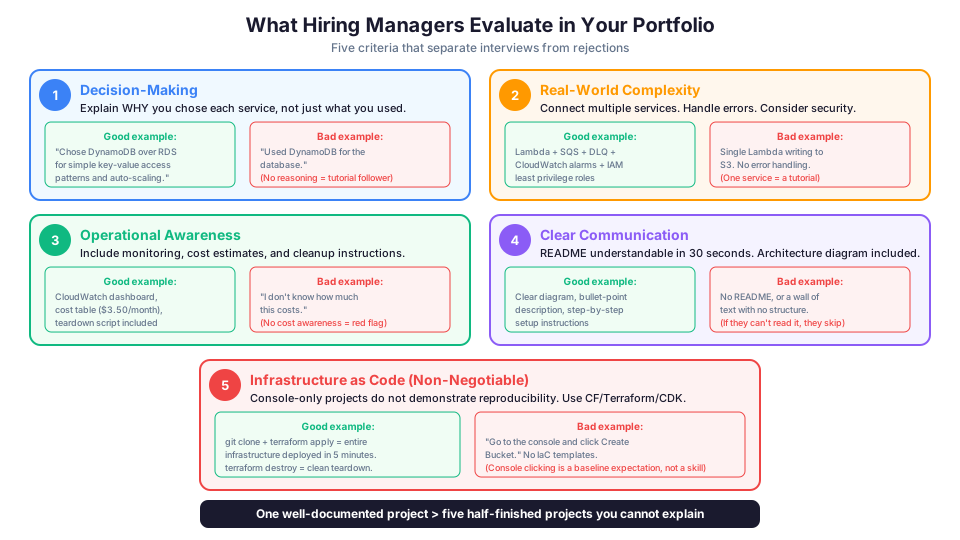
They want to see decision-making, not just implementation.
Anyone can follow a tutorial. What makes you valuable is the ability to evaluate options and choose the right one. When you document a project, explain why you chose DynamoDB over RDS. Why you used Lambda instead of EC2. Why you picked us-east-1 over us-west-2. Those decisions are what architects get paid for.
They want to see real-world complexity.
A project that uses one service is a tutorial. A project that connects multiple services, handles errors, considers security, and includes monitoring tells a hiring manager you can work on real systems.
They want to see operational awareness.
Include cost estimates, monitoring dashboards, and cleanup scripts. Show that you think about what happens after deployment, not just during.
They want to see clear communication.
Your GitHub README matters almost as much as the code itself. If a hiring manager cannot understand what your project does in 30 seconds, they will move on. Architecture diagrams, bullet-point descriptions, and clear setup instructions are essential.
They want Infrastructure as Code.
Console-only projects demonstrate that you can click buttons. IaC demonstrates that you can build reproducible, version-controlled infrastructure. CloudFormation, Terraform, or CDK are all acceptable. The specific tool matters less than the practice.
The Hiring Manager's 30-Second Test
When a hiring manager opens your GitHub repository, they evaluate it in roughly this order:
- README title and description (5 seconds): Do I understand what this project does?
- Architecture diagram (10 seconds): Can I see the services and data flow?
- Key decisions section (10 seconds): Does this person think architecturally?
- IaC presence (5 seconds): Are there CloudFormation/Terraform files?
If all four pass, they dig deeper. If any fail, they move to the next candidate. Your README is your resume for that project.
Project 1: Serverless Web Application (Beginner)
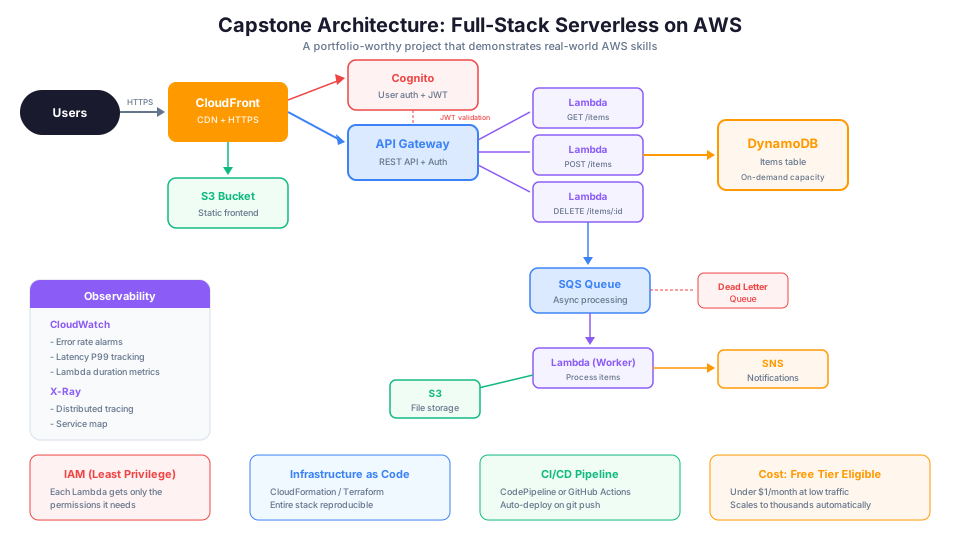
What you will build: A full-stack web application with a static frontend, serverless backend, user authentication, and a database.
AWS services used:
| Service | Purpose |
|---|---|
| S3 | Host the static frontend (HTML, CSS, JavaScript) |
| CloudFront | CDN for global content delivery and HTTPS |
| API Gateway | REST API endpoints |
| Lambda | Backend business logic |
| DynamoDB | NoSQL database for application data |
| Cognito | User authentication and authorization |
| IAM | Least-privilege roles for Lambda functions |
| CloudWatch | Monitoring and alerting |
Architecture:
Users --> CloudFront --> S3 (static frontend)
      --> API Gateway --> Lambda --> DynamoDB
      --> Cognito (authentication)
What to build specifically: A task management application, a URL shortener, or a simple note-taking app. The specific application does not matter as much as the architecture.
Key decisions to document:
- Why serverless instead of EC2? (Variable traffic, zero idle cost, no server management)
- Why DynamoDB instead of RDS? (Simple access patterns, automatic scaling, serverless pricing)
- Why Cognito instead of building your own auth? (Security best practice, managed service reduces risk)
- How did you handle CORS between S3 and API Gateway?
- What is the estimated monthly cost at different traffic levels?
What makes it stand out: Deploy it with Infrastructure as Code (CloudFormation or Terraform), not the console. Include a CI/CD pipeline that deploys on git push. Add CloudWatch alarms for error rates and latency.
Step-by-step build plan:
# Day 1: Set up the backend
# Create DynamoDB table
aws dynamodb create-table \
  --table-name Tasks \
  --attribute-definitions \
    AttributeName=userId,AttributeType=S \
    AttributeName=taskId,AttributeType=S \
  --key-schema \
    AttributeName=userId,KeyType=HASH \
    AttributeName=taskId,KeyType=RANGE \
  --billing-mode PAY_PER_REQUEST

# Create Lambda function with least-privilege IAM role
aws lambda create-function \
  --function-name get-tasks \
  --runtime nodejs20.x \
  --handler index.handler \
  --role arn:aws:iam::123456789012:role/lambda-get-tasks-role \
  --zip-file fileb://function.zip

# Day 2: Set up API Gateway + Cognito
# Create Cognito User Pool for authentication
aws cognito-idp create-user-pool \
  --pool-name TaskAppUsers \
  --auto-verified-attributes email \
  --password-policy '{
    "MinimumLength": 8,
    "RequireUppercase": true,
    "RequireLowercase": true,
    "RequireNumbers": true,
    "RequireSymbols": false
  }'

# Day 3: Set up frontend on S3 + CloudFront
# Day 4: Add monitoring (CloudWatch alarms + dashboard)
# Day 5: Document everything in README
Estimated cost: Free tier eligible. Under $1/month at low traffic.
Cost breakdown:
| Service | Monthly Cost (low traffic) | Monthly Cost (10K users) |
|---|---|---|
| S3 | $0.02 | $0.10 |
| CloudFront | $0.00 (free tier) | $1.00 |
| API Gateway | $0.00 (free tier) | $3.50 |
| Lambda | $0.00 (free tier) | $0.20 |
| DynamoDB | $0.00 (free tier) | $2.50 |
| Cognito | $0.00 (first 50K users free) | $0.00 |
| Total | ~$0.02 | ~$7.30 |
Project 2: Highly Available Web Application (Intermediate)
What you will build: A multi-tier web application running on EC2 with automatic scaling, load balancing, and a managed database.
AWS services used:
| Service | Purpose |
|---|---|
| VPC | Custom network with public and private subnets across 2 AZs |
| ALB | Application Load Balancer for traffic distribution |
| EC2 + Auto Scaling | Web server tier that scales with demand |
| RDS Multi-AZ | PostgreSQL database with automatic failover |
| S3 | Static asset storage |
| CloudFront | CDN in front of the ALB and S3 |
| Route 53 | DNS with health checks |
| CloudWatch | Monitoring and alarms |
| SNS | Alert notifications |
Architecture:
Internet --> Route 53 --> CloudFront --> ALB (public subnets)
                                    --> EC2 instances (private subnets, 2 AZs)
                                    --> RDS Multi-AZ (private subnets)
                                    --> S3 (static assets via CloudFront)
What to build specifically: A blog platform, a product catalog, or a simple e-commerce storefront. Focus on the infrastructure more than the application code.
Key decisions to document:
- Why Multi-AZ for RDS? (Automatic failover, high availability)
- How did you configure Auto Scaling? (What metrics trigger scale-out and scale-in?)
- Why private subnets for EC2 and RDS? (Defense in depth, no direct internet access)
- What is your scaling policy? (Target tracking on CPU? Step scaling? Scheduled?)
- What happens if one AZ fails? (ALB routes to healthy AZ, RDS fails over)
What makes it stand out: Include a load test demonstrating Auto Scaling in action. Use Apache Bench or k6 to generate traffic and show CloudWatch graphs of instances scaling up and down. Include a cost comparison between this architecture and a single-server setup.
# Run a simple load test to trigger Auto Scaling
# Install Apache Bench, then:
ab -n 10000 -c 100 https://your-alb-dns-name/

# Watch Auto Scaling respond
aws autoscaling describe-auto-scaling-groups \
  --auto-scaling-group-names my-web-asg \
  --query "AutoScalingGroups[0].{Desired:DesiredCapacity,Min:MinSize,Max:MaxSize,Current:Instances[*].InstanceId}" \
  --output table

# Capture the scaling activity for documentation
aws autoscaling describe-scaling-activities \
  --auto-scaling-group-name my-web-asg \
  --max-items 10 \
  --query "Activities[*].{Time:StartTime,Cause:Cause,Status:StatusCode}" \
  --output table
VPC network design (document this in your README):
VPC: 10.0.0.0/16
  Public Subnet AZ-1a:  10.0.1.0/24   (ALB, NAT Gateway)
  Public Subnet AZ-1b:  10.0.2.0/24   (ALB)
  Private Subnet AZ-1a: 10.0.10.0/24  (EC2 instances)
  Private Subnet AZ-1b: 10.0.20.0/24  (EC2 instances)
  Private Subnet AZ-1a: 10.0.100.0/24 (RDS primary)
  Private Subnet AZ-1b: 10.0.200.0/24 (RDS standby)
Estimated cost: $30-60/month with minimal instances. Terminate after documenting.
Project 3: Event-Driven Data Pipeline (Intermediate)
What you will build: An automated pipeline that ingests data, processes it, stores results, and sends notifications.
AWS services used:
| Service | Purpose |
|---|---|
| S3 | Data landing zone (raw files uploaded here) |
| Lambda | Processing functions triggered by S3 events |
| SQS | Message queue for decoupling and retry logic |
| DynamoDB | Processed results storage |
| SNS | Notifications on success or failure |
| Step Functions | Orchestrate multi-step processing workflow |
| CloudWatch | Monitoring and logging |
| IAM | Least-privilege roles for each Lambda function |
Architecture:
Data upload --> S3 bucket --> S3 event notification --> Lambda (validate)
  --> SQS (processing queue) --> Lambda (transform)
  --> DynamoDB (store results)
  --> SNS (notify on completion or error)

Step Functions orchestrates the full workflow with error handling
What to build specifically: A CSV file processor that validates uploaded data, transforms it, loads it into DynamoDB, and emails a summary. Or a log analyzer that processes CloudTrail logs and generates security reports. Or an image processing pipeline that resizes uploads into multiple formats.
Key decisions to document:
- Why SQS between processing steps? (Decoupling, retry logic, handling spikes)
- Why Step Functions for orchestration? (Visual workflow, built-in error handling, state management)
- How do you handle failures? (Dead letter queues, retry policies, SNS alerts)
- What happens if a Lambda function times out? (SQS visibility timeout, retry behavior)
- How would this scale to millions of files per day? (SQS handles the backpressure, Lambda scales automatically)
Step Functions workflow definition:
# Create the state machine that orchestrates the pipeline
aws stepfunctions create-state-machine \
  --name "DataPipeline" \
  --definition '{
    "StartAt": "ValidateFile",
    "States": {
      "ValidateFile": {
        "Type": "Task",
        "Resource": "arn:aws:lambda:us-east-1:123456789012:function:validate-csv",
        "Next": "IsValid",
        "Catch": [{
          "ErrorEquals": ["States.ALL"],
          "Next": "NotifyFailure"
        }]
      },
      "IsValid": {
        "Type": "Choice",
        "Choices": [{
          "Variable": "$.valid",
          "BooleanEquals": true,
          "Next": "TransformData"
        }],
        "Default": "NotifyFailure"
      },
      "TransformData": {
        "Type": "Task",
        "Resource": "arn:aws:lambda:us-east-1:123456789012:function:transform-csv",
        "Next": "StoreResults",
        "Retry": [{
          "ErrorEquals": ["States.TaskFailed"],
          "MaxAttempts": 3,
          "BackoffRate": 2
        }]
      },
      "StoreResults": {
        "Type": "Task",
        "Resource": "arn:aws:lambda:us-east-1:123456789012:function:store-results",
        "Next": "NotifySuccess"
      },
      "NotifySuccess": {
        "Type": "Task",
        "Resource": "arn:aws:states:::sns:publish",
        "Parameters": {
          "TopicArn": "arn:aws:sns:us-east-1:123456789012:pipeline-alerts",
          "Message.$": "States.Format('Pipeline completed. Processed {} records.', $.recordCount)"
        },
        "End": true
      },
      "NotifyFailure": {
        "Type": "Task",
        "Resource": "arn:aws:states:::sns:publish",
        "Parameters": {
          "TopicArn": "arn:aws:sns:us-east-1:123456789012:pipeline-alerts",
          "Message": "Pipeline failed. Check CloudWatch logs."
        },
        "End": true
      }
    }
  }' \
  --role-arn "arn:aws:iam::123456789012:role/StepFunctionsRole"
What makes it stand out: Include a dead letter queue for failed messages and a Lambda function that processes the DLQ for manual review. Add CloudWatch dashboards showing processing throughput, error rates, and queue depth. Document the cost per 1,000 files processed.
Estimated cost: Free tier eligible for most usage. Under $5/month at moderate volume.
Project 4: CI/CD Pipeline with Infrastructure as Code (Advanced)
What you will build: A complete deployment pipeline that takes code from a git repository, builds it, tests it, and deploys it to AWS automatically.
AWS services used:
| Service | Purpose |
|---|---|
| CodeCommit or GitHub | Source code repository |
| CodeBuild | Build and test the application |
| CodePipeline | Orchestrate the deployment stages |
| CloudFormation or CDK | Define all infrastructure as code |
| ECR | Container image registry (if using containers) |
| ECS Fargate | Run containerized application |
| ALB | Load balancer for the application |
| CloudWatch | Pipeline monitoring and alarms |
| S3 | Build artifact storage |
| Secrets Manager | Secure credential storage |
Architecture:
Developer pushes code --> CodePipeline triggers
  --> Source stage (pull from GitHub)
  --> Build stage (CodeBuild: lint, test, build Docker image)
  --> Push image to ECR
  --> Deploy to staging (ECS Fargate)
  --> Run integration tests against staging
  --> Manual approval gate
  --> Deploy to production (ECS Fargate)
  --> Post-deploy (health check, CloudWatch alarm evaluation)
Key decisions to document:
- Why Fargate instead of EC2 for ECS? (No cluster management, pay per task)
- Why CodePipeline over Jenkins? (Managed service, native AWS integration, no servers to maintain)
- How do you handle rollbacks? (ECS deployment circuit breaker, CloudFormation rollback triggers)
- What tests run in the build stage? (Unit tests, linting, security scanning)
- How do you manage secrets? (Secrets Manager, not environment variables)
BuildSpec file for CodeBuild:
# buildspec.yml - what CodeBuild does with your code
# This file should be in your project repository
cat > buildspec.yml << 'EOF'
version: 0.2
phases:
  pre_build:
    commands:
      - echo Logging in to Amazon ECR...
      - aws ecr get-login-password --region $AWS_DEFAULT_REGION | docker login --username AWS --password-stdin $AWS_ACCOUNT_ID.dkr.ecr.$AWS_DEFAULT_REGION.amazonaws.com
      - REPOSITORY_URI=$AWS_ACCOUNT_ID.dkr.ecr.$AWS_DEFAULT_REGION.amazonaws.com/$IMAGE_REPO_NAME
      - COMMIT_HASH=$(echo $CODEBUILD_RESOLVED_SOURCE_VERSION | cut -c 1-7)
      - IMAGE_TAG=${COMMIT_HASH:=latest}
  build:
    commands:
      - echo Running tests...
      - npm test
      - echo Building the Docker image...
      - docker build -t $REPOSITORY_URI:$IMAGE_TAG .
      - docker tag $REPOSITORY_URI:$IMAGE_TAG $REPOSITORY_URI:latest
  post_build:
    commands:
      - echo Pushing the Docker image...
      - docker push $REPOSITORY_URI:$IMAGE_TAG
      - docker push $REPOSITORY_URI:latest
      - printf '[{"name":"app","imageUri":"%s"}]' $REPOSITORY_URI:$IMAGE_TAG > imagedefinitions.json
artifacts:
  files:
    - imagedefinitions.json
EOF

# Create the CodePipeline
aws codepipeline create-pipeline \
  --pipeline '{
    "name": "my-app-pipeline",
    "roleArn": "arn:aws:iam::123456789012:role/CodePipelineRole",
    "stages": [
      {
        "name": "Source",
        "actions": [{
          "name": "Source",
          "actionTypeId": {"category": "Source", "owner": "ThirdParty", "provider": "GitHub", "version": "1"},
          "outputArtifacts": [{"name": "SourceOutput"}],
          "configuration": {
            "Owner": "your-github-username",
            "Repo": "your-repo-name",
            "Branch": "main"
          }
        }]
      },
      {
        "name": "Build",
        "actions": [{
          "name": "Build",
          "actionTypeId": {"category": "Build", "owner": "AWS", "provider": "CodeBuild", "version": "1"},
          "inputArtifacts": [{"name": "SourceOutput"}],
          "outputArtifacts": [{"name": "BuildOutput"}],
          "configuration": {"ProjectName": "my-app-build"}
        }]
      },
      {
        "name": "Deploy-Staging",
        "actions": [{
          "name": "Deploy",
          "actionTypeId": {"category": "Deploy", "owner": "AWS", "provider": "ECS", "version": "1"},
          "inputArtifacts": [{"name": "BuildOutput"}],
          "configuration": {
            "ClusterName": "my-cluster",
            "ServiceName": "my-app-staging"
          }
        }]
      }
    ]
  }'
What makes it stand out: Add a staging environment that deploys first, runs integration tests, then promotes to production only if tests pass. Include a manual approval step between staging and production. Show the pipeline running end-to-end in your documentation.
Estimated cost: $20-40/month for the pipeline and small Fargate tasks.
Project 5: Multi-Region Disaster Recovery (Advanced)
What you will build: A production-quality application with a complete disaster recovery setup in a secondary region.
AWS services used:
| Service | Purpose |
|---|---|
| VPC (x2 regions) | Network infrastructure in both regions |
| EC2/ECS | Application tier in both regions |
| RDS with cross-region replica | Database with continuous replication |
| S3 cross-region replication | Object storage replication |
| Route 53 | DNS failover between regions |
| CloudFront | Global edge caching |
| CloudWatch | Monitoring and health checks |
| CloudFormation | Deploy identical infrastructure in both regions |
| AWS Backup | Centralized backup management |
Architecture:
Route 53 (failover routing)
  --> Primary: us-east-1
      ALB --> ECS --> RDS (primary) --> S3 (source bucket)
  --> Secondary: us-west-2 (warm standby)
      ALB --> ECS (minimal) --> RDS (read replica) --> S3 (replica bucket)

Route 53 health checks monitor primary
Automatic failover to secondary on failure
Key decisions to document:
- Which DR strategy did you choose and why? (Pilot Light, Warm Standby, etc.)
- What is your RTO and RPO? (Measured, not estimated)
- How does DNS failover work? (Route 53 health check configuration)
- How do you promote the RDS read replica during failover?
- What is the monthly cost of running the DR setup?
- Did you test the failover? What was the actual recovery time?
Failover test documentation (include this in your README):
# DR Failover Test - [DATE]
# Objective: Verify warm standby failover completes within RTO target (15 min)

# Step 1: Record starting state
echo "Test started: $(date -u +%Y-%m-%dT%H:%M:%SZ)"
aws rds describe-db-instances \
  --db-instance-identifier primary-db \
  --query "DBInstances[0].DBInstanceStatus" \
  --region us-east-1

# Step 2: Simulate primary region failure
# (Stop the primary ECS service to trigger Route 53 health check failure)
aws ecs update-service \
  --cluster primary-cluster \
  --service web-app \
  --desired-count 0 \
  --region us-east-1

# Step 3: Verify Route 53 detects failure (check health check status)
aws route53 get-health-check-status \
  --health-check-id "abc123"

# Step 4: Promote RDS read replica in DR region
aws rds promote-read-replica \
  --db-instance-identifier dr-replica-db \
  --region us-west-2

# Step 5: Scale up DR region ECS service
aws ecs update-service \
  --cluster dr-cluster \
  --service web-app \
  --desired-count 4 \
  --region us-west-2

# Step 6: Verify application is serving from DR region
curl -s -w "\nHTTP_CODE: %{http_code}\nTIME: %{time_total}s\n" \
  https://app.example.com/health

# Step 7: Record completion time
echo "Test completed: $(date -u +%Y-%m-%dT%H:%M:%SZ)"

# Results:
# Route 53 failover detected: 62 seconds
# RDS promotion: 4 minutes 30 seconds
# ECS scale-up: 2 minutes 15 seconds
# Total recovery time: 7 minutes 47 seconds
# RTO target: 15 minutes -- PASSED
What makes it stand out: Actually test the failover. Document the process with timestamps showing actual RTO. Include a runbook that anyone on your team could follow to execute the failover manually. Compare the cost of your DR setup against the business cost of downtime.
Estimated cost: $50-100/month for a warm standby setup.
How to Document Your Projects
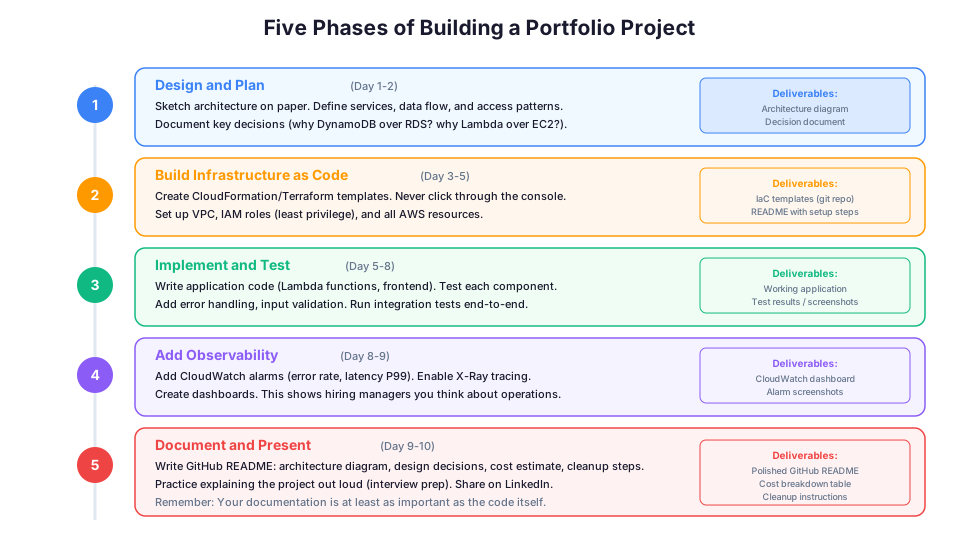
Your documentation is at least as important as the project itself. Here is the structure that works:
GitHub README Template
# Project Name

One-sentence description of what this project does.

## Architecture Diagram

[Include a clear diagram showing all AWS services and data flow]

## Services Used

- Service 1: what it does in this project
- Service 2: what it does in this project

## Key Design Decisions

1. Why I chose X over Y
2. Why I chose A over B
3. Trade-offs I considered

## Cost Estimate

| Resource | Monthly Cost |
|----------|-------------|
| Service 1 | $X.XX |
| Service 2 | $X.XX |
| Total | $XX.XX |

## Setup Instructions

Step-by-step instructions to deploy this project from scratch.

## What I Learned

Honest reflection on challenges faced and how you solved them.

## Cleanup Instructions

How to tear down all resources to avoid charges.
Architecture Diagrams
Hand-drawn diagrams are fine. Fancy tools are not required. What matters is clarity:
- Show all AWS services as labeled boxes
- Draw arrows showing data flow direction
- Label the arrows with the protocol or trigger (HTTPS, S3 event, SQS message)
- Include AZs and regions when relevant
- Keep it readable: if you need more than 15 boxes, you probably need two diagrams
Free tools that work well: draw.io (diagrams.net), Excalidraw, or the AWS Architecture Icons with any diagramming tool.
What to Include in the "What I Learned" Section
This section is what hiring managers read most carefully. Be honest about challenges:
Good "What I Learned" entries:
- "Lambda cold starts added 800ms to initial API responses. I implemented provisioned concurrency for the most critical function, reducing cold starts to ~100ms at a cost of $8/month."
- "I initially hardcoded the RDS endpoint in my Lambda function. When I tested failover, the application kept trying to connect to the old endpoint. I switched to using RDS Proxy, which handles the endpoint resolution automatically."
- "My CloudFormation template took 25 minutes to deploy because of the CloudFront distribution. I learned to separate the template into two stacks: one for slow-changing resources (CloudFront, RDS) and one for fast-changing resources (Lambda, API Gateway)."
Bad "What I Learned" entries:
- "I learned how to use DynamoDB." (Too vague)
- "Everything went smoothly." (Not credible and shows no growth)
Common Portfolio Mistakes to Avoid
1. Following tutorials without understanding. If you cannot explain why each service is there, hiring managers will know you just followed a guide. Modify the tutorial. Add features. Make it yours.
2. No cleanup instructions. If your project requires a hiring manager to create resources to evaluate it, they need to know how to delete them. Always include cleanup steps.
# Always include a cleanup script in your project
# cleanup.sh
echo "Destroying all resources..."
aws cloudformation delete-stack --stack-name my-project
aws s3 rb s3://my-project-bucket --force
echo "Cleanup complete. Verify in the AWS Console that all resources are deleted."
3. Hardcoded credentials. This happens more than you would think. Never commit AWS access keys, database passwords, or API keys to your repository. Use environment variables, Secrets Manager, or Parameter Store.
# BAD: Never do this
AWS_ACCESS_KEY_ID=AKIAIOSFODNN7EXAMPLE
DB_PASSWORD=mysecretpassword123

# GOOD: Use Secrets Manager
aws secretsmanager get-secret-value \
  --secret-id my-app/db-password \
  --query "SecretString" \
  --output text
4. No cost awareness. "I do not know how much this costs" is a red flag. Include cost estimates. Show that you think about the financial impact of your architecture decisions.
5. Only console-based projects. Clicking through the AWS Console does not demonstrate reproducibility. Use CloudFormation, Terraform, or CDK. Infrastructure as Code is a baseline expectation for cloud roles.
6. No monitoring or logging. A project without CloudWatch alarms, logs, or dashboards shows you only think about the happy path. Real systems need observability.
7. No error handling. What happens when a Lambda function fails? What happens when DynamoDB throttles? What happens when an S3 upload is invalid? Show that you think about failure modes.
8. Over-engineering. A project that uses 15 services to build a to-do list looks like resume padding, not architectural thinking. Use the right number of services for the problem.
How to Talk About Projects in Interviews
When an interviewer asks "Tell me about a project you built on AWS," use this structure:
1. Start with the problem. "I wanted to build a data pipeline that could process uploaded CSV files, validate the data, and store results in a database."
2. Describe the architecture. "I used S3 for file uploads, Lambda for processing, SQS for decoupling, and DynamoDB for storage. Step Functions orchestrated the workflow."
3. Explain a key decision. "I chose SQS between Lambda functions because I needed retry logic for failed processing. Without SQS, a Lambda failure would lose the file. With SQS and a dead letter queue, failed files get retried three times before being sent to a DLQ for manual review."
4. Share a challenge you solved. "Initially, large CSV files were timing out Lambda's 15-minute limit. I redesigned the pipeline to split large files into chunks using a pre-processing Lambda, then process each chunk independently."
5. Mention what you would do differently. "If I built this again, I would add CloudWatch dashboards from day one instead of adding them after debugging a production issue. Observability should not be an afterthought."
This structure shows that you understand the problem, the solution, the trade-offs, and your own growth areas. That is exactly what hiring managers want to hear.
Practice Questions for Each Project
Project 1 (Serverless):
- "Why did you use DynamoDB instead of RDS?" (Simple access patterns, pay-per-request, no connection management for Lambda)
- "How do you handle authentication?" (Cognito issues JWT tokens, API Gateway validates them)
- "What happens if your Lambda function fails?" (API Gateway returns 500, CloudWatch alarm triggers, logs capture the error)
Project 2 (Highly Available):
- "What happens if an AZ goes down?" (ALB routes to healthy AZ, RDS fails over to standby, Auto Scaling launches replacements)
- "How did you decide on your scaling policy?" (Started with CPU target tracking at 70%, monitored request latency, adjusted)
- "Why private subnets for your application tier?" (Defense in depth, instances only accessible through ALB, no direct SSH)
Project 3 (Data Pipeline):
- "How do you handle poison messages?" (SQS retry with exponential backoff, DLQ after 3 failures, Lambda processes DLQ)
- "How would this scale to 10 million files/day?" (SQS handles backpressure, Lambda scales automatically, DynamoDB on-demand scales)
- "Why Step Functions over just chaining Lambda?" (Visual workflow, built-in retry logic, state management, easier to debug)
Project 4 (CI/CD):
- "Why did you use Fargate instead of EC2?" (No cluster management, pay per task, focus on application not infrastructure)
- "How do you handle rollbacks?" (ECS deployment circuit breaker, CloudFormation rollback triggers)
- "What security scanning do you include?" (Container image scanning in ECR, dependency vulnerability checking in CodeBuild)
Project 5 (DR):
- "What is your measured RTO?" (Include the actual number from your failover test)
- "What is the cost of your DR setup?" (Include the actual monthly cost)
- "What would you improve?" (Automate the failover further, add more complete health checks)
Project Difficulty Progression
If you are building your portfolio from scratch, here is the recommended order:
| Order | Project | Skills Demonstrated | Time to Build |
|---|---|---|---|
| 1st | Serverless Web App | Core services, serverless, IaC | 5-7 days |
| 2nd | Event-Driven Pipeline | Event architecture, async, error handling | 5-7 days |
| 3rd | Highly Available Web App | Networking, HA, scaling | 7-10 days |
| 4th | CI/CD Pipeline | DevOps, containers, automation | 7-10 days |
| 5th | Multi-Region DR | Advanced architecture, testing, operations | 10-14 days |
You do not need all five. Two well-documented projects (one beginner, one intermediate or advanced) are enough for most cloud engineering roles.
Getting Started Today
You do not need to build all five projects. Pick one that excites you and build it well. A single, well-documented project that you can talk about deeply is more impressive than five half-finished projects you cannot explain.
Here is your action plan:
- Choose a project from the list above (start with Project 1 if you are new)
- Sketch the architecture on paper before touching the console
- Set up a GitHub repository with a clear README from the start
- Build the infrastructure with CloudFormation or Terraform, not the console
- Document your decisions as you make them, not after
- Test the project thoroughly and include the results
- Add cost estimates and cleanup instructions
- Share it on LinkedIn and mention it on your resume
The projects on this list are not theoretical exercises. They represent the real architectures that companies build on AWS every day. Building them proves you can do the work.
One final piece of advice: ship something imperfect rather than polishing something forever. A deployed project with rough edges and a honest "What I Would Do Differently" section beats a perfect architecture diagram that was never implemented. Hiring managers can tell the difference between someone who builds things and someone who reads about building things.
Start building: Module 74: Capstone Project walks you through building a production-grade serverless application from architecture design to deployment, with code review checkpoints along the way.