
Learning Objectives
By the end of this module, you will be able to:
- Read and write valid JSON documents with nested objects and arrays
- Read and write valid YAML documents, understanding indentation rules
- Convert between JSON and YAML representations of the same data
- Identify common configuration file formats used in cloud infrastructure (JSON, YAML, TOML, INI)
- Explain what environment variables are and how applications use them for configuration
- Recognize AWS-specific configuration patterns (IAM policies, CloudFormation templates, task definitions)
Prerequisites
- Completion of Module 04: APIs and Programming Basics (basic understanding of data types)
- Completion of Module 02: The Command Line (file editing)
Estimated self-study time:
| Activity | Estimated Time |
|---|---|
| Reading | 12 to 18 minutes |
| Quiz | 5 to 8 minutes |
| Total | 22 to 30 minutes |
Concepts
Why Configuration Matters
Every application needs configuration: settings that control how it behaves without changing the code. Examples:
- Which database to connect to
- What port to listen on
- How much memory to allocate
- Which users have access
- What happens when an error occurs
In cloud computing, configuration is everywhere. AWS services are configured through JSON and YAML documents: IAM policies, CloudFormation templates, ECS task definitions, Lambda function settings, and more.
JSON (JavaScript Object Notation)
JSON is the most common data format on the internet. APIs send JSON, configuration files use JSON, and AWS services accept JSON for policies and definitions.
Structure
JSON has six data types:
{
  "string": "hello world",
  "number": 42,
  "decimal": 3.14,
  "boolean": true,
  "null_value": null,
  "array": [1, 2, 3],
  "object": {
    "nested": "value"
  }
}
Rules
- Keys must be strings in double quotes
- Strings use double quotes (not single)
- No trailing commas after the last item
- No comments allowed (this is a common frustration)
- Whitespace/indentation is optional but improves readability
Real-World Example: AWS IAM Policy
This JSON document defines who can do what in AWS:
{
  "Version": "2012-10-17",
  "Statement": [
    {
      "Effect": "Allow",
      "Action": [
        "s3:GetObject",
        "s3:PutObject"
      ],
      "Resource": "arn:aws:s3:::my-bucket/*"
    },
    {
      "Effect": "Deny",
      "Action": "s3:DeleteObject",
      "Resource": "arn:aws:s3:::my-bucket/*"
    }
  ]
}
Reading this: "Allow getting and putting objects in my-bucket, but deny deleting objects." You'll write policies like this in Bootcamp Module 02.
Common Mistakes
{
  "name": "Jane",
  "age": 30,        ← trailing comma on last item = INVALID
}
{
  'name': 'Jane'   ← single quotes = INVALID (must use double quotes)
}
YAML (YAML Ain't Markup Language)
YAML is JSON's more readable cousin. It uses indentation instead of braces and is the preferred format for AWS CloudFormation, Docker Compose, GitHub Actions, and Kubernetes.
Structure
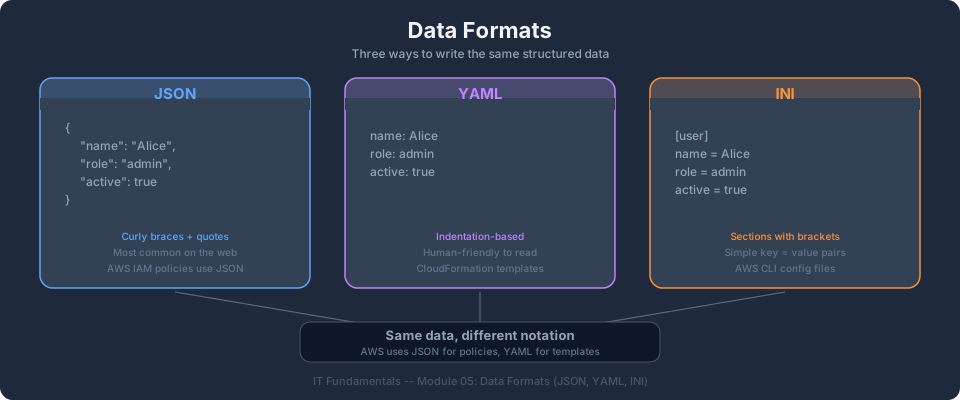
The same data in JSON and YAML:
JSON:
{
  "server": {
    "host": "localhost",
    "port": 3000,
    "debug": true
  },
  "database": {
    "engine": "postgres",
    "name": "myapp",
    "credentials": {
      "username": "admin",
      "password": "secret"
    }
  }
}
YAML:
server:
  host: localhost
  port: 3000
  debug: true

database:
  engine: postgres
  name: myapp
  credentials:
    username: admin
    password: secret
Rules
- Indentation matters (use spaces, never tabs)
- 2 spaces per level is the convention
- No braces or brackets needed (though they're allowed)
- Strings don't need quotes (unless they contain special characters)
- Comments use
# - Arrays use
-prefix
Arrays in YAML
# List of items
fruits:
  - apple
  - banana
  - cherry

# List of objects
students:
  - name: Jane
    email: jane@example.com
  - name: John
    email: john@example.com
Real-World Example: AWS CloudFormation Template
AWSTemplateFormatVersion: '2010-09-09'
Description: Create an S3 bucket for static website hosting

Resources:
  WebsiteBucket:
    Type: AWS::S3::Bucket
    Properties:
      BucketName: my-website-bucket
      WebsiteConfiguration:
        IndexDocument: index.html
        ErrorDocument: error.html
      Tags:
        - Key: Environment
          Value: production
        - Key: Project
          Value: aws-bootcamp

Outputs:
  BucketURL:
    Description: URL of the S3 website
    Value: !GetAtt WebsiteBucket.WebsiteURL
You'll write templates like this in Bootcamp Module 11.
Common Mistakes
server:
  host: localhost
	port: 3000        ← TAB character = INVALID (must use spaces)
items:
- first             ← missing space after dash = INVALID
-second             ← must be "- second"
Environment Variables
Environment variables are key-value pairs set outside your application code. They're the standard way to pass configuration (especially secrets) to applications without hardcoding them.
# Setting environment variables
export DATABASE_URL="postgres://admin:secret@localhost:5432/myapp"
export API_KEY="sk-abc123def456"
export DEBUG="true"

# Reading them in your application
echo $DATABASE_URL
Why use environment variables instead of config files?
- Security: Secrets aren't committed to Git
- Portability: Same code runs in dev, staging, and production with different values
- 12-Factor App: Industry best practice for cloud-native applications
In AWS, you'll set environment variables on Lambda functions, ECS tasks, and EC2 instances.
Configuration File Formats Comparison
| Format | Used By | Comments | Best For |
|---|---|---|---|
| JSON | AWS IAM, package.json, APIs | No | Machine-readable config, API responses |
| YAML | CloudFormation, Docker, K8s, GitHub Actions | Yes (#) | Human-edited infrastructure config |
| TOML | Cargo (Rust), pyproject.toml | Yes (#) | Simple app config |
| INI | AWS CLI config, .gitconfig | Yes (; or #) | Simple key-value settings |
| .env | Docker, Node.js apps | Yes (#) | Environment variable files |
AWS CLI Configuration (INI format)
[default]
region = us-east-1
output = json

[profile bootcamp-admin]
region = us-east-1
output = json
sso_start_url = https://my-sso.awsapps.com/start
Validating Configuration
A single typo in a JSON or YAML file can break your entire deployment. Tools to validate:
- JSON: Use
python3 -m json.tool < file.jsonor paste into jsonlint.com - YAML: Use
python3 -c "import yaml; yaml.safe_load(open('file.yaml'))"or yamllint.com - AWS:
aws cloudformation validate-template --template-body file://template.yaml
Tip: Most code editors (VS Code) highlight JSON/YAML syntax errors in real-time. Install the YAML extension for better CloudFormation support.
Key Takeaways
- JSON and YAML are the two dominant configuration formats in cloud computing
- JSON uses braces and quotes; YAML uses indentation and is more human-readable
- AWS IAM policies are JSON; CloudFormation templates are typically YAML
- Environment variables keep secrets out of code and enable portability across environments
- A single indentation error in YAML or a missing comma in JSON can break a deployment, so always validate
AWS Bootcamp: From Novice to Architect Author: Samuel Ogunti © 2026 Algorithmic Muse Technology LLC. All rights reserved.