
Learning Objectives
By the end of this module, you will be able to:
- Explain what a server is and how it differs from a personal computer
- Describe virtualization and how a single physical machine can run multiple virtual machines
- Distinguish between virtual machines and containers, and identify when each is appropriate
- Define the client-server model and trace a request from browser to server and back
- Explain what a data center is and why cloud providers build them in multiple locations
- Describe the pay-as-you-go model and how it differs from owning hardware
- Identify the three cloud service models (IaaS, PaaS, SaaS) at a high level
Prerequisites
- Completion of Module 01: Computers and Operating Systems
- Completion of Module 03: Networking and the Internet
- No cloud experience required; this module prepares you for the bootcamp
Estimated self-study time:
| Activity | Estimated Time |
|---|---|
| Reading | 12 to 18 minutes |
| Quiz | 5 to 8 minutes |
| Total | 20 to 30 minutes |
Concepts
What Is a Server?
A server is a computer that provides services to other computers (called clients). When you visit a website, your browser (the client) sends a request to a server, which processes it and sends back the web page.
Servers are just computers, but they're optimized for reliability and performance rather than user interaction:
| Feature | Personal Computer | Server |
|---|---|---|
| Purpose | One user, many tasks | Many users, specific services |
| Uptime | Turned off at night | Runs 24/7/365 |
| Hardware | Balanced (CPU, GPU, RAM) | Optimized (lots of RAM, fast storage, redundant power) |
| Interface | Monitor, keyboard, mouse | Usually no screen; managed remotely |
| Location | Your desk | Data center (rack-mounted) |
The Client-Server Model
Almost every internet application follows this pattern:
- Client (your browser, mobile app, or CLI) sends a request
- Server receives the request, processes it (reads from database, runs logic)
- Server sends a response back to the client
- Client displays the result to the user
When you search Google, your browser sends "search for X" to Google's servers. Their servers search billions of pages, rank results, and send back an HTML page, all in under a second. This happens across thousands of servers working together.
What Is Virtualization?
Virtualization is the technology that lets one physical computer act as multiple independent computers. Each virtual computer is called a virtual machine (VM).
The Problem Virtualization Solves
Before virtualization, one application ran on one physical server. This was wasteful:
- A server using 10% of its CPU capacity still costs 100% to power and cool
- Buying a new server for each application takes weeks and costs thousands
- If the server breaks, the application goes down
How It Works
A hypervisor is software that sits between the physical hardware and the virtual machines. It divides the physical resources (CPU, RAM, storage) among multiple VMs:
Physical Server (64 GB RAM, 16 CPUs)
├── Hypervisor (manages resource allocation)
│   ├── VM 1: Web Server (8 GB RAM, 4 CPUs, Ubuntu Linux)
│   ├── VM 2: Database (16 GB RAM, 4 CPUs, Amazon Linux)
│   ├── VM 3: API Server (8 GB RAM, 2 CPUs, Ubuntu Linux)
│   └── VM 4: Dev Environment (4 GB RAM, 2 CPUs, Windows)
└── Remaining: 28 GB RAM, 4 CPUs (available for more VMs)
Each VM:
- Has its own operating system
- Is completely isolated from other VMs
- Can be created, stopped, or deleted in minutes
- Thinks it's running on dedicated hardware
Tip: In the AWS Bootcamp (Module 04), you'll launch EC2 instances: virtual machines running on AWS's physical servers. You pick the size (CPU, RAM), the operating system, and AWS handles the hypervisor.
Virtual Machines vs. Containers
Containers are a lighter-weight alternative to VMs. Instead of virtualizing the entire operating system, containers share the host OS kernel and only package the application and its dependencies.
| Feature | Virtual Machine | Container |
|---|---|---|
| Includes | Full OS + app + dependencies | App + dependencies only |
| Size | Gigabytes | Megabytes |
| Startup time | Minutes | Seconds |
| Isolation | Complete (separate OS) | Process-level (shared kernel) |
| Resource usage | Heavy | Light |
| Use case | Different OS needs, strong isolation | Microservices, rapid scaling |
Virtual Machines:                    Containers:
┌─────────┐ ┌─────────┐            ┌─────┐ ┌─────┐ ┌─────┐
│  App A  │ │  App B  │            │App A│ │App B│ │App C│
│  Libs   │ │  Libs   │            │Libs │ │Libs │ │Libs │
│Guest OS │ │Guest OS │            └─────┘ └─────┘ └─────┘
└─────────┘ └─────────┘            ┌─────────────────────────┐
┌─────────────────────────┐         │    Container Runtime     │
│       Hypervisor         │         └─────────────────────────┘
└─────────────────────────┘         ┌─────────────────────────┐
┌─────────────────────────┐         │       Host OS            │
│       Host OS            │         └─────────────────────────┘
└─────────────────────────┘         ┌─────────────────────────┐
┌─────────────────────────┐         │      Hardware            │
│      Hardware            │         └─────────────────────────┘
└─────────────────────────┘
Tip: In the AWS Bootcamp, you'll use EC2 (VMs) in Module 04 and ECS/Docker (containers) in Module 10. Understanding this distinction now will make those modules much clearer.
What Is a Data Center?
A data center is a building filled with thousands of servers, networking equipment, storage systems, and cooling infrastructure. Cloud providers like AWS operate data centers around the world.
Key characteristics:
- Redundant power: Multiple power feeds, diesel generators, battery backups
- Cooling: Servers generate enormous heat, so data centers use sophisticated cooling systems
- Physical security: Biometric access, 24/7 guards, surveillance
- Network connectivity: Multiple high-speed internet connections from different providers
- Fire suppression: Specialized systems that don't damage electronics
AWS organizes data centers into:
- Regions: Geographic areas (e.g., US East, Europe West, Asia Pacific)
- Availability Zones: Isolated data centers within a region (typically 3 per region)
You'll learn this in detail in Bootcamp Module 01.
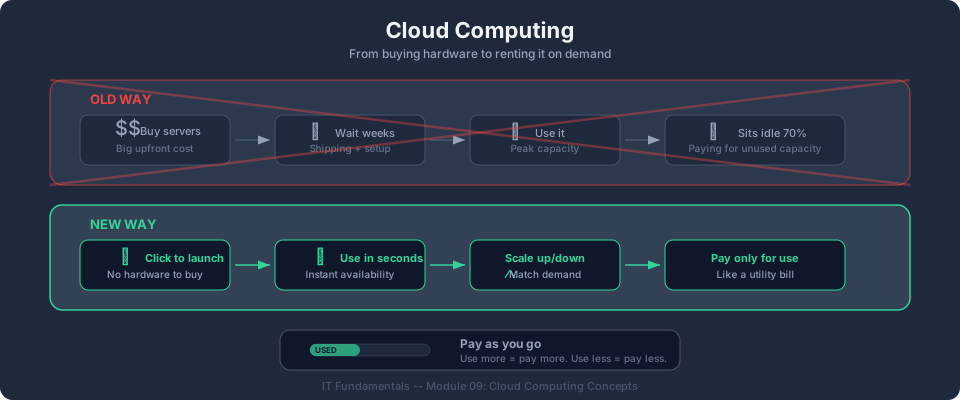
The Pay-As-You-Go Model
Traditional IT requires buying hardware upfront:
- Buy servers: $10,000–$100,000+
- Wait 4–8 weeks for delivery
- Set up in your own data center
- Pay for power, cooling, maintenance forever
- If you guessed wrong about capacity, buy more or waste money
Cloud computing flips this:
- Launch a server in 60 seconds
- Pay by the hour (or second) while it runs
- Turn it off when you don't need it; stop paying
- Scale up instantly if demand increases
- No upfront cost, no long-term commitment
This is the shift from Capital Expenditure (CapEx) to Operational Expenditure (OpEx): a concept you'll explore deeply in Bootcamp Module 01.
Cloud Service Models (Preview)
Cloud providers offer services at different levels of abstraction:
| Model | You Manage | Provider Manages | AWS Example |
|---|---|---|---|
| IaaS (Infrastructure) | OS, apps, data | Hardware, networking, virtualization | EC2 |
| PaaS (Platform) | Apps, data | Everything below | Elastic Beanstalk |
| SaaS (Software) | Just use it | Everything | Gmail, Slack |
The more the provider manages, the less control you have, but the less work you do. Most of the AWS Bootcamp focuses on IaaS and PaaS.
Key Takeaways
- Servers are computers optimized to serve many users 24/7, managed remotely
- Virtualization lets one physical server run multiple isolated virtual machines
- Containers are lighter than VMs: they share the host OS and start in seconds
- Data centers are purpose-built facilities with redundant power, cooling, and security
- Cloud computing replaces upfront hardware purchases with pay-as-you-go pricing
- IaaS gives you the most control; SaaS gives you the least work
Bridge to the Bootcamp
Congratulations! You've completed the IT Fundamentals primer. You now have the foundational knowledge to start the AWS Bootcamp with confidence.
Explore Before You Start
Before jumping into Module 01, take 10 minutes to visit aws.amazon.com/free and explore the Free Tier page. Browse the categories of services. You don't need to create an account yet; just get familiar with the landscape.
Five Services You'll Build With
Here's a preview of the core AWS services you'll learn hands-on in the bootcamp:
| Service | What It Does |
|---|---|
| EC2 (Elastic Compute Cloud) | Launch virtual servers in the cloud. You pick the size, operating system, and location, and it runs in seconds. |
| S3 (Simple Storage Service) | Store any amount of data (files, images, backups) and access it from anywhere via a URL. |
| RDS (Relational Database Service) | Run managed databases (PostgreSQL, MySQL) without worrying about hardware, backups, or patching. |
| Lambda | Run code without managing servers. Just upload your function and AWS runs it when triggered. |
| VPC (Virtual Private Cloud) | Create your own isolated network in AWS, controlling exactly what traffic can enter and leave. |
What Comes Next
In Module 01 of the main bootcamp, you'll create your own AWS account and start using these services hands-on. Everything you've learned in IT Fundamentals (from how CPUs work to how HTTP requests travel the internet) will click into place when you see it in a real cloud environment.
You're ready. Let's go.
AWS Bootcamp: From Novice to Architect Author: Samuel Ogunti © 2026 Algorithmic Muse Technology LLC. All rights reserved.