
Learning Objectives
By the end of this module, you will be able to:
- Explain what a database is and why applications need persistent data storage
- Distinguish between relational databases (tables, rows, columns) and non-relational databases (key-value, document)
- Write basic SQL queries to create, read, update, and delete data (CRUD operations)
- Define primary keys, foreign keys, and indexes, and explain why they matter
- Describe the difference between structured, semi-structured, and unstructured data
- Explain what ACID properties mean and why transactions matter for data integrity
- Identify common database use cases and match them to the appropriate database type
Prerequisites
- Completion of Module 04: APIs and Programming Basics (understanding of data types and JSON)
- No prior database experience required
Estimated self-study time:
| Activity | Estimated Time |
|---|---|
| Reading | 15 to 20 minutes |
| Quiz | 5 to 10 minutes |
| Total | 25 to 35 minutes |
Concepts
What Is a Database?
A database is an organized collection of data that can be easily accessed, managed, and updated. Almost every application you use (email, social media, banking, shopping) stores its data in a database.
Without a database, an application would lose all its data every time it restarts. Databases provide persistence (data survives restarts), structure (data is organized), and concurrent access (multiple users can read and write simultaneously without corrupting data).
Files vs. Databases
You might wonder: why not just store data in files? For simple cases, files work fine. But as data grows, files become problematic:
| Aspect | Files | Databases |
|---|---|---|
| Finding specific data | Scan entire file | Instant lookup via indexes |
| Multiple users writing | Risk of corruption | Handled safely with transactions |
| Relationships between data | Manual, error-prone | Built-in with foreign keys |
| Querying patterns | Write custom code | Standard query language (SQL) |
| Data integrity | No guarantees | Enforced constraints |
Tip: Think of a database like a library with a catalog system. You can find any book instantly by title, author, or subject, without scanning every shelf. Files are like a pile of books on the floor.
Relational Databases (SQL)
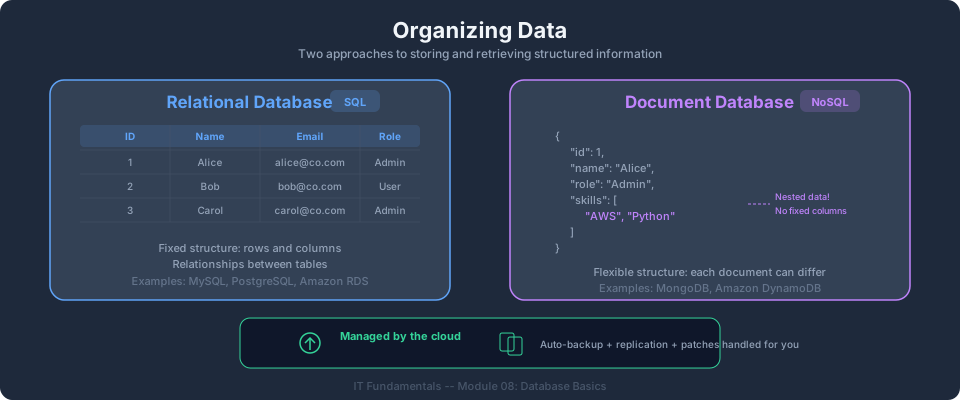
A relational database organizes data into tables (also called relations). Each table has:
- Columns (fields): define what data is stored (name, email, age)
- Rows (records): individual entries in the table
- Primary key: a unique identifier for each row (like a student ID)
Example: a students table
| id | name | enrolled_date | |
|---|---|---|---|
| 1 | Jane Doe | jane@example.com | 2026-05-23 |
| 2 | John Smith | john@example.com | 2026-05-23 |
| 3 | Maria Garcia | maria@example.com | 2026-05-23 |
The id column is the primary key: every row has a unique value.
SQL: Structured Query Language
SQL (pronounced "sequel" or "S-Q-L") is the standard language for interacting with relational databases. The four fundamental operations are called CRUD:
Create: insert new data:
INSERT INTO students (name, email, enrolled_date)
VALUES ('Jane Doe', 'jane@example.com', '2026-05-23');
Read: retrieve data:
SELECT name, email FROM students WHERE enrolled_date = '2026-05-23';
Update: modify existing data:
UPDATE students SET email = 'jane.doe@example.com' WHERE id = 1;
Delete: remove data:
DELETE FROM students WHERE id = 3;
Relationships and Foreign Keys
Real applications have related data. An e-commerce app has customers, orders, and products. These are connected:
- A customer places many orders
- Each order contains many products
A foreign key links one table to another:
CREATE TABLE orders (
  id INTEGER PRIMARY KEY,
  customer_id INTEGER REFERENCES customers(id),
  total_amount DECIMAL,
  order_date DATE
);
The customer_id column references the customers table; this is a foreign key. It ensures every order belongs to a valid customer.
Indexes
An index is like a book's index: it helps the database find data quickly without scanning every row. Without an index on email, finding a student by email requires checking all rows (slow). With an index, it's nearly instant.
CREATE INDEX idx_students_email ON students(email);
Check your understanding: You have a table with 10 million rows. A query searches by email address. Without an index, the database scans all 10 million rows. With an index, it finds the result in microseconds. Why would you not put an index on every column? (Answer: indexes use storage space and slow down writes, because the index must be updated on every insert/update.)
Non-Relational Databases (NoSQL)
Not all data fits neatly into tables with fixed columns. Non-relational databases (often called NoSQL) handle flexible, high-volume, or hierarchical data.
Key-Value Stores
The simplest NoSQL type. Each item is a key (unique identifier) and a value (any data).
Key: "user:1234"
Value: {"name": "Jane", "email": "jane@example.com", "preferences": {...}}
Use cases: caching, session storage, user preferences. AWS example: Amazon DynamoDB, Amazon ElastiCache.
Document Databases
Store data as JSON-like documents. Each document can have different fields; no fixed schema required.
{
  "orderId": "ORD-9876",
  "customer": "Jane Doe",
  "items": [
    {"product": "AWS Certification Guide", "qty": 1, "price": 45.00},
    {"product": "Cloud Architecture Poster", "qty": 2, "price": 15.00}
  ],
  "status": "shipped"
}
Use cases: content management, catalogs, user profiles. AWS example: Amazon DocumentDB, DynamoDB.
When to Use Relational vs. Non-Relational
| Factor | Relational (SQL) | Non-Relational (NoSQL) |
|---|---|---|
| Data structure | Fixed schema, relationships | Flexible schema, nested data |
| Query patterns | Complex joins, aggregations | Simple lookups by key |
| Scale | Vertical (bigger server) | Horizontal (more servers) |
| Consistency | Strong (ACID) | Eventual (in many cases) |
| Best for | Financial data, inventory, reporting | Real-time apps, IoT, gaming |
Tip: In the AWS Bootcamp (Module 06), you'll use Amazon RDS (relational) and Amazon DynamoDB (non-relational). Understanding when to choose each is a key architect skill.
Data Types and Formats
Structured Data
Data with a fixed schema: every record has the same fields. Examples: spreadsheets, SQL tables, CSV files.
Semi-Structured Data
Data with some organization but flexible fields. Examples: JSON, XML, YAML. Each record can have different fields.
Unstructured Data
No predefined structure. Examples: images, videos, PDFs, log files. Stored as-is, often in object storage (like S3).
ACID Properties
Relational databases guarantee four properties for transactions:
- Atomicity: A transaction either completes entirely or not at all. If transferring money between accounts, both the debit and credit happen, or neither does.
- Consistency: Data always moves from one valid state to another. Constraints (like "balance cannot be negative") are always enforced.
- Isolation: Concurrent transactions don't interfere with each other. Two people buying the last item in stock won't both succeed.
- Durability: Once a transaction is committed, it survives crashes. Your data is safe even if the power goes out.
Check your understanding: A banking app transfers $100 from Account A to Account B. The debit from A succeeds, but the system crashes before crediting B. With ACID, what happens? (Answer: the entire transaction rolls back; A gets its $100 back. Without ACID, the $100 would be lost.)
Key Takeaways
- Databases provide persistent, organized, concurrent data storage for applications
- Relational databases use tables with fixed schemas, SQL for queries, and foreign keys for relationships
- Non-relational databases offer flexible schemas and horizontal scaling for high-volume workloads
- SQL CRUD operations (INSERT, SELECT, UPDATE, DELETE) are the foundation of data manipulation
- ACID properties guarantee data integrity in relational databases
- In the AWS Bootcamp, you'll use RDS (relational) and DynamoDB (non-relational); this module gives you the conceptual foundation
AWS Bootcamp: From Novice to Architect Author: Samuel Ogunti © 2026 Algorithmic Muse Technology LLC. All rights reserved.