
AWS Lambda for Beginners: Serverless Guide
Serverless is one of those buzzwords that makes people's eyes glaze over. It sounds like marketing nonsense. There are still servers involved, so why call it serverless? Let me clear that up, and by the end of this article you will understand exactly what Lambda does, when to use it, when not to use it, and how to deploy your first function.
Prerequisites: You should understand IAM basics and cloud computing fundamentals before starting this article.
What You Will Learn
By the end of this article, you will be able to:
- Explain how Lambda's execution lifecycle works, including cold starts, warm invocations, and scaling behavior
- Implement a Lambda function from the CLI, configure its triggers, and verify it runs correctly in CloudWatch Logs
- Evaluate whether Lambda is the right compute choice for a given workload based on runtime limits, traffic patterns, and cost
- Configure provisioned concurrency, layers, and environment variables to optimize Lambda performance
- Design event-driven architectures using Lambda with S3, SQS, API Gateway, and DynamoDB
What Does "Serverless" Actually Mean?
Serverless does not mean "no servers." It means "not your problem." When you use Lambda, AWS manages the servers, the operating system, the runtime, the scaling, and the patching. You write a function, upload it, and AWS runs it when something triggers it.
The contract is simple:
- You write the code. A function that takes an input and produces an output.
- You define the trigger. An API call, an S3 upload, a schedule, a queue message.
- AWS does everything else. Provisioning, scaling, monitoring, patching, retiring hardware.
You never SSH into a Lambda. You never choose an instance size. You never worry about how many servers are running. You just write code and define when it should run.
The Serverless Spectrum
Lambda is not the only serverless service. AWS has an entire spectrum of serverless offerings:
| Service | What It Does | Serverless Equivalent Of |
|---|---|---|
| Lambda | Run code | EC2 instances |
| API Gateway | HTTP routing | ALB / nginx |
| DynamoDB | Database | RDS |
| S3 | Object storage | EBS / EFS |
| SQS/SNS | Messaging | RabbitMQ / Kafka |
| Step Functions | Workflow orchestration | Airflow / custom code |
| EventBridge | Event routing | Custom event bus |
| Aurora Serverless | Relational database | RDS (auto-scaling) |
When people talk about "serverless architecture," they mean combining several of these services so that no component requires server management.
How Lambda Works
When you create a Lambda function, you upload your code (or point to a container image) and configure a few settings:
- Runtime: The language your code is written in (Python, Node.js, Java, Go, .NET, Ruby, or a custom runtime)
- Handler: The specific function in your code that Lambda calls
- Memory: Between 128 MB and 10,240 MB (CPU scales proportionally)
- Timeout: Between 1 second and 15 minutes
- Trigger: What causes the function to run
Here is the simplest possible Lambda function in Python:
def handler(event, context):
    name = event.get("name", "World")
    return {
        "statusCode": 200,
        "body": f"Hello, {name}!"
    }
That is it. The event parameter contains the input data (like the HTTP request body or the S3 event details). The context parameter contains metadata about the invocation (like the remaining execution time).
The Event Object
The event object looks different depending on what triggered the Lambda. Here are the most common formats:
API Gateway trigger:
{
  "httpMethod": "POST",
  "path": "/users",
  "headers": {"Content-Type": "application/json"},
  "body": "{\"name\": \"Jane\", \"email\": \"jane@example.com\"}"
}
S3 trigger:
{
  "Records": [{
    "s3": {
      "bucket": {"name": "my-uploads"},
      "object": {"key": "photos/image.jpg", "size": 1024}
    }
  }]
}
SQS trigger:
{
  "Records": [{
    "body": "{\"orderId\": \"123\", \"amount\": 99.99}",
    "messageId": "msg-abc123",
    "receiptHandle": "AQEBz..."
  }]
}
The Context Object
The context parameter gives you metadata about the current invocation:
def handler(event, context):
    print(f"Function name: {context.function_name}")
    print(f"Memory limit: {context.memory_limit_in_mb} MB")
    print(f"Time remaining: {context.get_remaining_time_in_millis()} ms")
    print(f"Request ID: {context.aws_request_id}")

    # Use remaining time to avoid timeouts
    if context.get_remaining_time_in_millis() < 5000:
        return {"statusCode": 500, "body": "Running out of time!"}
The Lambda Execution Lifecycle
Understanding how Lambda runs your code helps you write better functions and avoid common mistakes.
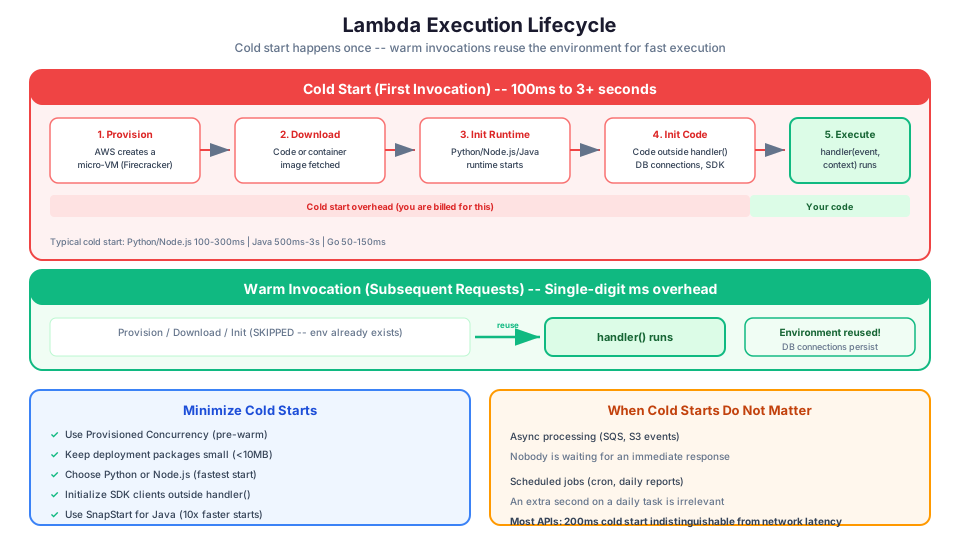
1. Cold Start (First Invocation)
When Lambda receives a request and no existing execution environment is available:
- AWS provisions a new execution environment (a lightweight micro-VM using Firecracker)
- Downloads your code or container image
- Initializes the runtime (Python, Node.js, etc.)
- Runs any initialization code outside your handler function
- Executes your handler function
This entire process takes anywhere from 100 milliseconds to several seconds, depending on your runtime and package size. This delay is called a cold start.
2. Warm Invocation (Subsequent Requests)
After the first invocation, Lambda keeps your execution environment alive for a while (typically 5-15 minutes of inactivity). Subsequent requests reuse this environment:
- Executes your handler function
That is it. No provisioning, no downloading, no initialization. Warm invocations are fast, usually single-digit milliseconds of overhead.
3. Scaling
If multiple requests arrive simultaneously, Lambda creates multiple execution environments in parallel. Each environment handles one request at a time. Lambda can scale to thousands of concurrent executions within seconds.
Lambda Triggers: What Invokes Your Function?
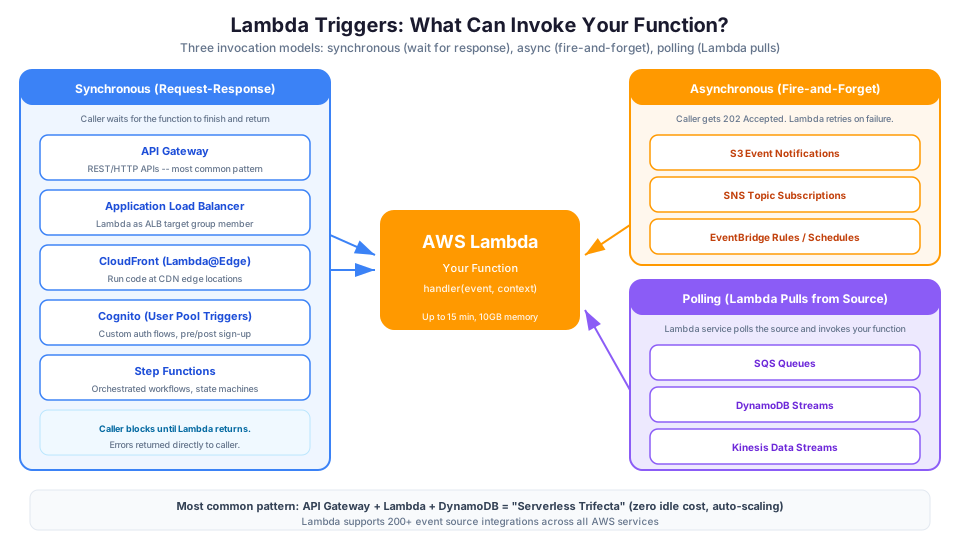
Lambda supports three invocation models:
Synchronous (Request-Response)
The caller waits for the function to complete and return a result.
- API Gateway
- Application Load Balancer
- CloudFront (Lambda@Edge)
- Cognito (User Pool Triggers)
- Step Functions
Asynchronous (Fire-and-Forget)
The caller gets a 202 response immediately. Lambda handles retries.
- S3 event notifications
- SNS topic subscriptions
- EventBridge rules and schedules
- CloudWatch Logs
- SES (email receiving)
Polling (Event Source Mapping)
Lambda polls the source and invokes your function with batches of records.
- SQS queues
- DynamoDB Streams
- Kinesis Data Streams
- Amazon MQ
- Apache Kafka (MSK)
Cold Starts: The Full Picture
Cold starts are the most discussed topic in serverless. Let us put them in perspective.
How Long Are Cold Starts?
| Runtime | Typical Cold Start | With VPC |
|---|---|---|
| Python | 100-300 ms | 200-500 ms |
| Node.js | 100-300 ms | 200-500 ms |
| Go | 50-150 ms | 150-300 ms |
| Java | 500 ms - 3 seconds | 1-5 seconds |
| .NET | 300 ms - 1 second | 500 ms - 2 seconds |
Note: VPC cold starts used to add 10+ seconds. AWS improved this dramatically with Hyperplane ENI technology. It is now much faster but still adds some overhead.
When Cold Starts Matter
- Synchronous APIs where users are waiting. If a user clicks a button and waits for a response, an extra 500ms cold start is noticeable.
- Latency-sensitive applications. Real-time gaming, financial trading, or video processing where milliseconds count.
When Cold Starts Do Not Matter
- Asynchronous processing. If Lambda is processing an SQS message or an S3 event, nobody is waiting for an immediate response. An extra second is irrelevant.
- Scheduled tasks. A daily report generator does not care about startup time.
- Most APIs. For many web applications, a 200ms cold start is indistinguishable from normal network latency. Users will not notice.
How to Minimize Cold Starts
- Use Provisioned Concurrency. AWS keeps a pool of pre-warmed execution environments ready. This eliminates cold starts entirely but costs money even when idle.
- Keep deployment packages small. Fewer files to download means faster cold starts. Remove unused dependencies.
- Choose a lightweight runtime. Python and Node.js have the fastest cold starts. Java has the slowest (but the best sustained throughput).
- Initialize outside the handler. Database connections, SDK clients, and configuration loaded outside the handler function persist between invocations.
- Use SnapStart for Java. Reduces Java cold starts by up to 10x by caching the initialized state.
import boto3
import os

# This runs ONCE during cold start, then persists across warm invocations
dynamodb = boto3.resource("dynamodb")
table = dynamodb.Table(os.environ["TABLE_NAME"])

# This also persists -- load configuration once
CONFIG = {
    "max_retries": 3,
    "timeout": 30
}

def handler(event, context):
    # This runs on EVERY invocation
    # The table connection is already established
    # CONFIG is already loaded
    response = table.get_item(Key={"id": event["id"]})
    return response["Item"]
Provisioned Concurrency Example
# Keep 5 environments always warm
aws lambda put-provisioned-concurrency-config \
  --function-name my-api-function \
  --qualifier prod \
  --provisioned-concurrent-executions 5

# Check provisioned concurrency status
aws lambda get-provisioned-concurrency-config \
  --function-name my-api-function \
  --qualifier prod
Lambda Limits You Need to Know
| Limit | Value |
|---|---|
| Maximum execution time | 15 minutes |
| Maximum memory | 10,240 MB |
| Maximum deployment package (zipped) | 50 MB (direct upload) or 250 MB (from S3) |
| Maximum unzipped deployment size | 250 MB |
| Maximum concurrent executions | 1,000 (default, can be increased) |
| Maximum payload (synchronous) | 6 MB |
| Maximum payload (asynchronous) | 256 KB |
| Ephemeral storage (/tmp) | 512 MB to 10,240 MB |
| Maximum environment variables | 4 KB total |
| Maximum layers | 5 per function |
| Maximum layer size (unzipped) | 250 MB total |
The 15-minute timeout is the hard limit that most often determines whether Lambda is the right choice.
Working Around Limits
15-minute timeout: Use Step Functions to orchestrate multiple Lambda invocations for long-running workflows.
6 MB payload: For large responses, write the result to S3 and return a pre-signed URL.
250 MB package size: Use container images (up to 10 GB) or Lambda Layers to share common code.
# Create a Lambda Layer with shared dependencies
zip -r layer.zip python/
aws lambda publish-layer-version \
  --layer-name shared-libs \
  --zip-file fileb://layer.zip \
  --compatible-runtimes python3.12

# Attach the layer to your function
aws lambda update-function-configuration \
  --function-name my-function \
  --layers arn:aws:lambda:us-east-1:123456789012:layer:shared-libs:1
When to Use Lambda
Lambda is the right choice when your workload matches these characteristics:
Short-lived tasks. Each invocation completes in seconds or minutes, not hours.
Event-driven processing. Something happens (file uploaded, message received, API called, timer fired) and you need to respond.
Variable traffic. Your load is spiky, unpredictable, or has long periods of zero traffic. Lambda scales to zero and costs nothing when idle.
Stateless operations. Each invocation is independent. It does not rely on data from a previous invocation being in memory.
Real-World Lambda Use Cases
- API backends. API Gateway triggers Lambda to handle HTTP requests. This is the most common Lambda pattern.
- File processing. S3 triggers Lambda when a file is uploaded. Lambda resizes images, transcodes video thumbnails, parses CSVs, or scans documents.
- Stream processing. Kinesis or DynamoDB Streams trigger Lambda to process each record in near real-time.
- Scheduled jobs. EventBridge triggers Lambda on a cron schedule to generate reports, clean up old data, or send digest emails.
- Event routing. Lambda processes events from SQS, SNS, or EventBridge to transform data and route it to downstream services.
- Authentication hooks. Cognito triggers Lambda during sign-up or sign-in to customize the authentication flow.
- IoT data processing. IoT Core triggers Lambda for each device message to transform, validate, and route data.
- ChatOps. Lambda handles Slack commands, processes webhook events, and posts automated updates.
The Serverless API Pattern
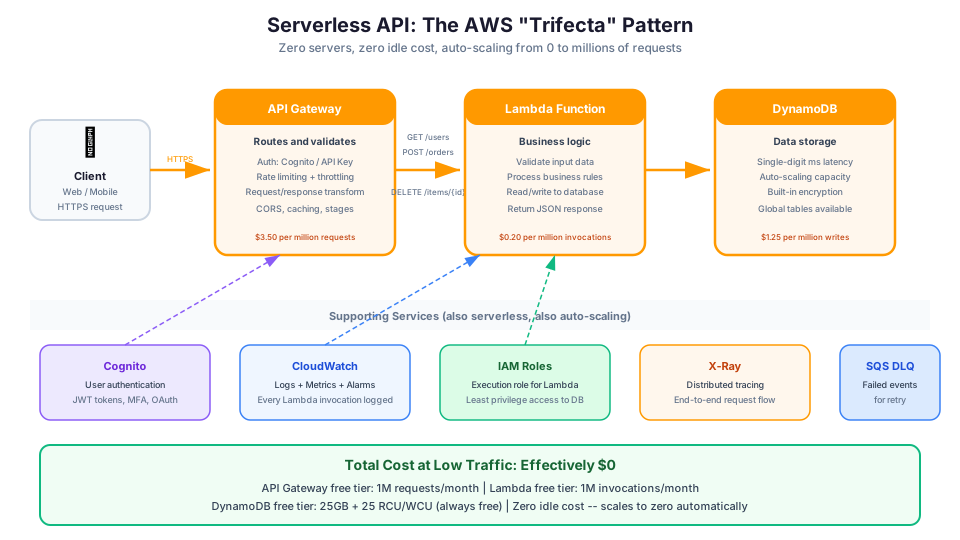
The most common Lambda architecture is the "serverless trifecta": API Gateway + Lambda + DynamoDB. Here is a complete example:
import json
import boto3
import os
from datetime import datetime

dynamodb = boto3.resource('dynamodb')
table = dynamodb.Table(os.environ['TABLE_NAME'])

def handler(event, context):
    method = event['httpMethod']
    path = event['path']

    if method == 'GET' and path == '/users':
        return get_all_users()
    elif method == 'GET' and path.startswith('/users/'):
        user_id = path.split('/')[-1]
        return get_user(user_id)
    elif method == 'POST' and path == '/users':
        body = json.loads(event['body'])
        return create_user(body)
    elif method == 'DELETE' and path.startswith('/users/'):
        user_id = path.split('/')[-1]
        return delete_user(user_id)
    else:
        return response(404, {'error': 'Not found'})

def get_user(user_id):
    result = table.get_item(Key={'userId': user_id})
    if 'Item' in result:
        return response(200, result['Item'])
    return response(404, {'error': 'User not found'})

def get_all_users():
    result = table.scan(Limit=100)
    return response(200, result['Items'])

def create_user(body):
    item = {
        'userId': body['userId'],
        'name': body['name'],
        'email': body['email'],
        'createdAt': datetime.utcnow().isoformat()
    }
    table.put_item(Item=item)
    return response(201, item)

def delete_user(user_id):
    table.delete_item(Key={'userId': user_id})
    return response(204, None)

def response(status_code, body):
    return {
        'statusCode': status_code,
        'headers': {
            'Content-Type': 'application/json',
            'Access-Control-Allow-Origin': '*'
        },
        'body': json.dumps(body, default=str) if body else ''
    }
When NOT to Use Lambda
Lambda is not a silver bullet. Here are situations where other services are better:
Long-running processes. If your task takes more than 15 minutes, Lambda will timeout. Use EC2, ECS, or AWS Step Functions to orchestrate multiple Lambda invocations.
Consistent high throughput. If you are running millions of invocations per hour, 24 hours a day, EC2 or ECS with reserved capacity is likely cheaper. Lambda's per-invocation pricing adds up at sustained high volume.
Stateful applications. If your application needs to maintain state in memory between requests (like a WebSocket server or a game server), Lambda's execution model does not support this well.
GPU workloads. Machine learning inference, video encoding, or 3D rendering that requires GPU access. Lambda does not offer GPU instances.
Applications requiring specific OS configurations. If you need custom kernel modules, specific system libraries, or root access, use EC2 or ECS.
Hands-On: Your First Lambda Function from the CLI
Let us create, test, and invoke a Lambda function using only the AWS CLI.
Step 1: Create the Function Code
Create a file called lambda_function.py:
import json

def handler(event, context):
    name = event.get("name", "World")
    message = f"Hello, {name}! Welcome to serverless computing."

    print(f"Processing request for: {name}")

    return {
        "statusCode": 200,
        "body": json.dumps({"message": message})
    }
Step 2: Zip the Code
zip function.zip lambda_function.py
Step 3: Create an IAM Role for Lambda
aws iam create-role \
  --role-name my-lambda-role \
  --assume-role-policy-document '{
    "Version": "2012-10-17",
    "Statement": [{
      "Effect": "Allow",
      "Principal": {"Service": "lambda.amazonaws.com"},
      "Action": "sts:AssumeRole"
    }]
  }'

aws iam attach-role-policy \
  --role-name my-lambda-role \
  --policy-arn arn:aws:iam::aws:policy/service-role/AWSLambdaBasicExecutionRole
Step 4: Create the Function
aws lambda create-function \
  --function-name my-first-function \
  --runtime python3.12 \
  --role arn:aws:iam::YOUR_ACCOUNT_ID:role/my-lambda-role \
  --handler lambda_function.handler \
  --zip-file fileb://function.zip \
  --timeout 30 \
  --memory-size 256
Step 5: Invoke the Function
aws lambda invoke \
  --function-name my-first-function \
  --payload '{"name": "Sam"}' \
  --cli-binary-format raw-in-base64-out \
  response.json

cat response.json
You should see:
{"statusCode": 200, "body": "{\"message\": \"Hello, Sam! Welcome to serverless computing.\"}"}
Step 6: Update the Function Code
# Edit lambda_function.py, re-zip, then:
zip function.zip lambda_function.py

aws lambda update-function-code \
  --function-name my-first-function \
  --zip-file fileb://function.zip
Step 7: Add Environment Variables
aws lambda update-function-configuration \
  --function-name my-first-function \
  --environment '{"Variables": {"TABLE_NAME": "my-users", "STAGE": "dev"}}'
Step 8: Check the Logs
aws logs describe-log-groups \
  --log-group-name-prefix /aws/lambda/my-first-function

aws logs tail /aws/lambda/my-first-function --since 5m
Step 9: Clean Up
aws lambda delete-function --function-name my-first-function
aws iam detach-role-policy \
  --role-name my-lambda-role \
  --policy-arn arn:aws:iam::aws:policy/service-role/AWSLambdaBasicExecutionRole
aws iam delete-role --role-name my-lambda-role
Lambda Best Practices
1. Use Environment Variables for Configuration
import os

TABLE_NAME = os.environ['TABLE_NAME']
API_KEY = os.environ['API_KEY']
STAGE = os.environ.get('STAGE', 'dev')
Never hardcode table names, API keys, or endpoints. Use environment variables so you can change them without redeploying code.
2. Keep Functions Small and Focused
Each function should do one thing. If your function is doing five different things based on the input, break it into five functions.
3. Use Structured Logging
import json
import logging

logger = logging.getLogger()
logger.setLevel(logging.INFO)

def handler(event, context):
    logger.info(json.dumps({
        "action": "process_order",
        "orderId": event.get("orderId"),
        "requestId": context.aws_request_id
    }))
4. Handle Errors Gracefully
def handler(event, context):
    try:
        result = process_order(event)
        return response(200, result)
    except ValidationError as e:
        logger.warning(f"Validation failed: {e}")
        return response(400, {"error": str(e)})
    except Exception as e:
        logger.error(f"Unexpected error: {e}", exc_info=True)
        return response(500, {"error": "Internal server error"})
5. Set Appropriate Timeouts
Do not leave the default 3-second timeout. Set it to slightly more than your expected execution time:
- API handlers: 10-30 seconds
- File processing: 60-300 seconds
- Batch jobs: 300-900 seconds
Lambda Pricing
Lambda pricing is straightforward and generous for learners:
| Component | Price | Free Tier |
|---|---|---|
| Requests | $0.20 per 1 million | 1 million/month (always free) |
| Duration | $0.0000166667 per GB-second | 400,000 GB-seconds/month (always free) |
What does this mean in practice? If your function uses 256 MB of memory and runs for 200 milliseconds, each invocation costs $0.000000833. You would need to invoke it 1.2 million times to spend one dollar (beyond the free tier).
For most learners and small projects, Lambda is effectively free.
Cost Comparison at Scale
| Monthly Invocations | Avg Duration | Memory | Monthly Cost |
|---|---|---|---|
| 1 million | 200ms | 256 MB | ~$0.20 |
| 10 million | 200ms | 256 MB | ~$2.80 |
| 100 million | 200ms | 256 MB | ~$28.00 |
| 100 million | 200ms | 1024 MB | ~$53.00 |
| 100 million | 1 second | 1024 MB | ~$187.00 |
Lambda vs Other Compute Services
| Factor | Lambda | EC2 | ECS/Fargate |
|---|---|---|---|
| Startup | Milliseconds | Minutes | Seconds |
| Max runtime | 15 minutes | Unlimited | Unlimited |
| Scaling | Automatic, instant | Auto Scaling (minutes) | Auto Scaling (seconds) |
| Idle cost | Zero | Pay for running instances | Pay for running tasks |
| Management | None | Full OS management | Container management |
| Best for | Event-driven, variable load | Long-running, steady load | Microservices, complex apps |
How This Shows Up in Architecture Decisions
- API Gateway + Lambda + DynamoDB: The "serverless trifecta." A fully serverless web API with zero idle cost.
- S3 + Lambda: Automatic file processing triggered by uploads.
- SQS + Lambda: Reliable async processing with automatic retry.
- Step Functions + Lambda: Orchestrating multiple Lambda functions into complex workflows that exceed 15 minutes.
- CloudFront + Lambda@Edge: Running code at edge locations for URL rewrites, header manipulation, or authentication.
- DynamoDB Streams + Lambda: React to database changes in real-time.
- EventBridge + Lambda: Scheduled tasks and event-driven automation.
Tips for Getting Started
- Start with Python or Node.js. They have the fastest cold starts and the most Lambda examples online.
- Use the AWS Console first. The inline code editor is great for learning. Move to the CLI and IaC tools once you are comfortable.
- Read the CloudWatch Logs. Every
print()statement in your function shows up in CloudWatch Logs. This is your primary debugging tool. - Keep functions small and focused. Each function should do one thing. If your function is doing five different things based on the input, break it into five functions.
- Use environment variables for configuration. Do not hardcode database endpoints, table names, or API keys. Use environment variables so you can change them without redeploying code.
- Set up X-Ray tracing. It helps you understand performance bottlenecks across your entire serverless application.
- Always set a DLQ or on-failure destination. You need to know when invocations fail.
Troubleshooting Common Lambda Issues
| Problem | Likely Cause | How to Fix It |
|---|---|---|
| Function timeout | Execution exceeds the configured timeout value, often because of a slow downstream call or large payload processing | Increase the timeout in your function configuration. Check CloudWatch Logs for where time is being spent. If the function genuinely needs more than 15 minutes, consider Step Functions to orchestrate multiple invocations. |
| Permission denied invoking from trigger | The event source (S3, API Gateway, SQS) does not have a resource-based policy allowing it to invoke your function, or the function's execution role lacks permission to read from the source | Add a resource-based policy with aws lambda add-permission granting the trigger service invoke access. Verify the execution role has the required permissions for the event source (for example, sqs:ReceiveMessage for SQS triggers). |
| Import error for dependencies | Your deployment package is missing a required library, or the library was built for a different architecture (x86 vs ARM) or operating system (macOS vs Amazon Linux) | Install dependencies in a Docker container that matches the Lambda runtime (public.ecr.aws/lambda/python:3.12), then zip the result. Alternatively, use Lambda Layers to package shared dependencies separately. |
Hands-On Challenge
Deploy a complete Lambda-backed workflow and verify each step works:
- Create and deploy a Lambda function from the CLI that accepts a JSON payload with a
namefield and returns a greeting - Add an S3 trigger so the function fires automatically when a file is uploaded to a specific bucket prefix
- Verify the invocation in CloudWatch Logs by confirming the function's
print()output appears within 60 seconds of the upload - Add an environment variable (such as
GREETING_PREFIX) and update the function to use it, then invoke again to confirm the change - Clean up all resources (function, role, bucket notification) and verify nothing remains using
aws lambda list-functionsandaws iam list-roles
Pricing note: Costs cited in this article are for us-east-1 and were verified in May 2026. Check the AWS Pricing Calculator for current rates in your Region.
The best way to learn Lambda is to build something real with it. Not a Hello World function. Something that solves an actual problem: a webhook handler, a file processor, a scheduled cleanup job. Deploy it, watch the CloudWatch logs, observe the cold starts, and iterate. You will learn more in one afternoon of building than in a week of reading.
Build it yourself: This topic is covered hands-on in Module 17: Lambda of our AWS Bootcamp, where you build a complete serverless API from scratch.