
AWS Well-Architected Framework: Six Pillars
The AWS Well-Architected Framework is one of those things that sounds like corporate jargon until you actually understand it. Then you realize it is one of the most practical tools in cloud architecture, a structured way to evaluate whether your infrastructure is actually good.
AWS built this framework after reviewing thousands of customer architectures. They noticed the same mistakes over and over, and the same best practices that separated great architectures from fragile ones. They packaged those lessons into six pillars, and now they give the whole thing away for free.
If you are studying for the Solutions Architect Associate exam, this framework is foundational. If you are interviewing for cloud roles, being able to talk about these pillars fluently separates you from the other candidates. And if you are building real things on AWS, this is your architecture checklist.
Prerequisites: You should understand VPC networking and AWS security best practices before starting this article.
What You Will Learn
By the end of this article, you will be able to:
- Explain all six pillars of the Well-Architected Framework and identify which pillar applies to a given architecture concern
- Evaluate trade-offs between pillars (for example, reliability versus cost optimization) and articulate why a specific balance is appropriate for a workload
- Configure and run a Well-Architected Review using the AWS Well-Architected Tool, including applying specialized lenses
- Design an improvement plan that prioritizes high-risk findings from a review and maps them to specific AWS services
- Compare the pillar interactions that cause common architectural conflicts and describe how to resolve them
The Six Pillars at a Glance
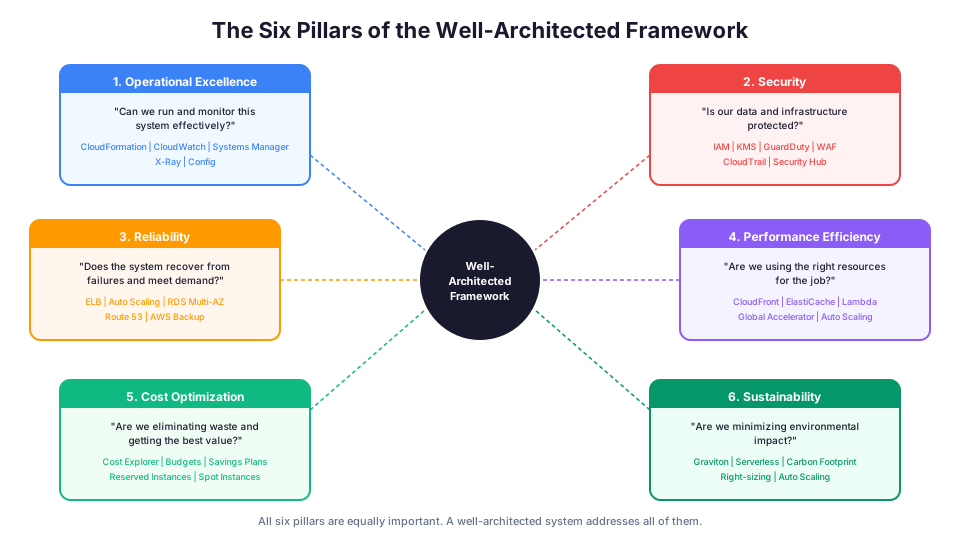
| Pillar | Core Question | Added |
|---|---|---|
| Operational Excellence | Can we run and monitor this system effectively? | Original |
| Security | Is our data and infrastructure protected? | Original |
| Reliability | Does the system recover from failures and meet demand? | Original |
| Performance Efficiency | Are we using the right resources for the job? | Original |
| Cost Optimization | Are we eliminating waste and getting the best value? | Original |
| Sustainability | Are we minimizing our environmental impact? | 2021 |
These pillars are not ranked. They are all equally important, and a well-architected system addresses all six. Let us break each one down.
Pillar 1: Operational Excellence
The question: How well can your team run, monitor, and improve this system?
This pillar is about operations, the day-to-day work of keeping systems running smoothly. Great architecture means nothing if your team cannot deploy changes safely, diagnose problems quickly, and learn from incidents.
Key principles:
-
Perform operations as code. Use CloudFormation, Terraform, or CDK to define your infrastructure. If someone has to click through the console to deploy, you have a problem. Manual steps introduce errors and make deployments scary.
-
Make frequent, small, reversible changes. Deploy small changes often rather than massive releases monthly. If something breaks, you know exactly which change caused it and you can roll back quickly.
-
Anticipate failure. Run game days where you intentionally break things. Inject failures in non-production environments. The best time to discover your monitoring gaps is when you are doing it on purpose.
-
Learn from operational events. After every incident, do a blameless post-mortem. Ask "what can we change about our system so this cannot happen again?" rather than "who messed up?"
-
Refine operations procedures frequently. Set aside time after each operational event to evaluate and improve your runbooks. The procedures that saved you six months ago might not match your current architecture.
AWS services that support this pillar:
| Service | How It Helps |
|---|---|
| CloudFormation / CDK | Infrastructure as code |
| AWS Config | Track configuration changes |
| CloudWatch | Monitoring and alerting |
| Systems Manager | Operational automation (patching, run commands) |
| X-Ray | Distributed tracing for debugging |
| CodePipeline | CI/CD automation |
| EventBridge | Event-driven automation |
Common anti-pattern: "We deploy to production by SSHing into the server and pulling the latest code from git." This is manual, error-prone, and unrepeatable. Use a CI/CD pipeline instead.
Operational Excellence in practice:
# Example: Use Systems Manager to patch all EC2 instances automatically
aws ssm create-maintenance-window \
  --name "Weekly-Patching" \
  --schedule "cron(0 2 ? * SUN *)" \
  --duration 3 \
  --cutoff 1 \
  --allow-unassociated-targets

# Example: Create a CloudWatch alarm for high error rates
aws cloudwatch put-metric-alarm \
  --alarm-name "API-High-Error-Rate" \
  --metric-name "5XXError" \
  --namespace "AWS/ApiGateway" \
  --statistic "Sum" \
  --period 300 \
  --threshold 10 \
  --comparison-operator "GreaterThanThreshold" \
  --evaluation-periods 2 \
  --alarm-actions "arn:aws:sns:us-east-1:123456789012:alerts"

# Example: Use Config rules to detect non-compliant resources
aws configservice put-config-rule \
  --config-rule '{
    "ConfigRuleName": "ec2-instances-in-vpc",
    "Source": {
      "Owner": "AWS",
      "SourceIdentifier": "INSTANCES_IN_VPC"
    }
  }'
Pillar 2: Security
The question: How do you protect your data, systems, and assets?
Security is not optional and it is not something you bolt on at the end. The Well-Architected Framework treats security as foundational, something you build in from the start.
Key principles:
-
Implement a strong identity foundation. Use IAM roles with least-privilege permissions. Never use the root account for daily work. Enable MFA everywhere.
-
Enable traceability. Log everything. CloudTrail captures every API call. VPC Flow Logs capture network traffic. CloudWatch Logs capture application output. You cannot investigate what you did not record.
-
Apply security at all layers. Do not just put a firewall at the edge and call it done. Use security groups on instances, NACLs on subnets, WAF on your load balancer, and encryption on your data. Defense in depth means attackers have to breach multiple controls.
-
Automate security best practices. Use AWS Config rules to automatically detect non-compliant resources. Use GuardDuty for threat detection. Use Security Hub to aggregate findings.
-
Protect data in transit and at rest. Enable encryption on every service that supports it. Use TLS for data in transit. Use KMS for managing encryption keys.
-
Keep people away from data. Reduce the need for direct access to data. Use dashboards and automated queries instead of giving engineers SSH access to production databases.
-
Prepare for security events. Have an incident response plan. Practice it. When a security event happens, you should know exactly who does what and in what order.
AWS services that support this pillar:
| Service | How It Helps |
|---|---|
| IAM | Identity and access management |
| CloudTrail | API activity logging |
| GuardDuty | Threat detection |
| Security Hub | Security posture dashboard |
| KMS | Encryption key management |
| WAF | Web application firewall |
| AWS Config | Compliance auditing |
| Inspector | Vulnerability scanning |
| Macie | Sensitive data discovery in S3 |
| VPC Flow Logs | Network traffic analysis |
Security in practice:
# Create an IAM role with least-privilege permissions for a Lambda function
aws iam create-role \
  --role-name lambda-process-orders \
  --assume-role-policy-document '{
    "Version": "2012-10-17",
    "Statement": [{
      "Effect": "Allow",
      "Principal": {"Service": "lambda.amazonaws.com"},
      "Action": "sts:AssumeRole"
    }]
  }'

# Attach only the permissions the function needs
aws iam put-role-policy \
  --role-name lambda-process-orders \
  --policy-name process-orders-policy \
  --policy-document '{
    "Version": "2012-10-17",
    "Statement": [
      {
        "Effect": "Allow",
        "Action": ["dynamodb:PutItem", "dynamodb:GetItem"],
        "Resource": "arn:aws:dynamodb:us-east-1:123456789012:table/Orders"
      },
      {
        "Effect": "Allow",
        "Action": ["logs:CreateLogGroup", "logs:CreateLogStream", "logs:PutLogEvents"],
        "Resource": "arn:aws:logs:us-east-1:123456789012:*"
      }
    ]
  }'

# Enable GuardDuty for threat detection
aws guardduty create-detector --enable
Common anti-pattern: An S3 bucket with public access enabled "because the frontend needs to read from it." Use CloudFront with an Origin Access Control instead.
Pillar 3: Reliability
The question: How does your system recover from failures and meet demand?
Reliability is about building systems that do what they are supposed to do, consistently, even when things go wrong. And things always go wrong eventually. Hardware fails. Software has bugs. Networks partition. The question is whether your system handles it gracefully or falls over.
Key principles:
-
Automatically recover from failure. Use health checks, Auto Scaling, and multi-AZ deployments so your system heals itself without human intervention.
-
Test recovery procedures. Actually test your failover. Terminate instances to see if Auto Scaling replaces them. Trigger a database failover to see if your application reconnects. If you have never tested it, it does not work.
-
Scale horizontally to increase availability. Instead of one massive server, run many small ones. If one fails, the others keep serving traffic. Load balancers distribute requests across healthy instances.
-
Stop guessing capacity. Use Auto Scaling to match capacity to demand automatically. Over-provisioning wastes money. Under-provisioning causes outages.
-
Manage change in automation. Infrastructure changes should go through the same CI/CD pipeline as application code. Reviewed, tested, and deployed automatically.
Reliability in practice:
# Create an Auto Scaling group that replaces unhealthy instances
aws autoscaling create-auto-scaling-group \
  --auto-scaling-group-name web-servers \
  --launch-template LaunchTemplateId=lt-0abc123,Version='$Latest' \
  --min-size 2 \
  --max-size 10 \
  --desired-capacity 2 \
  --vpc-zone-identifier "subnet-abc123,subnet-def456" \
  --health-check-type ELB \
  --health-check-grace-period 300 \
  --target-group-arns "arn:aws:elasticloadbalancing:us-east-1:123456789012:targetgroup/web/abc123"

# Create a target tracking scaling policy
aws autoscaling put-scaling-policy \
  --auto-scaling-group-name web-servers \
  --policy-name cpu-target-tracking \
  --policy-type TargetTrackingScaling \
  --target-tracking-configuration '{
    "PredefinedMetricSpecification": {
      "PredefinedMetricType": "ASGAverageCPUUsage"
    },
    "TargetValue": 70.0
  }'
AWS services that support this pillar:
| Service | How It Helps |
|---|---|
| Elastic Load Balancing | Distributes traffic across healthy instances |
| Auto Scaling | Adjusts capacity based on demand |
| RDS Multi-AZ | Automatic database failover |
| S3 | 99.999999999% durability (11 nines) |
| Route 53 | DNS failover between regions |
| AWS Backup | Centralized backup management |
| Fault Injection Service | Controlled chaos engineering |
Common anti-pattern: Running a single EC2 instance with no Auto Scaling group, no health checks, and no backups. When it dies (and it will), everything is gone.
Pillar 4: Performance Efficiency
The question: Are you using the right type and size of resources for your workload?
Performance efficiency means matching your resources to your needs, not just throwing bigger instances at every problem. Sometimes the answer is a bigger server. Sometimes it is a different architecture entirely.
Key principles:
-
Democratize advanced technologies. Use managed services instead of building from scratch. Do not run your own Kafka cluster when Amazon MSK exists. Do not manage your own search infrastructure when OpenSearch is available.
-
Go global in minutes. Use CloudFront for edge caching. Use Global Accelerator for improved network performance. Use multi-region architectures for latency-sensitive workloads.
-
Use serverless architectures. Lambda, DynamoDB, S3, and API Gateway eliminate the need to manage servers. You focus on your application logic while AWS handles the infrastructure.
-
Experiment more often. Cloud makes it easy to try different instance types, database engines, and architectures. Test a graviton instance against an x86 instance and compare price-performance. You can always switch back.
-
Consider mechanical sympathy. Understand how your resources work under the hood. A GP3 EBS volume might be fine for most workloads, but an IO2 volume is better for high-IOPS database workloads. Know the difference and choose accordingly.
Performance efficiency in practice:
# Compare Graviton vs x86 instance pricing and performance
# Graviton (t4g.large): $0.0672/hour
# x86 equivalent (t3.large): $0.0832/hour
# Graviton delivers ~20% better price-performance

# Right-size instances using Compute Optimizer recommendations
aws compute-optimizer get-ec2-instance-recommendations \
  --instance-arns "arn:aws:ec2:us-east-1:123456789012:instance/i-0abc123" \
  --query "instanceRecommendations[*].{Current:currentInstanceType,Recommendation:recommendationOptions[0].instanceType,Savings:recommendationOptions[0].projectedUsageMetrics}"
AWS services that support this pillar:
| Service | How It Helps |
|---|---|
| CloudFront | Edge caching for global performance |
| ElastiCache | In-memory caching (Redis, Memcached) |
| Global Accelerator | Improved network routing |
| Lambda | Serverless compute that scales automatically |
| Auto Scaling | Right-size capacity in real time |
| Compute Optimizer | Instance right-sizing recommendations |
Common anti-pattern: Using a relational database for everything, including simple key-value lookups. DynamoDB handles key-value access patterns at single-digit millisecond latency. Use the right tool for the job.
Pillar 5: Cost Optimization
The question: Are you eliminating waste and getting the best value?
This pillar is about making sure every dollar you spend on AWS is actually providing value. It is not about being cheap. It is about being intentional.
Key principles:
-
Implement cloud financial management. Assign cost ownership to teams. Use tags to track spending by project, team, and environment. Make costs visible to the people making architecture decisions.
-
Adopt a consumption model. Pay for what you use, not what you think you might use. Auto Scaling, serverless, and pay-per-request pricing all support this.
-
Measure overall efficiency. Track cost per transaction, cost per user, or cost per unit of business value. Raw spending numbers without context are meaningless.
-
Stop spending money on undifferentiated heavy lifting. If AWS offers a managed service, use it instead of running your own. The time your team spends patching, upgrading, and scaling infrastructure is time they are not spending on your product.
-
Analyze and attribute expenditure. Use Cost Explorer, Cost Allocation Tags, and AWS Budgets to understand where money goes and hold teams accountable.
Cost optimization in practice:
# Set up a budget alert to catch unexpected spending
aws budgets create-budget \
  --account-id 123456789012 \
  --budget '{
    "BudgetName": "Monthly-Total",
    "BudgetLimit": {"Amount": "500", "Unit": "USD"},
    "TimeUnit": "MONTHLY",
    "BudgetType": "COST"
  }' \
  --notifications-with-subscribers '[{
    "Notification": {
      "NotificationType": "ACTUAL",
      "ComparisonOperator": "GREATER_THAN",
      "Threshold": 80,
      "ThresholdType": "PERCENTAGE"
    },
    "Subscribers": [{
      "SubscriptionType": "EMAIL",
      "Address": "team@example.com"
    }]
  }]'

# Find unused EBS volumes (paying for storage with no attached instances)
aws ec2 describe-volumes \
  --filters "Name=status,Values=available" \
  --query "Volumes[*].{ID:VolumeId,Size:Size,Created:CreateTime}" \
  --output table

# Check for idle EC2 instances (low CPU over the past week)
aws cloudwatch get-metric-statistics \
  --namespace AWS/EC2 \
  --metric-name CPUUsage \
  --dimensions Name=InstanceId,Value=i-0abc123 \
  --start-time $(date -u -v-7d +%Y-%m-%dT%H:%M:%S) \
  --end-time $(date -u +%Y-%m-%dT%H:%M:%S) \
  --period 86400 \
  --statistics Average \
  --output table
Common cost optimization wins:
| Action | Typical Savings |
|---|---|
| Stop dev environments nights/weekends | 65-75% on dev EC2 |
| Switch to Graviton instances | 20-30% on compute |
| Use Reserved Instances (1-year) | 30-40% on steady-state |
| Use Savings Plans (3-year) | 50-60% on compute |
| Delete unused EBS volumes | 100% of that spend |
| Use S3 Intelligent-Tiering | 20-40% on storage |
Common anti-pattern: Running development environments 24/7 when developers only work 8 hours a day. That is 16 hours of waste every single day. Use Instance Scheduler or Lambda functions to start and stop dev environments automatically.
Pillar 6: Sustainability
The question: How can you minimize the environmental impact of your workloads?
This is the newest pillar, added in 2021. It focuses on reducing the environmental footprint of your cloud infrastructure.
Key principles:
-
Understand your impact. Use the AWS Customer Carbon Footprint Tool to see your emissions.
-
Establish sustainability goals. Set targets for reducing compute waste, storage bloat, and data transfer.
-
Maximize usage. An idle server is wasted energy. Right-size instances, use Auto Scaling, and choose serverless where possible.
-
Adopt newer, more efficient technologies. AWS Graviton processors deliver better performance per watt than x86. Serverless architectures run at higher usage rates because resources are shared.
-
Reduce downstream impact. Minimize data transfer, compress responses, and use caching to reduce the amount of processing needed.
Sustainability in practice:
# Check your carbon footprint in the AWS Console
# Navigate to: Billing > AWS Customer Carbon Footprint Tool

# Switch to Graviton instances for better performance per watt
# Before: t3.large (x86) - $0.0832/hour
# After:  t4g.large (Graviton) - $0.0672/hour
# Result: 20% cost savings + lower energy consumption

# Enable S3 Intelligent-Tiering to reduce storage waste
aws s3api put-bucket-intelligent-tiering-configuration \
  --bucket my-data-bucket \
  --id "AutoTiering" \
  --intelligent-tiering-configuration '{
    "Id": "AutoTiering",
    "Status": "Enabled",
    "Tierings": [
      {"Days": 90, "AccessTier": "ARCHIVE_ACCESS"},
      {"Days": 180, "AccessTier": "DEEP_ARCHIVE_ACCESS"}
    ]
  }'
How to Run a Well-Architected Review
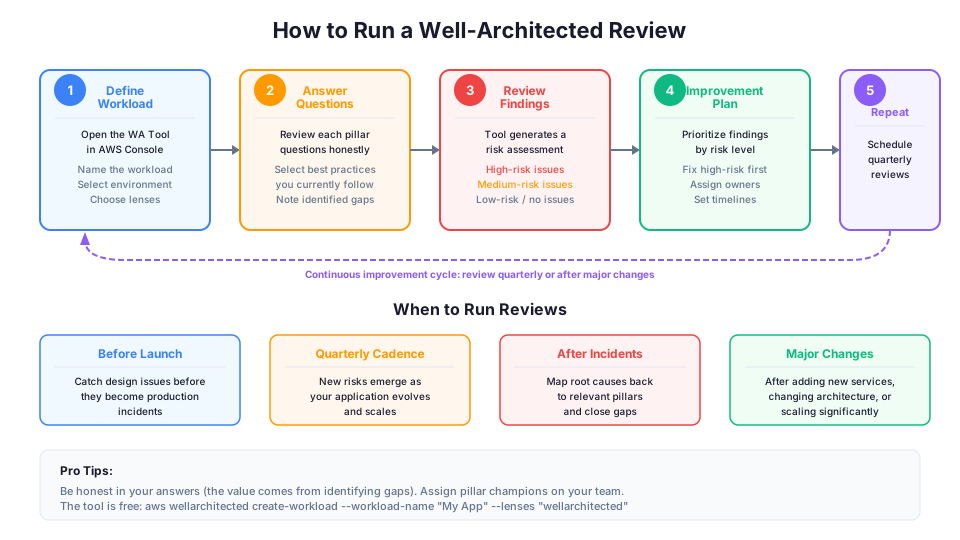
A Well-Architected Review is a structured conversation about your architecture using the framework as a guide. AWS provides a free tool for this.
Step 1: Open the Well-Architected Tool
In the AWS Console, search for "Well-Architected Tool" or navigate to it under the Architecture section. You can also access it through the CLI:
# List existing workloads in the Well-Architected Tool
aws wellarchitected list-workloads --region us-east-1

# Create a new workload for review
aws wellarchitected create-workload \
  --workload-name "My Production Application" \
  --description "Customer-facing web application" \
  --environment PRODUCTION \
  --review-owner "your-email@example.com" \
  --lenses "wellarchitected" \
  --aws-regions "us-east-1" \
  --region us-east-1
Step 2: Answer the questions
The tool presents questions for each pillar. For each question, you select which best practices you currently follow. Be honest. The value of the review comes from identifying gaps, not from pretending everything is perfect.
Example questions you will encounter:
- Operational Excellence: "How do you reduce defects, ease remediation, and improve flow into production?"
- Security: "How do you detect and investigate security events?"
- Reliability: "How does your system adapt to changes in demand?"
- Performance Efficiency: "How do you select your compute solution?"
- Cost Optimization: "How do you evaluate new services?"
- Sustainability: "How do you select regions to support your sustainability goals?"
Step 3: Review the findings
The tool generates a report highlighting high-risk and medium-risk issues. Each finding includes a description of the risk and recommended remediation steps.
# Get the list of findings for a workload
aws wellarchitected list-answers \
  --workload-id "abc123" \
  --lens-alias "wellarchitected" \
  --pillar-id "security" \
  --region us-east-1 \
  --query "AnswerSummaries[?Risk=='HIGH'].{Question:QuestionTitle,Risk:Risk}"
Step 4: Create an improvement plan
Prioritize findings by risk level. You do not need to fix everything at once. Start with the high-risk items that have the biggest blast radius.
Step 5: Schedule regular reviews
Run a review quarterly or after major architecture changes. Your architecture evolves over time, and new risks emerge as you add features and scale.
Why Interviewers Ask About This
When an interviewer asks "Tell me about the Well-Architected Framework," they are testing three things:
-
Do you understand the pillars? Being able to name all six and explain each one briefly shows foundational knowledge.
-
Can you apply them? The follow-up question is usually "How would you apply these principles to [specific scenario]?" Being able to connect abstract principles to concrete architecture decisions is what separates candidates.
-
Do you think holistically about architecture? Mentioning trade-offs between pillars (like the cost of higher reliability) shows senior-level thinking.
A strong interview answer sounds like this:
"The Well-Architected Framework has six pillars: operational excellence, security, reliability, performance efficiency, cost optimization, and sustainability. When I design a system, I use these as a checklist. For example, in my last project, we initially focused on reliability with multi-AZ deployments and Auto Scaling, but a Well-Architected Review revealed we were over-provisioned in our dev environments. We added instance scheduling to cut dev costs by 60% without impacting reliability."
That answer shows you know the framework, you have used it practically, and you understand the trade-offs. That is exactly what hiring managers want to hear.
A weak interview answer sounds like this:
"The Well-Architected Framework has six pillars. The first one is operational excellence, which is about operations. The second one is security, which is about security..."
This just lists the names without showing understanding. Any answer that reads like a Wikipedia article rather than practical experience will not impress.
How the Pillars Interact: Trade-Offs in Practice
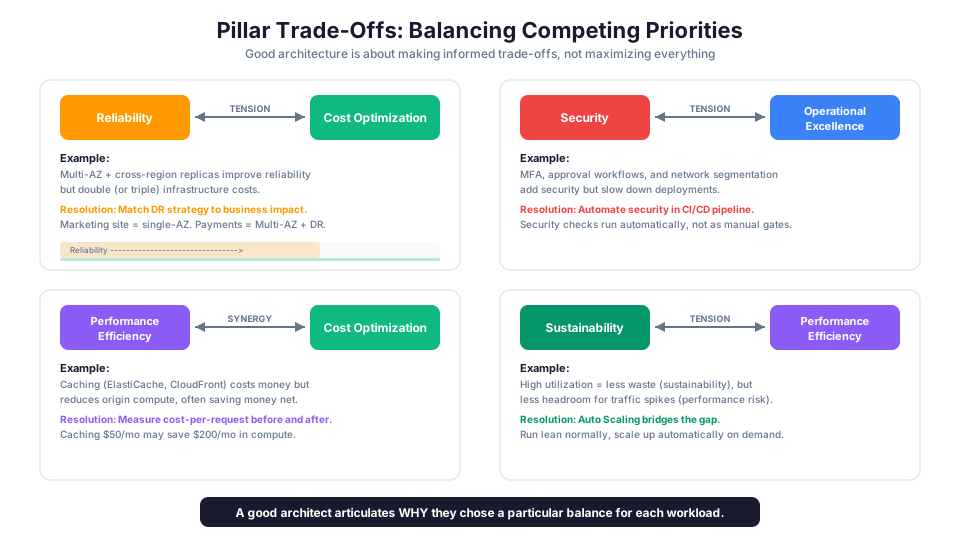
The six pillars are not independent. Improving one often affects others, sometimes positively, sometimes as a trade-off. Understanding these interactions is what separates entry-level knowledge from architectural thinking.
Reliability vs. Cost Optimization
Running Multi-AZ deployments and cross-region replicas improves reliability but increases cost. The question is always: what is the cost of downtime compared to the cost of redundancy? For a marketing website, single-AZ might be fine. For a payment processing system, Multi-AZ with cross-region DR is non-negotiable.
| Reliability Level | Architecture | Cost Multiplier | When It Makes Sense |
|---|---|---|---|
| Basic | Single AZ, no redundancy | 1x | Dev/test, non-critical |
| Standard | Multi-AZ, automated failover | ~1.3x | Most production workloads |
| High | Multi-region, warm standby | ~2x | Customer-facing, revenue-critical |
| Maximum | Multi-region, active-active | ~3x | Global, zero-downtime |
Security vs. Operational Excellence
Adding more security controls (MFA, approval workflows, network segmentation) makes the environment more secure but can slow down deployments and operations. The key is automating security checks so they happen automatically in the CI/CD pipeline rather than being manual gates that slow teams down.
Performance Efficiency vs. Cost Optimization
Caching with ElastiCache and CloudFront improves performance but adds cost for the caching infrastructure. However, the performance improvement often reduces the compute resources needed to handle the same traffic, so the net effect might actually save money. Always measure.
Sustainability vs. Performance Efficiency
Running at higher usage rates reduces waste (good for sustainability) but leaves less headroom for traffic spikes (risky for performance). Auto Scaling bridges this gap by running lean during normal times and scaling up when demand increases.
The Well-Architected Framework does not tell you to maximize every pillar simultaneously. It tells you to make informed, intentional trade-offs. A good architect can articulate why they chose a particular balance of cost, reliability, and performance for a given workload.
Well-Architected Lenses
Beyond the six general pillars, AWS provides specialized "lenses" for specific workload types:
| Lens | Focus Area | Key Addition |
|---|---|---|
| Serverless Lens | Best practices for Lambda, API Gateway, DynamoDB architectures | Cold start optimization, event-driven patterns |
| SaaS Lens | Multi-tenant application design and operations | Tenant isolation, onboarding automation |
| Machine Learning Lens | ML workload architecture on AWS | Model training, inference optimization |
| Data Analytics Lens | Data lakes, ETL pipelines, analytics platforms | Data governance, lake formation |
| Financial Services Lens | Compliance and security for financial workloads | Regulatory controls, audit trails |
| Healthcare Lens | HIPAA compliance and healthcare-specific patterns | PHI protection, access logging |
| Government Lens | FedRAMP and public sector requirements | Compliance frameworks, boundary controls |
| IoT Lens | Internet of Things device management and data | Edge processing, device security |
These lenses add industry-specific or technology-specific questions to the base Well-Architected Review. If you are working in one of these domains, the relevant lens provides targeted guidance that the general framework does not cover.
# List available lenses in the Well-Architected Tool
aws wellarchitected list-lenses \
  --region us-east-1 \
  --query "LensSummaries[*].{Name:LensName,Version:LensVersion}" \
  --output table

# Apply a specific lens to a workload
aws wellarchitected associate-lenses \
  --workload-id "abc123" \
  --lens-aliases "serverless" \
  --region us-east-1
Building a Culture of Well-Architected Reviews
The most effective teams do not treat Well-Architected Reviews as a one-time event. They build them into their regular rhythm.
Before launch: Run a review before deploying a new workload to production. This catches design issues before they become production incidents.
Quarterly reviews: Schedule reviews every quarter for existing production workloads. As your application evolves, new risks emerge that the original review did not cover.
After incidents: When something goes wrong, map the root cause back to the relevant pillar. "Our database ran out of storage" maps to Reliability and Operational Excellence. "Our S3 bucket was accidentally public" maps to Security. This connects abstract pillars to real consequences.
Shared ownership: Different team members should champion different pillars. Your security engineer focuses on the Security pillar. Your SRE focuses on Reliability and Operational Excellence. Your finance partner focuses on Cost Optimization. This distributes the cognitive load and builds expertise.
Sample Review Cadence
| Trigger | Review Type | Pillars to Focus On |
|---|---|---|
| New workload pre-launch | Full review (all 6 pillars) | All, with extra focus on Security |
| Quarterly check-in | Delta review (what changed) | Reliability, Cost Optimization |
| After a security incident | Targeted review | Security, Operational Excellence |
| After a performance issue | Targeted review | Performance Efficiency, Reliability |
| Budget review season | Targeted review | Cost Optimization, Sustainability |
| After major architecture change | Full review | All pillars |
How This Shows Up in Architecture Decisions
The Well-Architected Framework comes up constantly in architecture reviews and interviews. Here are the types of scenarios you will encounter:
- "Which pillar addresses the ability to recover from infrastructure failures?" (Reliability)
- "A company wants to ensure their architecture follows AWS best practices. What tool should they use?" (AWS Well-Architected Tool)
- "Which principle recommends using managed services to reduce operational burden?" (Operational Excellence, and also Performance Efficiency)
- "Which pillar focuses on protecting data in transit and at rest?" (Security)
- "Which pillar was added most recently to the framework?" (Sustainability, added in 2021)
- "A company wants to reduce their carbon footprint on AWS. Which pillar addresses this?" (Sustainability)
The key is not memorizing all the questions in the framework. It is understanding the pillars, knowing the key principles, and applying them to real scenarios.
Quick Reference for Architecture Discussions
| If the scenario mentions... | Think this pillar... |
|---|---|
| Monitoring, deployments, runbooks, automation | Operational Excellence |
| Encryption, IAM, logging, compliance | Security |
| Failover, scaling, backups, multi-AZ | Reliability |
| Caching, right-sizing, managed services | Performance Efficiency |
| Waste, budgets, reserved instances, tags | Cost Optimization |
| Carbon footprint, Graviton, usage | Sustainability |
Next Steps
One honest caveat: the Well-Architected Framework is not gospel. It is a set of recommendations, not rules. There are legitimate cases where you intentionally violate a best practice because the trade-off makes sense for your specific situation. A startup burning through runway should optimize for speed-to-market, not for multi-region redundancy. An internal tool with 10 users does not need the same operational excellence posture as a payment system.
The framework's value is not in following it blindly. It is in making your trade-offs conscious and documented, so that when something breaks at 2 AM, you can explain why that risk was accepted.
Start by running a Well-Architected Review on something you have already built. Even a simple personal project will reveal interesting insights. Just seeing the questions will change how you think about architecture.
Hands-On Challenge
Run a Well-Architected Review on a sample workload and produce an improvement plan:
- Create a workload in the AWS Well-Architected Tool for one of your existing projects (or use the bootcamp's serverless application)
- Answer the questions for all six pillars honestly, selecting only the best practices you currently follow
- Review the findings report and identify the top three high-risk items across all pillars
- Write a one-page improvement plan that maps each high-risk finding to a specific AWS service or configuration change, with an estimated level of effort (hours, days, weeks)
- Apply one specialized lens (Serverless, SaaS, or the lens most relevant to your workload) and note which additional questions it surfaces beyond the base framework
Build it yourself: This topic is covered hands-on in Module 69: Well-Architected Framework of our AWS Bootcamp, where you run a full review against a real architecture.