
CI/CD on AWS: Build Your First Pipeline
You make a code change, test it on your laptop, zip it up, upload it to S3, SSH into your server, download the zip, stop the application, deploy the new code, restart the application, and pray nothing breaks. If that sounds familiar, you need a CI/CD pipeline. This guide will take you from zero to understanding how automated pipelines work on AWS, and how to build one yourself.
Prerequisites: You should understand IAM roles and policies and S3 bucket basics before starting this article.
What You Will Learn
By the end of this article, you will be able to:
- Explain how CodePipeline, CodeBuild, and CodeDeploy work together to automate the path from code commit to production deployment
- Implement a working CI/CD pipeline that builds a Node.js application from GitHub and deploys it to S3
- Compare deployment strategies (rolling, blue/green, canary) and evaluate which one fits a given availability and risk requirement
- Configure pipeline security by assigning least-privilege IAM roles to each service and storing secrets in Parameter Store
- Troubleshoot failed pipeline stages using CloudWatch logs, build phase output, and CodeDeploy lifecycle events
What Is CI/CD?
CI/CD stands for Continuous Integration and Continuous Delivery (or Continuous Deployment). It is the practice of automating the process of getting code from a developer's laptop into production. Let us break each part down.
Continuous Integration (CI)
Every time a developer pushes code to the shared repository, the system automatically:
- Pulls the latest code
- Builds the application (compiles, bundles, packages)
- Runs automated tests (unit tests, integration tests, linting)
- Reports the results (pass or fail)
The goal: catch bugs early, when they are cheap to fix. If your tests fail on a code push, you know the problem is in the code you just wrote, not in some change from three weeks ago.
Continuous Delivery (CD)
After CI passes, continuous delivery automatically:
- Packages the application into a deployable artifact
- Deploys to a staging environment
- Runs additional tests (end-to-end, performance, security)
- Waits for manual approval to deploy to production
With continuous delivery, production deployment still requires a human to press the button. But everything up to that point is automated and tested.
Continuous Deployment
Continuous deployment goes one step further. After all tests pass, the code is automatically deployed to production. No human approval needed. This requires extremely high confidence in your test suite.
Most organizations start with continuous delivery and move to continuous deployment as their testing matures.
The CI/CD Pipeline
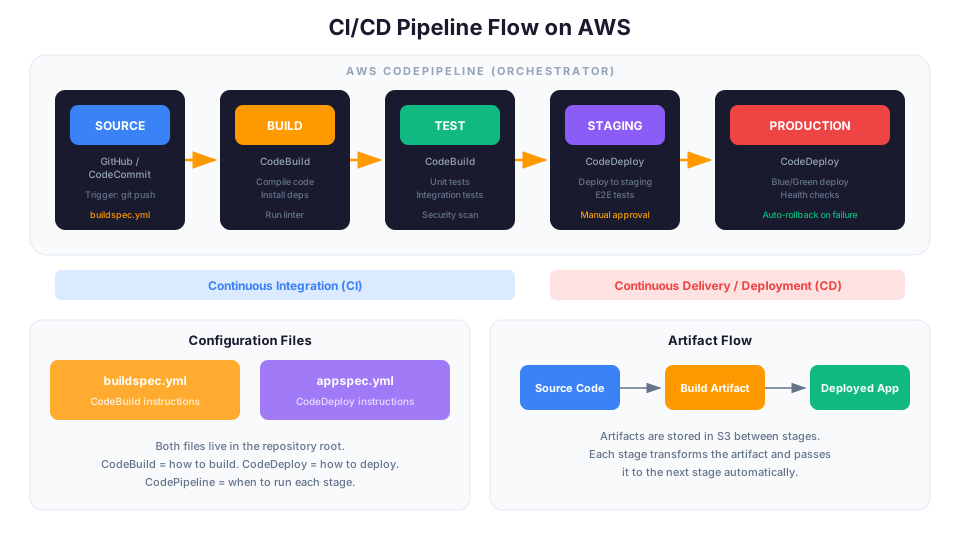
A pipeline is the automated workflow that implements CI/CD. Visualize it as a conveyor belt:
Code Push -> Build -> Test -> Stage -> Approve -> Deploy to Prod
Each stage runs automatically. If any stage fails, the pipeline stops and notifies the team. Nothing broken reaches production.
Why CI/CD Matters
Without CI/CD:
- Deployments are manual, slow, and error-prone
- "It works on my machine" is a constant problem
- Bugs are discovered in production, not during development
- Rollbacks are painful and sometimes impossible
- Nobody wants to deploy on a Friday (or any other day)
With CI/CD:
- Deployments happen automatically after every code change
- Every change is built and tested consistently
- Bugs are caught before they reach production
- Rollbacks are one click (or automatic)
- Deploying becomes routine and boring, which is exactly what you want
CI/CD by the Numbers
These statistics illustrate why CI/CD is not optional for serious teams:
| Metric | Without CI/CD | With CI/CD |
|---|---|---|
| Deploy frequency | Weekly/monthly | Multiple times per day |
| Lead time for changes | Days to weeks | Hours to minutes |
| Change failure rate | 15-45% | 0-15% |
| Mean time to recovery | Hours to days | Minutes to hours |
| Manual deploy effort | 30-120 minutes per deploy | 0 minutes (automated) |
The AWS CI/CD Services
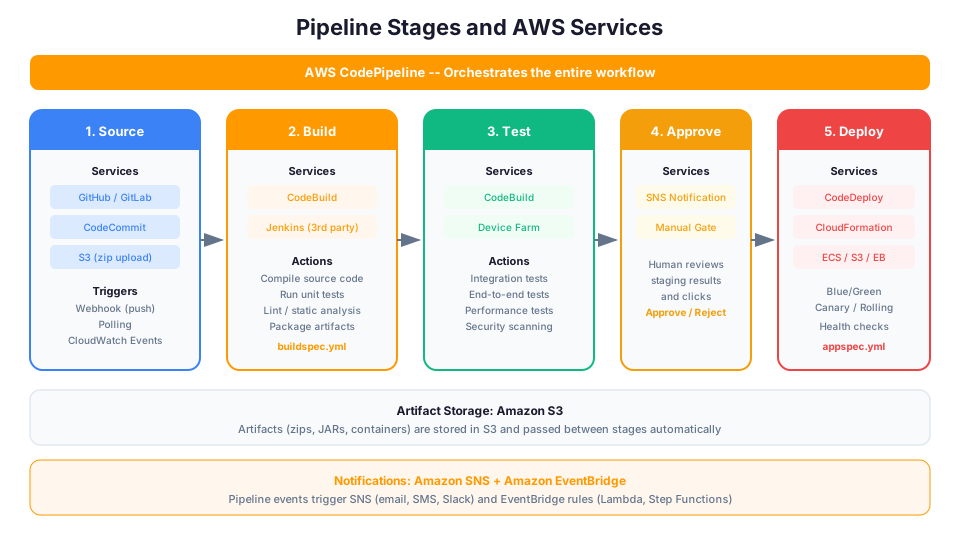
AWS provides a suite of services that together form a complete CI/CD pipeline:
| Service | Role | Analogy |
|---|---|---|
| CodeCommit | Source code repository | Like GitHub or GitLab |
| CodeBuild | Build and test service | Like GitHub Actions or Jenkins |
| CodeDeploy | Deployment automation | Like Octopus Deploy |
| CodePipeline | Pipeline orchestrator | Connects everything together |
| CodeArtifact | Package repository | Like npm registry or PyPI |
You do not have to use all of them. Many teams use GitHub for source control and CodePipeline + CodeBuild for the rest. You can mix and match.
CodeCommit
CodeCommit is a managed Git repository. It works exactly like GitHub or GitLab but runs inside your AWS account. Your code stays within your AWS boundary, which matters for compliance.
# Clone a CodeCommit repository
git clone https://git-codecommit.us-east-1.amazonaws.com/v1/repos/my-app

# Push code (triggers the pipeline)
git add .
git commit -m "Add user authentication feature"
git push origin main
Note: Many teams use GitHub or GitLab instead of CodeCommit. CodePipeline integrates with both. Use whatever your team prefers.
CodeBuild
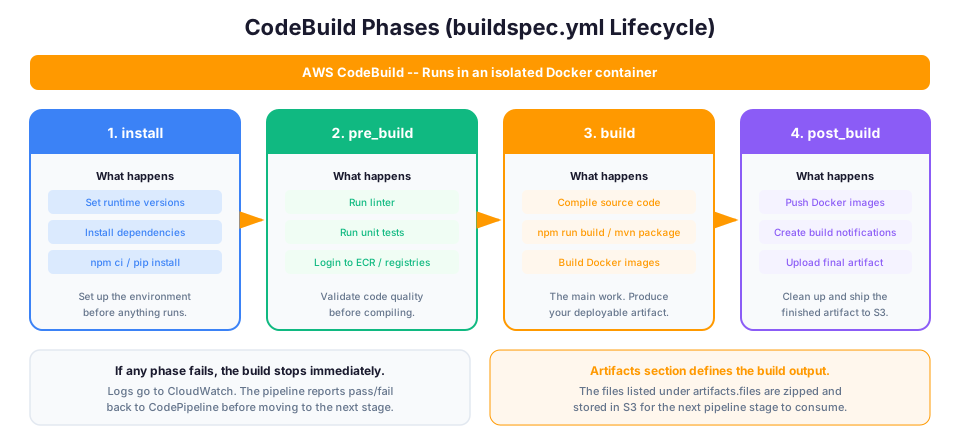
CodeBuild is a fully managed build service. It spins up a clean container, runs your build commands, and produces artifacts. You define the build steps in a buildspec.yml file in your repository.
# buildspec.yml
version: 0.2

phases:
  install:
    runtime-versions:
      nodejs: 18
    commands:
      - npm install

  pre_build:
    commands:
      - echo "Running linter..."
      - npm run lint
      - echo "Running unit tests..."
      - npm test

  build:
    commands:
      - echo "Building the application..."
      - npm run build

  post_build:
    commands:
      - echo "Build completed on $(date)"

artifacts:
  files:
    - '**/*'
  base-directory: dist

reports:
  test-reports:
    files:
      - 'test-results/**/*'
    file-format: JUNITXML

cache:
  paths:
    - 'node_modules/**/*'
CodeBuild features:
- Runs in isolated Docker containers (clean environment every time)
- Supports custom Docker images if you need specific tools
- Scales automatically (parallel builds for multiple branches)
- Integrates with CloudWatch for logs and metrics
- Caches dependencies to speed up builds
CodeBuild Environment Variables and Secrets
CodeBuild can pull secrets securely from Parameter Store and Secrets Manager:
# buildspec.yml - secure secrets handling
version: 0.2

env:
  parameter-store:
    DB_PASSWORD: /my-app/prod/db-password
    API_KEY: /my-app/prod/api-key
  secrets-manager:
    GITHUB_TOKEN: my-app/github-token:token

phases:
  build:
    commands:
      # Secrets are available as environment variables
      - echo "Database password is securely available"
      - npm run deploy
Never put secrets directly in your buildspec.yml or source code. If someone has read access to your repository, they should not see your production database password.
CodeDeploy
CodeDeploy automates the deployment of your application to EC2 instances, ECS services, or Lambda functions. It supports multiple deployment strategies that control how traffic shifts from the old version to the new version.
You define the deployment steps in an appspec.yml file:
# appspec.yml (for EC2 deployments)
version: 0.0
os: linux

files:
  - source: /
    destination: /var/www/my-app

hooks:
  BeforeInstall:
    - location: scripts/stop-server.sh
      timeout: 60

  AfterInstall:
    - location: scripts/install-dependencies.sh
      timeout: 120

  ApplicationStart:
    - location: scripts/start-server.sh
      timeout: 60

  ValidateService:
    - location: scripts/health-check.sh
      timeout: 60
CodeDeploy Lifecycle Event Order
Understanding the lifecycle event order is important for writing correct deployment scripts:
| Phase | Event | Typical Action |
|---|---|---|
| 1 | ApplicationStop | Stop the running application |
| 2 | DownloadBundle | CodeDeploy downloads the new revision |
| 3 | BeforeInstall | Clean up old files, create directories |
| 4 | Install | CodeDeploy copies files to destination |
| 5 | AfterInstall | Set permissions, install dependencies |
| 6 | ApplicationStart | Start the application |
| 7 | ValidateService | Health check to verify it works |
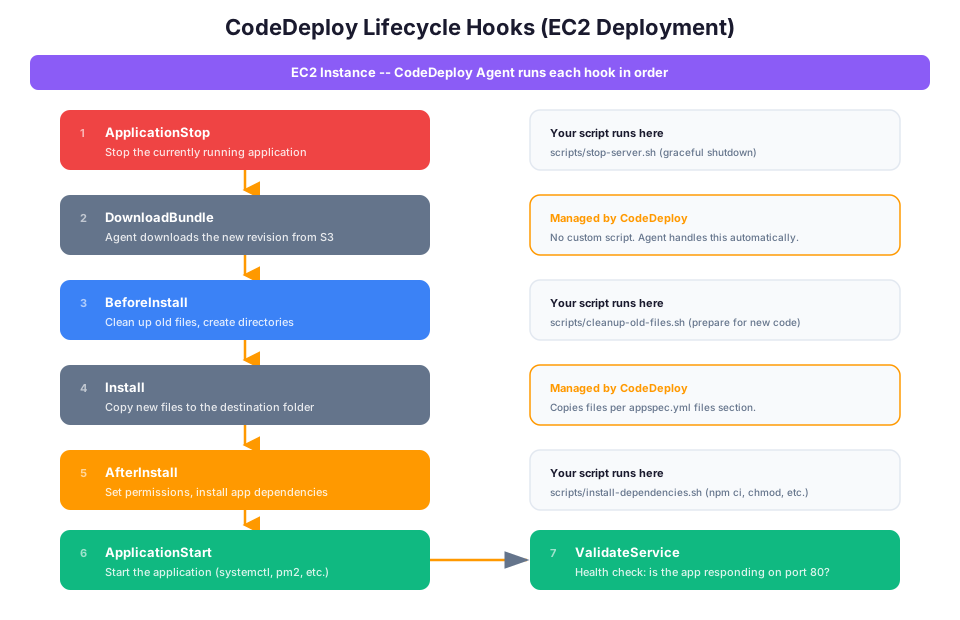
If any hook fails, CodeDeploy stops and can automatically roll back to the previous version.
CodePipeline
CodePipeline is the orchestrator that ties everything together. It defines the stages of your pipeline and the transitions between them. Think of it as the conveyor belt that moves your code through each stage.
Building Your First Pipeline
Let us build a real pipeline. This example deploys a Node.js application from GitHub through CodeBuild to S3 (for a static website).
Step 1: Create the buildspec.yml
Add this file to your repository root:
version: 0.2

phases:
  install:
    runtime-versions:
      nodejs: 18
    commands:
      - npm ci

  pre_build:
    commands:
      - npm run lint
      - npm test

  build:
    commands:
      - npm run build

artifacts:
  files:
    - '**/*'
  base-directory: build
Step 2: Create a CodeBuild Project
aws codebuild create-project \
  --name my-app-build \
  --source type=GITHUB,location=https://github.com/youruser/my-app \
  --environment type=LINUX_CONTAINER,computeType=BUILD_GENERAL1_SMALL,image=aws/codebuild/amazonlinux2-x86_64-standard:5.0 \
  --service-role arn:aws:iam::YOUR_ACCOUNT_ID:role/codebuild-role \
  --artifacts type=S3,location=my-app-artifacts-bucket
Step 3: Create the Pipeline
Create a file called pipeline.json:
{
  "pipeline": {
    "name": "my-app-pipeline",
    "roleArn": "arn:aws:iam::YOUR_ACCOUNT_ID:role/codepipeline-role",
    "stages": [
      {
        "name": "Source",
        "actions": [
          {
            "name": "SourceAction",
            "actionTypeId": {
              "category": "Source",
              "owner": "ThirdParty",
              "provider": "GitHub",
              "version": "1"
            },
            "outputArtifacts": [{"name": "SourceOutput"}],
            "configuration": {
              "Owner": "youruser",
              "Repo": "my-app",
              "Branch": "main",
              "OAuthToken": "YOUR_GITHUB_TOKEN"
            }
          }
        ]
      },
      {
        "name": "Build",
        "actions": [
          {
            "name": "BuildAction",
            "actionTypeId": {
              "category": "Build",
              "owner": "AWS",
              "provider": "CodeBuild",
              "version": "1"
            },
            "inputArtifacts": [{"name": "SourceOutput"}],
            "outputArtifacts": [{"name": "BuildOutput"}],
            "configuration": {
              "ProjectName": "my-app-build"
            }
          }
        ]
      },
      {
        "name": "Deploy",
        "actions": [
          {
            "name": "DeployAction",
            "actionTypeId": {
              "category": "Deploy",
              "owner": "AWS",
              "provider": "S3",
              "version": "1"
            },
            "inputArtifacts": [{"name": "BuildOutput"}],
            "configuration": {
              "BucketName": "my-app-website-bucket",
              "Extract": "true"
            }
          }
        ]
      }
    ]
  }
}
aws codepipeline create-pipeline --cli-input-json file://pipeline.json
Step 4: Push Code and Watch
git push origin main
Open the CodePipeline console and watch your code flow through Source -> Build -> Deploy automatically. Every subsequent push triggers the pipeline.
Step 5: Verify the Deployment
# Check pipeline status
aws codepipeline get-pipeline-state --name my-app-pipeline

# View most recent execution
aws codepipeline list-pipeline-executions \
  --pipeline-name my-app-pipeline \
  --max-results 5
Deployment Strategies Explained
How you deploy new code to production is as important as having a pipeline. The wrong strategy can cause downtime. The right strategy makes deployments invisible to users.
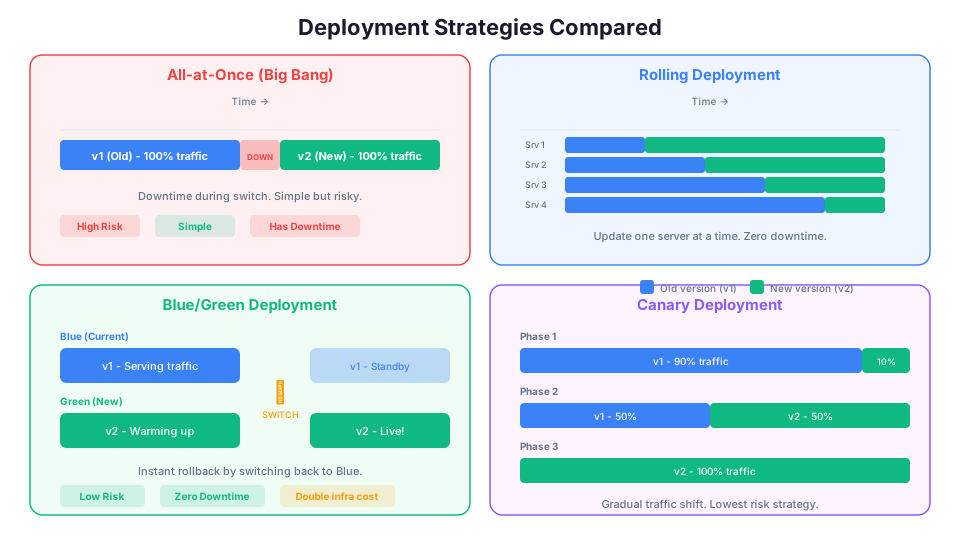
All-at-Once (Big Bang)
Old Version ████████████████
                             New Version ████████████████
Stop the old version, deploy the new version, start it up. Simple but causes downtime. Only acceptable for non-production environments.
Pros: Simple, fast Cons: Downtime during deployment, no easy rollback
Rolling Deployment
Server 1: Old ████ -> New ████████████████
Server 2: Old ████████ -> New ████████████
Server 3: Old ████████████ -> New ████████
Server 4: Old ████████████████ -> New ████
Update servers one at a time (or in batches). At any point, some servers run the old version and some run the new version.
Pros: Zero downtime, gradual rollout Cons: Two versions running simultaneously (must be compatible), slower deployment
Blue/Green Deployment
Blue (Old):  ████████████████ (serving traffic)
Green (New): ████████████████ (warming up)

[Switch traffic]

Blue (Old):  ████████████████ (standing by for rollback)
Green (New): ████████████████ (serving traffic)
Run two identical environments. Deploy the new version to the idle environment (Green). Test it. Then switch all traffic from Blue to Green instantly. If something is wrong, switch back.
Pros: Instant rollback, zero downtime, new version fully tested before receiving traffic Cons: Requires double the infrastructure during deployment, higher cost
Canary Deployment
Old Version: ████████████████ (90% of traffic)
New Version: ██               (10% of traffic)

[Monitor, then shift more traffic]

Old Version: ████████          (50% of traffic)
New Version: ████████          (50% of traffic)

[All good, shift remaining]

New Version: ████████████████ (100% of traffic)
Deploy the new version to a small percentage of traffic first. Monitor for errors. Gradually increase the percentage until 100% of traffic hits the new version.
Pros: Minimal blast radius, problems affect only a small percentage of users, data-driven rollout Cons: More complex to set up, requires good monitoring
Which Strategy to Use?
| Strategy | Downtime | Risk | Complexity | Best For |
|---|---|---|---|---|
| All-at-Once | Yes | High | Low | Dev/test environments |
| Rolling | No | Medium | Medium | Web applications, APIs |
| Blue/Green | No | Low | Medium | Production workloads |
| Canary | No | Lowest | Highest | High-traffic production |
In practice: Blue/Green is the go-to when zero downtime and instant rollback are non-negotiable. Canary is the right choice when you want to validate changes with a small percentage of real traffic before committing.
AWS Deployment Strategy Support
| Service | Strategies Supported |
|---|---|
| CodeDeploy (EC2) | All-at-once, Rolling, Blue/Green |
| CodeDeploy (ECS) | Blue/Green, Canary, Linear |
| CodeDeploy (Lambda) | Canary, Linear, All-at-once |
| Elastic Beanstalk | All-at-once, Rolling, Immutable, Blue/Green |
| ECS (native) | Rolling update |
| CloudFormation | Rolling update via UpdatePolicy |
CodeDeploy Lambda Traffic Shifting Example
CodeDeploy makes canary and linear deployments simple for Lambda:
# SAM template with canary deployment
Resources:
  MyFunction:
    Type: AWS::Serverless::Function
    Properties:
      Handler: app.handler
      Runtime: python3.12
      CodeUri: src/
      AutoPublishAlias: live
      DeploymentPreference:
        Type: Canary10Percent5Minutes
        Alarms:
          - !Ref MyFunctionErrorAlarm
        Hooks:
          PreTraffic: !Ref PreTrafficHookFunction
          PostTraffic: !Ref PostTrafficHookFunction
The Canary10Percent5Minutes configuration means: shift 10% of traffic to the new version, wait 5 minutes, and if the alarm stays in the OK state, shift the remaining 90%. If the alarm fires, roll back automatically.
Other deployment preference types:
| Type | Behavior |
|---|---|
Canary10Percent5Minutes | 10% first, remaining after 5 min |
Canary10Percent30Minutes | 10% first, remaining after 30 min |
Linear10PercentEvery1Minute | 10% more every minute |
Linear10PercentEvery10Minutes | 10% more every 10 min |
AllAtOnce | Immediate 100% shift |
Pipeline Best Practices
1. Fail Fast
Put the fastest checks first. Run linting and unit tests before integration tests and deployment. No point deploying code that does not compile.
2. Keep Builds Reproducible
Use specific version numbers for dependencies (package-lock.json, requirements.txt with pinned versions). A build should produce the same artifact today and six months from now.
# Good: install from lock file (exact versions)
npm ci

# Bad: install with version ranges (non-deterministic)
npm install
3. Use Separate Stages for Environments
Source -> Build -> Deploy to Dev -> Test -> Deploy to Staging -> Approve -> Deploy to Prod
Never deploy directly to production. Always go through at least one staging environment first.
4. Add Manual Approval Before Production
Until your test suite is rock-solid, require a human to approve production deployments. CodePipeline supports manual approval actions with SNS notifications.
# Create an SNS topic for approvals
aws sns create-topic --name pipeline-approval-notifications

# Subscribe your email
aws sns subscribe \
  --topic-arn arn:aws:sns:us-east-1:123456789012:pipeline-approval-notifications \
  --protocol email \
  --notification-endpoint team@example.com
5. Automate Rollbacks
Configure CodeDeploy to automatically roll back if health checks fail. Do not rely on humans to notice a problem and manually roll back at 2 AM.
6. Store Secrets Securely
Never put passwords, API keys, or tokens in your buildspec.yml or source code. Use AWS Systems Manager Parameter Store or AWS Secrets Manager. CodeBuild can pull secrets from both.
# In buildspec.yml, reference secrets from Parameter Store
env:
  parameter-store:
    DB_PASSWORD: /my-app/prod/db-password
    API_KEY: /my-app/prod/api-key
7. Cache Build Dependencies
CodeBuild supports caching to speed up subsequent builds:
# buildspec.yml with caching
cache:
  paths:
    - 'node_modules/**/*'
    - '/root/.cache/pip/**/*'
This can reduce build times from minutes to seconds for dependency-heavy projects.
8. Use Branch-Based Pipelines
Create separate pipelines for different branches:
| Branch | Pipeline Behavior |
|---|---|
main | Full pipeline: build, test, staging, approval, production |
develop | Build, test, deploy to dev environment |
feature/* | Build and test only (no deployment) |
9. Monitor Pipeline Health
Set up CloudWatch alarms for pipeline failures:
# Alert when any pipeline execution fails
aws cloudwatch put-metric-alarm \
  --alarm-name "Pipeline-Failure-Alert" \
  --metric-name "PipelineExecutionFailed" \
  --namespace "AWS/CodePipeline" \
  --statistic Sum \
  --period 300 \
  --threshold 1 \
  --comparison-operator GreaterThanOrEqualToThreshold \
  --evaluation-periods 1 \
  --alarm-actions arn:aws:sns:us-east-1:123456789012:pipeline-alerts \
  --dimensions Name=PipelineName,Value=my-app-pipeline
Pipeline Security
Securing your CI/CD pipeline is critical because a compromised pipeline can deploy malicious code to production.
IAM Roles for Pipeline Services
Each service in the pipeline needs its own IAM role with least privilege permissions:
| Service | Permissions Needed |
|---|---|
| CodePipeline | S3 (artifacts), CodeBuild (start builds), CodeDeploy (start deployments), SNS (notifications) |
| CodeBuild | S3 (artifacts, cache), CloudWatch Logs, ECR (if using containers), Parameter Store/Secrets Manager |
| CodeDeploy | S3 (artifacts), EC2/ECS/Lambda (deployment targets), Auto Scaling |
Artifact Encryption
CodePipeline encrypts artifacts in S3 using AWS KMS by default. For additional security, use a customer-managed KMS key:
aws codepipeline create-pipeline \
  --cli-input-json file://pipeline.json \
  --encryption-key id=arn:aws:kms:us-east-1:123456789012:key/my-key-id
CI/CD Costs
The AWS CI/CD services are inexpensive for learning:
| Service | Free Tier | Pricing After |
|---|---|---|
| CodeCommit | 5 active users, 50 GB storage | $1/active user/month |
| CodeBuild | 100 build minutes/month | $0.005/build minute (small) |
| CodeDeploy | Free for EC2 and Lambda | $0.02/deployment (ECS) |
| CodePipeline | 1 free pipeline | $1/active pipeline/month |
For learning purposes, one pipeline with a few builds per day will cost you less than $2/month.
Cost Optimization Tips
- Use the
BUILD_GENERAL1_SMALLcompute type for most builds (cheapest option) - Enable build caching to reduce build times and costs
- Delete inactive pipelines (they still cost $1/month if they exist)
- Use CodeBuild's on-demand pricing instead of reserved capacity for learning
Troubleshooting Common Pipeline Issues
| Problem | Likely Cause | Solution |
|---|---|---|
| Pipeline stuck in "InProgress" | Long-running build or missing approval | Check CloudWatch logs for build status |
| Build fails with "permission denied" | CodeBuild IAM role missing permissions | Add required permissions to the role |
| Deploy fails with "health check timeout" | Application not starting correctly | Check appspec.yml hooks and application logs |
| Source action fails | OAuth token expired or repo not found | Reconnect GitHub or update token |
| "Unable to access S3 artifact" | Cross-region or cross-account issue | Verify S3 bucket policy and IAM permissions |
Troubleshooting Common Errors
BUILD_GENERAL1_BUILD phase FAILED
This means your build commands exited with a non-zero status code. Open CloudWatch Logs for the CodeBuild project and scroll to the build phase output to find the exact command that failed. Common causes include missing dependencies (check that your install phase runs before build), incompatible Node.js or Python versions (verify runtime-versions in buildspec.yml), and syntax errors in your build scripts.
CodeDeploy AllowTraffic lifecycle event timed out
The AllowTraffic step waits for the load balancer health check to pass on the new target group. If your application takes too long to start, or the health check path returns a non-200 status, this step times out. Verify that your application starts within the health check grace period, confirm the health check path (e.g., /health) returns HTTP 200, and check that the security group allows traffic from the load balancer.
Insufficient permissions for CodePipeline to invoke CodeBuild
The CodePipeline service role needs codebuild:StartBuild and codebuild:BatchGetBuilds permissions. Check the IAM role attached to your pipeline and add a policy granting these actions on the specific CodeBuild project ARN. Also verify that the CodeBuild role has s3:GetObject and s3:PutObject permissions on the pipeline's artifact bucket.
How This Shows Up in Architecture Decisions
- CodePipeline orchestrates, CodeBuild builds, CodeDeploy deploys. When designing a release workflow, pick the right service for each stage rather than trying to do everything in one tool.
- Blue/Green = zero downtime + instant rollback. Choose this strategy when the business cannot tolerate any downtime during deployments and needs the ability to roll back in seconds.
- Canary = gradual traffic shift. Choose this when you want to minimize blast radius and validate with real production traffic before committing to the full rollout.
- CodeDeploy uses appspec.yml. CodeBuild uses buildspec.yml. Keeping these straight matters when debugging a failed pipeline, since the wrong file in the wrong place is a common root cause.
- CodePipeline can use GitHub as a source. You do not have to use CodeCommit. Most teams integrate with whatever source control they already use.
- Manual approval actions are used for production gate checks. In regulated environments, this provides an auditable record of who approved each release.
- CodeDeploy agent must be installed on EC2 instances for EC2 deployments. Fargate and Lambda deployments do not require an agent.
- CodeBuild supports custom Docker images for specialized build environments, which matters when your project has unique toolchain requirements.
- Pipeline artifacts are stored in S3 and encrypted with KMS. For sensitive workloads, use a customer-managed KMS key.
- EventBridge rules can trigger pipelines on a schedule or from other AWS events, enabling event-driven release workflows.
Hands-On Challenge
Build a working CI/CD pipeline that takes code from a GitHub repository, builds it with CodeBuild, and deploys the output to S3. Fork a simple project (a static website or Node.js API) and verify each of the following success criteria:
- A
buildspec.ymlexists in your repository root and defines install, pre_build, and build phases - A CodeBuild project is created and can be triggered manually with
aws codebuild start-build - The CodeBuild project successfully runs tests and produces a build artifact
- A CodePipeline connects the GitHub source to CodeBuild to S3 deployment
- Pushing a commit to the
mainbranch automatically triggers the full pipeline - Breaking a test on purpose causes the pipeline to stop at the Build stage (no deployment occurs)
- Fixing the test and pushing again causes the pipeline to succeed end to end
The best way to learn CI/CD is to build a pipeline and use it. Once you see your code deploy automatically after a git push, manual deployments start to feel prehistoric.
That said, CI/CD is not always the right investment. If you are a solo developer prototyping an idea, the time you spend setting up a multi-stage pipeline could be better spent shipping features. Pipelines add real complexity: more IAM roles to manage, more YAML to debug, more failure points to monitor. For a weekend project or a quick proof of concept, a simple aws s3 sync command might be all you need. The value of CI/CD scales with team size, deployment frequency, and how much you would lose if a bad deploy hits production. Start simple, add automation where it hurts, and grow the pipeline as your project demands it.
Pricing note: CI/CD service costs (for example, CodeBuild at $0.005/build minute for small instances, CodePipeline at $1/active pipeline/month) cited in this article are for us-east-1 and were verified in May 2026. Check the AWS Pricing Calculator for current rates in your Region.
Build it yourself: This topic is covered hands-on in Module 50: CodePipeline of our AWS Bootcamp.