
Cloud Computing Explained for Beginners
If someone asked you to explain cloud computing at a dinner party, could you do it without using jargon? Most people cannot. The term gets thrown around so casually that its meaning has become fuzzy. This article will fix that.
By the end, you will understand exactly what cloud computing is, how the three service models work, why companies are migrating, and how this knowledge connects to your AWS career.
What You Will Learn
By the end of this article, you will be able to:
- Explain cloud computing, IaaS, PaaS, and SaaS in plain English to a non-technical audience
- Identify the five NIST characteristics that define true cloud computing and give an AWS example for each
- Differentiate between public, private, hybrid, and multi-cloud deployment models and describe when each is appropriate
- Describe how the Shared Responsibility Model divides security duties between AWS and the customer for EC2 versus Lambda
- Explain how Regions, Availability Zones, and edge locations work together to deliver availability, performance, and compliance
Cloud Computing in Plain English
Cloud computing is renting someone else's computers over the internet instead of buying your own.
That is it. Everything else is details.
When you use Gmail, you are using cloud computing. Google owns the servers, manages the software, and you access it through your browser. When Netflix streams a movie, it runs on AWS infrastructure that Amazon owns and maintains. When a startup launches a new app, they do not buy servers and stack them in a closet. They rent compute power from AWS, Microsoft Azure, or Google Cloud.
The "cloud" is not a magical place. It is data centers, massive buildings filled with thousands of servers, storage drives, and networking equipment. The difference is that instead of you buying, racking, cabling, cooling, and maintaining all that hardware, a cloud provider does it for you. You just pay for what you use.
Before the Cloud: The On-Premises World
To appreciate why cloud computing matters, you need to understand what came before it.
Imagine you are starting a company in 2005. You need servers to run your website. Here is what you would do:
- Estimate capacity. Guess how much traffic you will get in the next 3-5 years.
- Purchase hardware. Buy servers, storage arrays, networking switches, firewalls, and load balancers. This could cost $100,000 to $1,000,000+ depending on your needs.
- Find space. Rent or build a server room or data center. Install power, cooling, and physical security.
- Hire staff. Employ system administrators to set up, configure, patch, and maintain everything.
- Wait. The procurement and setup process often took 6-12 weeks before you could deploy any code.
This is called on-premises (or "on-prem") infrastructure. You own it. You manage it. And you pay for it whether you use it or not.
Here is the problem: if you guessed your traffic wrong (and everyone guesses wrong), you either wasted money on idle servers or your website crashed because you did not have enough capacity. There was no middle ground.
The Real Cost of On-Premises
Let us put real numbers on this. A mid-size company running on-premises might spend:
| Expense | Annual Cost |
|---|---|
| Server hardware (20 servers) | $200,000 |
| Network switches, firewalls | $40,000 |
| Data center space and power | $60,000 |
| Cooling systems | $25,000 |
| System administrators (2 FTEs) | $180,000 |
| Software licenses (OS, databases) | $50,000 |
| Hardware refresh (every 3-5 years) | $80,000 |
| Total | ~$635,000/year |
And that is before a single line of application code gets written. The same workload on AWS might cost $80,000-$150,000 per year with proper optimization. That is not a small difference.
The Capacity Planning Problem
On-premises forces you to solve an impossible puzzle: predict future demand exactly.
Over-provision? You pay for servers sitting idle. Studies show that average on-premises server usage is only 15-25%. That means 75-85% of your hardware investment is wasted capacity.
Under-provision? Your application crashes during traffic spikes. On Black Friday 2013, multiple major retailers experienced outages because their servers could not handle the load. Each hour of downtime costs an average of $100,000 for mid-size companies and millions for enterprises.
Cloud computing eliminates this dilemma entirely. You scale up when demand rises and scale down when it drops. There is no guessing.
The Five Characteristics of Cloud Computing
The National Institute of Standards and Technology (NIST) defined five essential characteristics that separate cloud computing from traditional hosting. This definition matters because it shows up in architecture discussions, interviews, and real-world design decisions.
1. On-Demand Self-Service
You can provision resources whenever you want, without calling anyone. Need a server? Click a button (or run a command) and it is running in under a minute. Need to delete it? Same thing. No purchase orders, no waiting for hardware to ship, no approval chains.
# Launch a server on AWS in one command
aws ec2 run-instances \
  --image-id ami-0abcdef1234567890 \
  --instance-type t3.micro \
  --key-name my-key
Compare that to on-premises: submit a request, wait for budget approval, order hardware from a vendor, wait 4-6 weeks for delivery, have a technician rack and cable the server, install the operating system, configure networking. That "one command" replaces weeks of work.
2. Broad Network Access
You access cloud services over the internet from any device. Your laptop, phone, tablet, or another server can all connect to cloud resources using standard protocols like HTTPS.
This is not just about convenience. Broad network access means your development team in New York, your testing team in London, and your customer in Tokyo all interact with the same infrastructure through the same APIs. There is no "VPN into the office" requirement.
# Access your S3 bucket from anywhere in the world
aws s3 ls s3://my-bucket/ --region us-east-1

# Same command works from a laptop in Tokyo or an EC2 instance in Ireland
3. Resource Pooling
The cloud provider serves multiple customers from the same pool of physical hardware. Your virtual server might share a physical machine with another company's virtual server. You do not know (or care) which specific hardware you are on. This is called multi-tenancy, and it is how providers keep costs low.
Think of it like an apartment building. Each tenant has their own private unit, but they share the building's structure, utilities, and common areas. The building owner can serve many tenants efficiently because they share resources.
4. Rapid Elasticity
You can scale up and scale down automatically based on demand. Black Friday traffic spike? The cloud adds more servers. Tuesday at 3 AM when nobody is visiting? The cloud removes them. You pay only for what you use at any given moment.
# Set up auto-scaling that adds servers when CPU exceeds 70%
aws autoscaling put-scaling-policy \
  --auto-scaling-group-name my-web-app \
  --policy-name scale-up \
  --scaling-adjustment 2 \
  --adjustment-type ChangeInCapacity

# And removes them when CPU drops below 30%
aws autoscaling put-scaling-policy \
  --auto-scaling-group-name my-web-app \
  --policy-name scale-down \
  --scaling-adjustment -1 \
  --adjustment-type ChangeInCapacity
5. Measured Service
Everything is metered. You can see exactly how much compute, storage, and network bandwidth you consumed, down to the hour or even the second. This is the foundation of the pay-as-you-go pricing model that makes cloud computing financially different from buying hardware.
# Check your current month's estimated bill
aws ce get-cost-and-usage \
  --time-period Start=2026-05-01,End=2026-05-31 \
  --granularity MONTHLY \
  --metrics "UnblendedCost"
The Three Service Models: IaaS, PaaS, SaaS
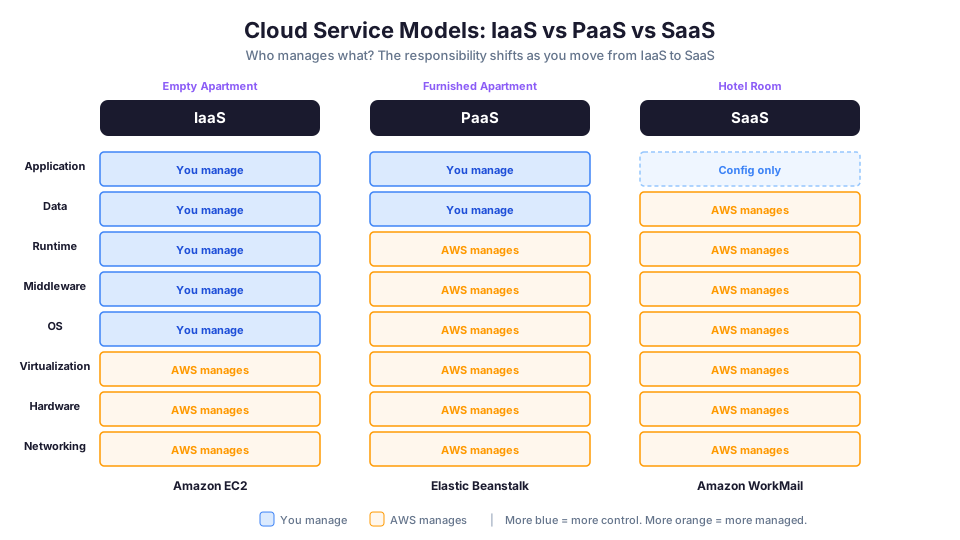
Cloud services come in three flavors, and the difference is how much the provider manages versus how much you manage.
Think of it as a spectrum from "you handle almost everything" to "you handle almost nothing."
Infrastructure as a Service (IaaS)
What you get: Virtual machines, storage, and networking. The raw building blocks.
What you manage: Operating system, middleware, runtime, applications, and data.
What the provider manages: Physical servers, networking hardware, storage hardware, data center facilities.
AWS examples: Amazon EC2, Amazon EBS, Amazon VPC
Analogy: Renting an empty apartment. The landlord maintains the building structure, plumbing, and electricity. You furnish it, decorate it, and maintain everything inside.
IaaS gives you the most control but also the most responsibility. If you forget to patch the operating system on your EC2 instance, that is your problem, not AWS's.
# IaaS example: Launch an EC2 instance and you manage everything on it
aws ec2 run-instances \
  --image-id ami-0abcdef1234567890 \
  --instance-type t3.micro \
  --key-name my-key \
  --security-group-ids sg-0123456789abcdef0

# You are now responsible for:
# - Installing and updating the OS
# - Installing your application runtime (Node.js, Python, Java)
# - Deploying your application code
# - Configuring security (firewall rules, user accounts)
# - Monitoring and backups
Platform as a Service (PaaS)
What you get: A managed platform where you deploy your code without worrying about the infrastructure underneath.
What you manage: Your application code and data.
What the provider manages: Operating system, runtime, middleware, servers, storage, and networking.
AWS examples: AWS Elastic Beanstalk, AWS App Runner, Amazon RDS (partially)
Analogy: Renting a furnished apartment. The landlord handles the furniture, appliances, and maintenance. You just bring your clothes and personal items.
PaaS is popular with developers who want to ship code fast without managing servers. You upload your application, and the platform handles scaling, load balancing, and patching.
# PaaS example: Deploy a web app to Elastic Beanstalk
# Just give it your code. It handles servers, load balancing, scaling.
eb init my-web-app --platform python-3.11 --region us-east-1
eb create production-env
eb deploy

# AWS handles:
# - Provisioning EC2 instances
# - Installing Python runtime
# - Configuring the load balancer
# - Setting up auto-scaling
# - OS patching
Software as a Service (SaaS)
What you get: A complete application that you access through a web browser or API.
What you manage: Your data and user settings. That is it.
What the provider manages: Everything else, the application, the platform, the infrastructure.
AWS examples: Amazon WorkMail, Amazon Chime, Amazon Connect
Non-AWS examples you already use: Gmail, Salesforce, Slack, Zoom, Dropbox
Analogy: Staying at a hotel. Everything is managed for you. You just show up and use it.
The Service Model Comparison Table
| Aspect | IaaS | PaaS | SaaS |
|---|---|---|---|
| You manage | OS, apps, data | Apps, data | Data only |
| Provider manages | Hardware, virtualization | Hardware through runtime | Everything |
| Control level | High | Medium | Low |
| Flexibility | Maximum | Moderate | Minimal |
| Maintenance effort | High | Low | None |
| AWS example | EC2 | Elastic Beanstalk | WorkMail |
| Startup speed | Minutes (but setup needed) | Minutes (deploy and go) | Seconds (just log in) |
| Cost model | Pay per resource | Pay per app/usage | Pay per user/subscription |
| Best for | Full control needed | Fast development | End-user tools |
When to Use Each Model
Choose IaaS when:
- You need full control over the operating system and runtime
- You have specific compliance requirements for the OS configuration
- You are running legacy applications that require a specific environment
- Your team has strong systems administration skills
Choose PaaS when:
- You want to focus on writing code, not managing infrastructure
- You are building new web applications or APIs
- You want automatic scaling and load balancing without configuring it yourself
- Your application fits standard runtime environments (Python, Node.js, Java)
Choose SaaS when:
- You need a complete application for business functions (email, CRM, chat)
- You do not want to build or maintain the application yourself
- Standard features meet your needs without heavy customization
- You want the lowest possible operational overhead
Why Companies Are Migrating to the Cloud
The global cloud market is projected to exceed $1.5 trillion by 2030. Here is why companies of every size are making the switch.
1. No Upfront Capital Expense
Instead of spending $500,000 on servers that depreciate over five years, you pay a monthly bill based on actual usage. This shifts spending from Capital Expenditure (CapEx) to Operational Expenditure (OpEx).
For a startup, this is transformative. You can launch a product with a $50/month cloud bill instead of a $50,000 hardware purchase. For an enterprise, it means freeing up capital for other investments.
2. Scale on Demand
On-premises infrastructure forces you to plan for peak capacity. If your app gets 10x traffic during the holidays, you need servers that sit idle the other 11 months. Cloud computing lets you scale up for the holiday rush and scale back down afterward, paying only for what you use.
3. Global Reach in Minutes
AWS operates in 30+ Regions around the world. Deploying your application in Tokyo, Frankfurt, and Sao Paulo takes minutes, not months. No building data centers, no negotiating with local ISPs, no hiring staff in each location.
# Deploy the same application to three regions
aws s3 sync ./website s3://my-site-us --region us-east-1
aws s3 sync ./website s3://my-site-eu --region eu-west-1
aws s3 sync ./website s3://my-site-asia --region ap-northeast-1

# Your users in North America, Europe, and Asia all get fast access
4. Speed and Agility
Need a new development environment? Provision it in 60 seconds. Need to test your application on a different operating system? Launch a new instance. The ability to experiment quickly and fail cheaply accelerates innovation in a way that on-premises infrastructure never could.
5. Stop Spending Money Running Data Centers
Managing physical infrastructure is not a competitive advantage for most companies. A hospital should focus on patient care, not server maintenance. A bank should focus on financial products, not cooling systems. Cloud computing lets organizations redirect engineering talent from "keeping the lights on" to building features that differentiate their business.
6. Benefit from Massive Economies of Scale
AWS serves millions of customers. That scale means they buy hardware at prices no individual company can match, they operate data centers with efficiency that no single IT team can replicate, and they pass those savings on through lower prices. AWS has reduced prices over 130 times since its launch.
Migration Comparison: Before vs After
| Aspect | On-Premises | Cloud (AWS) |
|---|---|---|
| Time to deploy | 6-12 weeks | Minutes |
| Upfront cost | $100K-$1M+ | $0 |
| Scaling | Buy more hardware (weeks) | Auto-scale (seconds) |
| Geographic reach | Your data center location | 30+ global Regions |
| Maintenance | Your team, 24/7 | AWS handles infrastructure |
| Disaster recovery | Build a second data center ($$$) | Multi-AZ deployment (built-in) |
| Usage | 15-25% average | Right-sized to actual demand |
| Innovation speed | Constrained by hardware | Experiment freely |
Cloud Deployment Models: Public, Private, and Hybrid
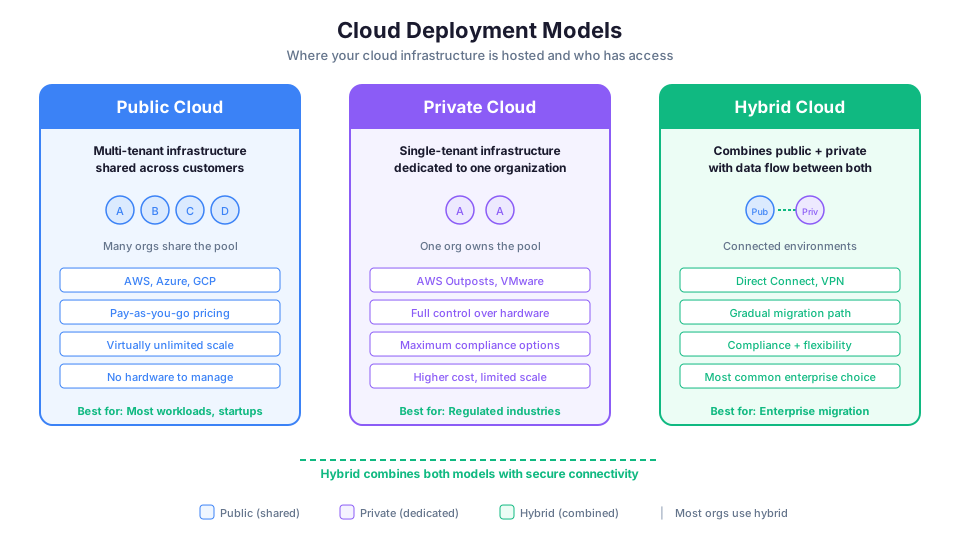
The service models (IaaS, PaaS, SaaS) describe what you get. Deployment models describe where and how the cloud is hosted.
Public Cloud
A public cloud is owned and operated by a third-party provider and shared among many customers over the internet. AWS, Azure, and Google Cloud are all public clouds.
"Public" does not mean your data is public. It means the infrastructure is shared (multi-tenant). Your resources are isolated from other customers through virtualization and software-defined networking. You still control who can access your data.
Public cloud is the most common deployment model and the one this bootcamp focuses on.
Private Cloud
A private cloud is dedicated to a single organization. It can be hosted in the company's own data center or managed by a third party, but the infrastructure is not shared with other organizations.
Companies in highly regulated industries (healthcare, government, financial services) sometimes use private clouds to meet compliance requirements. AWS offers AWS Outposts, which puts AWS hardware in your own data center, giving you a private cloud that runs the same APIs as the public AWS cloud.
Hybrid Cloud
A hybrid cloud combines public and private clouds, allowing data and applications to move between them. This is the most common enterprise strategy because it lets organizations keep sensitive workloads on-premises while using the public cloud for everything else.
For example, a hospital might keep patient records in a private cloud for compliance but use AWS for its public website, analytics, and disaster recovery.
AWS supports hybrid architectures through services like:
- AWS Outposts: AWS hardware in your data center
- AWS Direct Connect: Dedicated network connection between your data center and AWS
- AWS VPN: Encrypted connection over the internet between your network and AWS
- AWS Storage Gateway: Bridges on-premises storage with S3
Multi-Cloud: Using More Than One Provider
Some organizations use multiple public cloud providers simultaneously. A company might run its primary application on AWS, use Google Cloud for machine learning, and keep Microsoft workloads on Azure.
Benefits of multi-cloud:
- Avoid vendor lock-in
- Use best-of-breed services from each provider
- Meet compliance requirements that mandate data residency with specific providers
Drawbacks of multi-cloud:
- Increased complexity (your team needs skills across multiple platforms)
- Higher management overhead
- Harder to optimize costs
- Networking between providers can be complex and expensive
For most organizations, especially those starting their cloud journey, a single-provider strategy (like AWS-only) is simpler and more cost-effective. Multi-cloud is an advanced strategy for organizations with specific requirements.
Deployment Model Comparison
| Model | Hosted By | Shared? | Best For |
|---|---|---|---|
| Public | Cloud provider | Yes (multi-tenant) | Most workloads, startups, scalability |
| Private | Organization or dedicated provider | No (single-tenant) | Regulatory compliance, full control |
| Hybrid | Both | Mix | Gradual migration, compliance + flexibility |
| Multi-cloud | Multiple providers | Yes | Vendor diversity, best-of-breed |
The Shared Responsibility Model
This is one of the most important concepts in cloud computing and one of the most frequently tested topics on the AWS exam.
The Shared Responsibility Model defines who is responsible for what in the cloud. It splits security into two domains:
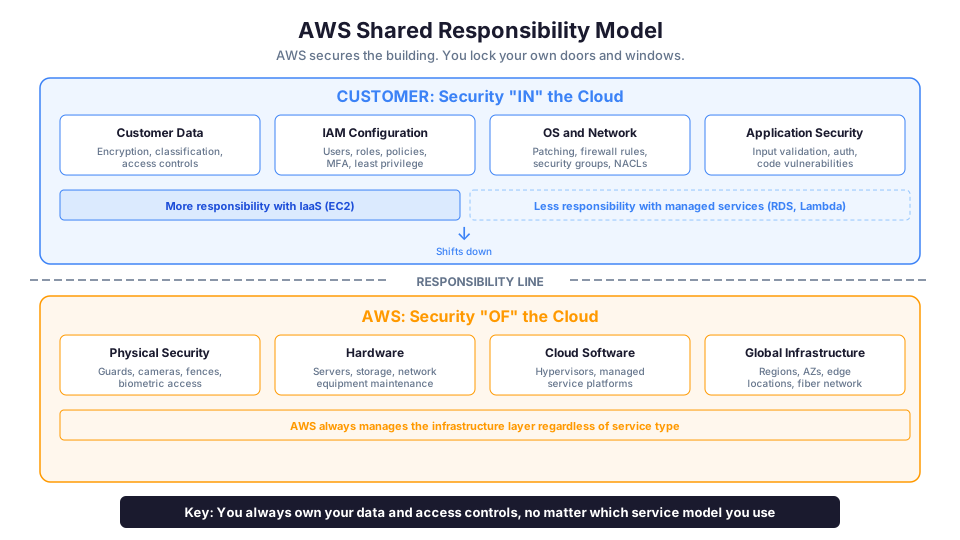
AWS is responsible for security "of" the cloud:
- Physical security of data centers (guards, cameras, fences)
- Hardware maintenance (servers, storage, networking equipment)
- Software that runs the cloud (hypervisors, managed service platforms)
- Global infrastructure (Regions, Availability Zones, edge locations)
You are responsible for security "in" the cloud:
- Your data (encryption, classification, access controls)
- Identity and access management (IAM users, roles, policies)
- Operating system patches on EC2 instances
- Network configuration (security groups, NACLs, route tables)
- Application-level security (input validation, authentication)
Think of it this way: AWS secures the building, but you lock your own doors and windows.
The line shifts depending on the service model:
| Service Type | AWS Manages | You Manage |
|---|---|---|
| IaaS (EC2) | Hardware, hypervisor | OS, apps, data, network config |
| PaaS (Elastic Beanstalk) | Hardware through runtime | App code, data |
| SaaS (WorkMail) | Everything except your content | Data, user access |
The more managed the service, the less you are responsible for, but you always own your data and access controls.
Real-World Shared Responsibility Example
Let us say you run a web application on EC2:
| Security Task | Who Handles It |
|---|---|
| Physical server security in the data center | AWS |
| Hypervisor patching and isolation | AWS |
| Network infrastructure (routers, switches) | AWS |
| Operating system updates on your EC2 instance | You |
| Configuring security groups (firewall rules) | You |
| Installing SSL/TLS certificates | You |
| Managing IAM users and permissions | You |
| Encrypting data at rest and in transit | You |
| Application code security (SQL injection prevention) | You |
| Backing up your data | You |
Now compare that to running the same app on Lambda (serverless):
| Security Task | Who Handles It |
|---|---|
| Physical server security | AWS |
| Operating system patching | AWS |
| Runtime updates | AWS |
| Scaling and availability | AWS |
| Your function code security | You |
| IAM execution role permissions | You |
| Data encryption | You |
Notice how much responsibility shifts to AWS when you use a more managed service. This is why many organizations prefer managed services: less to manage means less to go wrong.
AWS Global Infrastructure
Understanding where AWS runs is essential for designing available, performant, and compliant architectures.
Regions
An AWS Region is a geographic area that contains multiple data centers. Each Region is completely independent, with its own power, networking, and infrastructure. Examples: us-east-1 (Northern Virginia), eu-west-1 (Ireland), ap-northeast-1 (Tokyo).
How to choose a Region:
- Compliance: Some regulations require data to stay in specific countries. A European customer subject to GDPR might need to use
eu-west-1. - Latency: Choose the Region closest to your users. If most of your customers are in the U.S. East Coast,
us-east-1gives them the lowest latency. - Service availability: Not all services are available in all Regions. New services typically launch in
us-east-1first. - Pricing: Prices vary by Region.
us-east-1is usually the cheapest for most services.
# List all available Regions
aws ec2 describe-regions --query "Regions[].RegionName" --output table

# Check which services are available in a specific Region
# Visit: https://aws.amazon.com/about-aws/global-infrastructure/regional-product-services/
Availability Zones
Each Region contains multiple Availability Zones (AZs), typically three or more. An AZ is one or more physical data centers with independent power, cooling, and networking. AZs within a Region are connected by high-bandwidth, low-latency fiber.
The purpose of AZs is fault isolation. If a power failure takes out one data center, the other AZs in the Region continue operating. This is why you deploy critical applications across multiple AZs.
Region: us-east-1 (N. Virginia)
├── AZ: us-east-1a (data center cluster)
├── AZ: us-east-1b (data center cluster)
├── AZ: us-east-1c (data center cluster)
├── AZ: us-east-1d (data center cluster)
├── AZ: us-east-1e (data center cluster)
└── AZ: us-east-1f (data center cluster)
# List Availability Zones in your current Region
aws ec2 describe-availability-zones \
  --query "AvailabilityZones[].{Zone:ZoneName,State:State}" \
  --output table
Edge Locations
AWS has 400+ edge locations worldwide. These are smaller data centers used by Amazon CloudFront (CDN) and Route 53 (DNS) to cache content closer to users. When someone in Sydney loads your website hosted in us-east-1, CloudFront serves cached content from a nearby edge location instead of crossing the Pacific Ocean for every request.
How the Three Levels Work Together
| Level | What It Is | Purpose | Count |
|---|---|---|---|
| Region | Geographic area (e.g., N. Virginia) | Data residency, compliance | 30+ |
| Availability Zone | Isolated data center(s) within a Region | Fault tolerance | 3-6 per Region |
| Edge Location | CDN/DNS cache point | Low-latency content delivery | 400+ globally |
How AWS Fits In
Amazon Web Services launched in 2006 with two services: S3 (storage) and SQS (messaging). Today it offers over 200 services spanning compute, storage, databases, machine learning, analytics, IoT, and more.
AWS holds the largest market share of any cloud provider (roughly 31-32% as of 2025), followed by Microsoft Azure and Google Cloud Platform. This is why AWS certifications are the most in-demand cloud credentials in the job market.
Cloud Market Share (2025)
| Provider | Market Share | Strengths |
|---|---|---|
| AWS | ~31% | Broadest service catalog, most mature, largest community |
| Microsoft Azure | ~25% | Microsoft ecosystem integration, enterprise agreements |
| Google Cloud | ~11% | Data analytics, machine learning, Kubernetes |
| Others | ~33% | Alibaba (Asia), Oracle (databases), IBM (hybrid) |
When you learn AWS, you are not just learning one company's platform. You are learning cloud patterns and concepts that transfer to any provider. A Virtual Private Cloud on AWS works like a Virtual Network on Azure. An EC2 instance is conceptually the same as a Google Compute Engine VM. The skills are portable; the specifics differ.
Your First AWS CLI Commands
If you have the AWS CLI installed and configured, here are the first commands you should try. These are safe, read-only commands that will not create any resources or cost any money.
# Check your identity (who am I?)
aws sts get-caller-identity

# List all S3 buckets in your account
aws s3 ls

# List EC2 instances in the current Region
aws ec2 describe-instances \
  --query "Reservations[].Instances[].{ID:InstanceId,Type:InstanceType,State:State.Name}" \
  --output table

# Check which Region you are using
aws configure get region

# List available Regions
aws ec2 describe-regions --output table

# Get your current estimated charges
aws ce get-cost-and-usage \
  --time-period Start=2026-05-01,End=2026-05-31 \
  --granularity MONTHLY \
  --metrics "UnblendedCost" \
  --output table
These commands demonstrate the broad network access and measured service characteristics of cloud computing. You can run them from anywhere with an internet connection.
Common Misconceptions
"The cloud is less secure than on-premises." This is one of the most persistent myths. Major cloud providers invest billions in security, employ thousands of security engineers, and maintain compliance certifications that most organizations could never achieve independently. The AWS Shared Responsibility Model defines exactly what AWS secures and what you secure.
"Cloud always costs less." Not automatically. If you leave resources running 24/7 without optimizing, cloud bills can exceed on-premises costs. The savings come from right-sizing, auto-scaling, and paying only for what you use. This requires intentional architecture decisions.
"Moving to the cloud means moving everything at once." Most organizations migrate gradually. They might start by moving development environments, then non-critical workloads, then production systems over months or years. AWS calls this a "migration journey" and provides tools like the AWS Migration Hub to manage it.
"You lose control in the cloud." You actually gain more granular control in many ways. IAM policies let you control access down to individual API actions on specific resources. CloudTrail logs every API call. CloudWatch monitors everything. The level of visibility and control exceeds what most on-premises environments provide.
"Cloud computing is just for tech companies." In 2025, cloud adoption spans every industry: healthcare, finance, manufacturing, agriculture, education, government, and non-profits. The fastest-growing cloud adopters are in traditionally non-tech industries.
"Serverless means no servers." Servers still exist. "Serverless" means you do not manage, provision, or even see the servers. AWS handles all the infrastructure, and you only pay when your code runs. The name is about your experience, not the physical reality.
Cloud Computing Gotchas for Beginners
1. Cost Surprises
The most common beginner mistake is leaving resources running. An EC2 instance costs money every second it runs. A forgotten NAT Gateway costs ~$32/month. EBS volumes attached to stopped instances still incur charges.
Protection: Set up a billing alarm on day one.
# Create a billing alarm that notifies you at $5
aws cloudwatch put-metric-alarm \
  --alarm-name "BillingAlarm-5USD" \
  --alarm-description "Alert when charges exceed $5" \
  --metric-name EstimatedCharges \
  --namespace AWS/Billing \
  --statistic Maximum \
  --period 21600 \
  --threshold 5 \
  --comparison-operator GreaterThanThreshold \
  --evaluation-periods 1 \
  --alarm-actions arn:aws:sns:us-east-1:123456789012:billing-alerts
2. Region Confusion
Resources exist in specific Regions. If you create an EC2 instance in us-east-1 and then switch your console to us-west-2, you will not see it. This confuses many beginners who think they "lost" a resource.
Tip: Always check which Region you are in. The Region selector is in the top-right corner of the AWS Console.
3. The Free Tier Has Limits
The AWS Free Tier is generous but not unlimited. For example, you get 750 hours of t2.micro or t3.micro EC2 per month. That covers one instance running 24/7. But if you launch two instances, you will use 1,500 hours and pay for the second 750.
Tip: Read the Free Tier page carefully and know which services have always-free tiers versus 12-month trials.
4. Data Transfer Costs
Uploading data to AWS is free. Downloading data (egress) costs money. This catches people off guard when they start pulling large datasets out of S3 or serving lots of traffic from EC2.
| Direction | Cost |
|---|---|
| Data IN to AWS | Free |
| Data OUT to internet | $0.09/GB (first 10 TB/month) |
| Data between AZs | $0.01/GB each way |
| Data between Regions | $0.02/GB |
| Data within same AZ | Free |
Key Terms to Remember
| Term | Definition |
|---|---|
| Cloud computing | Delivering compute, storage, and networking resources over the internet on a pay-as-you-go basis |
| On-premises | Infrastructure you own and operate in your own facility |
| IaaS | Infrastructure as a Service, you rent virtual hardware |
| PaaS | Platform as a Service, you deploy code on a managed platform |
| SaaS | Software as a Service, you use a complete application |
| CapEx | Capital Expenditure, large upfront purchase |
| OpEx | Operational Expenditure, ongoing pay-as-you-go cost |
| Multi-tenancy | Multiple customers sharing the same physical infrastructure |
| Elasticity | Ability to scale resources up or down based on demand |
| Region | A geographic area with multiple isolated data centers |
| Availability Zone | One or more isolated data centers within a Region |
| Edge Location | A CDN cache point for low-latency content delivery |
| Shared Responsibility Model | The division of security duties between AWS and you |
| Free Tier | AWS services available at no cost (with limits) for learning |
| Egress | Data transferred out of AWS to the internet |
Quick Knowledge Check
Test yourself before moving on. Can you answer these confidently?
- What are the five NIST characteristics of cloud computing?
- Explain the difference between IaaS, PaaS, and SaaS in one sentence each.
- What is the Shared Responsibility Model, and where does the line between AWS and customer responsibility fall for EC2?
- Name three reasons a company would migrate from on-premises to the cloud.
- What is the difference between a Region and an Availability Zone?
- When would a company use a hybrid cloud deployment model?
- Why should you set up a billing alarm before launching any resources?
- What does "egress" mean and why does it matter for cost planning?
- How does the Shared Responsibility Model change when you use Lambda instead of EC2?
- What is multi-tenancy and how does it keep cloud costs low?
If any of those gave you trouble, re-read the relevant section. These concepts form the foundation for everything else you will learn in AWS.
What to Do Next
If you are just getting started with cloud computing, here is your path:
- Create a free AWS account. The AWS Free Tier gives you 12 months of access to core services at no cost.
- Explore the AWS Console. Log in and click around. Look at the list of services. You do not need to launch anything yet, just get familiar with the layout.
- Check the Region selector. In the top-right corner of the console, you will see the current Region. Switch between a few to see how the service list changes.
- Set up a billing alarm. Before you launch anything, configure a CloudWatch billing alarm so you are notified if charges exceed $5. This protects you from accidental costs while you learn.
- Install the AWS CLI. Practice running the read-only commands listed above.
- Learn the fundamentals. Understand Regions, Availability Zones, and the Shared Responsibility Model. These concepts come up in every AWS conversation.
The cloud is not going away. It is the foundation of modern technology, and understanding it opens the door to one of the most in-demand career paths available right now. But reading about it only gets you so far. The real understanding comes when you log into the console, create something, and see it work.
Get hands-on: Module 01: Cloud Fundamentals walks you through account setup, your first billing alarm, and a tour of the AWS Console with no prior experience required.