
CloudFront and Caching: Performance Guide
Speed matters. Amazon found that every 100ms of latency cost them 1% in sales (Greg Linden, 2006 presentation at Stanford). Google found that a half-second delay in search results caused a 20% drop in traffic (Marissa Mayer, Web 2.0 conference, 2006). These findings have been replicated repeatedly since then. Your users expect pages to load in under 2 seconds, and if they do not, they leave.
The good news: AWS gives you powerful tools to make your applications fast, no matter where your users are in the world. CloudFront puts your content on edge servers close to your users. ElastiCache keeps frequently accessed data in memory so your database is not the bottleneck. Together, they can reduce your response times from seconds to milliseconds.
This guide will walk you through both, from the fundamentals to practical implementation.
Prerequisites: You should understand S3 storage classes and DNS/networking basics before starting this article.
What You Will Learn
By the end of this article, you will be able to:
- Explain how CDNs reduce latency and configure a CloudFront distribution with an S3 origin, custom domain, and SSL certificate
- Design cache strategies using Cache-Control headers, TTLs, and invalidation methods appropriate for each content type
- Compare Redis and Memcached for application-level caching, and implement the cache-aside pattern with ElastiCache
- Implement edge logic using CloudFront Functions or Lambda@Edge for URL rewrites, header manipulation, and authentication
- Troubleshoot common CloudFront issues and measure performance using cache hit rate, origin latency, and error rate metrics
Part 1: How CDNs Work
A Content Delivery Network (CDN) is a network of servers distributed around the world that cache copies of your content. Instead of every user hitting your origin server in us-east-1, users are served by the nearest edge location.
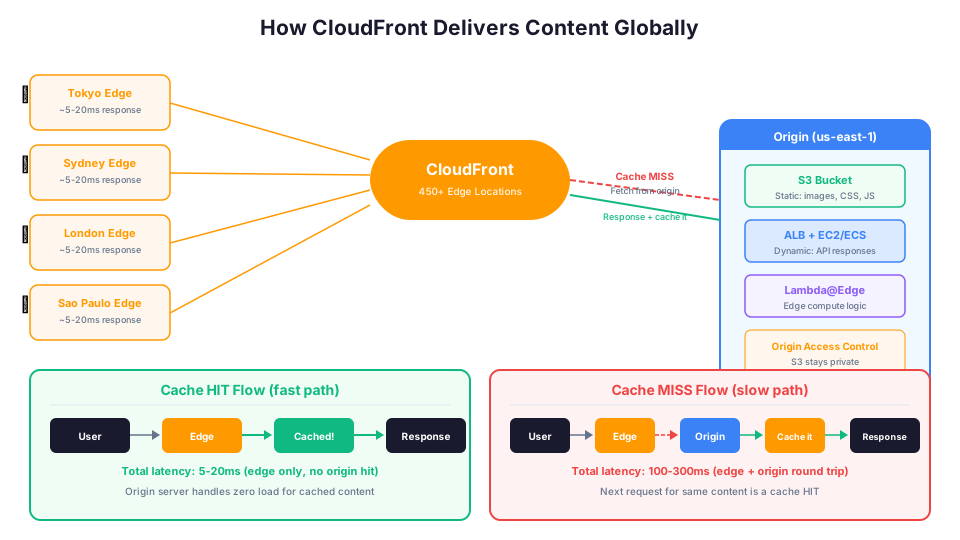
Without a CDN:
User in Tokyo --> crosses the Pacific Ocean --> your server in Virginia
Round trip: ~200-300ms just for the network
With CloudFront:
User in Tokyo --> CloudFront edge in Tokyo (cache hit) --> response
Round trip: ~5-20ms
That is a 10-15x improvement in latency just from geography. And your origin server handles far less traffic, which means lower costs and better reliability.
How CloudFront specifically works:
- A user in Sydney requests
images/logo.pngfrom your site - The request goes to the nearest CloudFront edge location (Sydney)
- If the edge has the file cached (cache hit), it returns it immediately
- If not (cache miss), the edge fetches it from your origin (S3, EC2, ALB, etc.)
- The edge caches the response and returns it to the user
- The next user in Sydney who requests the same file gets the cached version
CloudFront has over 450 edge locations across 100 cities in 50 countries. No matter where your users are, there is likely an edge location nearby.
CloudFront Network Tiers
CloudFront offers different price classes that control which edge locations are used:
| Price Class | Locations | Cost | Best For |
|---|---|---|---|
| All Edge Locations | 450+ globally | Highest | Global audience, lowest latency |
| Price Class 200 | US, Canada, Europe, Asia, Middle East, Africa | Medium | Most applications |
| Price Class 100 | US, Canada, Europe | Lowest | US/Europe focused audience |
Choosing a lower price class reduces cost but increases latency for users in excluded regions. For most applications, Price Class 200 provides good global coverage at a reasonable cost.
Part 2: Setting Up CloudFront
Let us set up a CloudFront distribution step by step. We will use S3 as the origin, which is the most common setup for static websites.
Step 1: Create an S3 Bucket for Your Content
# Create a bucket (the name must be globally unique)
aws s3 mb s3://my-website-content-2026 --region us-east-1

# Upload some content
aws s3 cp index.html s3://my-website-content-2026/
aws s3 cp --recursive ./images/ s3://my-website-content-2026/images/
aws s3 cp --recursive ./css/ s3://my-website-content-2026/css/
Important: Do NOT make the bucket public. CloudFront will access it through an Origin Access Control (OAC), which is more secure.
Step 2: Create a CloudFront Distribution
# Create an Origin Access Control
aws cloudfront create-origin-access-control \
  --origin-access-control-config '{
    "Name": "my-website-oac",
    "Description": "OAC for my website S3 bucket",
    "SigningProtocol": "sigv4",
    "SigningBehavior": "always",
    "OriginAccessControlOriginType": "s3"
  }'

# Note the OAC ID from the output, then create the distribution
aws cloudfront create-distribution \
  --distribution-config '{
    "CallerReference": "my-website-2026",
    "Origins": {
      "Quantity": 1,
      "Items": [
        {
          "Id": "S3-my-website",
          "DomainName": "my-website-content-2026.s3.us-east-1.amazonaws.com",
          "S3OriginConfig": {
            "OriginAccessIdentity": ""
          },
          "OriginAccessControlId": "YOUR_OAC_ID_HERE"
        }
      ]
    },
    "DefaultCacheBehavior": {
      "TargetOriginId": "S3-my-website",
      "ViewerProtocolPolicy": "redirect-to-https",
      "CachePolicyId": "658327ea-f89d-4fab-a63d-7e88639e58f6",
      "Compress": true,
      "AllowedMethods": {
        "Quantity": 2,
        "Items": ["GET", "HEAD"]
      }
    },
    "Enabled": true,
    "DefaultRootObject": "index.html",
    "Comment": "My website distribution"
  }'
Step 3: Update the S3 Bucket Policy
After creating the distribution, update the S3 bucket policy to allow CloudFront to access it:
aws s3api put-bucket-policy \
  --bucket my-website-content-2026 \
  --policy '{
    "Version": "2012-10-17",
    "Statement": [
      {
        "Sid": "AllowCloudFrontAccess",
        "Effect": "Allow",
        "Principal": {
          "Service": "cloudfront.amazonaws.com"
        },
        "Action": "s3:GetObject",
        "Resource": "arn:aws:s3:::my-website-content-2026/*",
        "Condition": {
          "StringEquals": {
            "AWS:SourceArn": "arn:aws:cloudfront::123456789012:distribution/EDFDVBD6EXAMPLE"
          }
        }
      }
    ]
  }'
Your content is now served globally through CloudFront. Users get HTTPS by default, content is compressed automatically, and your S3 bucket stays private.
Step 4: Add a Custom Domain and SSL Certificate
For production, you will want a custom domain instead of the default d1234.cloudfront.net:
# Request a free SSL certificate from ACM (must be in us-east-1 for CloudFront)
aws acm request-certificate \
  --domain-name "www.example.com" \
  --subject-alternative-names "example.com" \
  --validation-method DNS \
  --region us-east-1

# After DNS validation, update the distribution with the custom domain
aws cloudfront update-distribution \
  --id EDFDVBD6EXAMPLE \
  --distribution-config '{
    "Aliases": {
      "Quantity": 2,
      "Items": ["www.example.com", "example.com"]
    },
    "ViewerCertificate": {
      "ACMCertificateArn": "arn:aws:acm:us-east-1:123456789012:certificate/abc-123",
      "SSLSupportMethod": "sni-only",
      "MinimumProtocolVersion": "TLSv1.2_2021"
    }
  }'
Part 3: Caching Strategies
Caching is not "set it and forget it." Different types of content need different caching strategies.
Cache-Control Headers
The Cache-Control header tells CloudFront (and browsers) how long to cache content. You set this on your origin.
# Upload a file with a long cache lifetime (images, CSS, JS with hashed filenames)
aws s3 cp logo.png s3://my-website-content-2026/images/logo.png \
  --cache-control "public, max-age=31536000, immutable"

# Upload a file with a short cache lifetime (HTML pages that change frequently)
aws s3 cp index.html s3://my-website-content-2026/index.html \
  --cache-control "public, max-age=300"

# Upload API responses that should not be cached at the edge
aws s3 cp user-data.json s3://my-website-content-2026/api/user.json \
  --cache-control "private, no-cache, no-store"
Understanding Cache-Control Directives
| Directive | Meaning | When to Use |
|---|---|---|
public | Any cache (browser, CDN) can store this | Static assets, public content |
private | Only the browser can cache this | User-specific content |
max-age=N | Cache for N seconds | All cacheable content |
s-maxage=N | CDN caches for N seconds (overrides max-age for CDN) | Different browser vs CDN TTL |
no-cache | Revalidate with origin before using cache | Content that changes frequently |
no-store | Never cache this content | Sensitive data, real-time data |
immutable | Content will never change | Hashed filenames (style.abc123.css) |
stale-while-revalidate=N | Serve stale for N seconds while refreshing | Good user experience during refresh |
Recommended TTLs by Content Type
| Content Type | TTL | Reason |
|---|---|---|
| Images (PNG, JPG, SVG) | 1 year | Rarely change; use versioned filenames |
| CSS and JavaScript (hashed filenames) | 1 year | Hash in filename changes when content changes |
| CSS and JavaScript (unhashed) | 1 hour | May change between deployments |
| HTML pages | 5-15 minutes | Change more frequently; short TTL ensures freshness |
| API responses | 0-60 seconds | Depends on data freshness requirements |
| User-specific content | 0 (no cache) | Cannot be cached at the edge |
| Fonts (woff2, woff) | 1 year | Rarely change |
| Video/audio files | 1 year | Large files, rarely change |
Cache Invalidation
Sometimes you need to remove content from the cache before the TTL expires. There are three ways to handle this, and the right choice depends on your situation.
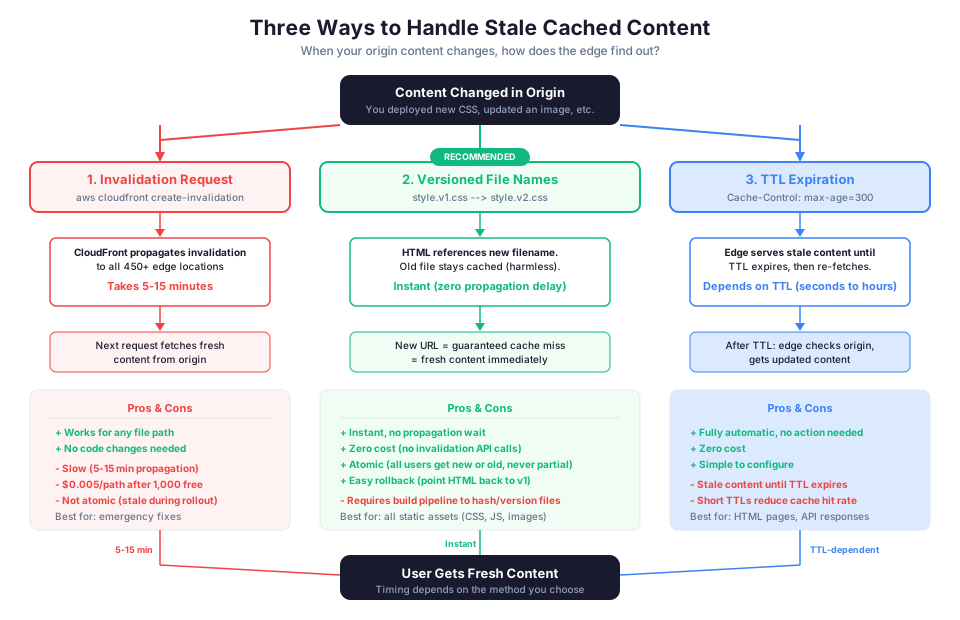
CloudFront lets you invalidate specific paths:
# Invalidate a single file
aws cloudfront create-invalidation \
  --distribution-id EDFDVBD6EXAMPLE \
  --paths "/index.html"

# Invalidate everything under a path
aws cloudfront create-invalidation \
  --distribution-id EDFDVBD6EXAMPLE \
  --paths "/images/*"

# Nuclear option: invalidate everything (costs money if done frequently)
aws cloudfront create-invalidation \
  --distribution-id EDFDVBD6EXAMPLE \
  --paths "/*"

# Check invalidation status
aws cloudfront get-invalidation \
  --distribution-id EDFDVBD6EXAMPLE \
  --id I1234567890ABC
Important: You get 1,000 free invalidation paths per month. After that, each path costs $0.005. Using versioned filenames (like style.abc123.css) is cheaper and more reliable than invalidation because you never need to invalidate. You just deploy a new filename.
Cache Behaviors for Different Content
CloudFront lets you configure different caching rules based on URL patterns:
| Path Pattern | Origin | Cache Policy | Use Case |
|---|---|---|---|
/api/* | ALB (EC2/ECS) | No cache or short TTL | Dynamic API responses |
/images/* | S3 bucket | Long TTL (1 year) | Static images |
/static/* | S3 bucket | Long TTL (1 year) | CSS, JS, fonts |
* (default) | S3 bucket | Short TTL (5 min) | HTML pages |
This lets you serve your entire application through a single CloudFront distribution, routing static content to S3 and dynamic requests to your backend.
CloudFront Cache Policies vs Origin Request Policies
CloudFront separates caching behavior into two policy types:
Cache Policy controls what is included in the cache key (the unique identifier for cached content):
# Create a custom cache policy
aws cloudfront create-cache-policy \
  --cache-policy-config '{
    "Name": "API-Cache-Policy",
    "DefaultTTL": 60,
    "MaxTTL": 300,
    "MinTTL": 0,
    "ParametersInCacheKeyAndForwardedToOrigin": {
      "EnableAcceptEncodingGzip": true,
      "EnableAcceptEncodingBrotli": true,
      "HeadersConfig": {"HeaderBehavior": "none"},
      "CookiesConfig": {"CookieBehavior": "none"},
      "QueryStringsConfig": {
        "QueryStringBehavior": "whitelist",
        "QueryStrings": {"Quantity": 2, "Items": ["page", "limit"]}
      }
    }
  }'
Origin Request Policy controls what headers, cookies, and query strings are forwarded to your origin (without affecting the cache key):
# Create an origin request policy that forwards auth headers to origin
# but does NOT include them in the cache key
aws cloudfront create-origin-request-policy \
  --origin-request-policy-config '{
    "Name": "Forward-Auth-Headers",
    "HeadersConfig": {
      "HeaderBehavior": "whitelist",
      "Headers": {"Quantity": 1, "Items": ["Authorization"]}
    },
    "CookiesConfig": {"CookieBehavior": "none"},
    "QueryStringsConfig": {"QueryStringBehavior": "all"}
  }'
This separation is powerful: you can forward authentication headers to your origin for validation without including them in the cache key (which would cause every user to get their own cached copy).
Part 4: ElastiCache for Application-Level Caching
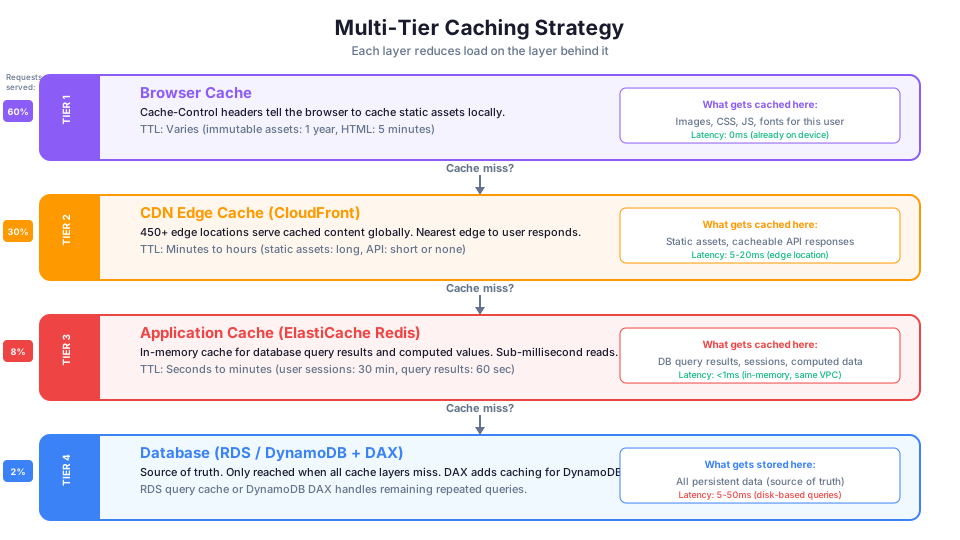
CloudFront handles caching at the edge, but what about data that lives behind your API? That is where ElastiCache comes in.
ElastiCache is a managed in-memory data store. It puts frequently accessed data in RAM so your application does not need to query the database every time.
Without caching:
User --> API --> Lambda/EC2 --> RDS query (10-50ms) --> response
With ElastiCache:
User --> API --> Lambda/EC2 --> ElastiCache (sub-1ms cache hit) --> response
                            --> RDS query (cache miss only) --> write to cache
Redis vs. Memcached
ElastiCache supports two engines. Here is when to use each:
| Feature | Redis | Memcached |
|---|---|---|
| Data structures | Strings, lists, sets, sorted sets, hashes | Strings only |
| Persistence | Yes (snapshots and AOF) | No (data lost on restart) |
| Replication | Yes (read replicas) | No |
| Multi-AZ failover | Yes | No |
| Pub/Sub | Yes | No |
| Lua scripting | Yes | No |
| Multi-threaded | No (single-threaded per shard) | Yes |
| Maximum data size per item | 512 MB | 1 MB |
| Cluster mode | Yes (horizontal scaling) | Yes (horizontal scaling) |
| Encryption | Yes (at-rest and in-transit) | Yes (in-transit only) |
Use Redis when: You need data persistence, replication, complex data structures, or pub/sub. This is the right choice 90% of the time.
Use Memcached when: You need simple key-value caching with multi-threaded performance and you do not care about data persistence. Large-scale, simple caching scenarios where you can tolerate data loss.
Common Caching Patterns
Cache-Aside (Lazy Loading):
This is the most common pattern. Your application checks the cache first. If the data is there (cache hit), return it. If not (cache miss), query the database, store the result in the cache, and return it.
1. App checks cache for key "user:123"
2. Cache miss -> query RDS for user 123
3. Store result in cache with TTL of 300 seconds
4. Return result to user
5. Next request for "user:123" -> cache hit (sub-millisecond)
Pros: Only caches data that is actually requested. Simple to implement. Cons: First request for any item is always slow (cache miss). Stale data possible until TTL expires.
Write-Through:
Every time your application writes to the database, it also writes to the cache. This keeps the cache always up to date.
1. App writes new data for user 123 to RDS
2. App simultaneously writes to cache for key "user:123"
3. Cache is always current
Pros: Cache data is never stale. Reads are always fast. Cons: Write penalty (every write goes to two places). Caches data that might never be read.
Write-Behind (Write-Back):
Application writes to the cache first, and the cache asynchronously writes to the database later. This speeds up writes but introduces complexity.
1. App writes to cache for key "user:123"
2. Cache acknowledges immediately (fast write)
3. Cache asynchronously flushes to RDS in the background
Pros: Very fast writes. Reduces database write load. Cons: Risk of data loss if cache fails before flushing. Complex to implement correctly.
TTL (Time to Live):
Set an expiration time on cached items. This is the safety net that prevents stale data from living forever:
SET user:123 "{name: 'Alice', role: 'admin'}" EX 300
# This entry expires after 300 seconds (5 minutes)
Choosing the Right TTL
| Data Type | Recommended TTL | Reason |
|---|---|---|
| User session data | 30 minutes | Sessions should expire for security |
| Product catalog | 5-15 minutes | Changes infrequently |
| Search results | 1-5 minutes | Acceptable to be slightly stale |
| Real-time pricing | 10-30 seconds | Needs to be fresh |
| User-specific data | 60 seconds | Balance of freshness and performance |
| Configuration data | 5 minutes | Changes rarely, can tolerate brief staleness |
| Leaderboards | 30-60 seconds | Near-real-time is sufficient |
Creating an ElastiCache Redis Cluster
# Create a subnet group (ElastiCache runs in your VPC)
aws elasticache create-cache-subnet-group \
  --cache-subnet-group-name my-cache-subnets \
  --cache-subnet-group-description "Subnets for ElastiCache" \
  --subnet-ids subnet-0abc123 subnet-0def456

# Create a Redis cluster with replication for high availability
aws elasticache create-replication-group \
  --replication-group-id my-app-cache \
  --replication-group-description "Application cache" \
  --engine redis \
  --cache-node-type cache.t3.micro \
  --num-cache-clusters 2 \
  --cache-subnet-group-name my-cache-subnets \
  --security-group-ids sg-0abc123 \
  --automatic-failover-enabled \
  --at-rest-encryption-enabled \
  --transit-encryption-enabled

# Check cluster status
aws elasticache describe-replication-groups \
  --replication-group-id my-app-cache \
  --query "ReplicationGroups[0].{Status:Status,Endpoint:NodeGroups[0].PrimaryEndpoint}"
ElastiCache Sizing Guide
| Use Case | Instance Type | Memory | Monthly Cost |
|---|---|---|---|
| Dev/test, small cache | cache.t3.micro | 0.5 GB | ~$12 |
| Small production | cache.t3.small | 1.37 GB | ~$24 |
| Medium production | cache.r6g.large | 13.07 GB | ~$130 |
| Large production | cache.r6g.xlarge | 26.32 GB | ~$260 |
| High-memory workloads | cache.r6g.2xlarge | 52.82 GB | ~$520 |
Start small and monitor the BytesUsedForCache and CacheHitRate metrics. Scale up when usage exceeds 70% or the hit rate drops.
Part 5: Edge Computing with CloudFront
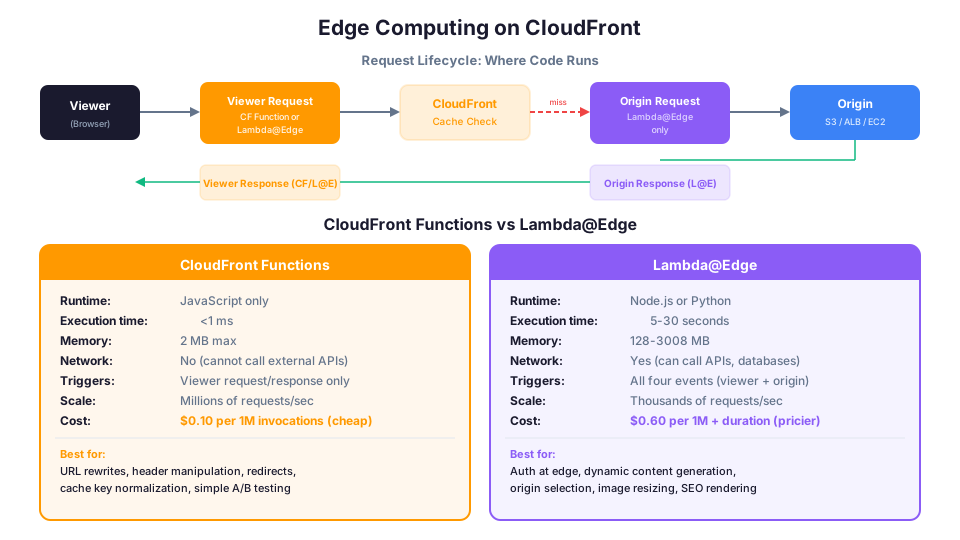
Beyond simple caching, CloudFront lets you run code at the edge. This is powerful for logic that does not need to travel back to your origin.
CloudFront Functions
Lightweight JavaScript functions that run on every request. Sub-millisecond execution.
// Example: URL rewrite for single-page applications
// Routes all paths to index.html (except files with extensions)
function handler(event) {
    var request = event.request;
    var uri = request.uri;

    // If the URI has a file extension, serve the file
    if (uri.includes('.')) {
        return request;
    }

    // Otherwise, rewrite to index.html for SPA routing
    request.uri = '/index.html';
    return request;
}
# Create and deploy a CloudFront Function
aws cloudfront create-function \
  --name spa-url-rewrite \
  --function-config '{
    "Comment": "SPA URL rewrite",
    "Runtime": "cloudfront-js-2.0"
  }' \
  --function-code fileb://function.js

# Publish the function
aws cloudfront publish-function \
  --name spa-url-rewrite \
  --if-match ETVPDKIKX0DER

# Associate with a cache behavior
aws cloudfront update-distribution \
  --id EDFDVBD6EXAMPLE \
  --distribution-config '...'
Lambda@Edge
Full Lambda functions that can run at all four lifecycle events. Up to 30 seconds execution time and can make network calls.
// Example: Authentication at the edge
// Verify JWT tokens before the request reaches your origin
exports.handler = async (event) => {
    const request = event.Records[0].cf.request;
    const headers = request.headers;

    const authHeader = headers['authorization'];
    if (!authHeader || !authHeader[0]) {
        return {
            status: '401',
            statusDescription: 'Unauthorized',
            headers: {
                'content-type': [{ value: 'application/json' }]
            },
            body: JSON.stringify({ error: 'Missing authorization header' })
        };
    }

    // Verify the JWT token
    // If valid, forward the request to the origin
    // If invalid, return 401

    return request;
};
Common Edge Computing Use Cases
| Use Case | Tool | Why Edge |
|---|---|---|
| URL rewrites/redirects | CloudFront Function | Simple, sub-ms, no network needed |
| Header manipulation | CloudFront Function | Add security headers, modify request |
| A/B testing | CloudFront Function | Route users to variants at edge |
| Geo-based routing | CloudFront Function | Use CF-provided geo headers |
| Authentication | Lambda@Edge | Needs to validate tokens (network) |
| Image resizing | Lambda@Edge | Process images before caching |
| Origin selection | Lambda@Edge | Route to different origins based on logic |
| SEO rendering | Lambda@Edge | Server-side render for bots |
| Bot detection | CloudFront Function | Block bad bots at the edge |
Part 6: Performance Optimization Best Practices
Here are the techniques that have the biggest impact, organized from easiest to most involved.
Quick Wins (Implement Today)
1. Enable CloudFront compression. CloudFront can automatically compress text-based content (HTML, CSS, JavaScript, JSON) using gzip or Brotli. This reduces transfer sizes by 60-80%.
Set Compress: true in your cache behavior (we did this in the distribution config above).
2. Optimize your images. Images are usually the largest assets on a page. Use modern formats like WebP (30% smaller than JPEG) or AVIF (50% smaller). Use responsive images that serve different sizes for different screen widths.
| Format | Quality | Size vs JPEG | Browser Support |
|---|---|---|---|
| JPEG | Good | Baseline | Universal |
| WebP | Good | 25-35% smaller | 97% of browsers |
| AVIF | Excellent | 40-50% smaller | 92% of browsers |
3. Use HTTP/2 (or HTTP/3). CloudFront supports HTTP/2 by default and HTTP/3 as an option. HTTP/2 multiplexes requests over a single connection, eliminating the head-of-line blocking that slows down HTTP/1.1.
# Enable HTTP/3 on your distribution
aws cloudfront update-distribution \
  --id EDFDVBD6EXAMPLE \
  --distribution-config '{
    "HttpVersion": "http3"
  }'
4. Set appropriate Cache-Control headers. We covered this above, but it bears repeating: proper cache headers are the single highest-impact performance optimization. A cached response is always faster than a computed one.
Architecture-Level Optimizations
5. Use a multi-tier caching strategy.
Think of caching as layers:
| Layer | Tool | TTL | What It Caches |
|---|---|---|---|
| Browser | Cache-Control headers | Varies | Static assets for the specific user |
| CDN (Edge) | CloudFront | Minutes to hours | Static assets and cacheable API responses |
| Application | ElastiCache Redis | Seconds to minutes | Database query results, computed values |
| Database | RDS query cache / DAX | Automatic | Frequently run queries |
Each layer reduces load on the layer behind it. By the time a request reaches your database, it should be only requests that genuinely need fresh data.
6. Move static assets to S3 + CloudFront. If your EC2 instances are serving static files (images, CSS, JavaScript), every request for those files burns compute capacity that could be handling dynamic requests. Move static assets to S3 and serve them through CloudFront.
7. Use connection pooling. Database connections are expensive to create. Use connection pooling (RDS Proxy, PgBouncer, or your application's built-in pool) to reuse connections instead of creating new ones for every request.
# Create an RDS Proxy for connection pooling
aws rds create-db-proxy \
  --db-proxy-name my-app-proxy \
  --engine-family POSTGRESQL \
  --auth '[{
    "AuthScheme": "SECRETS",
    "SecretArn": "arn:aws:secretsmanager:us-east-1:123456789012:secret:my-db-creds",
    "IAMAuth": "DISABLED"
  }]' \
  --role-arn arn:aws:iam::123456789012:role/rds-proxy-role \
  --vpc-subnet-ids subnet-0abc123 subnet-0def456
8. Use CloudFront Functions or Lambda@Edge for edge logic. Instead of routing requests all the way to your origin for simple logic (URL redirects, header manipulation, A/B testing), run that logic at the edge.
9. Implement DynamoDB DAX for DynamoDB-heavy workloads. DAX (DynamoDB Accelerator) is a fully managed, in-memory cache specifically for DynamoDB. It requires no application code changes; you just point your DynamoDB client at the DAX endpoint.
# Create a DAX cluster
aws dax create-cluster \
  --cluster-name my-dax-cluster \
  --node-type dax.t3.small \
  --replication-factor 2 \
  --iam-role-arn arn:aws:iam::123456789012:role/DAXRole \
  --subnet-group my-dax-subnets
DAX provides microsecond read latency for cached items, compared to single-digit millisecond latency from DynamoDB directly. For read-heavy DynamoDB workloads, DAX can reduce read costs by up to 90%.
Measuring Performance
You cannot improve what you do not measure. Here are the key metrics to track:
CloudFront metrics (CloudWatch):
- Cache Hit Rate: Percentage of requests served from cache. Aim for 85%+ for static content.
- Origin Latency: How long the origin takes to respond on cache misses.
- Error Rate: 4xx and 5xx errors from your distribution.
- Bytes Downloaded: Total data transfer from your distribution.
# Check your CloudFront cache hit ratio
aws cloudwatch get-metric-statistics \
  --namespace AWS/CloudFront \
  --metric-name CacheHitRate \
  --dimensions Name=DistributionId,Value=EDFDVBD6EXAMPLE Name=Region,Value=Global \
  --start-time 2026-05-11T00:00:00Z \
  --end-time 2026-05-12T00:00:00Z \
  --period 3600 \
  --statistics Average

# Check origin latency to identify slow backends
aws cloudwatch get-metric-statistics \
  --namespace AWS/CloudFront \
  --metric-name OriginLatency \
  --dimensions Name=DistributionId,Value=EDFDVBD6EXAMPLE Name=Region,Value=Global \
  --start-time 2026-05-11T00:00:00Z \
  --end-time 2026-05-12T00:00:00Z \
  --period 3600 \
  --statistics p50 p90 p99
ElastiCache metrics (CloudWatch):
- CacheHitRate: Percentage of reads served from cache. Below 80% suggests your caching strategy needs tuning.
- Evictions: Items removed from cache due to memory pressure. Persistent evictions mean you need more memory.
- CurrConnections: Number of active connections to the cache.
- DatabaseMemoryUsagePercentage: How full the cache is. Scale up before hitting 90%.
# Monitor ElastiCache health
aws cloudwatch get-metric-statistics \
  --namespace AWS/ElastiCache \
  --metric-name CacheHitRate \
  --dimensions Name=ReplicationGroupId,Value=my-app-cache \
  --start-time 2026-05-11T00:00:00Z \
  --end-time 2026-05-12T00:00:00Z \
  --period 3600 \
  --statistics Average

# Check for memory pressure
aws cloudwatch get-metric-statistics \
  --namespace AWS/ElastiCache \
  --metric-name DatabaseMemoryUsagePercentage \
  --dimensions Name=ReplicationGroupId,Value=my-app-cache \
  --start-time 2026-05-11T00:00:00Z \
  --end-time 2026-05-12T00:00:00Z \
  --period 3600 \
  --statistics Maximum
Troubleshooting Common Errors
Distribution returning 403 A 403 from CloudFront usually means the distribution cannot access the origin. If using an S3 origin with Origin Access Control (OAC), verify that the S3 bucket policy includes a statement allowing s3:GetObject from the cloudfront.amazonaws.com service principal with a Condition matching your distribution ARN. Also confirm the OAC ID in your distribution config matches the one you created. Run aws s3api get-bucket-policy --bucket <bucket-name> to check the policy. If the bucket is in a different region than expected, make sure the distribution uses the regional S3 endpoint (e.g., my-bucket.s3.us-east-1.amazonaws.com), not the global one.
Cache not invalidating Invalidation requests can take up to 10-15 minutes to propagate to all edge locations. Check the invalidation status with aws cloudfront get-invalidation --distribution-id <id> --id <invalidation-id>. If the status is Completed but you still see old content, the issue is likely browser caching. Clear your browser cache or test with curl -H "Cache-Control: no-cache". Also verify your invalidation path matches the actual object path (paths are case-sensitive and must start with /). Using versioned filenames (like style.v2.css) is more reliable than invalidation and avoids both edge and browser caching issues.
Custom domain SSL errors CloudFront requires SSL certificates to be in the us-east-1 region, regardless of where your origin is. If you see "The SSL certificate does not match the domain name," verify the certificate covers your domain (including any www. variant). Run aws acm describe-certificate --certificate-arn <arn> --region us-east-1 to check the domain names and validation status. The certificate status must be ISSUED, not PENDING_VALIDATION. If validation is stuck, verify the DNS CNAME records ACM provided are correctly configured in your DNS provider.
Performance Optimization Checklist
| Optimization | Impact | Effort | Priority |
|---|---|---|---|
| Enable CloudFront compression | High | Low | Do first |
| Set proper Cache-Control headers | High | Low | Do first |
| Serve static assets from S3+CloudFront | High | Medium | Week 1 |
| Optimize images (WebP/AVIF) | Medium | Medium | Week 1 |
| Add ElastiCache for hot queries | High | Medium | Week 2 |
| Enable HTTP/2 or HTTP/3 | Medium | Low | Week 2 |
| Implement connection pooling (RDS Proxy) | Medium | Medium | Week 3 |
| Add Lambda@Edge for edge logic | Low-Medium | Medium | Week 4 |
| Implement DynamoDB DAX | High (for DDB) | Low | If using DynamoDB |
How This Shows Up in Architecture Decisions
CloudFront and caching decisions come up in nearly every architecture review and technical interview:
- "We need to serve static content to users globally with the lowest latency." (CloudFront with S3 origin)
- "Our application makes repeated read queries to an RDS database. How can we improve performance?" (ElastiCache, specifically Redis)
- "We need to serve different content based on the user's location." (CloudFront with geo-restriction or Lambda@Edge)
- "How can we reduce the load on our origin server?" (CloudFront caching with appropriate TTLs)
- "Which ElastiCache engine supports replication and persistence?" (Redis)
- "We want to run authentication logic without going to the origin." (Lambda@Edge)
- "How can we cache DynamoDB reads with microsecond latency?" (DAX)
Understanding when to use edge caching (CloudFront) versus application caching (ElastiCache) and how they work together is essential.
Quick Reference for Architecture Decisions
| If the question says... | Think... |
|---|---|
| "Global users", "static content", "low latency" | CloudFront |
| "Repeated database reads", "in-memory cache" | ElastiCache Redis |
| "Simple key-value cache", "multi-threaded" | ElastiCache Memcached |
| "DynamoDB reads", "microsecond latency" | DynamoDB DAX |
| "Edge logic", "URL rewrite", "header manipulation" | CloudFront Functions |
| "Edge logic", "authentication", "image resize" | Lambda@Edge |
| "S3 origin", "private bucket" | Origin Access Control (OAC) |
| "Connection pooling", "Lambda + RDS" | RDS Proxy |
Next Steps
Put CloudFront in front of your next project before you write any backend optimization code. The fastest request is one that never reaches your origin. The AWS Free Tier includes 1 TB of CloudFront data transfer per month, so you can start experimenting at zero cost.
Once CloudFront is handling your static content, evaluate whether ElastiCache makes sense for your hot database queries. The combination of edge caching and application caching can take response times from seconds to single-digit milliseconds.
Pricing note: CloudFront data transfer, invalidation path costs, ElastiCache instance pricing, and DAX cluster costs cited in this article are for us-east-1 and were verified in May 2026. Check the AWS Pricing Calculator for current rates in your Region.
Hands-On Challenge
Deploy a static website with CloudFront, a custom domain, and properly configured cache policies.
Success criteria:
- Create an S3 bucket with static site content and an Origin Access Control (OAC) that keeps the bucket private
- Create a CloudFront distribution pointing to the S3 origin with compression enabled and HTTPS enforced via redirect
- Configure a custom domain with an ACM certificate (in us-east-1) and DNS records pointing to the CloudFront distribution
- Set Cache-Control headers on your assets: 1-year TTL for images and hashed CSS/JS, 5-minute TTL for HTML pages
- Verify the cache is working by checking the
X-Cacheresponse header (should show "Hit from cloudfront" on the second request) - Run a cache invalidation on your HTML files and confirm the new content is served within 15 minutes
- Check your CloudFront cache hit rate metric in CloudWatch and confirm it is above 80% for static content
Build it yourself: This topic is covered hands-on in Module 19: Advanced Topics of our AWS Bootcamp.