
AWS Disaster Recovery: RTO, RPO, and 4 Strategies
Nobody thinks about disaster recovery until something breaks. And when something breaks in production at 2 AM, it is too late to start planning.
Disaster recovery on AWS is one of those topics that sounds intimidating but follows a clear, logical framework. Once you understand two key metrics and four strategies, you can design a DR plan for any workload. And yes, this comes up on the Solutions Architect Associate exam frequently.
Whether you are preparing for the certification, building production systems, or interviewing for cloud roles, understanding DR is non-negotiable. The companies that recover gracefully from outages are the ones that planned ahead. The ones that scramble in the middle of an incident are the ones that did not.
Prerequisites: You should understand VPC networking and CloudWatch monitoring before starting this article.
What You Will Learn
By the end of this article, you will be able to:
- Explain the relationship between RTO, RPO, and business cost, and calculate downtime impact for a given workload
- Compare the four AWS disaster recovery strategies (backup-and-restore, pilot light, warm standby, active-active) by cost, complexity, and recovery targets
- Design a disaster recovery architecture that matches specific RTO/RPO requirements and budget constraints
- Implement a basic DR plan using cross-region backups, RDS read replicas, and Route 53 failover routing
- Evaluate whether a workload needs single-region multi-AZ or multi-region DR based on regulatory and business requirements
The Two Numbers That Drive Everything: RTO and RPO
Before we talk about strategies, you need to understand two metrics. Every disaster recovery conversation starts here.
RTO (Recovery Time Objective) is the maximum amount of time your application can be down after a disaster. If your RTO is 4 hours, that means you need to have everything back up and running within 4 hours of the failure.
RPO (Recovery Point Objective) is the maximum amount of data you can afford to lose, measured in time. If your RPO is 1 hour, that means you need backups or replication that captures data at least every hour. Any data written in the gap between your last backup and the failure is lost.
Here is a simple way to remember them:
- RTO answers: "How quickly do we need to be back online?"
- RPO answers: "How much data can we afford to lose?"
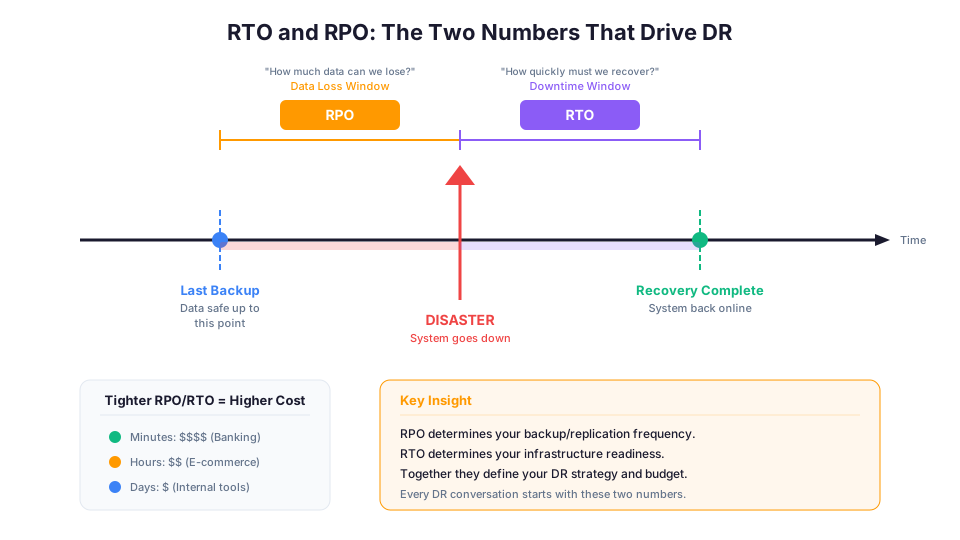
A real example: An e-commerce site might have an RTO of 1 hour (every hour of downtime costs revenue) and an RPO of 5 minutes (losing 5 minutes of orders is painful but survivable). A static marketing website might have an RTO of 24 hours and an RPO of 24 hours because the content changes infrequently and downtime costs nothing.
The tighter your RTO and RPO, the more expensive your DR solution. This is the fundamental trade-off.
| RTO / RPO | Business Impact | Typical Cost Level | Example Workloads |
|---|---|---|---|
| Minutes | Mission-critical (banking, healthcare) | High | Payment processing, patient records |
| Hours | Important (e-commerce, SaaS) | Medium | Online stores, collaboration tools |
| Days | Low impact (internal tools, archives) | Low | Internal wikis, batch reporting |
How to Calculate the Business Cost of Downtime
This is the conversation that determines your DR budget. If you cannot quantify the cost of downtime, you cannot justify DR investment.
Revenue loss: If your application generates $50,000/hour in revenue, a 4-hour outage costs $200,000 in direct revenue loss.
Reputation damage: This is harder to quantify but often more expensive than revenue loss. A major outage can drive customers to competitors permanently.
SLA penalties: If you have contractual uptime commitments (99.9%, 99.99%), each minute of downtime beyond your SLA budget triggers financial penalties.
Regulatory fines: In regulated industries (healthcare, finance), extended outages can trigger compliance violations with significant fines.
# Quick calculation example:
# Annual revenue: $10,000,000
# Revenue per hour: $10,000,000 / 8,760 hours = ~$1,142/hour
# If an outage lasts 8 hours: $1,142 * 8 = $9,136 in direct revenue loss
# If your DR solution costs $500/month ($6,000/year), it pays for itself
# with a single prevented 6-hour outage
The Four Disaster Recovery Strategies
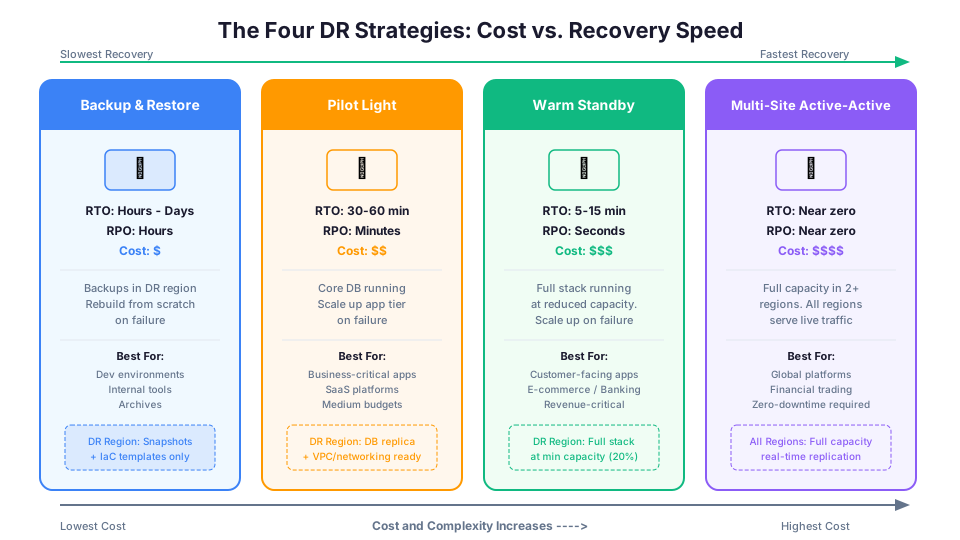
AWS documentation describes four DR strategies, arranged from cheapest and slowest to most expensive and fastest. Think of them as a spectrum.
Strategy 1: Backup and Restore
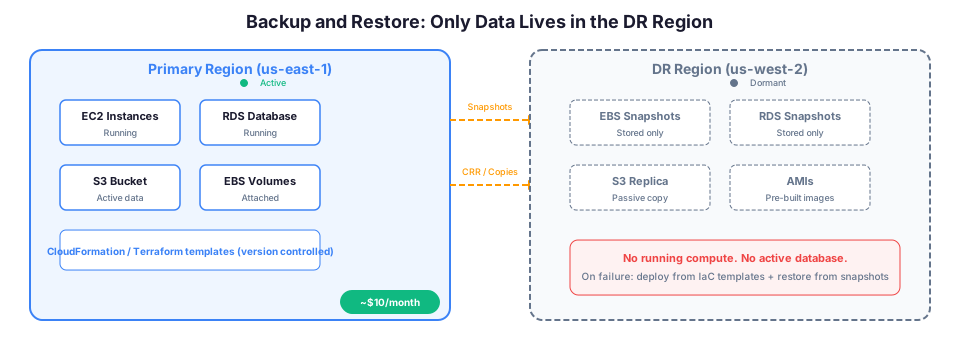
How it works: You take regular backups of your data and store them in another region. When disaster strikes, you restore from backup and rebuild your infrastructure from scratch.
RTO: Hours to days RPO: Hours (depends on backup frequency) Cost: Lowest
What this looks like on AWS:
- Automated EBS snapshots copied to another region
- RDS automated backups with cross-region snapshot copies
- S3 cross-region replication for object data
- Infrastructure defined in CloudFormation or Terraform templates (so you can rebuild quickly)
- AWS Backup providing centralized, policy-driven backup management
# Copy an EBS snapshot to another region
aws ec2 copy-snapshot \
  --source-region us-east-1 \
  --source-snapshot-id snap-0abc123def456 \
  --destination-region us-west-2 \
  --description "DR copy of production database volume"

# Copy an RDS snapshot to another region
aws rds copy-db-snapshot \
  --source-db-snapshot-identifier arn:aws:rds:us-east-1:123456789012:snapshot:my-db-snapshot \
  --target-db-snapshot-identifier my-db-snapshot-dr-copy \
  --source-region us-east-1 \
  --region us-west-2

# Verify the snapshot copy completed
aws rds describe-db-snapshots \
  --db-snapshot-identifier my-db-snapshot-dr-copy \
  --region us-west-2 \
  --query "DBSnapshots[0].{Status:Status,Size:AllocatedStorage,Engine:Engine}"
When to use it: Development environments, non-critical internal tools, data archives, or any workload where hours of downtime are acceptable. This is also a good starting point for organizations just beginning their DR journey.
Real-world example: A company runs an internal reporting tool that employees use during business hours. If the primary region fails on a Tuesday, they can restore from the previous night's backup in another region. The team loses at most 24 hours of data and the tool is offline for a few hours while they rebuild. Since the tool is not customer-facing, this trade-off is acceptable and the DR cost is minimal: just the storage cost for snapshots and replicated data.
Cost breakdown for Backup and Restore:
| Component | Monthly Cost |
|---|---|
| EBS snapshot storage (100 GB cross-region) | ~$5 |
| RDS snapshot storage (50 GB cross-region) | ~$4 |
| S3 cross-region replication (10 GB) | ~$0.30 |
| Total ongoing DR cost | ~$9.30/month |
Strategy 2: Pilot Light
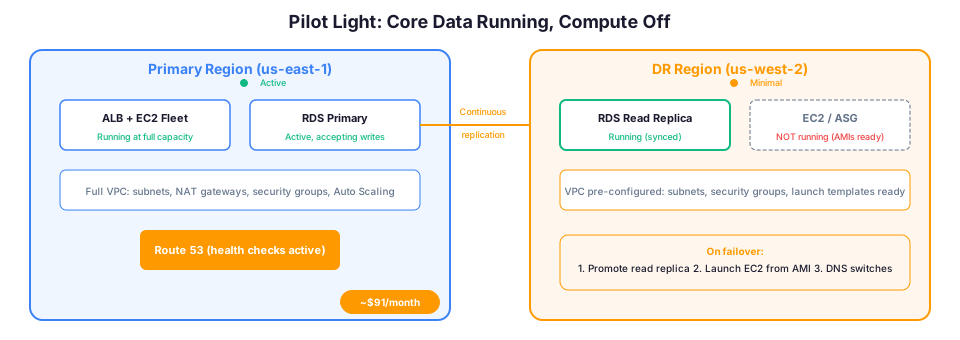
How it works: You keep a minimal version of your core infrastructure running in the DR region at all times. Think of it like a pilot light on a gas furnace: the flame is small but it is always on, ready to ignite the full system.
RTO: Tens of minutes to hours RPO: Minutes to hours Cost: Low to medium
What this looks like on AWS:
- An RDS read replica running in the DR region (always in sync)
- Core networking (VPC, subnets, security groups) already configured
- AMIs and launch templates ready to go
- No EC2 instances running for the application tier (you scale those up during failover)
- Route 53 health checks monitoring the primary region
# Create an RDS read replica in the DR region
aws rds create-db-instance-read-replica \
  --db-instance-identifier my-db-dr-replica \
  --source-db-instance-identifier arn:aws:rds:us-east-1:123456789012:db:my-production-db \
  --region us-west-2 \
  --db-instance-class db.t3.medium

# When disaster strikes, promote the replica to a standalone database
aws rds promote-read-replica \
  --db-instance-identifier my-db-dr-replica \
  --region us-west-2

# Monitor the promotion status
aws rds describe-db-instances \
  --db-instance-identifier my-db-dr-replica \
  --region us-west-2 \
  --query "DBInstances[0].{Status:DBInstanceStatus,Endpoint:Endpoint.Address}"

# Launch application instances from pre-built AMI
aws ec2 run-instances \
  --image-id ami-0abc123def456 \
  --instance-type t3.large \
  --count 2 \
  --subnet-id subnet-0abc123 \
  --security-group-ids sg-0abc123 \
  --region us-west-2 \
  --tag-specifications 'ResourceType=instance,Tags=[{Key=Name,Value=DR-AppServer}]'
When to use it: Business-critical applications where you need faster recovery than backup-and-restore but cannot justify running full duplicate infrastructure. The ongoing cost is primarily the database replica and network configuration.
Real-world example: A SaaS company keeps an RDS read replica and pre-configured networking in us-west-2. Their production runs in us-east-1. If us-east-1 has a major outage, they promote the read replica to primary, launch EC2 instances from pre-built AMIs, and update Route 53 DNS. Total recovery time: 30-60 minutes. Their RPO is near-zero for the database because the replica is continuously synced.
Cost breakdown for Pilot Light:
| Component | Monthly Cost |
|---|---|
| RDS read replica (db.t3.medium) | ~$50 |
| VPC networking (NAT Gateway, etc.) | ~$35 |
| EBS snapshots for AMIs | ~$5 |
| Route 53 health checks | ~$1 |
| Total ongoing DR cost | ~$91/month |
Strategy 3: Warm Standby
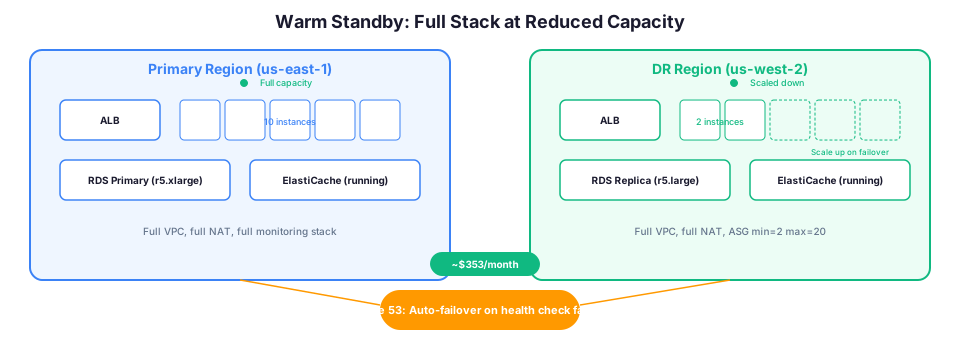
How it works: You run a scaled-down but fully functional version of your environment in the DR region. Everything is running, just at reduced capacity. When failover happens, you scale up.
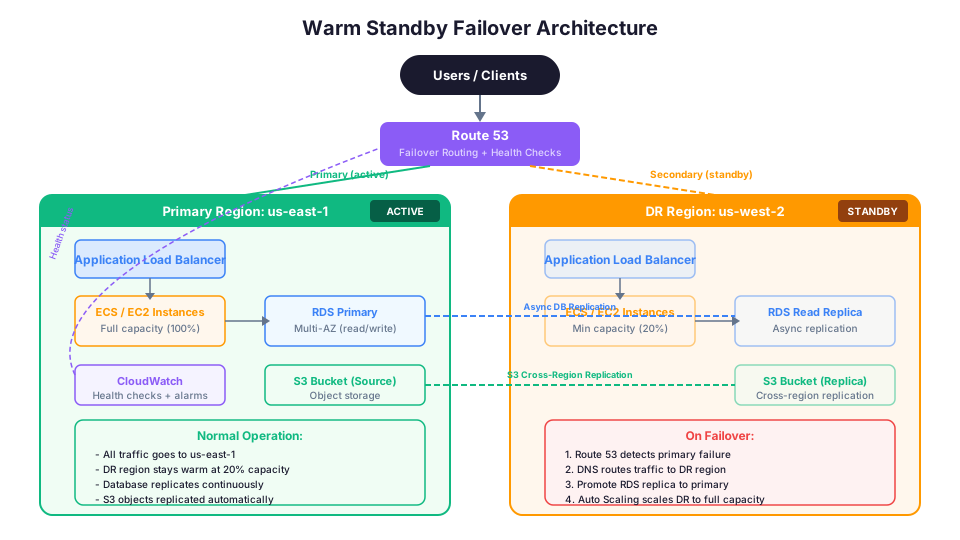
RTO: Minutes RPO: Seconds to minutes Cost: Medium to high
What this looks like on AWS:
- Full application stack running in the DR region (web servers, app servers, databases)
- Everything scaled to minimum (e.g., 1 instance instead of 10)
- Database running as an active read replica with continuous replication
- Route 53 health checks monitoring the primary region
- Auto Scaling groups configured and ready to scale up
# Set up a Route 53 health check for automatic failover
aws route53 create-health-check \
  --caller-reference "prod-health-$(date +%s)" \
  --health-check-config '{
    "Type": "HTTPS",
    "FullyQualifiedDomainName": "app.example.com",
    "Port": 443,
    "ResourcePath": "/health",
    "RequestInterval": 10,
    "FailureThreshold": 3
  }'

# Configure Route 53 failover routing
# Primary record points to us-east-1, secondary to us-west-2
# When the health check fails, Route 53 automatically routes to the standby

# Pre-configure Auto Scaling in the DR region
aws autoscaling update-auto-scaling-group \
  --auto-scaling-group-name dr-web-asg \
  --min-size 1 \
  --max-size 20 \
  --desired-capacity 1 \
  --region us-west-2

# During failover, scale up to handle full production traffic
aws autoscaling update-auto-scaling-group \
  --auto-scaling-group-name dr-web-asg \
  --min-size 5 \
  --desired-capacity 10 \
  --region us-west-2
When to use it: Customer-facing applications that need to recover within minutes. E-commerce platforms, banking applications, and SaaS products where downtime directly impacts revenue.
Real-world example: An online banking platform runs its full stack in both us-east-1 (primary, scaled for full traffic) and us-west-2 (warm standby, scaled to 20% capacity). Route 53 health checks monitor the primary. If us-east-1 fails, Route 53 automatically starts routing traffic to us-west-2, and Auto Scaling groups in us-west-2 scale up to handle the full load. Total recovery: 5-15 minutes. Users might experience brief slowness during the scale-up but no actual outage.
Cost breakdown for Warm Standby:
| Component | Monthly Cost |
|---|---|
| EC2 instances (2x t3.large, 20% of prod) | ~$120 |
| RDS read replica (db.r5.large) | ~$175 |
| ALB in DR region | ~$22 |
| VPC networking (NAT Gateway, etc.) | ~$35 |
| Route 53 health checks | ~$1 |
| Total ongoing DR cost | ~$353/month |
Strategy 4: Multi-Site Active-Active
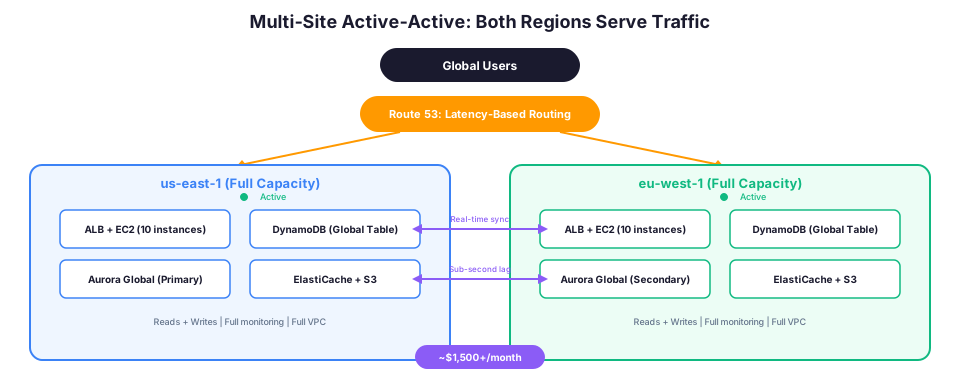
How it works: Your application runs at full capacity in two or more regions simultaneously. Traffic is distributed across all regions. There is no "failover" because all regions are always serving traffic.
RTO: Near zero (seconds) RPO: Near zero (real-time replication) Cost: Highest (you are running everything twice or more)
What this looks like on AWS:
- Identical full-capacity deployments in multiple regions
- DynamoDB Global Tables for real-time multi-region database replication
- Route 53 latency-based or weighted routing distributing traffic
- S3 cross-region replication for object data
- CloudFront in front of both regions for global edge caching
- Aurora Global Database for sub-second cross-region replication
# DynamoDB Global Tables replicate across regions automatically
aws dynamodb update-table \
  --table-name MyApplicationTable \
  --replica-updates '[
    {"Create": {"RegionName": "us-west-2"}},
    {"Create": {"RegionName": "eu-west-1"}}
  ]' \
  --region us-east-1

# Route 53 latency-based routing sends users to the closest region
# No failover needed because both regions handle production traffic

# Verify global table replication status
aws dynamodb describe-table \
  --table-name MyApplicationTable \
  --region us-east-1 \
  --query "Table.Replicas[*].{Region:RegionName,Status:ReplicaStatus}"

# Create an Aurora Global Database for relational data
aws rds create-global-cluster \
  --global-cluster-identifier my-global-db \
  --source-db-cluster-identifier arn:aws:rds:us-east-1:123456789012:cluster:my-primary-cluster \
  --region us-east-1
When to use it: Globally distributed applications with zero tolerance for downtime. Financial trading platforms, real-time communication services, and applications with users across multiple continents.
Real-world example: A global video conferencing platform runs in us-east-1, eu-west-1, and ap-southeast-1. Users automatically connect to the nearest region for the lowest latency. DynamoDB Global Tables keep user data synchronized across all three regions in real time. If any single region fails, the other two continue operating without any user impact. The cost is roughly 3x a single-region deployment, but for this application, even one minute of downtime costs millions.
Cost breakdown for Multi-Site Active-Active (2 regions):
| Component | Monthly Cost |
|---|---|
| EC2 instances (full capacity x2 regions) | ~$1,200 |
| DynamoDB Global Tables (2 regions) | ~$200 |
| ALB (x2 regions) | ~$44 |
| VPC networking (x2 regions) | ~$70 |
| Route 53 latency routing | ~$5 |
| Total ongoing DR cost | ~$1,519/month |
Comparing the Four Strategies
| Strategy | RTO | RPO | Cost | Complexity | Primary AWS Services |
|---|---|---|---|---|---|
| Backup and Restore | Hours to days | Hours | $ | Low | AWS Backup, S3 CRR, EBS Snapshots |
| Pilot Light | 30-60 minutes | Minutes | $$ | Medium | RDS Read Replica, Route 53, AMIs |
| Warm Standby | 5-15 minutes | Seconds to minutes | $$$ | Medium-High | Full stack at min capacity, ASG, Route 53 |
| Multi-Site Active-Active | Seconds | Near zero | $$$$ | High | DynamoDB Global Tables, Aurora Global, Route 53 |
How to Choose the Right Strategy
Start by asking three questions:
1. What is the business cost of downtime?
If your application generates $10,000 per hour in revenue, even a 4-hour outage costs $40,000. At that rate, investing in warm standby or active-active makes financial sense. If your application is an internal tool used by 20 people, backup-and-restore is probably fine.
2. What are your regulatory requirements?
Some industries (healthcare, financial services, government) have mandated recovery requirements. HIPAA, PCI-DSS, and FedRAMP all have specific availability expectations. These requirements might push you toward a more aggressive strategy than the business case alone would justify.
3. What is your team's operational capability?
A multi-site active-active architecture is useless if your team does not know how to operate it. Start with a simpler strategy and evolve as your team gains experience. A well-tested backup-and-restore plan is infinitely better than an untested active-active setup.
Decision Matrix: Matching Strategy to Requirements
| Scenario | Recommended Strategy | Why |
|---|---|---|
| Internal dev/test environments | Backup and Restore | Downtime is acceptable, minimize cost |
| B2B SaaS with 99.9% SLA | Pilot Light or Warm Standby | SLA allows ~8.7 hours/year downtime |
| E-commerce platform (peak seasons) | Warm Standby | Revenue loss during downtime is high |
| Global financial trading platform | Multi-Site Active-Active | Zero downtime tolerance, regulatory requirements |
| Healthcare patient records system | Warm Standby + encryption | Regulatory mandate for data availability |
| Static marketing website | Backup and Restore | Content changes rarely, low business impact |
The Most Important Thing: Testing
Here is the truth that nobody wants to hear: your disaster recovery plan is worthless if you have never tested it.
AWS provides tools to help you test:
- AWS Fault Injection Service (FIS) lets you simulate failures in a controlled way
- GameDays are planned exercises where you intentionally trigger a failover and time the recovery
- Runbooks document the step-by-step recovery process so anyone on the team can execute it
Schedule DR tests at least quarterly. Many organizations discover during testing that their "30-minute RTO" is actually a "4-hour RTO" because of steps nobody accounted for, like DNS propagation, cache warming, and manual approval gates.
How to Run a DR Test
# Step 1: Document the current state
aws rds describe-db-instances \
  --db-instance-identifier my-production-db \
  --query "DBInstances[0].{Status:DBInstanceStatus,Endpoint:Endpoint.Address}" \
  --region us-east-1

# Step 2: Start the timer
echo "DR Test started at: $(date -u +%Y-%m-%dT%H:%M:%SZ)"

# Step 3: Simulate failure by promoting the DR read replica
aws rds promote-read-replica \
  --db-instance-identifier my-db-dr-replica \
  --region us-west-2

# Step 4: Update DNS to point to the DR region
# (In a real scenario, Route 53 health checks handle this automatically)

# Step 5: Verify the application is responding from the DR region
curl -s -o /dev/null -w "%{http_code} %{time_total}s" \
  https://dr-endpoint.example.com/health

# Step 6: Record recovery time
echo "DR Test completed at: $(date -u +%Y-%m-%dT%H:%M:%SZ)"
Building a DR Test Checklist
| Test Step | Expected Result | Actual Result | Time |
|---|---|---|---|
| Promote RDS read replica | Status: available within 5 min | _____ | _____ |
| Launch EC2 from AMI | Instances running within 3 min | _____ | _____ |
| DNS failover detected | Route 53 switches within 60s | _____ | _____ |
| Application health check passes | HTTP 200 within 2 min | _____ | _____ |
| End-to-end user flow works | Login, create, read, update | _____ | _____ |
| Total recovery time | Within RTO target | _____ | _____ |
Troubleshooting Common Errors
InvalidDBInstanceState: DB instance is not in a valid state for promotion
This happens when you try to promote an RDS read replica that is still applying backlog or is in a failed replication state. Check the replica's replication status with aws rds describe-db-instances and look at the StatusInfos field. If the replica is in an error state, you may need to delete it and create a fresh replica from a snapshot. During a real DR event, this delay can blow your RTO, so always verify replica health as part of your quarterly DR tests.
Route 53 health check reporting unhealthy (false positive)
Route 53 health checks can report false positives when the health check endpoint is slow to respond rather than actually down. This commonly happens when a health check path hits a database query or external dependency that intermittently times out. Fix this by pointing health checks at a lightweight /health endpoint that only confirms the application process is running. Also verify that the security group on the health-checked resource allows inbound traffic from Route 53 health checker IP ranges (published by AWS in their ip-ranges.json file). Set the FailureThreshold to at least 3 to avoid flapping.
RDS promote-read-replica succeeds but application cannot connect
After promotion, the read replica becomes a standalone instance with a new endpoint. If your application has the old primary endpoint hardcoded (or cached in a connection pool), it will keep trying to reach the failed primary. Store database endpoints in AWS Systems Manager Parameter Store or use Route 53 private hosted zone CNAME records so you can update the connection target in one place during failover. Also remember that connection pools in application frameworks (like HikariCP or SQLAlchemy) cache connections and may need a restart or pool refresh after the DNS change.
Key AWS Services for Disaster Recovery
| Service | Role in DR | Strategy Level |
|---|---|---|
| Route 53 | DNS failover routing between regions | Pilot Light+ |
| S3 Cross-Region Replication | Object data replication | All strategies |
| RDS Read Replicas | Database replication across regions | Pilot Light+ |
| DynamoDB Global Tables | Multi-region NoSQL replication | Active-Active |
| Aurora Global Database | Sub-second cross-region replication | Warm Standby+ |
| AWS Backup | Centralized backup management | All strategies |
| CloudFormation / Terraform | Infrastructure-as-code for rapid rebuilds | All strategies |
| Elastic Disaster Recovery | Automated server replication and recovery | Pilot Light+ |
| AWS Fault Injection Service | Controlled failure testing | All strategies |
| EventBridge | Cross-region event replication | Warm Standby+ |
AWS Elastic Disaster Recovery (AWS DRS)
AWS DRS deserves special mention because it simplifies the pilot light and warm standby strategies significantly. Instead of manually managing replicas and AMIs, DRS continuously replicates your source servers to a staging area in the DR region.
# DRS continuously replicates block-level changes to the DR region
# When you need to failover:

# Launch recovery instances from the replicated data
aws drs start-recovery \
  --source-servers '[{"sourceServerID": "s-0abc123def456"}]' \
  --region us-west-2

# Check recovery job status
aws drs describe-jobs \
  --filters '[{"name": "jobID", "values": ["drsjob-0abc123"]}]' \
  --region us-west-2
DRS handles the complexity of continuous replication, launch configuration, and recovery automation. For organizations that want pilot light or warm standby without the operational overhead of building it themselves, DRS is often the best choice.
Building a Basic DR Plan: Step by Step
If you do not have a DR plan today, here is a practical starting path. You do not need to implement everything at once.
Phase 1: Protect your data (Week 1)
Start with backups. This is the minimum viable DR plan.
# Enable automated backups for RDS (if not already enabled)
aws rds modify-db-instance \
  --db-instance-identifier my-production-db \
  --backup-retention-period 14 \
  --preferred-backup-window "03:00-04:00" \
  --apply-immediately

# Create an AWS Backup plan for cross-region copies
aws backup create-backup-plan \
  --backup-plan '{
    "BackupPlanName": "CrossRegionDR",
    "Rules": [
      {
        "RuleName": "DailyBackupWithCopy",
        "TargetBackupVaultName": "Default",
        "ScheduleExpression": "cron(0 5 ? * * *)",
        "Lifecycle": {"DeleteAfterDays": 30},
        "CopyActions": [
          {
            "DestinationBackupVaultArn": "arn:aws:backup:us-west-2:123456789012:backup-vault:Default",
            "Lifecycle": {"DeleteAfterDays": 30}
          }
        ]
      }
    ]
  }'

# Enable S3 cross-region replication on critical buckets
aws s3api put-bucket-replication \
  --bucket my-production-bucket \
  --replication-configuration '{
    "Role": "arn:aws:iam::123456789012:role/S3ReplicationRole",
    "Rules": [
      {
        "ID": "DR-Replication",
        "Status": "Enabled",
        "Destination": {
          "Bucket": "arn:aws:s3:::my-dr-bucket-us-west-2",
          "StorageClass": "STANDARD_IA"
        }
      }
    ]
  }'
Phase 2: Infrastructure as Code (Week 2-3)
Define your entire infrastructure in CloudFormation or Terraform. If you need to rebuild in another region, you should be able to deploy the same templates with region-specific parameters. This turns a multi-day manual rebuild into a 30-minute automated deployment.
# Example: Deploy your stack to the DR region using CloudFormation
aws cloudformation create-stack \
  --stack-name production-app-dr \
  --template-body file://infrastructure.yaml \
  --parameters \
    ParameterKey=Environment,ParameterValue=dr \
    ParameterKey=DBSnapshotIdentifier,ParameterValue=my-db-snapshot-dr-copy \
  --region us-west-2 \
  --capabilities CAPABILITY_IAM

# Monitor the stack creation
aws cloudformation describe-stack-events \
  --stack-name production-app-dr \
  --region us-west-2 \
  --query "StackEvents[?ResourceStatus=='CREATE_FAILED']"
Phase 3: Test a restore (Week 4)
Actually restore from your backups. Verify that:
- Database backups contain the data you expect
- Your application can connect to the restored database
- Your CloudFormation templates deploy successfully in the DR region
- You documented every step for the next person who needs to do this
Phase 4: Evolve based on requirements
Once you have working backup-and-restore, evaluate whether your business needs justify upgrading to pilot light or warm standby. Many organizations find that backup-and-restore with good IaC and tested runbooks provides an acceptable RTO of 2-4 hours.
DR Plan Evolution Path
| Phase | Capability | Typical RTO | Monthly Cost |
|---|---|---|---|
| 1. Backups only | Data protected, manual rebuild | Days | $10-30 |
| 2. Backups + IaC | Automated rebuild from templates | 2-4 hours | $10-30 |
| 3. Pilot Light | DB replica + automated failover | 30-60 min | $80-150 |
| 4. Warm Standby | Full stack running at min capacity | 5-15 min | $300-500 |
| 5. Active-Active | No failover needed | Near zero | $1,000+ |
Single-Region vs. Multi-Region: When Each Makes Sense
Not every application needs multi-region DR. AWS Availability Zones within a single region already provide significant resilience.
Single-region, multi-AZ is sufficient when:
- Your RTO tolerance is minutes (not seconds)
- You are protecting against instance or AZ failure, not regional failure
- Regional AWS outages are acceptable risk for your business
- Your compliance requirements do not mandate multi-region
Region: us-east-1
  AZ-1a: EC2 instances, RDS primary
  AZ-1b: EC2 instances, RDS standby
  ALB distributes across both AZs
  If AZ-1a fails, AZ-1b handles all traffic automatically
Multi-region is needed when:
- You have zero tolerance for regional outages
- Regulatory requirements mandate geographic separation
- Your users are globally distributed and need low latency
- Your business cannot afford even a 1-hour regional outage
| Architecture | Protects Against | Typical RTO | Monthly Cost Overhead |
|---|---|---|---|
| Single AZ | Nothing (single point of failure) | N/A | $0 |
| Multi-AZ | Instance failure, AZ failure | Seconds to minutes | ~20% more |
| Multi-Region (Pilot Light) | Regional failure | 30-60 minutes | ~40% more |
| Multi-Region (Warm Standby) | Regional failure | 5-15 minutes | ~60% more |
| Multi-Region (Active-Active) | Regional failure | Near zero | ~100% more |
Historical AWS Outages: Why Multi-Region Matters
AWS regional outages are rare but they happen. Understanding history helps you make informed decisions:
-
December 2021 (us-east-1): A network configuration issue in us-east-1 caused widespread outages affecting DynamoDB, Lambda, and other services. Organizations with multi-region architectures continued operating from other regions.
-
June 2023 (us-east-1): A Lambda service event caused elevated error rates. Applications using only us-east-1 experienced degradation while multi-region architectures routed around the issue.
The pattern is consistent: us-east-1 is the largest and most popular region, which means outages there have the widest blast radius. Having a DR strategy in a different region (like us-west-2) provides genuine protection.
Advanced DR Patterns
Aurora Global Database
For relational database workloads that need faster RPO than standard RDS read replicas, Aurora Global Database provides sub-second replication across regions.
# Create a global database from an existing Aurora cluster
aws rds create-global-cluster \
  --global-cluster-identifier my-global-aurora \
  --source-db-cluster-identifier arn:aws:rds:us-east-1:123456789012:cluster:my-primary-cluster

# Add a secondary region
aws rds create-db-cluster \
  --db-cluster-identifier my-secondary-cluster \
  --global-cluster-identifier my-global-aurora \
  --engine aurora-postgresql \
  --region us-west-2

# During failover, promote the secondary to primary
aws rds failover-global-cluster \
  --global-cluster-identifier my-global-aurora \
  --target-db-cluster-identifier arn:aws:rds:us-west-2:123456789012:cluster:my-secondary-cluster
Aurora Global Database typically achieves replication lag under 1 second, which means your RPO is effectively near-zero for the database layer. The failover itself takes about 1 minute, significantly faster than promoting a standard RDS read replica.
Cross-Region Event Replication with EventBridge
For event-driven architectures, you need your events to flow across regions too:
# Create an EventBridge rule that forwards events to another region
aws events put-rule \
  --name "cross-region-replication" \
  --event-pattern '{"source": ["my.application"]}' \
  --region us-east-1

aws events put-targets \
  --rule "cross-region-replication" \
  --targets '[{
    "Id": "dr-region-bus",
    "Arn": "arn:aws:events:us-west-2:123456789012:event-bus/default",
    "RoleArn": "arn:aws:iam::123456789012:role/EventBridgeCrossRegionRole"
  }]' \
  --region us-east-1
Common DR Mistakes
1. Never testing the failover. The most common and most dangerous mistake. Your DR plan is a hypothesis until you test it. Schedule quarterly failover tests.
2. Forgetting about DNS propagation. When you change a Route 53 record, it does not take effect instantly. DNS caches around the internet may hold the old record for up to the TTL period. Set low TTLs (60 seconds) on records that participate in DR failover.
3. Ignoring data consistency. Asynchronous replication means the DR region is always slightly behind. During failover, you might lose the last few seconds of writes. Understand your replication lag and make sure it is within your RPO.
4. No runbook. When the disaster actually happens, it will be at 2 AM and the person responding might not be the one who designed the DR architecture. Write a step-by-step runbook with exact commands that anyone on the team can follow.
5. DR environment configuration drift. If your DR environment was set up 6 months ago and your production has changed since then, your DR environment is out of date. Use Infrastructure as Code and CI/CD to keep both environments in sync.
6. Forgetting about application-level dependencies. Your database might failover perfectly, but if your application hardcodes the primary database endpoint instead of using a DNS name or connection string from Parameter Store, the failover breaks at the application layer.
7. Not accounting for warm-up time. Caches need time to fill after failover. Auto Scaling groups need time to launch instances. DNS propagation takes time. All of these add to your actual RTO. Always measure your real RTO, not just the theoretical one.
8. Ignoring cost of failed back. Getting back to the primary region after the disaster is over is its own project. Plan for it. You need to re-sync data that was written to the DR region during the outage.
How This Shows Up in Architecture Decisions
In design reviews and interviews, DR questions come up as scenario-based trade-off discussions. Here are the patterns you will encounter:
- "A company needs an RPO of 1 hour and an RTO of 4 hours for a non-critical application." (Answer: Backup and Restore or Pilot Light)
- "Which strategy provides the lowest RTO?" (Answer: Multi-Site Active-Active)
- "A company wants to minimize DR costs while keeping the database synchronized." (Answer: Pilot Light with a cross-region read replica)
- "How can you automate failover between regions?" (Answer: Route 53 health checks with failover routing)
- "Which service provides sub-second cross-region database replication?" (Answer: Aurora Global Database)
- "A company needs to replicate servers to a DR region with minimal RPO." (Answer: AWS Elastic Disaster Recovery / DRS)
These questions test your ability to match a strategy to the requirements and budget. Understanding the trade-offs between cost, complexity, RTO, and RPO is what separates a strong architecture recommendation from a generic one.
Quick Reference for Architecture Decisions
| If the question says... | Think... |
|---|---|
| "Minimize cost" + "hours of downtime acceptable" | Backup and Restore |
| "Database synchronized" + "moderate cost" | Pilot Light (RDS read replica) |
| "Minutes of downtime" + "customer-facing" | Warm Standby |
| "Near-zero downtime" + "global users" | Multi-Site Active-Active |
| "Automated server replication" | AWS Elastic Disaster Recovery |
| "Sub-second database replication" | Aurora Global Database |
| "Multi-region NoSQL" | DynamoDB Global Tables |
The Honest Truth About DR
Most organizations overestimate how good their DR posture is. They have backups, sure, but they have never actually restored from them under pressure. They have a documented runbook, but it was written two years ago and references services that no longer exist.
Hands-On Challenge: Implement and Test Backup-and-Restore DR
Put what you learned into practice. Set up a backup-and-restore DR plan for a simple two-tier application (EC2 + RDS) and run a recovery test. Your implementation is complete when you meet all five of these success criteria:
- Automated cross-region backups are running. An AWS Backup plan copies RDS snapshots and EBS snapshots to a secondary region on a daily schedule, and you can verify at least one successful copy in the destination region.
- Infrastructure templates deploy in the DR region. A CloudFormation or Terraform template can stand up the full application stack (VPC, subnets, security groups, EC2, ALB) in the secondary region using the copied snapshot as the database source.
- Application passes a health check after restore. After deploying from the template and restoring the database from the cross-region snapshot, the application responds with HTTP 200 on its health endpoint.
- Recovery time is documented. You recorded the wall-clock time from "start restore" to "health check passes" and it is within your target RTO. If it is not, you identified which steps took longer than expected.
- A written runbook captures every step. Someone who did not build the DR plan can follow your runbook and complete the failover without guessing. The runbook includes exact CLI commands, expected wait times, and verification steps.
Pricing note: DR costs cited in this article (such as ~$9.30/month for backup-and-restore, ~$91/month for pilot light, ~$353/month for warm standby, and ~$1,519/month for active-active) are for us-east-1 and were verified in May 2026. Check the AWS Pricing Calculator for current rates in your Region.
Start simple. If you do not have any DR plan today, set up automated backups with cross-region copies this week. That alone puts you ahead of most organizations.
Build it yourself: This topic is covered hands-on in Module 67: Disaster Recovery of our AWS Bootcamp, where you implement a pilot light strategy and run a failover test.