
EC2 vs Lambda: When to Use Each in 2026
One of the most common questions on the AWS Solutions Architect Associate exam and in real-world architecture is: should I use EC2 or Lambda? But in 2025, the real question is broader: EC2, Lambda, Fargate, or App Runner? The answer depends on your workload pattern, and this guide will make the decision obvious.
Prerequisites: You should understand Lambda fundamentals and EC2 instance types before starting this article.
I have helped dozens of teams make this decision, and the mistake I see most often is not choosing the "wrong" service. It is over-thinking the choice. By the end of this guide, you will have a clear mental framework that makes the decision in under 30 seconds for most workloads.
What You Will Learn
By the end of this article, you will be able to:
- Compare EC2, Lambda, Fargate, and App Runner across pricing, scaling, cold starts, and operational overhead
- Design a decision framework that selects the right compute service based on hard constraints, traffic patterns, and team size
- Evaluate the cost crossover point where EC2 Reserved Instances become cheaper than Lambda for a given workload
- Implement a Strangler Fig migration from EC2 to Lambda using API Gateway route splitting
- Troubleshoot cold start latency and apply mitigation strategies (Provisioned Concurrency, SnapStart, ARM architecture)
The Full Comparison: EC2 vs Lambda vs Fargate vs App Runner
Before diving into when to use each service, let me give you the complete comparison table. Bookmark this.
| Factor | EC2 | Lambda | Fargate | App Runner |
|---|---|---|---|---|
| Pricing model | Per hour/second | Per request + duration | Per vCPU-hour + GB-hour | Per vCPU-hour + GB-hour |
| Min billing | 60 seconds | 1 ms (x86) / 1 ms (ARM) | Per second (60s min) | Per second |
| Max execution | Unlimited | 15 minutes | Unlimited | Unlimited |
| Max memory | 24 TB | 10 GB | 120 GB | 12 GB |
| Max vCPU | 448 (u-24tb1) | 6 vCPU (at 10 GB) | 16 vCPU | 4 vCPU |
| Scaling speed | Minutes | Milliseconds | Seconds (30-90s) | Seconds (30-60s) |
| Scale to zero | No | Yes | No (min 1 task unless using scheduled scaling) | Yes (with provisioned concurrency disabled) |
| Idle cost | Full instance cost | Zero | Full task cost | Minimal (memory only when scaled down) |
| OS access | Full root/admin | None | None (container only) | None (container only) |
| Container support | Yes (manual Docker) | Container images (10 GB) | Native | Native |
| GPU support | Yes (P, G, Inf instances) | No | No | No |
| Persistent storage | EBS, instance store | /tmp (10 GB, ephemeral) | EFS mount | No |
| Networking | Full VPC control | VPC optional | VPC required | Simplified VPC |
| Maintenance | You patch OS + runtime | AWS manages everything | You manage container image | AWS manages infrastructure |
| Deployment | AMIs, user data | ZIP or container image | Task definitions | Source code or container |
| Startup time | 1-3 minutes | 100ms - 5s (cold start) | 30-90 seconds | 30-60 seconds |
The Decision Framework
Here is the framework I use. Three questions, asked in order, will get you to the right answer 90% of the time.
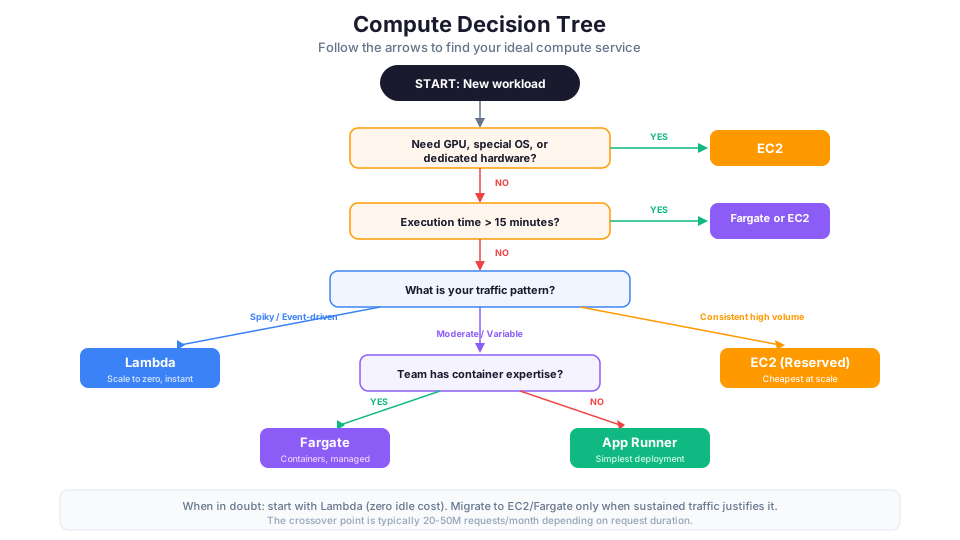
Question 1: What are your hard constraints?
Some requirements immediately eliminate options:
| Constraint | Eliminates | Why |
|---|---|---|
| Execution longer than 15 minutes | Lambda | Hard limit, no workaround |
| GPU required | Lambda, Fargate, App Runner | Only EC2 has GPU instances |
| Specific OS/kernel required | Lambda, Fargate, App Runner | Only EC2 gives full OS access |
| Must run Windows | Lambda, Fargate (mostly), App Runner | EC2 is the primary Windows option |
| Memory > 10 GB per execution | Lambda | Fargate goes to 120 GB |
| Memory > 120 GB | Lambda, Fargate, App Runner | Only EC2 has high-memory instances |
| Regulatory: dedicated hardware | Lambda, Fargate, App Runner | Only EC2 Dedicated Hosts/Instances |
If any of these constraints apply, your decision is already made.
Question 2: What is your traffic pattern?
| Traffic Pattern | Best Fit | Why |
|---|---|---|
| Spiky/unpredictable | Lambda | Pay nothing during quiet periods, instant scale |
| Event-driven (file uploads, queue messages) | Lambda | Native integration with event sources |
| Consistent 24/7 | EC2 with Reserved Instances | Cheapest per-hour cost at sustained usage |
| Moderate with some variation | Fargate with auto-scaling | Container flexibility with managed scaling |
| Simple web service, variable traffic | App Runner | Zero config scaling, pay less at low traffic |
| Zero traffic most of the time | Lambda or App Runner | Both scale to zero (or near-zero) |
| Predictable batch processing | Fargate | Run to completion, pay per second |
Question 3: What is your team's operational capacity?
| Team Size/Skill | Recommended | Why |
|---|---|---|
| Solo developer or tiny team | Lambda or App Runner | Zero operational overhead |
| Small team (2-5 engineers) | Fargate or App Runner | Moderate ops, container familiarity |
| Full platform team | EC2 or Fargate | Maximum control and optimization |
| Team with container expertise | Fargate | Uses existing Docker knowledge |
| Team with no container expertise | Lambda or App Runner | No Docker knowledge required |
Cost Comparison at Different Traffic Levels
Let me give you real numbers. This is where the decision often becomes clear.
Scenario: REST API handling web requests
Assumptions: Each request takes 200ms of processing, requires 512 MB memory, and we are comparing apples-to-apples performance.
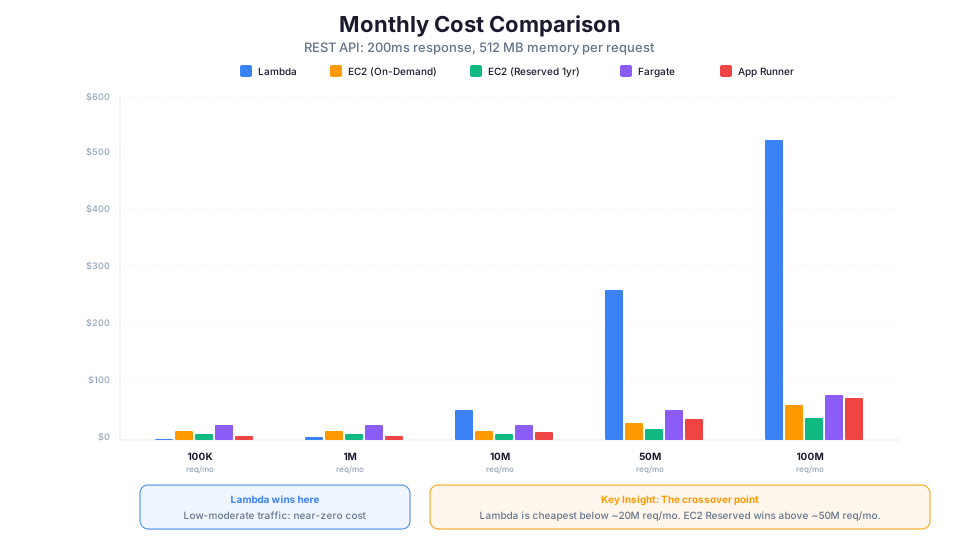
| Monthly Requests | Lambda | EC2 (t3.small on-demand) | EC2 (t3.small Reserved 1yr) | Fargate (0.5 vCPU, 1 GB) | App Runner (0.5 vCPU, 1 GB) |
|---|---|---|---|---|---|
| 100,000 | $0.52 | $15.18 | $9.64 | $26.28 | $7.20 |
| 1,000,000 | $5.20 | $15.18 | $9.64 | $26.28 | $7.20 |
| 10,000,000 | $52.00 | $15.18 | $9.64 | $26.28 | $14.40 |
| 50,000,000 | $260.00 | $30.36 (2 instances) | $19.28 | $52.56 (2 tasks) | $36.00 |
| 100,000,000 | $520.00 | $60.72 (4 instances) | $38.56 | $78.84 (3 tasks) | $72.00 |
| 500,000,000 | $2,600.00 | $152.00 (10 instances) | $96.40 | $263.00 (10 tasks) | $288.00 |
Key takeaways from this table:
- Lambda wins at low traffic (under 5M requests/month). The per-request model means near-zero cost when usage is low.
- EC2 Reserved Instances win at high sustained traffic (over 50M requests/month). The fixed-cost model becomes extremely efficient at scale.
- The crossover point is roughly 20-50M requests/month depending on request duration. Below that, Lambda is cheaper. Above that, EC2/Fargate are cheaper.
- App Runner is a middle ground that works well for moderate, variable traffic without the operational burden of EC2.
- Fargate is expensive for always-on workloads compared to EC2, but the reduced operational burden may justify the premium.
The Hidden Costs People Forget
The table above only shows compute costs. Real-world costs include:
| Hidden Cost | EC2 | Lambda | Fargate | App Runner |
|---|---|---|---|---|
| Load Balancer | ~$16/month + LCU charges | Not needed (API Gateway) | ~$16/month + LCU charges | Included |
| API Gateway | Not needed | ~$3.50 per million requests | Not needed | Included |
| NAT Gateway (for VPC) | ~$32/month if needed | ~$32/month if VPC-attached | ~$32/month | Managed |
| OS patching time | Engineer hours | Zero | Minimal (rebuild image) | Zero |
| On-call burden | High | Low | Medium | Low |
| Monitoring setup | Manual (CloudWatch agent) | Built-in | Built-in (basic) | Built-in |
When you factor in operational costs (engineer time for patching, on-call, scaling configuration), Lambda and App Runner often remain cheaper even at traffic levels where their compute cost exceeds EC2.
Cold Start Deep-Dive
Cold starts are Lambda's most discussed limitation. Let me explain exactly what they are, what causes them, and how to eliminate them.
What Is a Cold Start?
When Lambda has not run your function recently (or needs to handle more concurrent requests than existing instances can serve), it must:
- Provision a new execution environment (microVM)
- Download your deployment package
- Initialize the runtime (Node.js, Python, Java, etc.)
- Run your initialization code (outside the handler)
- Execute the handler (your actual function)
Steps 1-4 are the "cold start." They happen once per new execution environment. Subsequent requests to the same environment skip directly to step 5 (a "warm start").
Cold Start Duration by Runtime
| Runtime | Typical Cold Start | Notes |
|---|---|---|
| Python | 100-300ms | Fastest for simple functions |
| Node.js | 100-300ms | Similar to Python for most workloads |
| Go | 50-150ms | Compiled binary, very fast startup |
| .NET | 300-800ms | JIT compilation adds time |
| Java | 500-2000ms | JVM initialization is the primary cause |
| Ruby | 200-400ms | Moderate startup time |
| Custom Runtime | Varies | Depends on your implementation |
What Increases Cold Start Time
| Factor | Impact | Why |
|---|---|---|
| Deployment package size | +100-500ms per 50 MB | Larger packages take longer to download and extract |
| VPC attachment | +200-1000ms | ENI creation and attachment required |
| Number of imported modules | +50-200ms per heavy module | Each import runs at init time |
| Java/Spring Boot | +1000-5000ms | Framework initialization is heavy |
| Provisioned Concurrency disabled | Variable | No pre-warmed instances available |
| Function in a cold region | +50-100ms | Less infrastructure pre-provisioned |
Cold Start Mitigation Strategies
Strategy 1: Provisioned Concurrency
Pre-warm a specified number of Lambda execution environments. They are always ready to handle requests with zero cold start. You pay for them whether they are used or not.
# Set provisioned concurrency on a Lambda function
aws lambda put-provisioned-concurrency-config \
  --function-name my-api-function \
  --qualifier prod \
  --provisioned-concurrent-executions 5
Cost: ~$0.015 per GB-hour of provisioned concurrency. A 512 MB function with 5 provisioned instances costs about $27/month.
Strategy 2: Keep deployment packages small
# Check your current package size
aws lambda get-function --function-name my-function \
  --query "Configuration.CodeSize" --output text

# Use layers for shared dependencies
aws lambda publish-layer-version \
  --layer-name common-deps \
  --zip-file fileb://layer.zip \
  --compatible-runtimes python3.12
Strategy 3: Use ARM/Graviton (arm64)
ARM-based Lambda functions typically have 10-20% faster cold starts AND cost 20% less per GB-second.
# Deploy on ARM architecture
aws lambda create-function \
  --function-name my-function \
  --runtime python3.12 \
  --architectures arm64 \
  --handler lambda_function.handler \
  --zip-file fileb://function.zip \
  --role arn:aws:iam::123456789012:role/lambda-role
Strategy 4: Optimize initialization code
# BAD: Heavy imports inside the handler (runs every cold start)
def handler(event, context):
    import boto3
    import pandas as pd
    # ... do work

# GOOD: Imports at module level, cached across warm invocations
import boto3
import json

# Initialize clients outside the handler (runs once per cold start)
dynamodb = boto3.resource('dynamodb')
table = dynamodb.Table('my-table')

def handler(event, context):
    # This code runs on every invocation (cold AND warm)
    response = table.get_item(Key={'id': event['id']})
    return response['Item']
Strategy 5: Use SnapStart (Java only)
Lambda SnapStart takes a snapshot of the initialized execution environment and restores it for cold starts, reducing Java cold starts from 2-5 seconds to 200-500ms.
aws lambda update-function-configuration \
  --function-name my-java-function \
  --snap-start ApplyOn=PublishedVersions
When Cold Starts Actually Matter
Here is the reality: cold starts matter far less than most people think.
- API with human users: If your P99 latency goes from 100ms to 400ms during a cold start, users will not notice.
- Async processing (SQS, S3 events): Cold starts do not matter at all. Users are not waiting for the response.
- Real-time trading/gaming: Cold starts are unacceptable. Use EC2 or Fargate.
- Health checks/monitoring: A cold start might trigger a false alarm. Use provisioned concurrency.
When EC2 Wins
EC2 is the right choice in these specific scenarios:
1. Long-Running Processes
Video encoding, machine learning training, data processing jobs that take hours. Lambda's 15-minute limit makes it impossible for these workloads.
Example: Training a machine learning model that takes 4 hours on a p3.2xlarge instance. You cannot split this across Lambda invocations because the model state needs to persist in GPU memory.
2. GPU Workloads
AI/ML inference, video transcoding, 3D rendering, and scientific computing all require GPU access. Only EC2 provides GPU instances (P4, P5, G5, G6, Inf2 families).
3. Specific Operating System or Kernel Requirements
Regulatory requirements that mandate a specific hardened OS image. Applications that need custom kernel modules or specific Linux distributions not available as Lambda runtimes.
4. Consistent High-Traffic Applications
A web application server handling 1,000+ requests per second consistently, 24/7. Reserved Instances or Savings Plans make EC2 substantially cheaper than Lambda at this scale.
The math: A c6g.large Reserved Instance (1-year, no upfront) costs about $37/month. It can handle ~2,000 requests/second for simple web serving. The equivalent Lambda cost at 5 billion requests/month would be over $2,000.
5. Stateful Applications
Databases, caching layers, game servers, and WebSocket servers that maintain persistent connections or in-memory state cannot run on Lambda (which is stateless and ephemeral).
6. Compliance: Dedicated Hardware
Some regulations (HIPAA, PCI-DSS in certain interpretations, government contracts) require dedicated hardware. EC2 Dedicated Hosts and Dedicated Instances provide this guarantee.
When Lambda Wins
1. Event-Driven Workflows
Processing S3 file uploads, responding to DynamoDB streams, handling SQS messages, processing Kinesis records, or running on EventBridge schedules. Lambda has native integrations with over 200 AWS event sources.
# Lambda trigger configuration for S3 events
aws s3api put-bucket-notification-configuration \
  --bucket my-bucket \
  --notification-configuration '{
    "LambdaFunctionConfigurations": [{
      "LambdaFunctionArn": "arn:aws:lambda:us-east-1:123456789012:function:process-upload",
      "Events": ["s3:ObjectCreated:*"],
      "Filter": {"Key": {"FilterRules": [{"Name": "suffix", "Value": ".csv"}]}}
    }]
  }'
2. Spiky or Unpredictable Traffic
An API that handles 10 requests per hour most of the time but 10,000 during a marketing campaign. You pay nothing during quiet periods and scale instantly during spikes.
3. Scheduled Tasks (Cron Jobs)
Tasks that run on a schedule (hourly reports, daily cleanups, weekly aggregations). Lambda + EventBridge Scheduler is cheaper and simpler than maintaining an EC2 instance just for cron jobs.
# Create a scheduled Lambda execution
aws scheduler create-schedule \
  --name daily-cleanup \
  --schedule-expression "cron(0 2 * * ? *)" \
  --target '{"Arn": "arn:aws:lambda:us-east-1:123456789012:function:cleanup", "RoleArn": "arn:aws:iam::123456789012:role/scheduler-role"}' \
  --flexible-time-window '{"Mode": "OFF"}'
4. Zero Operational Overhead
No patching, no capacity planning, no monitoring instance health. Lambda lets your team focus entirely on application logic. For a team of 1-3 engineers, this operational savings is massive.
5. Prototyping and MVPs
When you do not know what your traffic will look like, Lambda's pay-per-use model means you spend almost nothing while validating your idea. If the product fails, you spent $0.03 instead of $15/month on an idle EC2 instance.
6. Microservice Backends
Each Lambda function is independently deployable, scalable, and monitorable. This makes Lambda natural for microservice architectures where each service has different scaling needs.
When Fargate Wins
1. Containerized Workloads Over 15 Minutes
Fargate handles any container workload regardless of runtime. If your task takes 20 minutes or 2 hours, Fargate runs it without the Lambda time limit.
2. Teams with Container Expertise
If your team already uses Docker and has existing Dockerfiles, Fargate is the path of least resistance. No need to rewrite code for Lambda's event model.
3. Predictable Moderate Traffic
For applications with predictable traffic that is not high enough to justify Reserved EC2 Instances, Fargate with auto-scaling provides a good balance of cost and simplicity.
4. Multi-Container Applications
Applications that need multiple cooperating containers (sidecars, service mesh, log forwarders) run naturally on Fargate with ECS task definitions.
5. Batch Processing Jobs
Large data processing jobs that need more than 10 GB memory or more than 15 minutes of runtime. Fargate tasks with 16 vCPU and 120 GB memory can handle substantial workloads.
When App Runner Wins
1. Simple Web Services
A straightforward web application or API that needs HTTPS, auto-scaling, and zero infrastructure configuration. App Runner handles all of this from a container image or source code.
2. Teams That Want to Focus on Code
App Runner is the "I just want to deploy my code" option. No VPC configuration, no load balancer setup, no capacity planning. Push code, get a URL.
3. Variable Traffic Web Apps
App Runner scales to zero (or near-zero), handling variable traffic efficiently without the cold start characteristics of Lambda.
Graviton/ARM Considerations
AWS Graviton processors (ARM-based) offer significant cost savings for both EC2 and Lambda.
EC2 Graviton Benefits
| Metric | x86 (Intel/AMD) | Graviton (ARM) | Savings |
|---|---|---|---|
| t3.medium cost | $0.0416/hr | $0.0336/hr (t4g) | 20% |
| c5.xlarge cost | $0.170/hr | $0.136/hr (c6g) | 20% |
| m5.large cost | $0.096/hr | $0.077/hr (m6g) | 20% |
| Performance | Baseline | 20-40% better | Performance + cost |
Graviton instances provide 20% lower cost AND typically 20-40% better performance for most workloads. That means you get the same work done for 30-50% less money.
Lambda Graviton Benefits
# Deploy Lambda on ARM for 20% cost savings
aws lambda update-function-configuration \
  --function-name my-function \
  --architectures arm64

# Verify the architecture
aws lambda get-function-configuration \
  --function-name my-function \
  --query "Architectures"
Lambda on ARM (arm64):
- 20% cheaper per GB-second ($0.0000133334 vs $0.0000166667)
- 10-20% faster cold starts for most runtimes
- Identical programming model (no code changes for Python, Node.js, Go)
- Some native binaries may need recompilation (C/C++ extensions)
When NOT to Use Graviton
- Windows workloads (Graviton is Linux-only for most use cases)
- Applications with x86-specific dependencies (some legacy C++ libraries)
- FPGA workloads (different instance families)
- When you need instance store NVMe with specific I/O characteristics (check instance family)
Real-World Examples: What Companies Choose and Why
Netflix: EC2 + Lambda Hybrid
Netflix uses EC2 instances for their core streaming encoding pipeline (long-running, GPU-intensive) and Lambda for event-driven microservices (user actions, personalization triggers, A/B test evaluation). They do not choose one or the other. They use each where it fits.
Airbnb: Containers (ECS/Fargate) for Services
Airbnb migrated from a monolith to containerized microservices running on ECS. They chose containers over Lambda because their services maintain connection pools to databases and cache layers (stateful patterns that do not map well to Lambda).
Capital One: Lambda-First Architecture
Capital One adopted a "serverless first" strategy for new applications. Their banking APIs use Lambda + API Gateway because the variable traffic pattern (quiet at 3 AM, peak at payday) makes Lambda dramatically cheaper than provisioned compute.
A Startup Example: URL Shortener
A startup building a URL shortener might evolve through stages:
- MVP (Month 1-3): Lambda + DynamoDB. Zero cost at zero traffic. Validates the idea.
- Growth (Month 4-12): Same architecture. Lambda scales automatically as traffic grows to 10M requests/month. Cost: ~$50/month.
- Scale (Year 2): Traffic hits 500M requests/month. Lambda costs ~$2,600/month. They evaluate migration to Fargate or EC2 behind a load balancer. Expected cost: ~$200/month. The migration is worthwhile.
- Mature (Year 3+): Hybrid architecture. Real-time redirects run on EC2 Reserved Instances. Analytics processing stays on Lambda (event-driven, spiky).
This progression is common. Start serverless. Migrate to containers or EC2 only when the math justifies the operational cost.
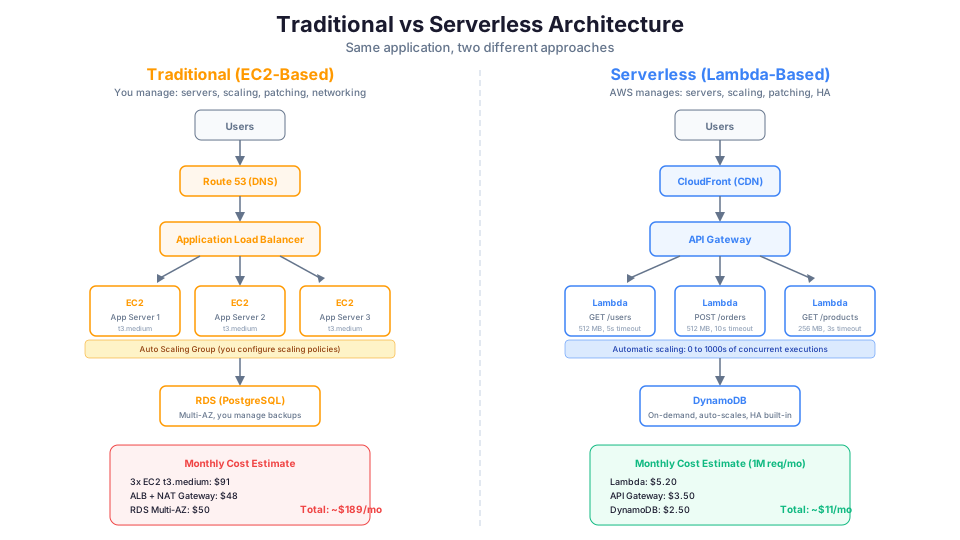
Migration Path: Moving from EC2 to Lambda
If you have an existing EC2-based application and want to evaluate a Lambda migration, here is the practical guide.
What Can Be Migrated
| Component | Migratable? | How |
|---|---|---|
| REST API endpoints | Yes | API Gateway + Lambda functions |
| Cron jobs | Yes | EventBridge Scheduler + Lambda |
| File processing | Yes | S3 trigger + Lambda |
| Queue consumers | Yes | SQS trigger + Lambda |
| WebSocket server | Partially | API Gateway WebSocket + Lambda (different model) |
| Background workers (<15 min) | Yes | SQS/SNS trigger + Lambda |
| Long-running processes (>15 min) | No | Stay on EC2 or move to Fargate |
| Stateful services (DB, cache) | No | Use managed services (RDS, ElastiCache) |
| Real-time streaming | No | Use Kinesis Data Streams or MSK |
The Migration Process
Step 1: Identify candidates
Look for code that:
- Handles HTTP requests (each request is independent)
- Processes events/messages (naturally event-driven)
- Runs on a schedule (cron-like)
- Completes in under 15 minutes
Step 2: Refactor for statelessness
Lambda functions cannot maintain state between invocations. If your EC2 code stores data in memory or on local disk, you need to move that state to an external service:
| EC2 State Pattern | Lambda Alternative |
|---|---|
| In-memory session data | DynamoDB or ElastiCache |
| Local file system | S3 or EFS |
| Connection pools | Initialize in handler, or use RDS Proxy |
| Global variables (cached data) | Module-level initialization (per-instance) |
| Scheduled timers | EventBridge Scheduler |
Step 3: Break monolithic handlers into functions
On EC2, you might have one application handling multiple routes. On Lambda, each route (or group of related routes) becomes its own function.
# EC2 monolith (one server handles everything)
/users/*     -> handled by the same Express.js app
/orders/*    -> handled by the same Express.js app
/products/*  -> handled by the same Express.js app

# Lambda microservice (each function handles its domain)
/users/*     -> users-lambda function
/orders/*    -> orders-lambda function
/products/*  -> products-lambda function
Step 4: Strangler Fig pattern (gradual migration)
Do not rewrite everything at once. Use API Gateway to route some paths to Lambda and others to your existing EC2 application:
# API Gateway routes (mix of Lambda and EC2)
GET /users/{id}    -> Lambda (migrated)
POST /users        -> Lambda (migrated)
GET /orders/{id}   -> EC2 via ALB integration (not yet migrated)
POST /orders       -> EC2 via ALB integration (not yet migrated)
Migrate one endpoint at a time. If something breaks, route it back to EC2. This eliminates the risk of a "big bang" migration.
How This Shows Up in Architecture Decisions
Architects and interviewers frequently test your ability to choose between compute services. Here is what to know:
Common Scenario Patterns
| Scenario | Recommended Service | Why |
|---|---|---|
| "Variable traffic, minimize cost" | Lambda | Scale-to-zero, per-request pricing |
| "Consistent high traffic, minimize cost" | EC2 with Reserved Instances | Lowest per-hour cost at sustained use |
| "Process S3 uploads automatically" | Lambda with S3 trigger | Native event-driven integration |
| "15+ minute processing job" | Fargate or EC2 | Lambda's 15-min limit is a hard constraint |
| "No server management" | Lambda or Fargate | Both are "serverless" in different ways |
| "GPU required" | EC2 (P/G/Inf instances) | Only EC2 has GPU support |
| "Containers, no cluster management" | Fargate | Container support without EC2 management |
| "Simplest deployment for web app" | App Runner or Elastic Beanstalk | Minimal configuration required |
| "Stateless microservices" | Lambda | Natural fit for independent, short-lived tasks |
| "WebSocket connections" | EC2 or Fargate | Persistent connections need long-lived compute |
Key Limits to Remember
| Service | Limit | Value |
|---|---|---|
| Lambda max timeout | Execution duration | 15 minutes (900 seconds) |
| Lambda max memory | Memory allocation | 10,240 MB (10 GB) |
| Lambda max package size | Deployment (zipped) | 50 MB (250 MB unzipped) |
| Lambda max container image | Container deployment | 10 GB |
| Lambda concurrent executions | Default quota | 1,000 per region (can request increase) |
| Fargate max memory | Task memory | 120 GB |
| Fargate max vCPU | Task vCPU | 16 |
| EC2 max instances | Default quota | 20 on-demand per instance type (can request increase) |
Nuances to Watch For
- "Most cost-effective" does not always mean cheapest compute. Factor in operational costs (engineer time), which real-world budgeting and architecture reviews often include.
- "Serverless" is not just Lambda. Fargate is also serverless (no server management). Some design discussions test this distinction.
- Reserved Instances require commitment. If traffic might change significantly in 6 months, RI is the wrong answer even though it is cheapest today.
- Lambda in VPC adds cold start time. If the scenario requires low latency AND access to VPC resources, consider provisioned concurrency or Fargate.
Advanced Patterns: Combining Services
The best architectures often combine multiple compute services:
Pattern 1: EC2 + Lambda (Offload Processing)
User request → ALB → EC2 (handles request, returns response quickly)
                ↓ (async)
              SQS → Lambda (processes heavy work in background)
Use case: E-commerce site where the web tier needs to be fast (EC2), but order processing, email sending, and analytics can happen asynchronously (Lambda).
Pattern 2: Lambda + Fargate (Short + Long Tasks)
S3 upload → Lambda (validates file, extracts metadata: 2 seconds)
              ↓ (if valid)
            Fargate task (processes/transforms file: 30 minutes)
Use case: Media processing pipeline where validation is quick (Lambda) but transformation is slow (Fargate).
Pattern 3: App Runner + Lambda (Web + Events)
Web requests → App Runner (serves web app, handles user sessions)
Background events → Lambda (processes webhooks, sends notifications)
Use case: SaaS application where the user-facing web app runs on App Runner but background automation runs on Lambda.
Quick Knowledge Check
Test yourself on these questions:
- What is Lambda's maximum execution time?
- At approximately what traffic level does EC2 Reserved Instances become cheaper than Lambda?
- Name three scenarios where Lambda is the clear winner.
- What is a cold start, and which runtime has the longest cold starts?
- When would you choose Fargate over Lambda?
- What is Provisioned Concurrency and when would you use it?
- How much cheaper are Graviton-based Lambda functions compared to x86?
- What is the Strangler Fig pattern for migration?
- Name two hidden costs of EC2 that people forget to include in comparisons.
- Why might a startup choose Lambda for an MVP even if they expect high traffic later?
If you can answer all ten, you have a solid understanding of AWS compute selection.
Pricing note: Costs cited in this article are for us-east-1 and were verified in May 2026. Check the AWS Pricing Calculator for current rates in your Region.
The honest truth about this decision: it matters less than you think. Most workloads can run successfully on any of these services. The difference shows up in operational burden over time, not in whether the thing works. Pick the simplest option that meets your constraints today. You can always migrate later, and the migration is rarely as painful as people fear.
Build it yourself: These topics are covered hands-on in Module 13: EC2 Fundamentals and Module 17: Lambda of our AWS Bootcamp. Build the same API on both services and compare the experience firsthand.