
Infrastructure as Code on AWS: CloudFormation vs SAM vs CDK
You spend an hour in the AWS Console clicking through wizards to set up a VPC, subnets, security groups, an EC2 instance, and a load balancer. It works. Then your manager asks you to create the same thing in another region. Or your teammate accidentally deletes the security group and nobody remembers the exact rules. Or an auditor asks you to prove what changed last Tuesday.
This is why Infrastructure as Code exists. And by the end of this article, you will understand not just why IaC matters, but which AWS tool to use for your situation.
Prerequisites: You should understand EC2 instance types and launching instances and IAM users, roles, and policies before starting this article.
What You Will Learn
By the end of this article, you will be able to:
- Explain why Infrastructure as Code eliminates configuration drift, speeds up disaster recovery, and enables auditability
- Compare CloudFormation, SAM, and CDK by verbosity, testability, and use case fit, and recommend the right tool for a given team
- Implement a CloudFormation template that creates parameterized, multi-environment resources with proper deletion policies
- Configure a CDK project that uses L2 constructs, loops, and unit tests to define infrastructure in TypeScript or Python
- Troubleshoot common deployment failures including rollback errors, circular dependencies, and template validation issues
What Is Infrastructure as Code?
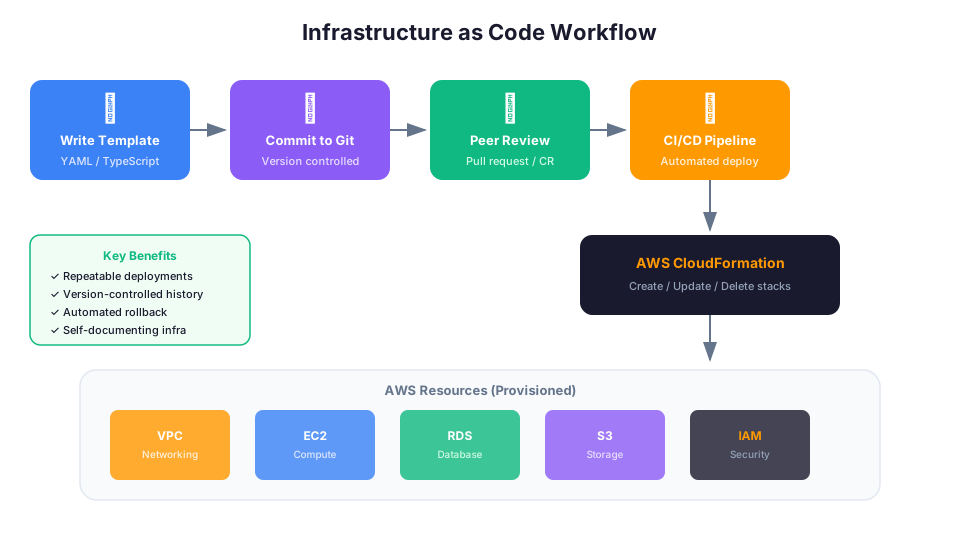
Infrastructure as Code (IaC) means defining your cloud resources in text files instead of clicking through a console. These files are version-controlled, reviewed, tested, and deployed just like application code.
Instead of this workflow:
Developer -> Console -> Click buttons -> Resources created -> Hope nobody changes them
You get this:
Developer -> Write template -> Commit to Git -> Deploy via pipeline -> Resources created -> Changes tracked
Why IaC Matters
Repeatability. Deploy the same infrastructure in any region or account by running the same template. No more "I forgot a step" or "the Dev environment is slightly different from Prod."
Version control. Your infrastructure has a history. You can see who changed what, when, and why. You can roll back to a previous version if something breaks.
Review process. Infrastructure changes go through pull requests, just like code changes. A teammate can review your security group rules before they hit production.
Automation. Deploy infrastructure from a CI/CD pipeline. No human needs to log into the console. This eliminates manual errors and speeds up deployments.
Documentation. Your templates ARE the documentation. If you want to know how your production environment is configured, read the template. It is always accurate because it IS the configuration.
Disaster recovery. If an entire region goes down, you can redeploy everything in a new region from your templates. Try doing that from memory at 3 AM during an outage.
Compliance and auditing. Regulated industries require proof that infrastructure meets specific standards. IaC templates provide that proof. Combined with CloudTrail, you have a complete audit trail of every change.
The Cost of Not Using IaC
Before you dismiss IaC as "extra work," consider these real-world scenarios that happen without it:
| Scenario | Without IaC | With IaC |
|---|---|---|
| Recreate environment | Hours of clicking, missed steps | aws cloudformation deploy (5 minutes) |
| Audit: "What changed Friday?" | "I think someone updated a security group?" | git log --since=friday (exact diff) |
| Disaster recovery | Panic, partial docs, guesswork | Deploy templates to new region |
| Onboard new team member | "Watch me click through the console" | "Read the templates in the repo" |
| Scale to new region | Repeat everything manually | Deploy same templates, new parameters |
AWS CloudFormation
CloudFormation is the native AWS IaC service. You write a template in YAML or JSON that describes the resources you want, and CloudFormation creates, updates, or deletes them for you.
How It Works
- You write a template describing your desired resources.
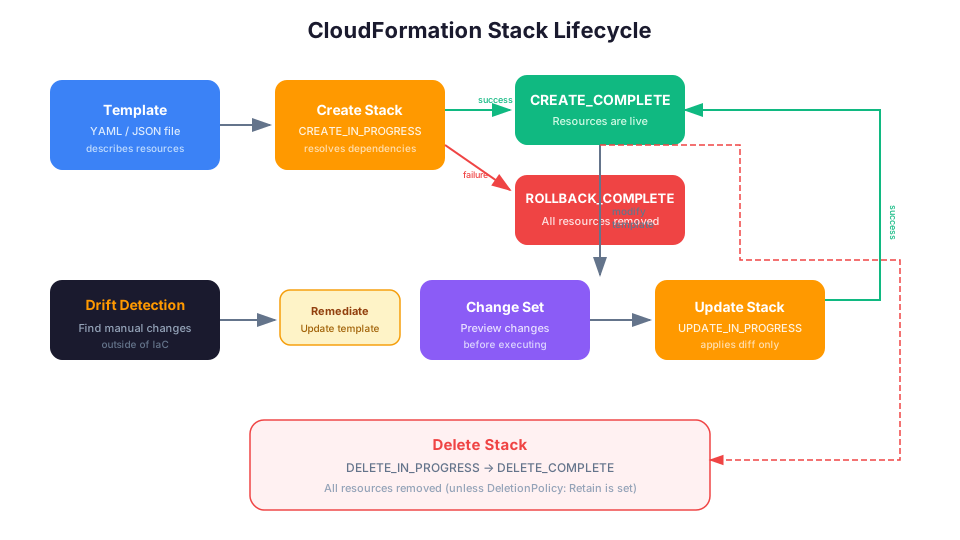
- You submit the template to CloudFormation, creating a stack.
- CloudFormation figures out the dependency order and creates everything.
- If something fails, CloudFormation rolls back automatically.
- To change your infrastructure, you update the template and CloudFormation applies only the changes.
A Simple CloudFormation Template
Here is a template that creates an S3 bucket and a DynamoDB table:
AWSTemplateFormatVersion: '2010-09-09'
Description: Simple storage resources for my application

Parameters:
  Environment:
    Type: String
    Default: dev
    AllowedValues:
      - dev
      - staging
      - prod

Resources:
  AppBucket:
    Type: AWS::S3::Bucket
    Properties:
      BucketName: !Sub 'my-app-${Environment}-${AWS::AccountId}'
      VersioningConfiguration:
        Status: Enabled
      BucketEncryption:
        ServerSideEncryptionConfiguration:
          - ServerSideEncryptionByDefault:
              SSEAlgorithm: AES256

  AppTable:
    Type: AWS::DynamoDB::Table
    Properties:
      TableName: !Sub 'my-app-${Environment}'
      BillingMode: PAY_PER_REQUEST
      AttributeDefinitions:
        - AttributeName: pk
          AttributeType: S
        - AttributeName: sk
          AttributeType: S
      KeySchema:
        - AttributeName: pk
          KeyType: HASH
        - AttributeName: sk
          KeyType: RANGE

Outputs:
  BucketName:
    Value: !Ref AppBucket
  TableName:
    Value: !Ref AppTable
CloudFormation Concepts
Stack: A collection of AWS resources that you manage as a single unit. When you delete a stack, CloudFormation deletes all the resources in it.
Template: The YAML or JSON file that describes your resources. Templates have these sections:
| Section | Required | Purpose |
|---|---|---|
| AWSTemplateFormatVersion | No | Template version (always '2010-09-09') |
| Description | No | Human-readable description |
| Parameters | No | Input values you can pass at deploy time |
| Mappings | No | Static lookup tables (like region-to-AMI maps) |
| Conditions | No | Conditional resource creation |
| Resources | Yes | The AWS resources to create |
| Outputs | No | Values to export (like endpoint URLs) |
Change Set: A preview of what CloudFormation will change before it changes it. Always review change sets before deploying to production.
Drift Detection: CloudFormation can detect when someone manually changes a resource outside of the template (console clicks, CLI commands). This helps you find and fix configuration drift.
Deploying with the CLI
# Create a stack
aws cloudformation create-stack \
  --stack-name my-app-dev \
  --template-body file://template.yaml \
  --parameters ParameterKey=Environment,ParameterValue=dev

# Check stack status
aws cloudformation describe-stacks --stack-name my-app-dev

# Wait for stack creation to complete
aws cloudformation wait stack-create-complete --stack-name my-app-dev

# Update a stack (after changing the template)
aws cloudformation update-stack \
  --stack-name my-app-dev \
  --template-body file://template.yaml

# Delete a stack (deletes all resources)
aws cloudformation delete-stack --stack-name my-app-dev
Using Change Sets (Production Best Practice)
Never update a production stack directly. Always create a change set first:
# Create a change set (preview only, no changes applied)
aws cloudformation create-change-set \
  --stack-name my-app-prod \
  --template-body file://template.yaml \
  --change-set-name my-update-v2

# Review the change set
aws cloudformation describe-change-set \
  --stack-name my-app-prod \
  --change-set-name my-update-v2

# If the changes look correct, execute the change set
aws cloudformation execute-change-set \
  --stack-name my-app-prod \
  --change-set-name my-update-v2
The change set output tells you exactly what will be added, modified, or replaced. Pay special attention to resources marked as Replacement because CloudFormation will delete the old resource and create a new one, which can mean data loss for databases and stateful resources.
Intrinsic Functions You Need to Know
CloudFormation provides built-in functions for dynamic values:
| Function | Purpose | Example |
|---|---|---|
!Ref | Reference a parameter or resource | !Ref Environment returns "dev" |
!Sub | String substitution | !Sub 'app-${Environment}' returns "app-dev" |
!GetAtt | Get a resource attribute | !GetAtt AppBucket.Arn returns the bucket ARN |
!Join | Join strings with delimiter | !Join ["-", ["app", "dev", "bucket"]] |
!Select | Select item from list | !Select [0, !GetAZs ""] returns first AZ |
!If | Conditional value | !If [IsProd, "t3.large", "t3.micro"] |
!ImportValue | Import from another stack | !ImportValue NetworkStack-VpcId |
CloudFormation Strengths
- Native AWS service, no extra tools to install
- Supports every AWS resource type
- Automatic rollback on failure
- Drift detection for finding manual changes
- StackSets for deploying across multiple accounts and regions
- Change sets for previewing updates before applying them
CloudFormation Weaknesses
- YAML/JSON templates get verbose quickly (hundreds of lines for simple architectures)
- No loops, limited conditionals (template logic is awkward)
- Error messages can be cryptic
- Testing templates locally is difficult
- No built-in way to share and reuse components (nested stacks help but are clunky)
- Rollback on update failure can leave the stack in UPDATE_ROLLBACK_FAILED state, which is painful to fix
Validating Templates Before Deployment
Always validate your templates before deploying:
# Basic syntax validation
aws cloudformation validate-template --template-body file://template.yaml

# Use cfn-lint for deeper analysis (install with pip install cfn-lint)
cfn-lint template.yaml

# Use cfn-guard for policy validation
cfn-guard validate -d template.yaml -r rules.guard
Troubleshooting Common Errors
ROLLBACK_COMPLETE (stack stuck, cannot update or redeploy)
When a stack creation fails, CloudFormation rolls back all resources and leaves the stack in ROLLBACK_COMPLETE state. You cannot update a stack in this state. You must delete it first with aws cloudformation delete-stack --stack-name <name> and then create it again. Before redeploying, check the stack events to find the root cause: run aws cloudformation describe-stack-events --stack-name <name> --query "StackEvents[?ResourceStatus=='CREATE_FAILED']" and look at the ResourceStatusReason field. Common causes include insufficient IAM permissions, resource name conflicts, and service limits.
Template validation error: Invalid template property or resource type
This error appears when your YAML contains a typo in a property name, uses an unsupported resource type, or has incorrect indentation. Run aws cloudformation validate-template --template-body file://template.yaml for basic syntax checking, but note that this only catches structural issues. For deeper validation, install cfn-lint (via pip install cfn-lint) and run cfn-lint template.yaml, which catches incorrect property names, invalid attribute references, and deprecated resource types before you attempt deployment.
Circular dependency between resources
CloudFormation reports this when two or more resources reference each other in a way that creates a dependency loop (for example, a security group referencing another security group that references the first one back). To fix this, break the cycle by creating one of the resources without the reference, then use a separate AWS::EC2::SecurityGroupIngress or AWS::EC2::SecurityGroupEgress resource to add the cross-reference after both groups exist. In CDK, circular dependencies between stacks produce the same error. The fix is to restructure so that shared resources live in a single stack or use CfnOutput and Fn.importValue to break the cycle.
AWS SAM (Serverless Application Model)
SAM is an extension of CloudFormation specifically designed for serverless applications. It provides shorthand syntax for defining Lambda functions, API Gateway APIs, DynamoDB tables, and other serverless resources.
What SAM Adds
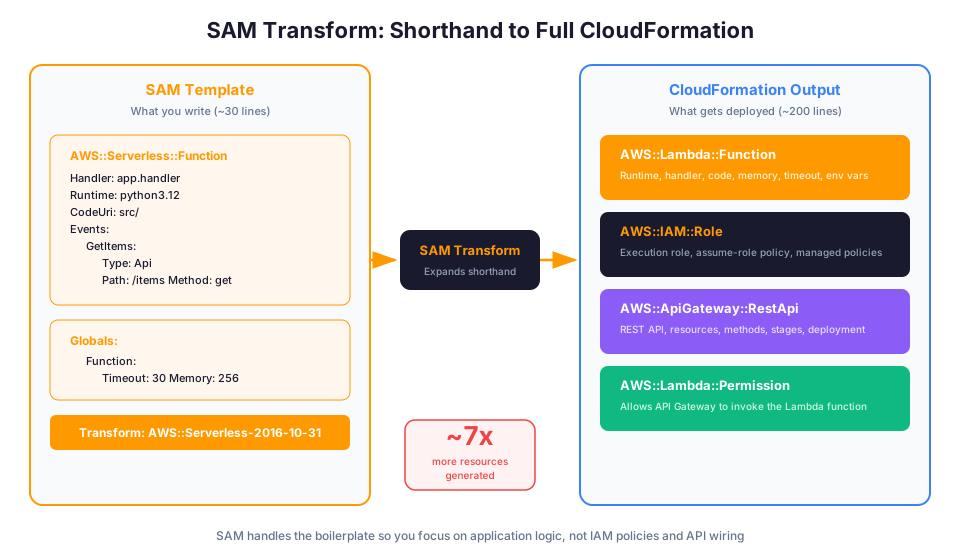
SAM is not a separate service. It is a transform that runs on top of CloudFormation. A SAM template IS a CloudFormation template with some extra resource types that expand into multiple CloudFormation resources.
SAM Template Example
Here is a serverless API in SAM:
AWSTemplateFormatVersion: '2010-09-09'
Transform: AWS::Serverless-2016-10-31
Description: A simple serverless API

Globals:
  Function:
    Timeout: 30
    Runtime: python3.12
    MemorySize: 256
    Environment:
      Variables:
        TABLE_NAME: !Ref UsersTable
        LOG_LEVEL: INFO

Resources:
  GetUsersFunction:
    Type: AWS::Serverless::Function
    Properties:
      Handler: app.get_users
      CodeUri: src/
      Events:
        GetUsers:
          Type: Api
          Properties:
            Path: /users
            Method: get

  CreateUserFunction:
    Type: AWS::Serverless::Function
    Properties:
      Handler: app.create_user
      CodeUri: src/
      Events:
        CreateUser:
          Type: Api
          Properties:
            Path: /users
            Method: post
      Policies:
        - DynamoDBCrudPolicy:
            TableName: !Ref UsersTable

  UsersTable:
    Type: AWS::Serverless::SimpleTable
    Properties:
      PrimaryKey:
        Name: userId
        Type: String
That SAM template expands to roughly 200 lines of CloudFormation. SAM created the Lambda functions, IAM roles, API Gateway REST API, stages, permissions, and wired everything together. The AWS::Serverless::Function resource type is doing a tremendous amount of heavy lifting.
SAM CLI
SAM comes with a powerful CLI for local development:
# Initialize a new SAM project
sam init

# Build the application
sam build

# Test locally (starts a local API Gateway)
sam local start-api

# Invoke a function locally with a test event
sam local invoke GetUsersFunction --event event.json

# Generate a sample event for testing
sam local generate-event apigateway aws-proxy > event.json

# Deploy to AWS (first time, guided mode asks questions)
sam deploy --guided

# Subsequent deploys use saved config
sam deploy

# View logs from deployed function
sam logs -n GetUsersFunction --tail
The sam local commands let you test Lambda functions and APIs on your laptop before deploying to AWS. This is a massive productivity boost.
SAM Policy Templates
SAM includes pre-built IAM policy templates so you do not have to write IAM JSON by hand:
| Policy Template | What It Grants |
|---|---|
DynamoDBCrudPolicy | Read/write to a specific DynamoDB table |
S3ReadPolicy | Read from a specific S3 bucket |
SQSSendMessagePolicy | Send messages to a specific SQS queue |
SNSPublishMessagePolicy | Publish to a specific SNS topic |
KMSDecryptPolicy | Decrypt using a specific KMS key |
StepFunctionsExecutionPolicy | Start a specific Step Functions state machine |
These follow the principle of least privilege automatically. Instead of granting broad permissions and "tightening later" (you will not), use these scoped policy templates.
When to Use SAM
- You are building serverless applications (Lambda + API Gateway + DynamoDB)
- You want local testing capabilities
- You are already comfortable with CloudFormation YAML
- Your infrastructure is primarily serverless with some traditional resources mixed in
AWS CDK (Cloud Development Kit)
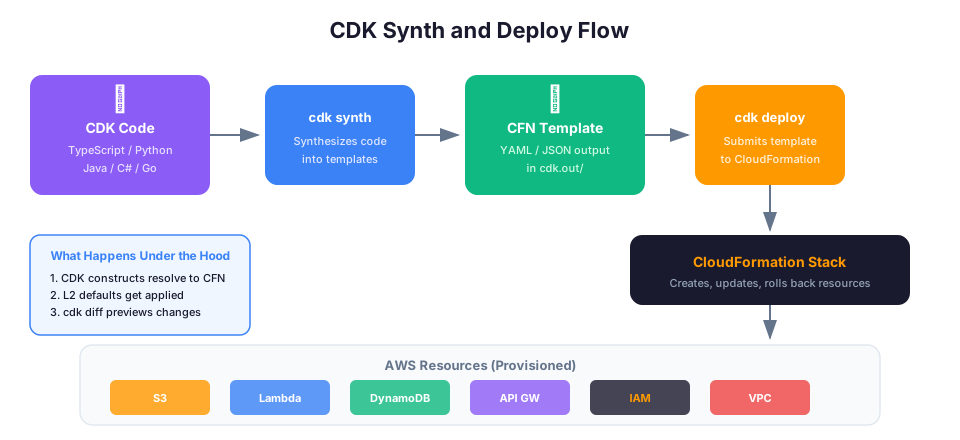
The CDK takes a completely different approach. Instead of writing YAML templates, you write infrastructure in a real programming language: TypeScript, Python, Java, C#, or Go. The CDK synthesizes your code into CloudFormation templates and deploys them.
Why the CDK Exists
CloudFormation YAML is declarative and verbose. You cannot write a for loop. You cannot create a function that generates resources dynamically. You cannot use your IDE's autocomplete, type checking, or testing tools on YAML files.
The CDK gives you the full power of a programming language for defining infrastructure.
CDK Example (TypeScript)
Here is the same S3 bucket and DynamoDB table from the CloudFormation example:
import * as cdk from 'aws-cdk-lib';
import * as s3 from 'aws-cdk-lib/aws-s3';
import * as dynamodb from 'aws-cdk-lib/aws-dynamodb';
import { Construct } from 'constructs';

export class AppStack extends cdk.Stack {
  constructor(scope: Construct, id: string, props?: cdk.StackProps) {
    super(scope, id, props);

    const environment = new cdk.CfnParameter(this, 'Environment', {
      default: 'dev',
      allowedValues: ['dev', 'staging', 'prod'],
    });

    const bucket = new s3.Bucket(this, 'AppBucket', {
      bucketName: `my-app-${environment.valueAsString}-${this.account}`,
      versioned: true,
      encryption: s3.BucketEncryption.S3_MANAGED,
      removalPolicy: cdk.RemovalPolicy.RETAIN,
      blockPublicAccess: s3.BlockPublicAccess.BLOCK_ALL,
    });

    const table = new dynamodb.Table(this, 'AppTable', {
      tableName: `my-app-${environment.valueAsString}`,
      billingMode: dynamodb.BillingMode.PAY_PER_REQUEST,
      partitionKey: { name: 'pk', type: dynamodb.AttributeType.STRING },
      sortKey: { name: 'sk', type: dynamodb.AttributeType.STRING },
      pointInTimeRecovery: true,
    });
  }
}
Notice how the CDK's L2 constructs add sensible defaults. The Bucket construct blocks public access by default. The Table construct enables point-in-time recovery with a simple boolean. You would need many more lines of YAML to achieve the same in CloudFormation.
CDK Example (Python)
from aws_cdk import (
    Stack,
    CfnParameter,
    RemovalPolicy,
    aws_s3 as s3,
    aws_dynamodb as dynamodb,
)
from constructs import Construct

class AppStack(Stack):
    def __init__(self, scope: Construct, id: str, **kwargs):
        super().__init__(scope, id, **kwargs)

        environment = CfnParameter(self, "Environment",
            default="dev",
            allowed_values=["dev", "staging", "prod"],
        )

        bucket = s3.Bucket(self, "AppBucket",
            bucket_name=f"my-app-{environment.value_as_string}-{self.account}",
            versioned=True,
            encryption=s3.BucketEncryption.S3_MANAGED,
            removal_policy=RemovalPolicy.RETAIN,
            block_public_access=s3.BlockPublicAccess.BLOCK_ALL,
        )

        table = dynamodb.Table(self, "AppTable",
            table_name=f"my-app-{environment.value_as_string}",
            billing_mode=dynamodb.BillingMode.PAY_PER_REQUEST,
            partition_key=dynamodb.Attribute(
                name="pk", type=dynamodb.AttributeType.STRING
            ),
            sort_key=dynamodb.Attribute(
                name="sk", type=dynamodb.AttributeType.STRING
            ),
            point_in_time_recovery=True,
        )
CDK Concepts
App: The root of your CDK application. Contains one or more stacks.
Stack: Maps directly to a CloudFormation stack. A unit of deployment.
Construct: A reusable building block. There are three levels:
- L1 (Cfn): Direct CloudFormation resources. One-to-one mapping. Example:
CfnBucketmaps exactly toAWS::S3::Bucket. - L2: Opinionated abstractions with sensible defaults. Most of what you use. Example:
Bucketadds encryption, block public access, and lifecycle rules with simple properties. - L3 (Patterns): Complete architectures. For example,
ApplicationLoadBalancedFargateServicecreates a load balancer, ECS cluster, Fargate service, logging, and health checks in one line.
The Power of Loops and Conditionals
This is where the CDK really shines. Creating 10 SQS queues with dead letter queues in CloudFormation would be hundreds of lines. In CDK:
const queueNames = ['orders', 'payments', 'notifications', 'emails', 'audit',
                     'analytics', 'exports', 'imports', 'webhooks', 'reports'];

queueNames.forEach(name => {
  const dlq = new sqs.Queue(this, `${name}-dlq`, {
    queueName: `${name}-dead-letter-${environment}`,
    retentionPeriod: cdk.Duration.days(14),
  });

  new sqs.Queue(this, `${name}-queue`, {
    queueName: `${name}-${environment}`,
    deadLetterQueue: {
      queue: dlq,
      maxReceiveCount: 3,
    },
    visibilityTimeout: cdk.Duration.seconds(30),
  });
});
That is 20 queues (10 primary + 10 DLQ) created in 15 lines. In CloudFormation YAML, that would be roughly 200 lines.
CDK CLI
# Initialize a new CDK project
cdk init app --language typescript

# See the synthesized CloudFormation template
cdk synth

# Preview changes (like a change set)
cdk diff

# Deploy to AWS
cdk deploy

# Deploy all stacks
cdk deploy --all

# Deploy with approval required for security changes
cdk deploy --require-approval broadening

# Destroy all resources
cdk destroy
Unit Testing CDK Infrastructure
One of the biggest advantages of CDK is testability. Here is a test verifying your S3 bucket has encryption:
import { Template } from 'aws-cdk-lib/assertions';
import * as cdk from 'aws-cdk-lib';
import { AppStack } from '../lib/app-stack';

test('S3 bucket has encryption enabled', () => {
  const app = new cdk.App();
  const stack = new AppStack(app, 'TestStack');
  const template = Template.fromStack(stack);

  template.hasResourceProperties('AWS::S3::Bucket', {
    BucketEncryption: {
      ServerSideEncryptionConfiguration: [
        {
          ServerSideEncryptionByDefault: {
            SSEAlgorithm: 'AES256',
          },
        },
      ],
    },
  });
});

test('DynamoDB table uses PAY_PER_REQUEST billing', () => {
  const app = new cdk.App();
  const stack = new AppStack(app, 'TestStack');
  const template = Template.fromStack(stack);

  template.hasResourceProperties('AWS::DynamoDB::Table', {
    BillingMode: 'PAY_PER_REQUEST',
  });
});
Run the tests just like any other code:
npm test
If someone changes the encryption setting or billing mode, the test fails before the code is deployed. This is infrastructure testing that CloudFormation simply cannot do.
CDK Strengths
- Full programming language: loops, conditionals, functions, classes
- IDE support: autocomplete, type checking, inline documentation
- Testable: write unit tests for your infrastructure
- L2 constructs provide sensible defaults (encryption, logging enabled by default)
- L3 patterns create complete architectures in a few lines
- Reusable libraries: share infrastructure patterns as packages
CDK Weaknesses
- Learning curve if you are new to both programming and infrastructure
- Another layer of abstraction on top of CloudFormation
- Debugging requires understanding both CDK and CloudFormation
- CDK version upgrades can introduce breaking changes
- Synthesized templates can be large and hard to read
Head-to-Head Comparison
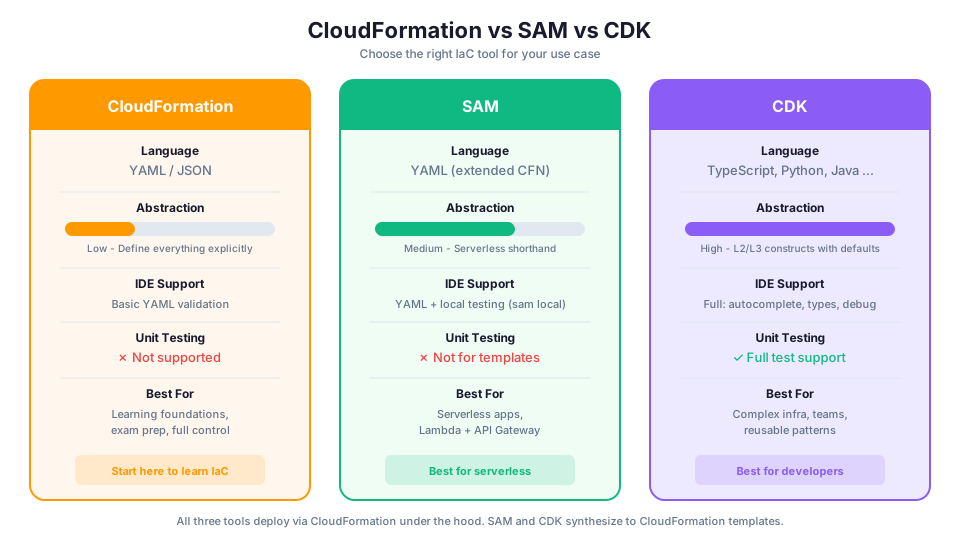
| Feature | CloudFormation | SAM | CDK |
|---|---|---|---|
| Language | YAML/JSON | YAML/JSON | TypeScript, Python, Java, C#, Go |
| Learning curve | Medium | Medium | Higher (programming + IaC) |
| Verbosity | High | Low (for serverless) | Low |
| Local testing | No | Yes (sam local) | Limited (cdk synth) |
| IDE support | Basic YAML | Basic YAML | Full (autocomplete, types) |
| Reusability | Nested stacks | Nested stacks | Constructs, npm/pip packages |
| Best for | Any AWS resource | Serverless apps | Complex, multi-resource stacks |
| Unit testing | No | No | Yes |
| Abstraction level | Low (you define everything) | Medium (shorthand for serverless) | High (sensible defaults) |
| Error messages | Cryptic | Better for serverless | Clear TypeScript/Python errors |
| Drift detection | Built-in | Inherited from CFN | Inherited from CFN |
| Multi-account deploy | StackSets | StackSets | CDK Pipelines |
Lines of Code Comparison
Here is the same infrastructure expressed in each tool. A VPC with public and private subnets, an ALB, an ECS Fargate service, and an RDS database:
| Tool | Approximate Lines | Files |
|---|---|---|
| CloudFormation | 600-800 lines | 1-3 YAML files |
| SAM | N/A (not suited for this) | Not applicable |
| CDK (TypeScript) | 80-120 lines | 1-2 .ts files |
The CDK achieves this compression through L2 and L3 constructs that handle VPC CIDR math, subnet routing, security groups, task definitions, and dozens of other details automatically.
Which Should You Start With?
Here is my recommendation based on your background:
Start with CloudFormation if:
- You are studying for the AWS Solutions Architect exam (it is tested heavily)
- You want to understand the foundation that SAM and CDK are built on
- Your team already uses CloudFormation
- You prefer declarative configuration over imperative code
- You are in a regulated environment that requires template auditing
Start with SAM if:
- You are building serverless applications (Lambda, API Gateway, DynamoDB)
- You want local testing capabilities
- You are comfortable with YAML but want less boilerplate
- You need to iterate quickly on Lambda function development
Start with CDK if:
- You are already a developer comfortable with TypeScript or Python
- You are building complex infrastructure with many repeating patterns
- You want IDE support, autocomplete, and type safety
- You plan to share infrastructure patterns across teams
- You want to write tests for your infrastructure
The Honest Answer
For learning, start with CloudFormation. It is the foundation. Every SAM template becomes CloudFormation. Every CDK app synthesizes to CloudFormation. Understanding CloudFormation means you can debug anything the other tools produce.
For building, use CDK if you are a developer, SAM if you are building serverless, and CloudFormation if you want maximum control and transparency.
Terraform: The Elephant in the Room
You will hear about Terraform (by HashiCorp). It is a popular IaC tool that works across multiple cloud providers (AWS, Azure, GCP). If your organization uses multiple clouds, Terraform's multi-provider support is valuable.
However, for the AWS Solutions Architect exam and pure AWS environments, CloudFormation, SAM, and CDK are the native tools. The exam tests CloudFormation specifically. Learn the AWS-native tools first, then explore Terraform if your job requires it.
Key differences from CloudFormation:
| Aspect | CloudFormation | Terraform |
|---|---|---|
| State | Managed by AWS | Stored in S3 or Terraform Cloud (you manage) |
| Providers | AWS only | AWS, Azure, GCP, Kubernetes, and hundreds more |
| Language | YAML/JSON | HCL (HashiCorp Configuration Language) |
| Rollback | Automatic on failure | Manual (apply previous state) |
| Resource coverage | All AWS services on launch day | Lag behind new AWS services by days/weeks |
| Import existing resources | Supported | Supported (easier than CFN) |
Common IaC Patterns
Pattern 1: Environment Parity
Use the same template with different parameters for dev, staging, and prod:
# Same template, different environments
aws cloudformation deploy \
  --stack-name my-app-dev \
  --template-file template.yaml \
  --parameter-overrides Environment=dev

aws cloudformation deploy \
  --stack-name my-app-staging \
  --template-file template.yaml \
  --parameter-overrides Environment=staging

aws cloudformation deploy \
  --stack-name my-app-prod \
  --template-file template.yaml \
  --parameter-overrides Environment=prod
Pattern 2: Nested Stacks
Break large templates into smaller, reusable components:
Resources:
  NetworkStack:
    Type: AWS::CloudFormation::Stack
    Properties:
      TemplateURL: https://s3.amazonaws.com/my-templates/network.yaml

  DatabaseStack:
    Type: AWS::CloudFormation::Stack
    Properties:
      TemplateURL: https://s3.amazonaws.com/my-templates/database.yaml
      Parameters:
        VpcId: !GetAtt NetworkStack.Outputs.VpcId
Pattern 3: Tagging Everything
Always tag your resources for cost tracking and organization:
Resources:
  MyBucket:
    Type: AWS::S3::Bucket
    Properties:
      Tags:
        - Key: Environment
          Value: !Ref Environment
        - Key: Team
          Value: platform
        - Key: CostCenter
          Value: engineering
        - Key: ManagedBy
          Value: cloudformation
Pattern 4: Cross-Stack References
Share values between independent stacks using exports and imports:
# In network-stack.yaml
Outputs:
  VpcId:
    Value: !Ref MyVPC
    Export:
      Name: !Sub '${AWS::StackName}-VpcId'

# In app-stack.yaml
Resources:
  MyInstance:
    Type: AWS::EC2::Instance
    Properties:
      SubnetId: !ImportValue 'network-stack-SubnetId'
Pattern 5: Deletion Protection for Stateful Resources
Protect databases and storage from accidental deletion:
Resources:
  ProductionDatabase:
    Type: AWS::RDS::DBInstance
    DeletionPolicy: Retain
    UpdateReplacePolicy: Retain
    Properties:
      DBInstanceClass: db.t3.medium
      Engine: postgres
      # ...

  CriticalBucket:
    Type: AWS::S3::Bucket
    DeletionPolicy: Retain
    Properties:
      BucketName: !Sub 'critical-data-${AWS::AccountId}'
The DeletionPolicy: Retain keeps the resource even if the stack is deleted. This is essential for databases and buckets containing production data.
Common Mistakes and How to Avoid Them
Mistake 1: Hardcoding Account IDs and Regions
Bad:
BucketName: my-app-123456789012-us-east-1
Good:
BucketName: !Sub 'my-app-${AWS::AccountId}-${AWS::Region}'
Mistake 2: Not Using Parameters for Environment-Specific Values
Bad: Separate templates for each environment with hardcoded values.
Good: One template with parameters that change between environments.
Mistake 3: Ignoring Stack Events on Failure
When a stack fails, the error is often buried in the stack events, not the top-level error message:
# See the full event log including the actual error
aws cloudformation describe-stack-events \
  --stack-name my-app-dev \
  --query "StackEvents[?ResourceStatus=='CREATE_FAILED']"
Mistake 4: Not Setting Removal Policies
By default, CloudFormation deletes resources when you remove them from the template. For databases and S3 buckets, this means data loss. Always set DeletionPolicy: Retain for stateful resources.
Mistake 5: Massive Single Templates
A 2,000-line template is impossible to maintain. Break it into nested stacks or use the CDK where you can split infrastructure across multiple files naturally.
Getting Started Today
- Pick a simple project: an S3 bucket with versioning, or a DynamoDB table
- Write the CloudFormation template by hand (use the AWS documentation)
- Deploy it with
aws cloudformation create-stack - Make a change to the template and update the stack
- Delete the stack and verify all resources are cleaned up
- Try the same exercise with SAM (add a Lambda function) or CDK (use TypeScript)
Once you are comfortable, try recreating the same resources with SAM (if serverless) or CDK (if you prefer code). Seeing the same infrastructure expressed in different tools solidifies your understanding.
How This Shows Up in Architecture Decisions
When you are designing production infrastructure or discussing trade-offs in a design review, these are the IaC principles that come up most often:
- CloudFormation is the foundation. SAM templates are CloudFormation. CDK synthesizes to CloudFormation. Know CloudFormation.
- Change sets preview changes without applying them. Always use them in production.
- StackSets deploy across multiple accounts and regions. Think AWS Organizations.
- Drift detection finds manual changes to stack resources.
DeletionPolicy: Retainkeeps resources when the stack is deleted. Critical for databases.- Nested stacks break large templates into reusable components.
!Refvs!GetAtt:!Refreturns the resource ID.!GetAttreturns a specific attribute (like an ARN or endpoint).- SAM = serverless shorthand. The
Transform: AWS::Serverless-2016-10-31line identifies a SAM template. - CDK constructs come in three levels: L1 (raw CFN), L2 (opinionated defaults), L3 (complete patterns).
Knowledge Check
Test your understanding before moving on. Try to answer each question before revealing the answer.
1. A teammate manually changed a security group rule in the Console last week, and now the CloudFormation template no longer matches the live resource. Which CloudFormation feature detects this, and what should you do about it?
Drift detection. Run aws cloudformation detect-stack-drift to find the discrepancy. Then either update the template to match the desired state or re-deploy the template to overwrite the manual change.
2. You need to create the same VPC, subnets, and security group setup across three AWS accounts (dev, staging, prod). Which CloudFormation feature is designed for this, and what service does it integrate with?
StackSets. They integrate with AWS Organizations to deploy the same template across multiple accounts and regions from a single management operation.
3. Your CloudFormation template defines an RDS database, but you are worried that deleting the stack will destroy production data. What two template properties should you set on the database resource?
Set DeletionPolicy: Retain so the database is preserved when the stack is deleted, and set UpdateReplacePolicy: Retain so the database is preserved if CloudFormation needs to replace it during an update.
4. A developer on your team wants to know whether to use SAM or CDK for a new project that consists of five Lambda functions behind API Gateway, plus a DynamoDB table. The team writes Python but has never used CDK. What do you recommend and why?
SAM is the better starting point. The project is purely serverless (Lambda + API Gateway + DynamoDB), which is exactly what SAM is optimized for. SAM provides local testing with sam local, requires no programming language knowledge beyond the Lambda runtime, and the team can be productive immediately without learning CDK abstractions.
5. In CDK, what is the difference between an L1 construct like CfnBucket and an L2 construct like Bucket? When would you use L1 over L2?
L1 constructs map one-to-one to CloudFormation resources with no added defaults or abstractions. L2 constructs are opinionated wrappers that add sensible defaults (like blocking public access on S3 buckets). Use L1 when you need access to a CloudFormation property that the L2 construct does not expose yet, or when you need exact control with no abstraction layer.
Here is a contrarian take: not everything needs IaC. If you are spinning up a single EC2 instance for a weekend experiment, writing a CloudFormation template first is overkill. IaC earns its keep when infrastructure is shared, long-lived, or needs to be reproduced. The moment a second person touches the environment, or the environment needs to survive past next week, you need templates. Until then, the Console is fine. The real skill is knowing where that line is for your team.
Pricing note: CloudFormation itself has no additional charge (you pay only for the AWS resources it creates). CDK and SAM are also free tools. The costs in this article refer to the underlying resources like EC2 instances, S3 buckets, and DynamoDB tables, and were verified in May 2026 for us-east-1. Check the AWS Pricing Calculator for current rates in your Region.
Ready to practice? Pick one resource you built manually in the Console this week and rewrite it as a CloudFormation template. Deploy it, change it, delete it. That exercise teaches more than reading ten articles. This topic is covered in depth in Module 43: CloudFormation Fundamentals of our free AWS Bootcamp.