
Microservices vs Monolith on AWS
"Should we use microservices?" is one of the most asked questions in cloud architecture, and one of the most frequently answered wrong. The internet is full of advice telling you to break everything into microservices from day one. That advice has cost companies millions of dollars and years of lost productivity.
The truth is simpler and less dramatic: monoliths are fine. Microservices are fine. Serverless is fine. The right answer depends on your team, your application, and where you are in the growth journey. This guide will give you a clear framework for making that decision on AWS.
Prerequisites: You should understand Docker containers and ECS and AWS messaging services before starting this article.
What You Will Learn
By the end of this article, you will be able to:
- Evaluate the trade-offs of monolith, microservices, and serverless architectures for a given set of project requirements
- Design a migration path from monolith to microservices using the Strangler Fig pattern
- Implement inter-service communication using SQS, SNS, EventBridge, and the Saga pattern on AWS
- Compare ECS and EKS as container orchestration platforms and select the right one for your team
- Troubleshoot common distributed systems issues including cascading failures and data consistency problems
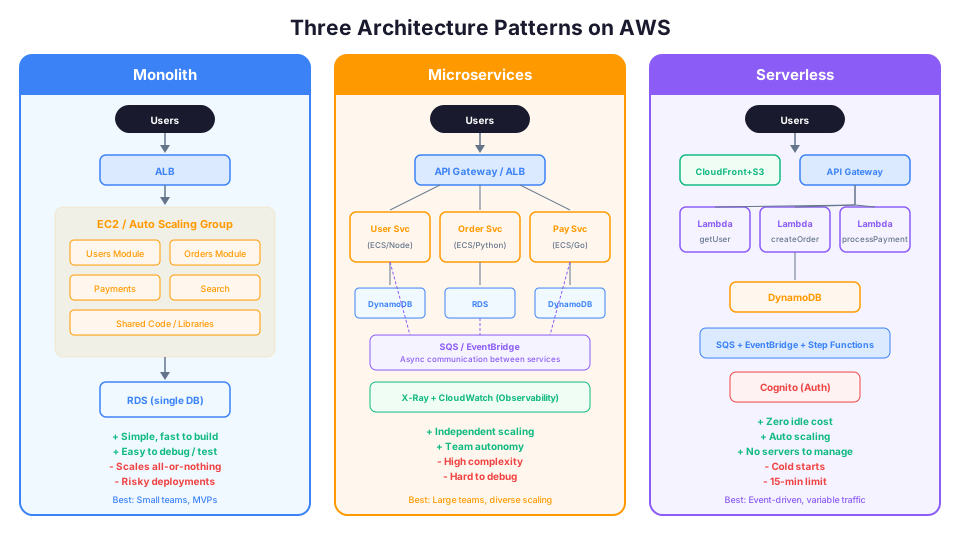
Three Architecture Patterns on AWS
The Monolith
A monolith is a single application that contains all your business logic, deployed as one unit. On AWS, this typically looks like:
- An EC2 instance (or Auto Scaling group) running your entire application
- A single RDS database backing everything
- An Application Load Balancer in front
User --> ALB --> EC2 (entire application) --> RDS
That is it. One deployment, one codebase, one database. Simple.
Monolith advantages:
| Advantage | Why It Matters |
|---|---|
| Simple to develop | One codebase, one IDE, one repo |
| Simple to deploy | Build one artifact, deploy to one place |
| Simple to debug | All the code is in one process, stack traces are complete |
| Simple to test | Integration tests run against one application |
| Low operational overhead | One service to monitor, one log stream to watch |
| Fast to start | No distributed systems complexity on day one |
| Easy transactions | ACID transactions across all data in one database |
Monolith disadvantages:
| Disadvantage | Why It Matters |
|---|---|
| Scaling is all-or-nothing | You cannot scale just the part that is under load |
| Deployments affect everything | A bug in one feature can take down the whole application |
| Technology lock-in | The entire application uses one language/framework |
| Team coordination overhead | As the team grows, merge conflicts and coordination increase |
| Longer build and deploy times | As code grows, builds slow down |
| Blast radius | A memory leak in one feature crashes the entire process |
Microservices
A microservices architecture breaks the application into small, independently deployable services. Each service owns one piece of business functionality and has its own data store.
On AWS, this typically looks like:
- Multiple ECS or EKS services, each running a different component
- Each service has its own database (or DynamoDB table)
- Services communicate via API calls, SQS queues, or EventBridge events
- API Gateway or an ALB routes external traffic to the right service
User --> API Gateway --> Service A (ECS) --> DynamoDB
                    --> Service B (ECS) --> RDS
                    --> Service C (ECS) --> DynamoDB
         Service A --SQS--> Service D (ECS) --> S3
Microservices advantages:
| Advantage | Why It Matters |
|---|---|
| Independent scaling | Scale each service based on its own demand |
| Independent deployment | Deploy Service A without touching Service B |
| Technology flexibility | Each service can use the best language/framework for its job |
| Team autonomy | Small teams own entire services end-to-end |
| Fault isolation | If Service C crashes, Services A and B keep running |
| Smaller codebases | Each service is easier to understand and modify |
| Organizational alignment | Service boundaries mirror team boundaries |
Microservices disadvantages:
| Disadvantage | Why It Matters |
|---|---|
| Distributed system complexity | Network calls fail, services go down, data gets out of sync |
| Operational overhead | N services means N deployments, N log streams, N monitoring dashboards |
| Data consistency challenges | No more simple database transactions across services |
| Testing complexity | Integration testing across services is significantly harder |
| Debugging difficulty | A request touches 5 services; finding the bug requires distributed tracing |
| Higher infrastructure cost | More load balancers, more containers, more networking |
| Network latency | Every service-to-service call adds milliseconds |
Serverless
Serverless is not really a third architecture pattern. It is a deployment model that can implement either monolithic or microservices designs. But it is worth discussing separately because it changes the trade-offs significantly.
On AWS, serverless typically looks like:
- Lambda functions handling business logic
- API Gateway for HTTP routing
- DynamoDB for data storage
- SQS and EventBridge for async communication
- S3 for file storage
- Step Functions for orchestrating workflows
User --> API Gateway --> Lambda (handler) --> DynamoDB
                                          --> SQS --> Lambda (processor)
                                          --> S3
Serverless advantages:
| Advantage | Why It Matters |
|---|---|
| Zero idle cost | You pay nothing when nobody is using your application |
| Automatic scaling | From zero to thousands of concurrent executions without configuration |
| No server management | No patching, no capacity planning, no OS maintenance |
| Fast development | Focus entirely on business logic |
| Built-in high availability | Lambda runs across multiple AZs automatically |
| Pay-per-invocation | Costs scale exactly with usage |
Serverless disadvantages:
| Disadvantage | Why It Matters |
|---|---|
| Cold starts | First invocation after idle period adds latency (100ms-1s) |
| 15-minute execution limit | Long-running processes cannot use Lambda |
| Vendor lock-in | Your code is tightly coupled to AWS services |
| Limited compute resources | Max 10 GB memory per Lambda function |
| Complex debugging | Distributed, event-driven systems are harder to trace |
| State management | Lambda is stateless; you need external storage for everything |
| Concurrency limits | Default 1,000 concurrent executions per region (can increase) |
When the Monolith Is the Right Choice
This is the section most architecture articles skip, and it is the most important one.
Start with a monolith when:
-
You are a small team (fewer than 10 developers). The overhead of managing multiple services, deployment pipelines, and inter-service communication is not justified. Your team will move faster with one codebase.
-
You are building an MVP or prototype. You do not know what the final architecture will look like. A monolith lets you iterate quickly, figure out the domain boundaries, and refactor later with actual knowledge instead of guesses.
-
Your application has tightly coupled features. If Feature A always needs data from Feature B and Feature C in the same request, splitting them into separate services adds network latency and complexity with no benefit.
-
You need simple transactions. If your business logic requires atomic database transactions across multiple entities, a monolith with a single database handles this trivially. In microservices, you need distributed transactions or eventual consistency patterns like sagas, which are dramatically more complex.
-
You value deployment simplicity. One build, one deploy, one rollback. In a monolith, deploying is boring. In microservices, coordinating deployments across dependent services is a project in itself.
Real-world example on AWS:
Internet --> ALB --> Auto Scaling Group (t3.large instances)
                      --> Application (Python/Django)
                      --> RDS PostgreSQL (Multi-AZ)
This architecture serves millions of requests, is highly available, and costs a fraction of what a microservices equivalent would cost. For most startups and small teams, this is the right answer.
The Monolith Cost Advantage
Here is a cost comparison that illustrates why starting with a monolith often makes sense:
| Component | Monolith | Microservices (5 services) |
|---|---|---|
| Compute | 2x t3.large ($120/mo) | 5x ECS tasks ($250/mo) |
| Load Balancer | 1x ALB ($22/mo) | 1x ALB + internal ($44/mo) |
| Database | 1x RDS ($100/mo) | 3x DynamoDB + 2x RDS ($300/mo) |
| NAT Gateway | 1x ($35/mo) | 1x ($35/mo) |
| Monitoring | CloudWatch basic ($10/mo) | CloudWatch + X-Ray ($50/mo) |
| Total | ~$287/month | ~$679/month |
The microservices version costs 2.4x more for the same functionality. That difference only makes sense when you actually need the benefits microservices provide.
When to Move to Microservices
Microservices solve specific problems. If you do not have those problems, you do not need microservices.
Consider microservices when:
-
Your team has grown past 15-20 developers. Multiple teams stepping on each other in the same codebase is the number one sign you need service boundaries. Each team should own a service they can develop and deploy independently.
-
You have components with vastly different scaling needs. If your image processing pipeline needs 10x the compute of your user API, scaling them independently saves money and improves performance.
-
You need independent deployment cycles. If your payments team needs to deploy 3 times a day but your analytics team deploys weekly, coupling them in a monolith creates friction.
-
You need technology diversity. Maybe your real-time processing needs Go for performance, your ML pipeline needs Python, and your API needs Node.js. Microservices let each team choose the best tool.
-
You want fault isolation. In a monolith, a memory leak in one feature crashes the entire application. In microservices, one service can fail without taking down everything else (if you design the system correctly).
-
You need to comply with organizational standards. Large organizations often require teams to own and operate their own services. Microservices align with this organizational model.
Real-world example on AWS:
Internet --> API Gateway

  /users    --> ECS Service (Node.js) --> DynamoDB (Users table)
  /orders   --> ECS Service (Python)  --> RDS PostgreSQL (Orders)
  /payments --> ECS Service (Go)      --> DynamoDB (Payments table)
  /search   --> ECS Service (Java)    --> OpenSearch

  Order Service --SQS--> Payment Service
  Payment Service --EventBridge--> Notification Service
This architecture makes sense when you have separate teams owning Users, Orders, Payments, and Search, and when those services have different scaling profiles and technology needs.
Microservices on AWS: ECS vs EKS
If you choose microservices, you need a container orchestration platform. The two main options on AWS:
| Feature | ECS (Elastic Container Service) | EKS (Elastic Kubernetes Service) |
|---|---|---|
| Complexity | Lower (AWS-native) | Higher (Kubernetes) |
| Learning curve | Moderate | Steep |
| Portability | AWS only | Multi-cloud, on-premises |
| Cost | Just Fargate/EC2 pricing | $0.10/hour per cluster + compute |
| Integration | Deep AWS integration | Good AWS integration + K8s ecosystem |
| Best for | AWS-focused teams | Teams with K8s experience, multi-cloud |
# Create an ECS service for one microservice
aws ecs create-service \
  --cluster my-microservices-cluster \
  --service-name user-service \
  --task-definition user-service:3 \
  --desired-count 2 \
  --launch-type FARGATE \
  --network-configuration '{
    "awsvpcConfiguration": {
      "subnets": ["subnet-abc123", "subnet-def456"],
      "securityGroups": ["sg-abc123"],
      "assignPublicIp": "DISABLED"
    }
  }' \
  --load-balancers '[{
    "targetGroupArn": "arn:aws:elasticloadbalancing:us-east-1:123456789012:targetgroup/user-svc/abc123",
    "containerName": "user-service",
    "containerPort": 8080
  }]'

# Configure service auto scaling
aws application-autoscaling register-scalable-target \
  --service-namespace ecs \
  --resource-id service/my-microservices-cluster/user-service \
  --scalable-dimension ecs:service:DesiredCount \
  --min-capacity 2 \
  --max-capacity 20
When Serverless Wins
Serverless is ideal when:
-
Your traffic is unpredictable. An API that gets 10 requests one hour and 10,000 the next. Serverless scales to zero and up to thousands without any configuration.
-
You are building event-driven workflows. File uploaded to S3? Process it with Lambda. Message arrives in SQS? Lambda handles it. Database record changed? Lambda reacts. These event-driven patterns are what serverless was built for.
-
Your team is small and does not want to manage infrastructure. Serverless eliminates patching, capacity planning, and OS management entirely.
-
Your workloads are short-lived. API requests, file processing, data transformations, and webhook handlers that complete in seconds or minutes are perfect for Lambda.
-
You want minimal cost at low traffic. A serverless application serving 1,000 requests per day costs pennies. The same application on EC2 costs at least $7-8/month even if idle.
Real-world example on AWS:
Internet --> CloudFront --> S3 (static frontend)
         --> API Gateway --> Lambda functions --> DynamoDB
                                              --> SES (email)
                                              --> S3 (file storage)
         --> EventBridge --> Lambda (scheduled tasks)
This is a complete production application with zero servers to manage. It scales from zero to massive and costs almost nothing at low traffic.
Serverless Cost Comparison at Different Traffic Levels
| Monthly Requests | Lambda Cost | Equivalent EC2 (t3.small) |
|---|---|---|
| 10,000 | $0.02 | $15.18 |
| 100,000 | $0.20 | $15.18 |
| 1,000,000 | $2.00 | $15.18 |
| 10,000,000 | $20.00 | $15.18 |
| 50,000,000 | $100.00 | $30.36 (need larger) |
| 100,000,000 | $200.00 | $60.72 (need scaling) |
The crossover point where EC2 becomes cheaper than Lambda depends on your workload, but it is typically around 10-50 million requests/month. Below that, serverless wins on cost. Above that, you need to evaluate.
The Decision Framework
Use this flowchart to choose your architecture:
Question 1: How big is your team?
- Fewer than 10 developers? Start with a monolith (on EC2/ECS) or serverless.
- 10-20 developers? Consider a modular monolith or begin splitting into a few services.
- More than 20 developers? Microservices likely make sense for team autonomy.
Question 2: What is your traffic pattern?
- Consistent, high-volume traffic? EC2 with Auto Scaling (monolith or microservices).
- Spiky or unpredictable? Serverless (Lambda) or containers with Fargate.
- Low traffic or MVPs? Serverless. You pay almost nothing.
Question 3: How long do your processes run?
- Under 15 minutes? Lambda is an option.
- Over 15 minutes? EC2 or ECS/Fargate with longer-running tasks.
- Continuous processing? EC2 or ECS.
Question 4: How important is deployment independence?
- One team, deploying together? Monolith is simpler.
- Multiple teams needing independent release cycles? Microservices.
Question 5: What is your budget for operational overhead?
- Minimal ops budget? Serverless (AWS manages everything).
- Moderate ops team? Monolith on ECS/Fargate (managed containers).
- Dedicated platform team? Microservices on ECS/EKS.
Summary table:
| Factor | Monolith | Microservices | Serverless |
|---|---|---|---|
| Team size | Small (1-10) | Large (10+) | Any |
| Complexity | Low | High | Medium |
| Scaling | All-or-nothing | Per-service | Automatic |
| Deployment speed | Fast (one unit) | Fast (per service) | Fastest |
| Infrastructure cost | Medium | Higher | Lowest at low traffic |
| Operational overhead | Low | High | Lowest |
| Transaction support | Strong (ACID) | Eventual consistency | Eventual consistency |
| Debugging | Easy (one process) | Hard (distributed) | Medium (event-driven) |
| Best for | MVPs, small teams, tightly coupled features | Large orgs, diverse scaling needs, team autonomy | Event-driven, variable traffic, no-ops teams |
The Pragmatic Middle Ground: The Modular Monolith
There is a pattern that does not get enough attention: the modular monolith. You build a single deployable application, but you organize the code into well-defined modules with clear boundaries and interfaces.
This gives you the simplicity of a monolith for deployment and operations, while setting up clean boundaries that make a future migration to microservices straightforward if you ever need it.
On AWS, this looks identical to a monolith from an infrastructure perspective. The difference is entirely in code organization. Many successful companies run on modular monoliths, including Shopify, which handles massive scale with this approach.
Key rules for a modular monolith:
- Each module has a public API (interface) and private implementation
- Modules communicate through interfaces, never by reaching into another module's database tables
- Each module could theoretically become its own service without rewriting the interface
- Shared database, but each module owns its own tables
Application
  /modules
    /users        (owns: users table, profiles table)
    /orders       (owns: orders table, line_items table)
    /payments     (owns: payments table, refunds table)
    /search       (owns: search_index table)
    /notifications (owns: notification_log table)
  /shared
    /auth         (shared authentication middleware)
    /logging      (shared logging utilities)
Communication Patterns in Microservices
If you do go the microservices route, one of the most important decisions is how your services talk to each other. This is where most microservices implementations go wrong.
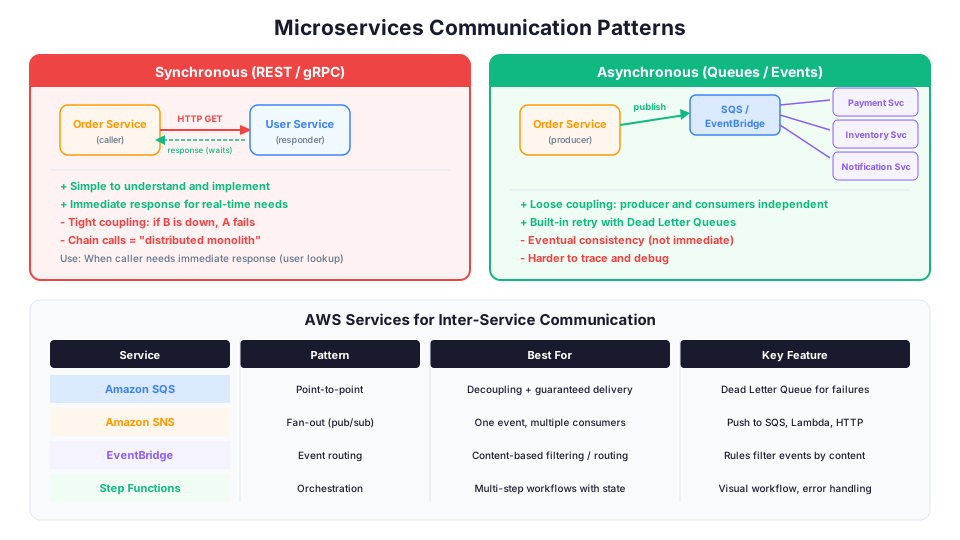
Synchronous Communication (REST/gRPC)
Service A calls Service B directly and waits for a response.
Service A --HTTP GET /users/123--> Service B --> response
Use when: The caller needs the response immediately to continue processing (e.g., an API request that needs user data to build the response).
Risk: If Service B is down, Service A fails too. This creates tight coupling through availability. Chain enough synchronous calls together and you have a distributed monolith, all the complexity of microservices with none of the benefits.
Mitigating the risk:
# Use circuit breakers to prevent cascading failures
# When Service B is unavailable, the circuit breaker "opens"
# and returns a fallback response instead of waiting and timing out

# AWS App Mesh provides built-in circuit breaker support
# Or implement in your application code with libraries like:
# - resilience4j (Java)
# - polly (C#)
# - tenacity (Python)
Asynchronous Communication (Queues and Events)
Service A puts a message on a queue. Service B processes it later.
Service A --message--> SQS Queue --> Service B processes when ready
Service A --event--> EventBridge --> Service B, C, D all react independently
Use when: The caller does not need an immediate response. Order processing, notification sending, data synchronization, and log processing are all naturally asynchronous.
AWS services for async communication:
| Service | Best For | Delivery | Ordering |
|---|---|---|---|
| SQS Standard | Point-to-point, at-least-once delivery | At least once | Best effort |
| SQS FIFO | Point-to-point, exactly-once, ordered | Exactly once | Guaranteed |
| SNS | Fan-out to multiple subscribers | At least once | Best effort |
| EventBridge | Event routing with filtering rules | At least once | Best effort |
| Kinesis | Real-time streaming data processing | At least once | Per-shard |
| Step Functions | Orchestrating multi-step workflows | Exactly once | Sequential |
Real-world example: When a customer places an order, the Order Service writes the order to its database and publishes an "OrderPlaced" event to EventBridge. The Payment Service, Inventory Service, and Notification Service all subscribe to that event and process it independently. If the Notification Service is down, the order still gets processed. The notification will be sent when the service recovers.
# Publish an event when an order is placed
aws events put-events \
  --entries '[{
    "Source": "com.myapp.orders",
    "DetailType": "OrderPlaced",
    "Detail": "{\"orderId\": \"ord-123\", \"customerId\": \"cust-456\", \"total\": 99.99}",
    "EventBusName": "default"
  }]'

# Create rules that route the event to different services
aws events put-rule \
  --name "OrderPlaced-to-Payment" \
  --event-pattern '{
    "source": ["com.myapp.orders"],
    "detail-type": ["OrderPlaced"]
  }'

aws events put-targets \
  --rule "OrderPlaced-to-Payment" \
  --targets '[
    {"Id": "payment-queue", "Arn": "arn:aws:sqs:us-east-1:123456789012:payment-processing"},
    {"Id": "inventory-queue", "Arn": "arn:aws:sqs:us-east-1:123456789012:inventory-updates"},
    {"Id": "notification-fn", "Arn": "arn:aws:lambda:us-east-1:123456789012:function:send-order-confirmation"}
  ]'
The Saga Pattern for Distributed Transactions
In a monolith, you can wrap multiple database operations in a single transaction. In microservices, each service has its own database, so you cannot do that. The Saga pattern solves this with a sequence of local transactions coordinated by either choreography (events) or orchestration (Step Functions).
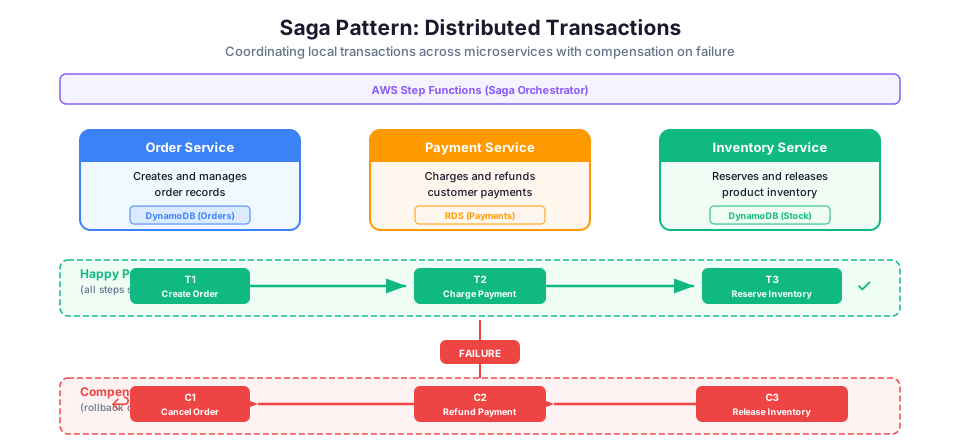
# Example: Order Saga with Step Functions (orchestration)
# Step 1: Create Order (Order Service)
# Step 2: Reserve Inventory (Inventory Service)
# Step 3: Process Payment (Payment Service)
# Step 4: Confirm Order (Order Service)
#
# If Step 3 fails:
# Compensate Step 2: Release Inventory
# Compensate Step 1: Cancel Order

# Step Functions handles the orchestration and compensation automatically
aws stepfunctions create-state-machine \
  --name "OrderSaga" \
  --definition '{
    "StartAt": "CreateOrder",
    "States": {
      "CreateOrder": {
        "Type": "Task",
        "Resource": "arn:aws:lambda:us-east-1:123456789012:function:create-order",
        "Next": "ReserveInventory",
        "Catch": [{"ErrorEquals": ["States.ALL"], "Next": "CancelOrder"}]
      },
      "ReserveInventory": {
        "Type": "Task",
        "Resource": "arn:aws:lambda:us-east-1:123456789012:function:reserve-inventory",
        "Next": "ProcessPayment",
        "Catch": [{"ErrorEquals": ["States.ALL"], "Next": "ReleaseInventory"}]
      },
      "ProcessPayment": {
        "Type": "Task",
        "Resource": "arn:aws:lambda:us-east-1:123456789012:function:process-payment",
        "Next": "ConfirmOrder",
        "Catch": [{"ErrorEquals": ["States.ALL"], "Next": "ReleaseInventory"}]
      },
      "ConfirmOrder": {"Type": "Task", "Resource": "arn:aws:lambda:us-east-1:123456789012:function:confirm-order", "End": true},
      "ReleaseInventory": {"Type": "Task", "Resource": "arn:aws:lambda:us-east-1:123456789012:function:release-inventory", "Next": "CancelOrder"},
      "CancelOrder": {"Type": "Task", "Resource": "arn:aws:lambda:us-east-1:123456789012:function:cancel-order", "End": true}
    }
  }' \
  --role-arn "arn:aws:iam::123456789012:role/StepFunctionsRole"
The Strangler Fig Pattern: Migrating Gradually
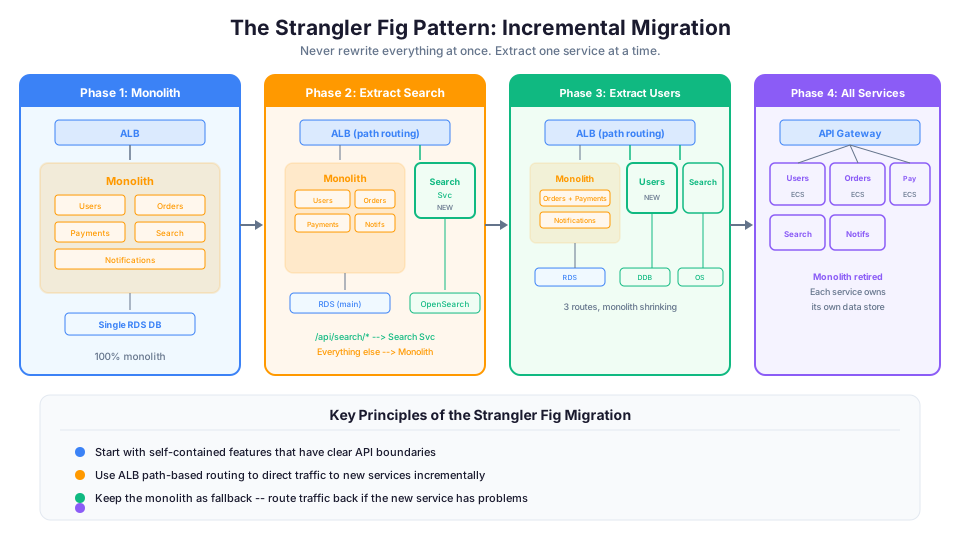
If you have an existing monolith and decide you need microservices, do not rewrite everything at once. Use the Strangler Fig pattern:
- Identify one feature to extract (start with something self-contained)
- Build the new microservice alongside the monolith
- Route traffic for that feature to the new service (API Gateway or ALB path-based routing)
- Once the new service is stable, remove the old code from the monolith
- Repeat for the next feature
Phase 1: Monolith handles everything
Phase 2: New Search Service handles /search, monolith handles everything else
Phase 3: New User Service handles /users, Search Service handles /search
Phase 4: Continue until the monolith is empty (or small enough to maintain)
On AWS, this is straightforward with an Application Load Balancer or API Gateway. You create path-based routing rules that send specific URL patterns to the new service while everything else continues to hit the monolith.
# ALB path-based routing example
# /api/search/* goes to the new Search Service target group
# Everything else goes to the monolith target group
aws elbv2 create-rule \
  --listener-arn arn:aws:elasticloadbalancing:us-east-1:123456789012:listener/app/my-alb/abc123/def456 \
  --conditions '[{"Field":"path-pattern","Values":["/api/search/*"]}]' \
  --actions '[{"Type":"forward","TargetGroupArn":"arn:aws:elasticloadbalancing:us-east-1:123456789012:targetgroup/search-service/abc123"}]' \
  --priority 10
This pattern reduces risk because you are migrating incrementally. If the new service has problems, you route traffic back to the monolith. No big bang cutover required.
How to Choose What to Extract First
When using the Strangler Fig pattern, choose your first extraction carefully:
| Good First Candidates | Why | Bad First Candidates | Why |
|---|---|---|---|
| Search functionality | Usually self-contained, read-heavy | User authentication | Touches everything, high risk |
| Notification sending | Naturally async, low coupling | Core business logic | Too tightly coupled initially |
| File/image processing | Event-driven, clear boundary | Payment processing | High risk, needs atomic transactions |
| Reporting/analytics | Read-only, different scaling needs | Shared data models | Creates distributed data challenges |
Observability: The Non-Negotiable for Microservices
If you run microservices without proper observability, you will spend most of your time debugging. When a request touches 5 services and something fails, you need to trace the request across all of them.
Three pillars of observability:
| Pillar | What It Shows | AWS Service |
|---|---|---|
| Logs | What happened in each service | CloudWatch Logs |
| Metrics | How the system is performing | CloudWatch Metrics |
| Traces | How a request flowed across services | X-Ray |
AWS X-Ray is especially important for microservices. It traces requests across Lambda functions, ECS services, API Gateway, and other AWS services, showing you exactly where time is spent and where failures occur.
# Enable X-Ray tracing on an API Gateway stage
aws apigateway update-stage \
  --rest-api-id abc123 \
  --stage-name prod \
  --patch-operations op=replace,path=/tracingEnabled,value=true

# Enable X-Ray on an ECS task definition
# Add the X-Ray daemon as a sidecar container in your task definition
# The daemon collects traces from your application and sends them to X-Ray

# Query X-Ray for traces with errors in the last hour
aws xray get-trace-summaries \
  --start-time $(date -u -v-1H +%s) \
  --end-time $(date -u +%s) \
  --filter-expression 'service("order-service") AND fault = true'

# Create a CloudWatch dashboard for microservices health
aws cloudwatch put-dashboard \
  --dashboard-name "Microservices-Health" \
  --dashboard-body '{
    "widgets": [
      {
        "type": "metric",
        "properties": {
          "metrics": [
            ["AWS/ECS", "CPUUsage", "ServiceName", "user-service"],
            ["AWS/ECS", "CPUUsage", "ServiceName", "order-service"],
            ["AWS/ECS", "CPUUsage", "ServiceName", "payment-service"]
          ],
          "title": "CPU Usage by Service",
          "period": 300
        }
      }
    ]
  }'
Without distributed tracing, debugging microservices is like debugging a monolith with no stack traces. You know something is broken, but you have no idea where.
Service Mesh with AWS App Mesh
For complex microservices deployments, a service mesh adds a layer of infrastructure that handles service-to-service communication, observability, and traffic management:
# Create an App Mesh virtual service
aws appmesh create-virtual-service \
  --mesh-name my-app-mesh \
  --virtual-service-name user-service.local \
  --spec '{
    "provider": {
      "virtualRouter": {
        "virtualRouterName": "user-service-router"
      }
    }
  }'
App Mesh gives you circuit breakers, retry policies, and traffic shifting without modifying your application code. It is useful for large microservices deployments but adds complexity that smaller deployments do not need.
Troubleshooting Common Errors
Circuit breaker tripping too aggressively Your circuit breaker opens and returns fallback responses even though the downstream service is healthy. This usually means your thresholds are too sensitive. Start with a failure rate threshold of 50% over a 60-second rolling window, then tune from there. In App Mesh, check the outlierDetection settings on your virtual node. Also confirm your health check endpoints return 200 quickly and are not timing out on cold starts.
Distributed tracing gaps (missing spans in X-Ray) You see incomplete traces where requests disappear between services. This happens when one or more services do not propagate the X-Ray trace header (X-Amzn-Trace-Id). Every service in the call chain must forward that header on outbound requests. If you use an HTTP client library, configure it to pass through the trace header automatically. For ECS, verify the X-Ray daemon sidecar container is running and healthy in each task definition.
Service discovery failures (ECS services cannot find each other) Containers start successfully but fail to connect to other services by name. If you use AWS Cloud Map for service discovery, confirm that your services are registering instances to the correct namespace and that the security groups allow traffic on the expected ports between services. Run aws servicediscovery list-instances --service-id <id> to verify registrations. DNS-based discovery can also fail if the VPC DNS resolution settings are not enabled.
How This Shows Up in Architecture Decisions
Architecture reviews and design discussions frequently present these kinds of scenarios:
- "A startup with 5 developers wants to build an MVP quickly." (Monolith or serverless)
- "A company has teams that need to deploy independently." (Microservices)
- "An application processes images uploaded to S3." (Serverless/Lambda)
- "A workload has steady, predictable traffic." (EC2 with Reserved Instances or Savings Plans)
- "A company wants to minimize operational overhead." (Serverless)
- "An application needs to coordinate a multi-step workflow with compensation." (Step Functions)
- "Services need to communicate without tight coupling." (SQS, SNS, or EventBridge)
No single pattern is universally "right." The skill is matching the pattern to the requirements. Understanding trade-offs is what matters.
Quick Reference for Architecture Decisions
| If the requirement says... | Think... |
|---|---|
| "MVP", "small team", "simple" | Monolith or serverless |
| "Independent deployment", "team autonomy" | Microservices |
| "Event-driven", "S3 trigger", "variable traffic" | Serverless (Lambda) |
| "Long-running process" (>15 min) | ECS/Fargate or EC2 |
| "Decouple services", "loose coupling" | SQS or EventBridge |
| "Orchestrate workflow", "compensation" | Step Functions |
| "Minimize operational overhead" | Serverless or Fargate |
| "Container orchestration", "multi-cloud" | EKS (Kubernetes) |
| "Container orchestration", "AWS-native" | ECS |
Pricing note: Monthly cost estimates (such as the monolith vs. microservices comparison) cited in this article are for us-east-1 and were verified in May 2026. Check the AWS Pricing Calculator for current rates in your Region.
Hands-On Challenge
Deploy two services that communicate asynchronously on AWS. When you are finished, verify you have met all of these success criteria:
- Two ECS Fargate services are running in the same cluster, each with its own task definition and container image
- An SQS queue connects the two services (Service A sends messages, Service B consumes them)
- A dead letter queue is configured on the SQS queue with
maxReceiveCountset to 3 - Both services write logs to CloudWatch Logs with distinct log groups
- X-Ray tracing is enabled and you can view a trace map showing the request flow between both services
- Service B processes a test message published by Service A, and you can confirm delivery by checking the CloudWatch logs
- You can stop Service B, send a message from Service A, restart Service B, and confirm the message was still processed (proving the decoupling works)
Next Steps
If you are building something new, start with the simplest architecture that meets your requirements. You can always add complexity later. You cannot easily remove it.
If you are evaluating an existing system, ask yourself: "What specific problem would microservices solve that I cannot solve by better organizing my current architecture?" If the answer is not clear, you probably do not need microservices yet.
Remember Martin Fowler's advice: "You should not start a new project with microservices, even if you are sure your application will be big enough to make it worthwhile." Start with a monolith, keep it modular, and extract services when you have a clear need.
Build it yourself: This topic is covered hands-on in Module 70: Architecture Patterns of our AWS Bootcamp.