
RDS vs DynamoDB: Which AWS Database Should You Use?
"Should I use a SQL or NoSQL database?" is one of the most common architecture questions in cloud computing. On AWS, this usually means choosing between Amazon RDS and Amazon DynamoDB.
The answer is not "one is better than the other." They solve different problems. This guide will help you understand the fundamental differences, see when each one shines, and give you a decision framework you can use on real projects and on the AWS exam.
Prerequisites: You should understand cloud computing basics and VPC networking before starting this article.
What You Will Learn
By the end of this article, you will be able to:
- Explain the fundamental differences between relational (SQL) and non-relational (NoSQL) data models, including ACID properties and the CAP theorem
- Compare Amazon RDS and DynamoDB across dimensions like schema design, query flexibility, scaling, and operational overhead
- Evaluate which database service fits a given workload by applying a five-question decision framework
- Configure RDS Multi-AZ deployments, read replicas, DynamoDB tables, and Global Secondary Indexes using the AWS CLI
- Troubleshoot common database issues including connection timeouts, throughput exceptions, and replication lag
SQL vs NoSQL: The Fundamental Difference
Before comparing AWS services, you need to understand what separates these two database paradigms.
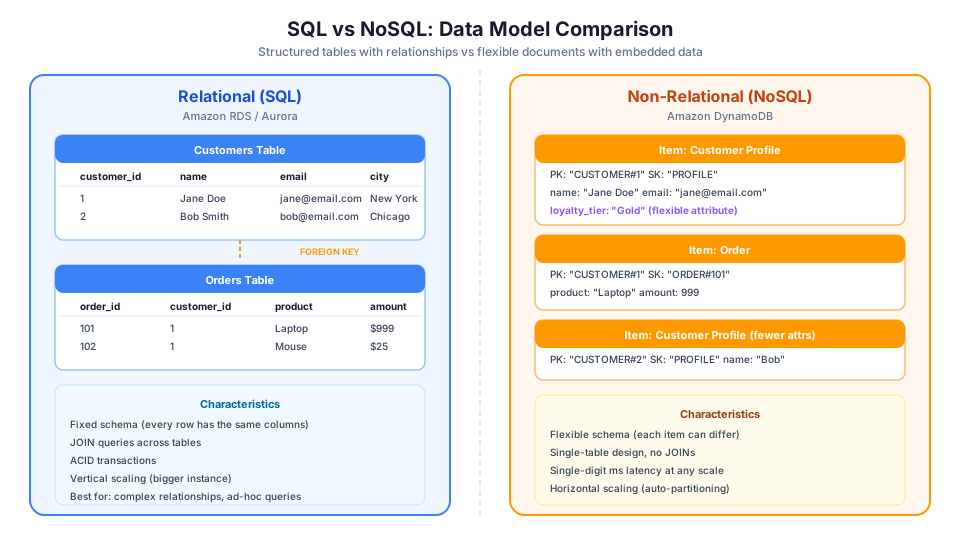
Relational Databases (SQL)
Relational databases store data in tables with rows and columns, like a spreadsheet. Every row follows the same structure (schema), and you define relationships between tables.
Here is what a simple e-commerce database looks like:
Customers table:
| customer_id | name | city | |
|---|---|---|---|
| 1 | Jane Doe | jane@email.com | New York |
| 2 | Bob Smith | bob@email.com | Chicago |
Orders table:
| order_id | customer_id | product | amount |
|---|---|---|---|
| 101 | 1 | Laptop | $999 |
| 102 | 1 | Mouse | $25 |
| 103 | 2 | Keyboard | $75 |
You query relational databases using SQL (Structured Query Language):
-- Find all orders for Jane Doe
SELECT orders.order_id, orders.product, orders.amount
FROM orders
JOIN customers ON orders.customer_id = customers.customer_id
WHERE customers.name = 'Jane Doe';
Relational databases enforce ACID properties (Atomicity, Consistency, Isolation, Durability), which guarantees that transactions are reliable. If you transfer money between bank accounts, either both the debit and credit succeed, or neither does. There is no middle state.
ACID Properties Explained
Understanding ACID is important for both the exam and real-world architecture decisions:
| Property | What It Means | Example |
|---|---|---|
| Atomicity | All operations in a transaction succeed or all fail | Transfer $100: debit and credit both happen or neither does |
| Consistency | Database moves from one valid state to another | Account balance cannot go negative if you have a constraint |
| Isolation | Concurrent transactions do not interfere with each other | Two users buying the last item do not both succeed |
| Durability | Committed data survives crashes | After you get "transaction complete," data is safe on disk |
Non-Relational Databases (NoSQL)
NoSQL databases store data in formats other than traditional tables. DynamoDB uses a key-value and document model. Each item (row) can have different attributes (columns). There is no enforced schema beyond the primary key.
Here is the same data in DynamoDB format:
{
  "PK": "CUSTOMER#1",
  "SK": "PROFILE",
  "name": "Jane Doe",
  "email": "jane@email.com",
  "city": "New York",
  "loyalty_tier": "Gold"
}

{
  "PK": "CUSTOMER#1",
  "SK": "ORDER#101",
  "product": "Laptop",
  "amount": 999,
  "shipping_address": "123 Main St"
}

{
  "PK": "CUSTOMER#2",
  "SK": "PROFILE",
  "name": "Bob Smith",
  "email": "bob@email.com"
}
Notice that Jane's profile has a loyalty_tier field but Bob's does not. That is fine in DynamoDB. Each item can have different attributes. Also notice that the customer profile and order data live in the same table, accessed by the same partition key. This is called single-table design, and it is how you build efficient DynamoDB applications.
The CAP Theorem: Why You Cannot Have Everything
The CAP theorem states that a distributed system can only guarantee two of three properties:
- Consistency: Every read receives the most recent write
- Availability: Every request receives a response
- Partition tolerance: The system continues operating during network failures
RDS prioritizes Consistency and Availability (CA) within a single Region. DynamoDB prioritizes Availability and Partition Tolerance (AP), offering eventual consistency by default (with an option for strongly consistent reads at higher cost).
This is why DynamoDB offers two read consistency models:
| Read Type | Behavior | Cost |
|---|---|---|
| Eventually consistent | Might return slightly stale data (usually <1 second old) | 1x (default) |
| Strongly consistent | Always returns the most recent write | 2x read cost |
For most applications, eventually consistent reads are fine. The data is usually consistent within milliseconds.
Amazon RDS: Managed Relational Databases
Amazon RDS (Relational Database Service) takes the heavy lifting out of running a relational database. You choose the engine, pick the instance size, and AWS handles the rest: patching, backups, failover, and storage management.
Supported Engines
| Engine | Description |
|---|---|
| MySQL | Most popular open-source database. Great for web applications. |
| PostgreSQL | Advanced open-source database with rich feature set. Strong JSON support. |
| MariaDB | MySQL-compatible fork with performance improvements. |
| Oracle | Enterprise database. Bring your own license or pay through AWS. |
| Microsoft SQL Server | Enterprise Windows-ecosystem database. |
| Amazon Aurora | AWS-built engine compatible with MySQL and PostgreSQL. Up to 5x faster than MySQL, 3x faster than PostgreSQL. |
What AWS Manages for You
When you use RDS, AWS handles:
- Automated backups (configurable retention up to 35 days)
- Software patching for the database engine
- Multi-AZ deployments for high availability (automatic failover)
- Read replicas for scaling read-heavy workloads
- Storage auto-scaling
- Monitoring through CloudWatch
What you still manage:
- Schema design (tables, indexes, relationships)
- Query optimization
- Application connection management
- Database user permissions
- Parameter and option groups
Creating an RDS Instance
# Create a MySQL RDS instance
aws rds create-db-instance \
  --db-instance-identifier my-database \
  --db-instance-class db.t3.micro \
  --engine mysql \
  --engine-version 8.0 \
  --master-username admin \
  --master-user-password YourSecurePassword123! \
  --allocated-storage 20 \
  --storage-type gp3 \
  --multi-az \
  --backup-retention-period 7

# Check the status of your instance
aws rds describe-db-instances \
  --db-instance-identifier my-database \
  --query 'DBInstances[0].DBInstanceStatus'

# Wait for it to become available (takes 5-10 minutes)
aws rds wait db-instance-available \
  --db-instance-identifier my-database
RDS Multi-AZ: Automatic Failover
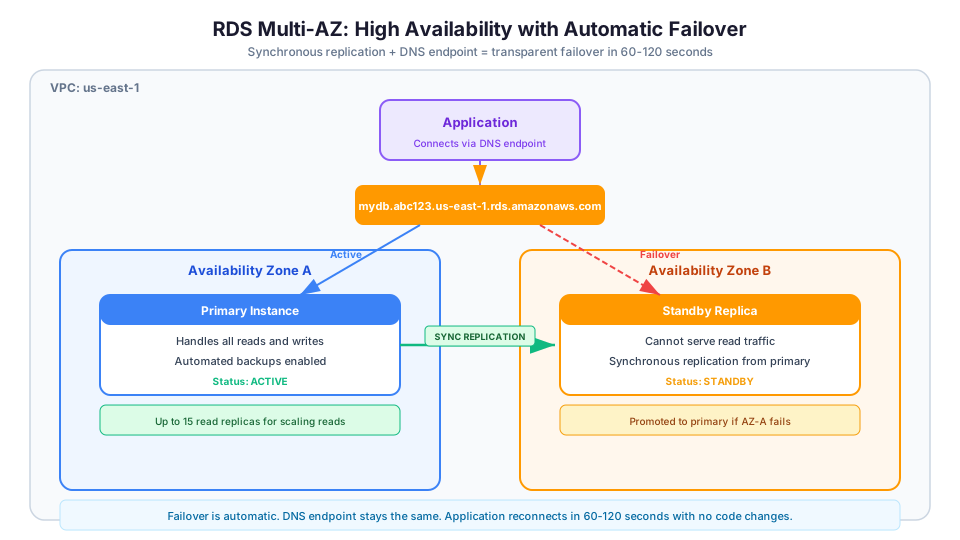
In a Multi-AZ deployment, AWS creates a standby replica in a different Availability Zone. If the primary database fails (hardware failure, AZ outage), AWS automatically switches to the standby, typically within 60-120 seconds. Your application connects through a DNS endpoint that does not change, so the failover is transparent.
Key distinction: Multi-AZ is for high availability, not for performance. The standby does not serve read traffic. If you need to scale reads, use read replicas.
RDS Multi-AZ vs Read Replicas
This is a common point of confusion. Here is the difference:
| Feature | Multi-AZ | Read Replicas |
|---|---|---|
| Purpose | High availability (disaster recovery) | Read scalability (performance) |
| Replication | Synchronous | Asynchronous |
| Serves traffic | No (standby only) | Yes (read queries) |
| Failover | Automatic (60-120 seconds) | Manual promotion required |
| Cross-Region | No (same Region, different AZ) | Yes (can be cross-Region) |
| Max count | 1 standby | Up to 15 replicas |
| Cost | 2x instance cost | Per replica instance |
RDS Read Replicas: Scaling Reads
If your application is read-heavy (90% reads, 10% writes), you can create up to 15 read replicas. Your application sends writes to the primary database and reads to the replicas. This distributes the load and improves performance.
# Create a read replica
aws rds create-db-instance-read-replica \
  --db-instance-identifier my-read-replica \
  --source-db-instance-identifier my-database

# Create a cross-Region read replica (for disaster recovery)
aws rds create-db-instance-read-replica \
  --db-instance-identifier my-dr-replica \
  --source-db-instance-identifier my-database \
  --region eu-west-1

# List all read replicas for an instance
aws rds describe-db-instances \
  --query 'DBInstances[?ReadReplicaSourceDBInstanceIdentifier==`my-database`].DBInstanceIdentifier'
Amazon Aurora: The Premium Choice
Aurora deserves special mention because it combines the best of both worlds:
| Feature | Standard RDS | Aurora |
|---|---|---|
| Storage | Up to 64 TB | Up to 128 TB, auto-scaling |
| Replicas | Up to 15 (async) | Up to 15 (faster replication, ~10ms lag) |
| Failover | 60-120 seconds | ~30 seconds |
| Storage redundancy | 2 AZs | 6 copies across 3 AZs |
| Serverless option | No | Yes (Aurora Serverless v2) |
| Global Database | No | Yes (cross-Region, <1 second lag) |
| Cost | Lower | ~20% more than standard RDS |
Aurora Serverless v2 is particularly interesting: it auto-scales capacity up and down based on demand, much like DynamoDB's on-demand mode but for a relational database.
Amazon DynamoDB: Serverless NoSQL
DynamoDB is a fully managed, serverless, key-value and document database. There are no instances to provision, no patching to manage, and no storage to allocate. You create a table, and DynamoDB handles everything.
Key Concepts
Table: The top-level container for data (similar to a table in RDS, but schema-free).
Item: A single record in the table (similar to a row).
Attribute: A data element within an item (similar to a column, but each item can have different attributes).
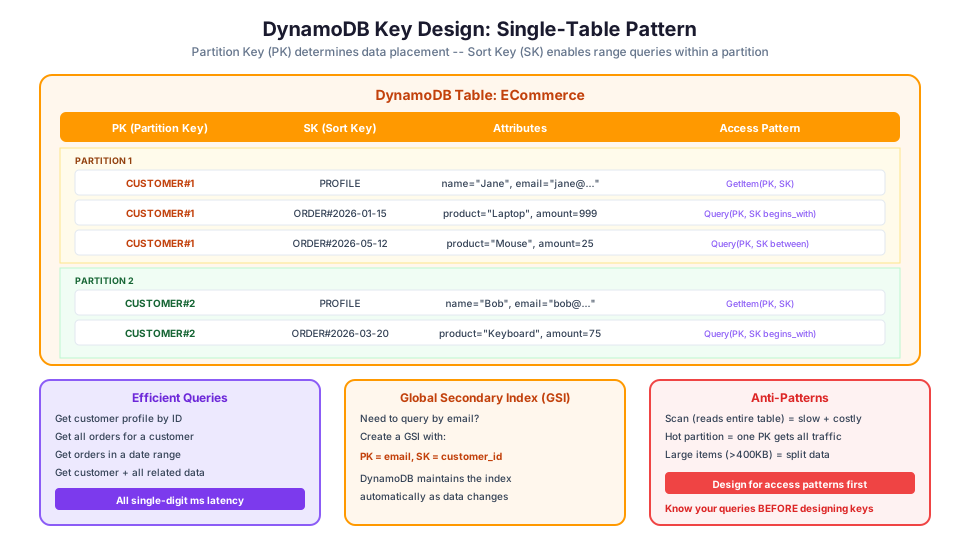
Primary Key: Every table needs a primary key. It comes in two forms:
- Partition key only: A single attribute that uniquely identifies each item (e.g.,
user_id) - Partition key + sort key: Two attributes that together uniquely identify each item. This enables querying multiple items with the same partition key, sorted by the sort key (e.g., partition key =
customer_id, sort key =order_date)
# Create a DynamoDB table
aws dynamodb create-table \
  --table-name Orders \
  --attribute-definitions \
    AttributeName=CustomerID,AttributeType=S \
    AttributeName=OrderDate,AttributeType=S \
  --key-schema \
    AttributeName=CustomerID,KeyType=HASH \
    AttributeName=OrderDate,KeyType=RANGE \
  --billing-mode PAY_PER_REQUEST

# Check table status
aws dynamodb describe-table \
  --table-name Orders \
  --query 'Table.TableStatus'

# Enable point-in-time recovery (PITR)
aws dynamodb update-continuous-backups \
  --table-name Orders \
  --point-in-time-recovery-specification PointInTimeRecoveryEnabled=true
What Makes DynamoDB Different
Serverless: No instances, no capacity planning, no maintenance windows. You interact with a table through an API, and AWS runs everything behind the scenes.
Single-digit millisecond performance at any scale. Whether your table has 1 GB or 1 PB of data, reads and writes complete in single-digit milliseconds. DynamoDB achieves this by distributing data across multiple partitions automatically.
Two pricing modes:
| Mode | How It Works | Best For |
|---|---|---|
| On-Demand | Pay per request. No capacity planning. | Unpredictable workloads, new applications |
| Provisioned | Pre-set read/write capacity units (with auto-scaling) | Predictable, steady workloads |
Built-in features:
- Point-in-time recovery (continuous backups for the last 35 days)
- Global tables (multi-Region, active-active replication)
- DynamoDB Streams (capture changes and trigger Lambda functions)
- DynamoDB Accelerator (DAX) for microsecond read performance
- Time-to-live (TTL) for automatic item expiration
- Encryption at rest (enabled by default)
- On-demand backups (in addition to PITR)
Understanding Capacity Units
Before getting into the math, it helps to see the two capacity modes side by side:
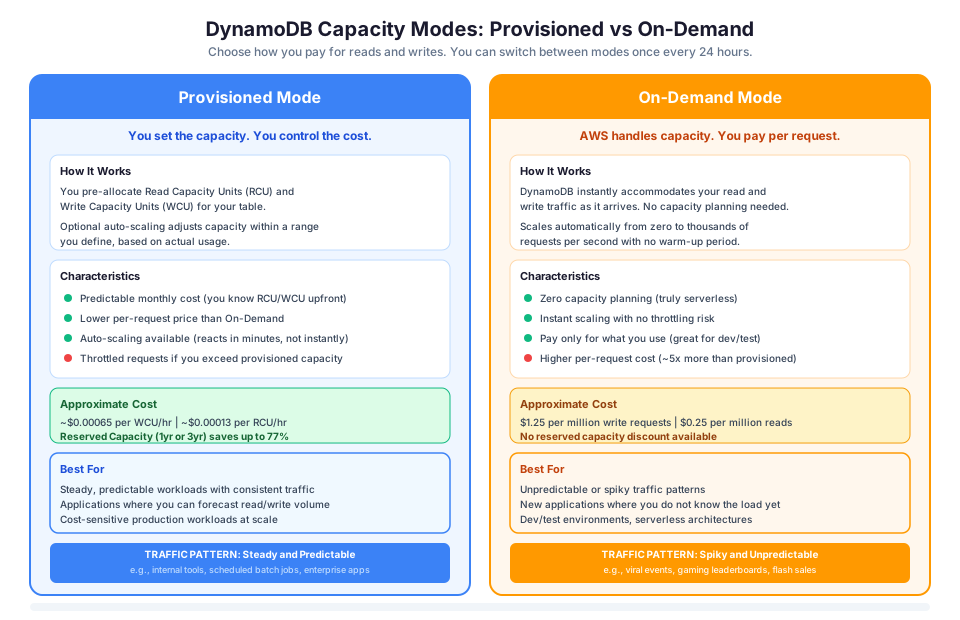
If you choose provisioned mode, you need to understand capacity units:
| Unit | What It Means |
|---|---|
| 1 RCU (Read Capacity Unit) | One strongly consistent read of up to 4 KB, OR two eventually consistent reads of up to 4 KB |
| 1 WCU (Write Capacity Unit) | One write of up to 1 KB |
Example: If your items are 2 KB and you need 100 strongly consistent reads per second:
- Each read uses 1 RCU (item is under 4 KB)
- You need 100 RCU provisioned
If you switch to eventually consistent reads, you only need 50 RCU (because each RCU covers two eventually consistent reads).
Reading and Writing Data
# Write an item
aws dynamodb put-item \
  --table-name Orders \
  --item '{
    "CustomerID": {"S": "C001"},
    "OrderDate": {"S": "2026-05-12"},
    "Product": {"S": "Laptop"},
    "Amount": {"N": "999"}
  }'

# Read an item by primary key
aws dynamodb get-item \
  --table-name Orders \
  --key '{
    "CustomerID": {"S": "C001"},
    "OrderDate": {"S": "2026-05-12"}
  }'

# Query all orders for a customer
aws dynamodb query \
  --table-name Orders \
  --key-condition-expression "CustomerID = :cid" \
  --expression-attribute-values '{":cid": {"S": "C001"}}'

# Query orders in a date range
aws dynamodb query \
  --table-name Orders \
  --key-condition-expression "CustomerID = :cid AND OrderDate BETWEEN :start AND :end" \
  --expression-attribute-values '{
    ":cid": {"S": "C001"},
    ":start": {"S": "2026-01-01"},
    ":end": {"S": "2026-06-30"}
  }'

# Update an item (add a status field)
aws dynamodb update-item \
  --table-name Orders \
  --key '{
    "CustomerID": {"S": "C001"},
    "OrderDate": {"S": "2026-05-12"}
  }' \
  --update-expression "SET #s = :status" \
  --expression-attribute-names '{"#s": "Status"}' \
  --expression-attribute-values '{":status": {"S": "Shipped"}}'

# Delete an item
aws dynamodb delete-item \
  --table-name Orders \
  --key '{
    "CustomerID": {"S": "C001"},
    "OrderDate": {"S": "2026-05-12"}
  }'
Global Secondary Indexes (GSI)
The primary key defines your main access pattern. But what if you need to query by a different attribute? That is what Global Secondary Indexes are for.
# Add a GSI to query orders by product
aws dynamodb update-table \
  --table-name Orders \
  --attribute-definitions \
    AttributeName=Product,AttributeType=S \
  --global-secondary-index-updates '[
    {
      "Create": {
        "IndexName": "Product-Index",
        "KeySchema": [
          {"AttributeName": "Product", "KeyType": "HASH"},
          {"AttributeName": "OrderDate", "KeyType": "RANGE"}
        ],
        "Projection": {"ProjectionType": "ALL"},
        "ProvisionedThroughput": {
          "ReadCapacityUnits": 5,
          "WriteCapacityUnits": 5
        }
      }
    }
  ]'

# Query the GSI
aws dynamodb query \
  --table-name Orders \
  --index-name Product-Index \
  --key-condition-expression "Product = :prod" \
  --expression-attribute-values '{":prod": {"S": "Laptop"}}'
GSI limits to know:
- Up to 20 GSIs per table
- Each GSI has its own provisioned capacity
- GSIs are eventually consistent only (no strongly consistent reads)
- Writes to the base table also write to each GSI (this costs WCU)
RDS vs DynamoDB: Side-by-Side Comparison
| Factor | Amazon RDS | Amazon DynamoDB |
|---|---|---|
| Database type | Relational (SQL) | Key-value / Document (NoSQL) |
| Schema | Fixed (defined upfront) | Flexible (per-item) |
| Query language | SQL | API calls (GetItem, Query, Scan) |
| Joins | Supported (multi-table queries) | Not supported natively |
| Transactions | Full ACID | ACID (up to 100 items per transaction) |
| Scaling writes | Vertical (bigger instance) | Horizontal (automatic partitioning) |
| Scaling reads | Read replicas (up to 15) | On-demand / auto-scaling, DAX cache |
| Max storage | 128 TB (Aurora), 64 TB (others) | Virtually unlimited |
| Latency | Low milliseconds | Single-digit milliseconds |
| Maintenance | Patching windows required | Zero maintenance |
| High availability | Multi-AZ (60-120s failover) | Built-in multi-AZ (no configuration) |
| Pricing model | Per instance hour + storage | Per request or provisioned capacity |
| Free Tier | 750 hrs/month db.t3.micro (12 months) | 25 GB + 25 RCU/WCU (always free) |
When to Choose RDS
1. Your Data Has Complex Relationships
If your application needs to JOIN data from multiple tables, a relational database is the natural fit. An e-commerce application where you need to query "all orders from customers in New York who bought products in the Electronics category" is much simpler with SQL JOINs than DynamoDB queries.
-- This is elegant and straightforward in SQL
SELECT c.name, o.product, o.amount, p.category
FROM customers c
JOIN orders o ON c.customer_id = o.customer_id
JOIN products p ON o.product_id = p.product_id
WHERE c.city = 'New York'
  AND p.category = 'Electronics'
ORDER BY o.order_date DESC;
In DynamoDB, you would need to denormalize this data, pre-compute the result, or make multiple queries and join in your application code.
2. You Need Ad-Hoc Queries
SQL lets you ask any question of your data without planning upfront. "What was our average order value by city last quarter?" is one SQL query. In DynamoDB, you would need to have anticipated this access pattern and created a Global Secondary Index, or run an expensive full-table scan.
-- Ad-hoc analytics query: no pre-planning needed
SELECT c.city,
       COUNT(*) as order_count,
       AVG(o.amount) as avg_order,
       SUM(o.amount) as total_revenue
FROM orders o
JOIN customers c ON o.customer_id = c.customer_id
WHERE o.order_date >= '2026-01-01'
GROUP BY c.city
HAVING COUNT(*) > 10
ORDER BY total_revenue DESC;
3. You Are Migrating an Existing SQL Application
If your application already uses MySQL, PostgreSQL, or another relational engine, moving to RDS is straightforward. The SQL stays the same, the schema stays the same, and you gain managed backups and failover. Rewriting the application for DynamoDB would require a complete rethink of data access patterns.
4. Your Application Requires Complex Transactions
Banking, inventory management, and booking systems often need multi-step transactions that span many records. While DynamoDB supports transactions, they are limited to 100 items per transaction. RDS handles complex, multi-table transactions natively.
-- Complex transaction: book a hotel room
BEGIN TRANSACTION;
  UPDATE rooms SET status = 'booked' WHERE room_id = 42 AND status = 'available';
  INSERT INTO reservations (guest_id, room_id, check_in, check_out)
    VALUES (123, 42, '2026-06-01', '2026-06-05');
  UPDATE guests SET loyalty_points = loyalty_points + 500 WHERE guest_id = 123;
  INSERT INTO billing (guest_id, amount, description)
    VALUES (123, 800.00, 'Room 42 - 4 nights');
COMMIT;
5. You Need Full-Text Search or Complex Aggregations
SQL databases support LIKE queries, GROUP BY, HAVING, window functions, and CTEs. These are essential for analytics dashboards, reporting, and content search. DynamoDB does not support these natively (you would pair it with OpenSearch or another service).
When to Choose DynamoDB
1. You Need Consistent Performance at Any Scale
DynamoDB delivers single-digit millisecond reads and writes whether your table has 1 GB or 100 TB. If your application needs predictable performance as it grows from 100 to 100 million users, DynamoDB is built for this.
2. Your Access Patterns Are Known and Simple
If you can describe your queries as "get item by ID," "get all items for this user," or "get items created in the last 24 hours," DynamoDB handles these efficiently. Key-value lookups and queries on partition/sort keys are its sweet spot.
3. You Want Zero Operational Overhead
No patching, no maintenance windows, no instance sizing, no storage allocation. DynamoDB is fully serverless. For small teams or startups that cannot afford a dedicated DBA, this is a significant advantage.
4. Your Workload Is Spiky or Unpredictable
On-Demand mode means you pay per request with no capacity planning. If your application goes from 10 requests per second to 10,000 during a viral event, DynamoDB scales automatically. With RDS, you would need to predict this and pre-provision a larger instance.
5. You Are Building Event-Driven or Serverless Architectures
DynamoDB pairs naturally with Lambda, API Gateway, and other serverless services. DynamoDB Streams can trigger Lambda functions in response to data changes, enabling event-driven workflows without managing any servers.
6. You Need Global Multi-Region Replication
DynamoDB Global Tables replicate data across AWS Regions with active-active writes. Users in Tokyo write to the Tokyo replica, users in Virginia write to the Virginia replica, and changes sync automatically. RDS cross-Region replication is read-only, not active-active.
# Create a global table (table must already exist in us-east-1)
aws dynamodb create-table \
  --table-name UserSessions \
  --attribute-definitions AttributeName=SessionID,AttributeType=S \
  --key-schema AttributeName=SessionID,KeyType=HASH \
  --billing-mode PAY_PER_REQUEST \
  --stream-specification StreamEnabled=true,StreamViewType=NEW_AND_OLD_IMAGES \
  --region us-east-1

# Add a replica in eu-west-1
aws dynamodb update-table \
  --table-name UserSessions \
  --replica-updates '[{"Create": {"RegionName": "eu-west-1"}}]' \
  --region us-east-1
The Decision Framework
Ask these five questions:
| Question | If Yes | If No |
|---|---|---|
| Do you need SQL JOINs across multiple tables? | RDS | Either |
| Do you need ad-hoc, unpredictable queries? | RDS | Either |
| Do you know your access patterns upfront? | DynamoDB | RDS |
| Do you need single-digit ms latency at massive scale? | DynamoDB | Either |
| Do you need zero operational maintenance? | DynamoDB | Either |
When in doubt: If you are building a new application and can design your data model around known access patterns, DynamoDB is often the better choice for its operational simplicity and scaling characteristics. If you are working with complex, highly relational data or need the flexibility of SQL, RDS is the better fit.
Can You Use Both?
Yes. Many production architectures use both RDS and DynamoDB for different parts of the same application:
- RDS for the core business data (customers, orders, products) where relationships and complex queries matter
- DynamoDB for session storage, user preferences, shopping carts, real-time leaderboards, and event logs where speed and scale matter
Using the right database for each workload is a hallmark of good cloud architecture. The AWS Solutions Architect exam tests this concept frequently.
Common Gotchas and Mistakes
RDS Gotchas
1. Forgetting maintenance windows. RDS requires periodic patching. If you do not configure a maintenance window, AWS picks one for you. This can cause unexpected downtime during business hours. Always set it to a low-traffic period.
# Set maintenance window to Sunday 3-4 AM EST
aws rds modify-db-instance \
  --db-instance-identifier my-database \
  --preferred-maintenance-window "sun:08:00-sun:09:00"
2. Running out of storage. If auto-scaling is not enabled and your database fills up, it stops accepting writes. Enable storage auto-scaling when you create the instance.
# Enable storage auto-scaling (up to 100 GB)
aws rds modify-db-instance \
  --db-instance-identifier my-database \
  --max-allocated-storage 100
3. Not testing failover. Multi-AZ failover works, but your application needs to handle the brief connection interruption. Test it before you need it.
# Force a failover (for testing only!)
aws rds reboot-db-instance \
  --db-instance-identifier my-database \
  --force-failover
4. Using the wrong instance class. db.t3 instances are burstable. If your workload is consistently high, you will exhaust CPU credits and performance will drop. Use db.m5 or db.r5 for sustained workloads.
DynamoDB Gotchas
1. Hot partitions. If one partition key gets disproportionately more traffic than others, that partition becomes a bottleneck. Design keys to distribute traffic evenly.
Bad: Using date as a partition key (today's date gets all the traffic).
Good: Using user_id as a partition key (traffic distributed across users).
2. Forgetting about GSI costs. Each GSI is essentially a copy of your data. If you have 3 GSIs, every write costs 4x WCU (base table + 3 indexes).
3. Scanning instead of querying. A Scan reads every item in the table. On a large table, this is extremely slow and expensive. Always use Query with a partition key when possible.
4. Not using condition expressions. Without conditions, a PutItem silently overwrites existing data. Use condition expressions for safe writes:
# Only insert if the item does not already exist
aws dynamodb put-item \
  --table-name Users \
  --item '{"UserID": {"S": "user-123"}, "Email": {"S": "new@example.com"}}' \
  --condition-expression "attribute_not_exists(UserID)"
5. Item size limits. Each DynamoDB item can be at most 400 KB. If you are storing large objects, put them in S3 and store the S3 key in DynamoDB.
Troubleshooting Common Errors
RDS connection timeout from Lambda Your Lambda function fails with a connection timeout when trying to reach your RDS instance. This almost always means the Lambda function's security group does not have outbound access to the RDS security group on the database port (3306 for MySQL, 5432 for PostgreSQL). Verify both security groups, and confirm the Lambda function is deployed in a subnet that can route to the RDS subnet. Also check that you are not exhausting the RDS connection limit. Lambda can spin up hundreds of concurrent executions, each opening a new connection. Use RDS Proxy to pool connections and prevent this.
DynamoDB ProvisionedThroughputExceededException Your application receives throttling errors on reads or writes. If you are using provisioned capacity mode, your traffic has exceeded the allocated RCU or WCU. Short-term fix: increase the provisioned capacity or enable auto-scaling. Long-term fix: check for hot partitions by examining the ConsumedReadCapacityUnits and ConsumedWriteCapacityUnits metrics per partition key in CloudWatch Contributor Insights. If one key is getting disproportionate traffic, redesign your partition key to distribute load more evenly. Switching to on-demand mode eliminates this error entirely but may cost more for steady workloads.
Read replica lag too high Your RDS read replicas are returning stale data, with ReplicaLag in CloudWatch consistently above acceptable thresholds. This happens when the primary instance is write-heavy and the replica cannot keep up. Check the replica's instance class (it should be the same size or larger than the primary). Reduce the write load on the primary by batching writes, or add more read replicas to distribute the read traffic. For Aurora, replica lag is typically under 10ms because of the shared storage layer, so consider migrating if lag is a persistent problem.
Cost Comparison Example
For a simple application handling 1 million reads and 500,000 writes per month with 10 GB of data:
RDS (db.t3.micro, single-AZ):
- Instance: ~$12.41/month
- Storage (20 GB gp3): ~$2.30/month
- Total: ~$14.71/month
DynamoDB (On-Demand):
- Reads: 1M x $0.25/million = $0.25
- Writes: 500K x $1.25/million = $0.625
- Storage: 10 GB x $0.25/GB = $2.50
- Total: ~$3.38/month
At low volume, DynamoDB is significantly cheaper. But at sustained high volume with predictable patterns, RDS with Reserved Instances can be more cost-effective. Always model your specific workload before deciding.
Cost Comparison at Scale
For a high-traffic application doing 100 million reads and 50 million writes per month with 500 GB of data:
RDS (db.r5.xlarge, Multi-AZ with Reserved Instance 1-year):
- Instance: ~$360/month (with RI discount)
- Storage (500 GB gp3): ~$57.50/month
- Total: ~$417.50/month
DynamoDB (Provisioned with auto-scaling):
- Reads: ~$25/month (provisioned at 40 RCU)
- Writes: ~$25/month (provisioned at 20 WCU)
- Storage: 500 GB x $0.25/GB = $125/month
- Total: ~$175/month
DynamoDB (On-Demand):
- Reads: 100M x $0.25/million = $25
- Writes: 50M x $1.25/million = $62.50
- Storage: 500 GB x $0.25/GB = $125
- Total: ~$212.50/month
At this scale, DynamoDB still wins on cost, but the RDS instance gives you the flexibility of SQL queries. The "right" choice depends on your access patterns, not just cost.
Pricing note: All cost estimates (instance pricing, per-request pricing, and storage costs) cited in this article are for us-east-1 and were verified in May 2026. Check the AWS Pricing Calculator for current rates in your Region.
Exam Tips: RDS vs DynamoDB
These are the most commonly tested scenarios:
| Exam Scenario | Correct Answer |
|---|---|
| "Decouple application from database, need JOINs" | RDS |
| "Need single-digit millisecond reads at any scale" | DynamoDB |
| "Serverless architecture with Lambda" | DynamoDB |
| "Migrate existing MySQL application to AWS" | RDS (MySQL or Aurora MySQL) |
| "Global multi-Region active-active database" | DynamoDB Global Tables |
| "Need ad-hoc reporting and analytics" | RDS (or Redshift for big data) |
| "Session storage for web application" | DynamoDB |
| "Highly relational data with complex queries" | RDS |
| "Shopping cart that scales during flash sales" | DynamoDB |
| "Financial system requiring strict ACID compliance" | RDS |
Quick Knowledge Check
- What are ACID properties, and which database service supports them?
- When would you choose RDS over DynamoDB?
- What is the difference between a partition key and a sort key?
- Can DynamoDB perform JOIN operations?
- What is a DynamoDB Global Table, and when would you use one?
- What is the difference between Multi-AZ and read replicas in RDS?
- When would you use DynamoDB on-demand mode vs provisioned mode?
- What is a hot partition in DynamoDB, and how do you avoid it?
The real answer to "RDS or DynamoDB?" is often "both." RDS handles your transactional, relationship-heavy data. DynamoDB handles high-velocity access patterns where scale and latency matter most. The best architectures use each database for what it does well, not as a universal solution.
Here is a challenge: pick a real application you use every day and map out which data belongs in a relational store versus a key-value store. You will find the line is clearer than you expect.
Build it yourself: This topic is covered in Module 27: RDS Fundamentals of our free AWS Bootcamp.