
S3 Storage Classes: When to Use Each One
Amazon S3 stores trillions of objects. It is the backbone of almost every AWS architecture, from simple file hosting to data lakes powering machine learning pipelines. But if you store everything in S3 Standard, you are probably overpaying.
AWS offers seven S3 storage classes, each with different pricing for storage, retrieval, and availability. Picking the right one based on how frequently you access your data can cut your S3 bill by 40-95%.
This guide will explain every storage class in plain English, help you decide which one fits your data, and show you how to automate transitions with lifecycle policies.
Prerequisites: You should understand what cloud computing is and how AWS regions and services work before starting this article.
What You Will Learn
By the end of this article, you will be able to:
- Compare all seven S3 storage classes by cost, retrieval time, durability, and minimum storage duration to select the right class for a given dataset
- Design a lifecycle policy that automatically transitions objects through storage tiers based on access frequency and retention requirements
- Evaluate total cost of ownership for a storage strategy by calculating both storage fees and retrieval costs
- Troubleshoot common S3 cost mistakes including early deletion charges, retrieval fee surprises, and orphaned multipart uploads
- Configure S3 Storage Lens and Storage Class Analysis to identify optimization opportunities in an existing bucket
Why Multiple Storage Classes Exist
Not all data is created equal. Some data gets accessed every second (your website images). Some data gets accessed once a month (last month's reports). Some data sits untouched for years but must be kept for compliance (seven-year audit logs).
Storing all of this at the same price does not make sense. That is why S3 offers a spectrum of storage classes that trade access speed for cost. The less frequently you need to access data, the less you pay to store it.
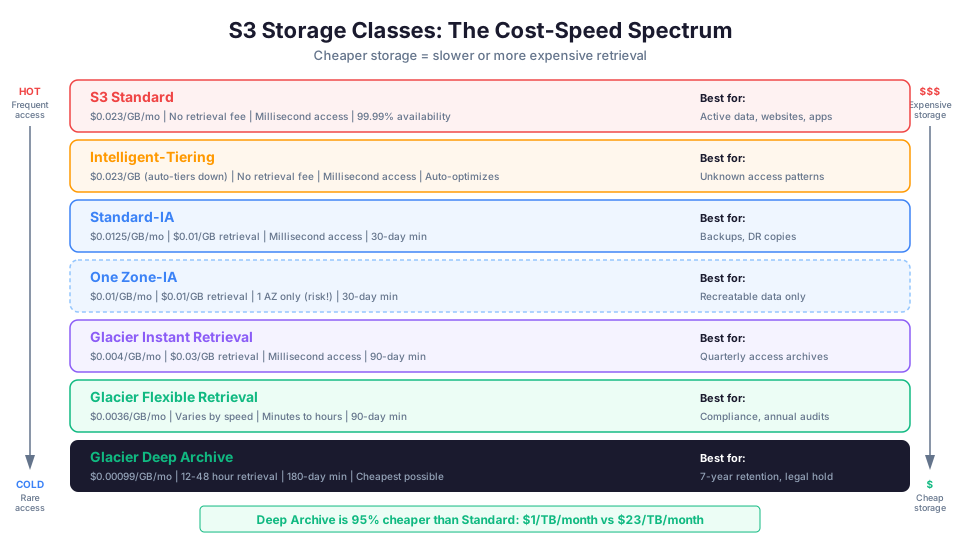
Here is the key trade-off: cheaper storage means slower and/or more expensive retrieval.
The Seven S3 Storage Classes
S3 Standard
Cost: Highest storage cost, no retrieval fee.
Availability: 99.99% (designed for 99.999999999% durability, often called "eleven nines").
Minimum storage duration: None.
Best for: Frequently accessed data where you need immediate access.
Use cases:
- Website content (images, CSS, JavaScript)
- Application assets
- Content distribution
- Data analytics input/output
- Active application data
- Frequently accessed API responses
S3 Standard is the default. When you upload an object to S3 without specifying a storage class, it goes to Standard. The data is stored across at least three Availability Zones, making it highly durable and available.
# Upload a file to S3 Standard (default)
aws s3 cp report.pdf s3://my-bucket/reports/report.pdf

# Explicitly specify Standard
aws s3 cp report.pdf s3://my-bucket/reports/report.pdf \
  --storage-class STANDARD
Understanding Durability vs Availability
These two terms are frequently confused:
| Concept | What It Means | S3 Standard Value |
|---|---|---|
| Durability | Probability your data will not be lost | 99.999999999% (11 nines) |
| Availability | Probability your data is accessible when requested | 99.99% |
Durability of 11 nines means: if you store 10 million objects, you can expect to lose one object every 10,000 years on average. Your data is essentially permanent.
Availability of 99.99% means: your data might be inaccessible for up to 52.6 minutes per year. This is designed into the SLA, not a defect.
All S3 storage classes except One Zone-IA have 11 nines of durability. The difference is in availability and retrieval characteristics.
S3 Intelligent-Tiering
Cost: Small monthly monitoring fee per object (~$0.0025 per 1,000 objects). No retrieval fee.
Availability: 99.9%.
Minimum storage duration: None.
Best for: Data with unpredictable or changing access patterns.
Use cases:
- Data lakes with mixed access patterns
- New applications where you do not know access patterns yet
- User-generated content with unpredictable popularity
- Media archives where some content goes viral
- Log data where recent logs are hot and older logs are cold
Intelligent-Tiering is the "set it and forget it" option. S3 monitors how often each object is accessed and automatically moves it between tiers:
| Tier | Access Pattern | Cost |
|---|---|---|
| Frequent Access | Accessed regularly | Same as Standard |
| Infrequent Access | Not accessed for 30 days | ~40% cheaper |
| Archive Instant Access | Not accessed for 90 days | ~68% cheaper |
| Archive Access (optional) | Not accessed for 90-180+ days | ~71% cheaper |
| Deep Archive (optional) | Not accessed for 180+ days | ~95% cheaper |
There is no retrieval fee when Intelligent-Tiering moves objects back to the Frequent Access tier. The only extra cost is the small monitoring fee. This makes it an excellent choice when you genuinely do not know how often data will be accessed.
# Upload directly to Intelligent-Tiering
aws s3 cp data.json s3://my-bucket/data/ \
  --storage-class INTELLIGENT_TIERING

# Enable the optional archive tiers
aws s3api put-bucket-intelligent-tiering-configuration \
  --bucket my-bucket \
  --id my-config \
  --intelligent-tiering-configuration '{
    "Id": "my-config",
    "Status": "Enabled",
    "Tierings": [
      {"Days": 90, "AccessTier": "ARCHIVE_ACCESS"},
      {"Days": 180, "AccessTier": "DEEP_ARCHIVE_ACCESS"}
    ]
  }'
When Intelligent-Tiering Does NOT Make Sense
The monitoring fee is $0.0025 per 1,000 objects per month. For millions of tiny objects, this fee can exceed the storage savings.
| Scenario | Objects | Monitoring Cost/Month | Recommendation |
|---|---|---|---|
| 1,000 large files (1 GB each) | 1,000 | $0.0025 | Use IT, savings far exceed fee |
| 1 million small files (1 KB each) | 1,000,000 | $2.50 | Storage only costs ~$0.02, skip IT |
| 100,000 medium files (1 MB each) | 100,000 | $0.25 | Use IT, good balance |
Rule of thumb: Use Intelligent-Tiering for objects larger than 128 KB. For millions of tiny objects with known access patterns, choose the storage class manually.
S3 Standard-Infrequent Access (Standard-IA)
Cost: ~40% cheaper storage than Standard. Per-GB retrieval fee.
Availability: 99.9%.
Minimum storage duration: 30 days (you are charged for 30 days even if you delete the object sooner).
Minimum object size charge: 128 KB (smaller objects are charged as 128 KB).
Best for: Data accessed less than once a month but needs immediate access when requested.
Use cases:
- Backups that might need quick restoration
- Disaster recovery copies (see our disaster recovery strategies guide for how S3 fits into a broader DR plan)
- Long-term storage for infrequently viewed content
- Older log files that occasionally need review
- Previous versions of frequently updated files
# Upload directly to Standard-IA
aws s3 cp backup.tar.gz s3://my-bucket/backups/ \
  --storage-class STANDARD_IA
The retrieval fee is the catch. If you access Standard-IA data frequently, the retrieval costs can exceed what you saved on storage. Use it only for data you genuinely access less than once a month.
The Standard-IA Break-Even Point
When does Standard-IA save money versus Standard? Here is the math:
Standard storage:    $0.023/GB/month, $0/GB retrieval
Standard-IA storage: $0.0125/GB/month, $0.01/GB retrieval

Storage savings per GB/month: $0.023 - $0.0125 = $0.0105
Retrieval cost per access: $0.01/GB

Break-even: $0.0105 / $0.01 = 1.05 retrievals per month
If you access data more than once per month per GB, Standard-IA costs MORE than Standard. This is the most common mistake people make with storage classes.
S3 One Zone-Infrequent Access (One Zone-IA)
Cost: ~20% cheaper than Standard-IA.
Availability: 99.5% (stored in a single Availability Zone).
Minimum storage duration: 30 days.
Minimum object size charge: 128 KB.
Best for: Infrequently accessed data that can be recreated if lost.
Use cases:
- Secondary backup copies (when you already have a primary backup elsewhere)
- Thumbnails or derived data that can be regenerated
- Cross-Region replication targets
- Transcoded media files (originals exist elsewhere)
The critical difference: One Zone-IA stores your data in a single AZ. If that AZ is destroyed (an extremely rare event, but theoretically possible), the data is lost. Use this only for data you can afford to lose or can recreate.
S3 Glacier Instant Retrieval
Cost: ~68% cheaper than Standard. Per-GB retrieval fee.
Availability: 99.9%.
Minimum storage duration: 90 days.
Best for: Archive data that needs immediate access when requested (millisecond retrieval).
Use cases:
- Medical images accessed quarterly
- Media archives that need on-demand playback
- Compliance data with infrequent but unpredictable access needs
- Historical financial reports
Glacier Instant Retrieval is the cheapest option that still delivers millisecond access. The trade-off is the 90-day minimum charge and higher retrieval fees than Standard-IA.
S3 Glacier Flexible Retrieval (formerly S3 Glacier)
Cost: ~78% cheaper than Standard. Retrieval fee varies by speed.
Availability: 99.99% (designed for eleven nines durability).
Minimum storage duration: 90 days.
Best for: Archive data that does not need immediate access.
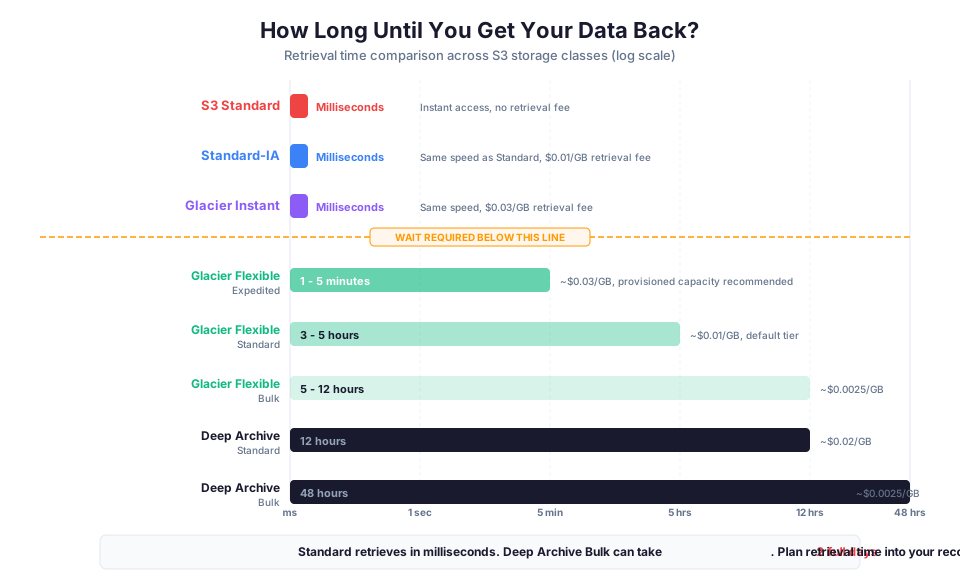
Retrieval options:
| Retrieval Tier | Time | Cost per GB | Use Case |
|---|---|---|---|
| Expedited | 1-5 minutes | ~$0.03 | Urgent compliance requests |
| Standard | 3-5 hours | ~$0.01 | Planned audits |
| Bulk | 5-12 hours | ~$0.0025 | Batch processing |
Use cases:
- Compliance archives
- Backup storage
- Digital preservation
- Data that might need occasional restoration for audits
# Initiate a retrieval from Glacier Flexible Retrieval
aws s3api restore-object \
  --bucket my-archive-bucket \
  --key old-report.pdf \
  --restore-request '{"Days": 7, "GlacierJobParameters": {"Tier": "Standard"}}'

# Check the restore status
aws s3api head-object \
  --bucket my-archive-bucket \
  --key old-report.pdf \
  --query 'Restore'
You cannot access Glacier Flexible Retrieval objects directly. You must first initiate a restore request, which copies the object temporarily to S3 Standard for the number of days you specify. This two-step process is why it is significantly cheaper.
S3 Glacier Deep Archive
Cost: Cheapest storage class (~95% cheaper than Standard).
Availability: 99.99%.
Minimum storage duration: 180 days.
Best for: Data you almost never access but must keep for years.
Retrieval options:
| Retrieval Tier | Time | Cost per GB |
|---|---|---|
| Standard | 12 hours | ~$0.02 |
| Bulk | 48 hours | ~$0.0025 |
Use cases:
- 7-year financial compliance records
- 10-year healthcare records (HIPAA)
- Legal hold data
- Long-term scientific datasets
- Regulatory archives (SOX, PCI, GDPR retention)
Deep Archive is the basement of S3. You put data here and essentially forget about it. At approximately $1 per TB per month, it is cheaper than tape storage and far more reliable. For organizations building a disaster recovery strategy on AWS, Deep Archive is often the foundation for long-term backup retention.
Tape vs Deep Archive Comparison
| Feature | Physical Tape | S3 Deep Archive |
|---|---|---|
| Cost per TB/month | $2-5 | ~$1 |
| Retrieval time | Hours to days (ship tapes) | 12-48 hours (API call) |
| Durability | Tapes degrade, require refresh | 11 nines, automatic |
| Physical handling | Manual, error-prone | Fully automated |
| Disaster recovery | Store in second location | Built-in across 3+ AZs |
| Scalability | Buy more tapes, shelf space | Unlimited, instant |
The Complete Storage Class Comparison
| Storage Class | Storage $/GB/mo | Retrieval Fee | Min Duration | Access Time | AZs |
|---|---|---|---|---|---|
| Standard | $0.023 | None | None | Milliseconds | 3+ |
| Intelligent-Tiering | $0.023 (frequent) | None | None | Milliseconds | 3+ |
| Standard-IA | $0.0125 | $0.01/GB | 30 days | Milliseconds | 3+ |
| One Zone-IA | $0.01 | $0.01/GB | 30 days | Milliseconds | 1 |
| Glacier Instant | $0.004 | $0.03/GB | 90 days | Milliseconds | 3+ |
| Glacier Flexible | $0.0036 | Varies | 90 days | Minutes-hours | 3+ |
| Deep Archive | $0.00099 | $0.02/GB | 180 days | 12-48 hours | 3+ |
Prices shown are for us-east-1 and are approximate. Check the S3 pricing page for current rates.
Decision Framework: Which Storage Class Should You Use?
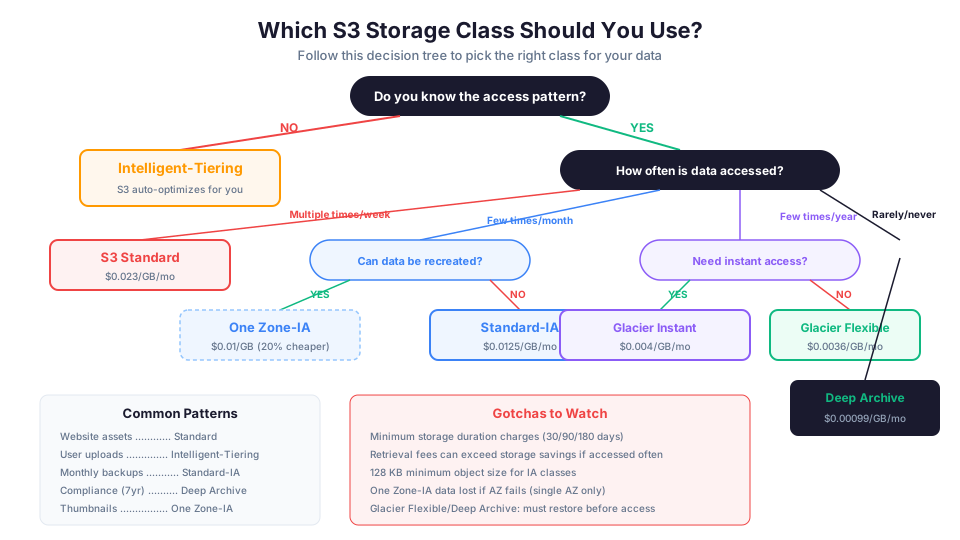
Here is a simple flowchart in question form:
1. Do you know your data's access pattern?
- No: Use Intelligent-Tiering and let S3 figure it out
- Yes: Continue to question 2
2. How often is this data accessed?
- Multiple times per day/week: S3 Standard
- A few times per month: Standard-IA
- A few times per year: Glacier Instant Retrieval
- Rarely (audit/compliance): Glacier Flexible Retrieval
- Almost never (long-term retention): Glacier Deep Archive
3. Can you recreate this data if an AZ is lost?
- Yes, and it is infrequently accessed: Consider One Zone-IA for extra savings
Quick Decision Table
| Data Type | Access Pattern | Recommended Class |
|---|---|---|
| Website images | Thousands/day | Standard |
| Application assets | Hundreds/day | Standard |
| User uploads (mixed) | Unpredictable | Intelligent-Tiering |
| Database backups | Monthly test | Standard-IA or Glacier Instant |
| Log files (recent) | Daily | Standard |
| Log files (>30 days) | Rarely | Standard-IA |
| Log files (>90 days) | Almost never | Glacier Flexible |
| Compliance archives | Yearly audit | Deep Archive |
| Thumbnails/derivatives | Infrequent, recreatable | One Zone-IA |
| ML training data (active) | Frequent | Standard |
| ML training data (archived) | Once, then stored | Glacier Flexible |
Lifecycle Policies: Automating Transitions
Manually moving objects between storage classes is tedious and error-prone. Lifecycle policies automate the process.
But before setting up policies, you need to understand which transitions are actually allowed. S3 transitions only flow downward, from warmer tiers to colder ones. You cannot automatically move data back up.
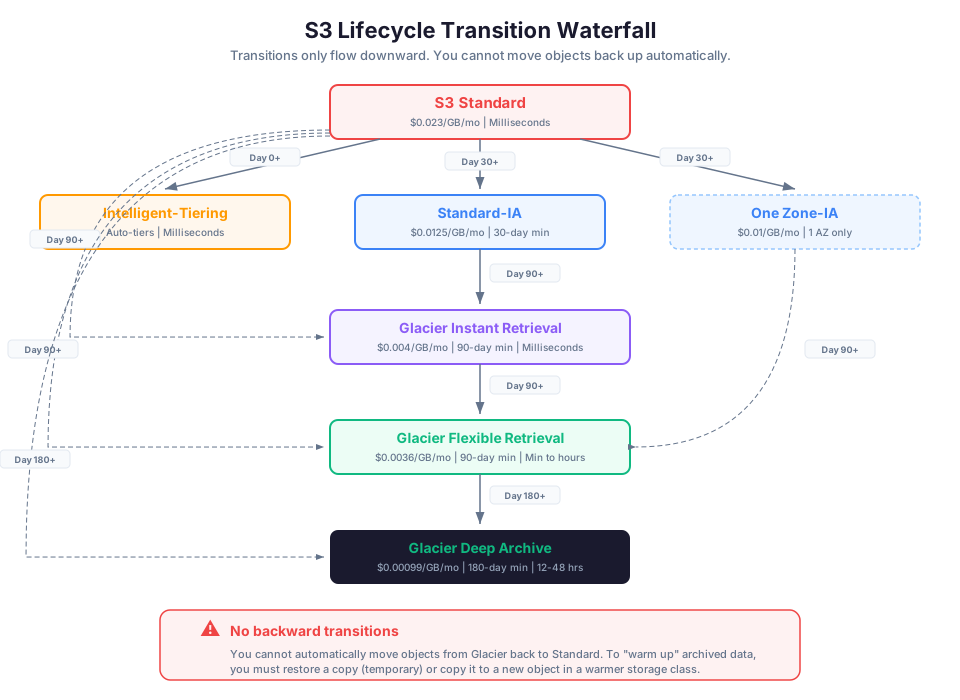
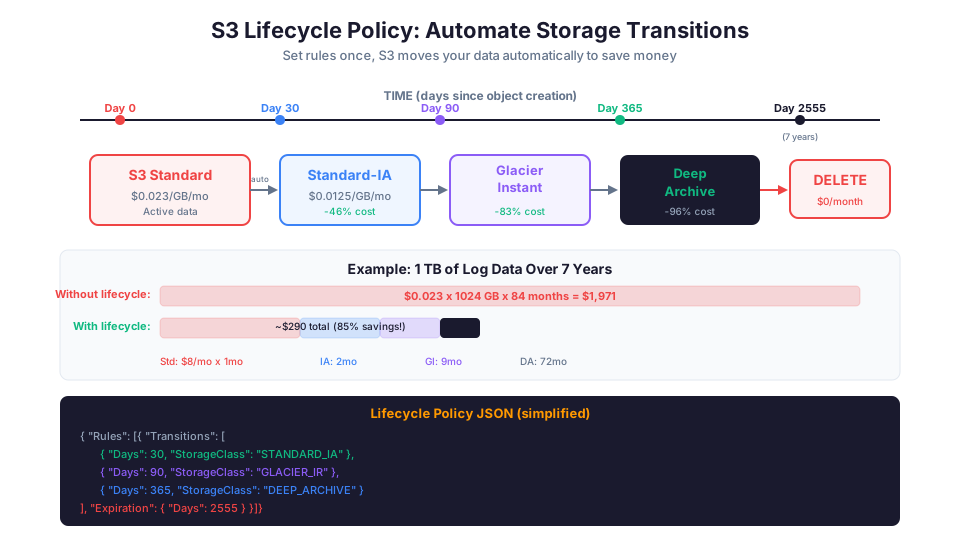
A lifecycle policy is a set of rules that tell S3 to transition or delete objects based on their age. For example:
- After 30 days, move objects from Standard to Standard-IA
- After 90 days, move objects to Glacier Instant Retrieval
- After 365 days, move objects to Glacier Deep Archive
- After 2,555 days (7 years), delete objects permanently
{
  "Rules": [
    {
      "ID": "ArchiveOldLogs",
      "Status": "Enabled",
      "Filter": {
        "Prefix": "logs/"
      },
      "Transitions": [
        {
          "Days": 30,
          "StorageClass": "STANDARD_IA"
        },
        {
          "Days": 90,
          "StorageClass": "GLACIER_IR"
        },
        {
          "Days": 365,
          "StorageClass": "DEEP_ARCHIVE"
        }
      ],
      "Expiration": {
        "Days": 2555
      }
    }
  ]
}
# Apply the lifecycle policy to a bucket
aws s3api put-bucket-lifecycle-configuration \
  --bucket my-logs-bucket \
  --lifecycle-configuration file://lifecycle.json

# View current lifecycle configuration
aws s3api get-bucket-lifecycle-configuration \
  --bucket my-logs-bucket
Multiple Lifecycle Rules for Different Data
You can have multiple rules with different prefixes:
{
  "Rules": [
    {
      "ID": "ActiveDataPolicy",
      "Status": "Enabled",
      "Filter": { "Prefix": "active/" },
      "Transitions": [
        { "Days": 90, "StorageClass": "STANDARD_IA" }
      ]
    },
    {
      "ID": "LogArchivePolicy",
      "Status": "Enabled",
      "Filter": { "Prefix": "logs/" },
      "Transitions": [
        { "Days": 30, "StorageClass": "STANDARD_IA" },
        { "Days": 90, "StorageClass": "GLACIER_IR" },
        { "Days": 365, "StorageClass": "DEEP_ARCHIVE" }
      ],
      "Expiration": { "Days": 2555 }
    },
    {
      "ID": "TempFileCleanup",
      "Status": "Enabled",
      "Filter": { "Prefix": "tmp/" },
      "Expiration": { "Days": 7 }
    },
    {
      "ID": "CleanupMultipartUploads",
      "Status": "Enabled",
      "Filter": {},
      "AbortIncompleteMultipartUpload": { "DaysAfterInitiation": 7 }
    }
  ]
}
Lifecycle Policy Tips
- You can apply different rules to different prefixes (folders). Hot data in
active/stays in Standard while old data inarchive/transitions faster. - You cannot transition objects to Standard-IA or One Zone-IA if they are smaller than 128 KB. Small objects should stay in Standard.
- Transitions must follow the hierarchy: Standard -> Standard-IA -> Glacier Instant -> Glacier Flexible -> Deep Archive. You cannot skip levels backward.
- Consider the minimum storage duration charges. Transitioning an object to Standard-IA and then to Glacier Instant Retrieval after only 15 days means you pay for the full 30-day minimum in Standard-IA plus the 90-day minimum in Glacier Instant.
- Use the
AbortIncompleteMultipartUploadrule on every bucket. It costs nothing and prevents orphaned upload fragments.
Lifecycle Transition Gotchas
| Gotcha | Impact | Solution |
|---|---|---|
| 30-day min for Standard-IA | Charged for 30 days even if deleted sooner | Do not transition objects that might be deleted quickly |
| 90-day min for Glacier classes | Charged for 90 days min | Use only for long-lived objects |
| 128 KB minimum size | Small objects charged as 128 KB in IA | Keep small objects in Standard |
| Transition request cost | $0.01 per 1,000 requests for IA | Batch transitions, do not transition one-offs |
| Cannot go backward | No Standard-IA to Standard transition | Use Intelligent-Tiering if data might get hot again |
Analyzing Your Current S3 Usage
Before optimizing, understand what you have. AWS provides two tools for this:
S3 Storage Lens
S3 Storage Lens provides organization-wide visibility into object storage usage and activity trends.
# Create a Storage Lens configuration
aws s3control put-storage-lens-configuration \
  --account-id 123456789012 \
  --config-id my-dashboard \
  --storage-lens-configuration '{
    "Id": "my-dashboard",
    "IsEnabled": true,
    "AccountLevel": {
      "BucketLevel": {
        "ActivityMetrics": {"IsEnabled": true},
        "PrefixLevel": {"StorageMetrics": {"IsEnabled": true}}
      }
    }
  }'
S3 Storage Class Analysis
S3 Analytics analyzes access patterns for a specific bucket or prefix and recommends when to transition to Standard-IA.
# Enable storage class analysis on a bucket
aws s3api put-bucket-analytics-configuration \
  --bucket my-bucket \
  --id access-analysis \
  --analytics-configuration '{
    "Id": "access-analysis",
    "StorageClassAnalysis": {
      "DataExport": {
        "OutputSchemaVersion": "V_1",
        "Destination": {
          "S3BucketDestination": {
            "Format": "CSV",
            "BucketAccountId": "123456789012",
            "Bucket": "arn:aws:s3:::analytics-output-bucket",
            "Prefix": "analysis/"
          }
        }
      }
    }
  }'
After 30 days of analysis, S3 will recommend whether transitioning to Standard-IA would save money based on actual access patterns.
Common S3 Cost Mistakes
Mistake 1: Keeping Everything in Standard
This is the most expensive mistake and the most common. Audit your buckets and identify data that has not been accessed in 30+ days. Even moving to Standard-IA saves 40%.
# Check the total size of a bucket
aws s3 ls s3://my-bucket --recursive --summarize | tail -2

# List objects not modified in 90+ days (approximate access check)
aws s3api list-objects-v2 \
  --bucket my-bucket \
  --query "Contents[?LastModified<='2026-02-10'].{Key:Key,Size:Size,Modified:LastModified}" \
  --output table
Mistake 2: Using Standard-IA for Frequently Accessed Data
The retrieval fee adds up fast. If you are accessing Standard-IA data daily, you will pay more than you would for Standard. Use S3 Storage Lens or S3 Analytics to check actual access patterns.
Mistake 3: Forgetting Minimum Duration Charges
If you upload an object to Standard-IA and delete it after 5 days, you still pay for 30 days. If you upload to Glacier Deep Archive and delete it after a week, you pay for 180 days. Plan your transitions accordingly.
| Storage Class | Min Duration | Cost if Deleted Early (1 GB) |
|---|---|---|
| Standard | None | $0 |
| Standard-IA | 30 days | $0.0125 (full month) |
| Glacier Instant | 90 days | $0.012 (3 months) |
| Glacier Flexible | 90 days | $0.0108 (3 months) |
| Deep Archive | 180 days | $0.00594 (6 months) |
Mistake 4: Not Using Lifecycle Policies
Without lifecycle policies, old data accumulates in expensive storage classes forever. Set up lifecycle rules on every bucket that stores time-series data (logs, reports, backups).
Mistake 5: Ignoring Incomplete Multipart Uploads
When a large file upload fails halfway, the partial upload fragments remain in your bucket and incur storage charges. Add a lifecycle rule to clean up incomplete multipart uploads:
{
  "Rules": [
    {
      "ID": "CleanupIncompleteUploads",
      "Status": "Enabled",
      "Filter": {},
      "AbortIncompleteMultipartUpload": {
        "DaysAfterInitiation": 7
      }
    }
  ]
}
Mistake 6: Not Using S3 Request Costs Wisely
S3 charges per request, and the cost varies by storage class:
| Storage Class | PUT/POST (per 1,000) | GET (per 1,000) |
|---|---|---|
| Standard | $0.005 | $0.0004 |
| Standard-IA | $0.01 | $0.001 |
| Glacier Instant | $0.02 | $0.01 |
| Deep Archive | $0.05 | $0.0004 |
PUT requests to Glacier classes cost 2-10x more than Standard. If you are writing thousands of small objects frequently, keep them in Standard and only transition with lifecycle policies.
Mistake 7: Not Considering Retrieval Costs in TCO
When calculating total cost of ownership (TCO) for a storage class, include both storage AND retrieval costs:
Total Monthly Cost = (Storage $/GB x Data Size) + (Retrieval $/GB x Data Retrieved)

Example: 1 TB in Standard-IA, retrieved 100 GB/month
Storage: $0.0125 x 1024 = $12.80
Retrieval: $0.01 x 100 = $1.00
Total: $13.80/month

Same data in Standard:
Storage: $0.023 x 1024 = $23.55
Retrieval: $0 x 100 = $0
Total: $23.55/month

Savings: $9.75/month (41%)
But if you retrieved 500 GB instead of 100 GB:
Standard-IA: $12.80 + ($0.01 x 500) = $17.80
Standard: $23.55 + $0 = $23.55

Still saves $5.75 (24%), but the savings shrink with more retrieval.
S3 Versioning and Storage Class Interaction
If you have versioning enabled (which you should for important data), remember that previous versions also consume storage. A file that is updated 100 times has 100 versions, all in whatever storage class they were in when uploaded.
Use lifecycle policies to manage non-current versions:
{
  "Rules": [
    {
      "ID": "ManageOldVersions",
      "Status": "Enabled",
      "Filter": {},
      "NoncurrentVersionTransitions": [
        {
          "NoncurrentDays": 30,
          "StorageClass": "STANDARD_IA"
        },
        {
          "NoncurrentDays": 90,
          "StorageClass": "GLACIER_IR"
        }
      ],
      "NoncurrentVersionExpiration": {
        "NoncurrentDays": 365
      }
    }
  ]
}
This keeps the current version in Standard for fast access, transitions old versions to cheaper classes after 30 and 90 days, and deletes old versions after a year.
Versioning Cost Impact Example
| Scenario | Current Version | Old Versions | Total Storage | Monthly Cost |
|---|---|---|---|---|
| 100 GB, no versioning | 100 GB Standard | N/A | 100 GB | $2.30 |
| 100 GB, 5 versions each | 100 GB Standard | 400 GB Standard | 500 GB | $11.50 |
| 100 GB, with lifecycle | 100 GB Standard | 400 GB Glacier | 500 GB | $3.94 |
| 100 GB, with expiration | 100 GB Standard | 100 GB (1 old ver) | 200 GB | $4.60 |
Versioning without lifecycle management can 5x your storage costs. Always pair versioning with lifecycle rules.
S3 Storage Best Practices Summary
| Practice | Impact | Difficulty |
|---|---|---|
| Add lifecycle policies to all buckets | 40-95% savings on old data | Easy |
| Use Intelligent-Tiering for unknown patterns | Auto-optimizes cost | Easy |
| Clean up incomplete multipart uploads | Eliminate hidden costs | Easy |
| Enable S3 Storage Lens | Visibility into usage | Easy |
| Use One Zone-IA for recreatable data | 20% savings over IA | Medium |
| Manage non-current versions | Prevent version bloat | Medium |
| Analyze access patterns before choosing class | Avoid retrieval cost traps | Medium |
| Use VPC endpoints for S3 access | Eliminate data transfer costs | Medium |
| Tag objects for cost allocation | Track spending by project | Medium |
| Use S3 Batch Operations for bulk transitions | Efficient at scale | Advanced |
Real-World Example: A Company's S3 Strategy
Here is how a mid-size company might organize their S3 storage:
| Data Type | Volume | Access Pattern | Storage Class | Monthly Cost (est.) |
|---|---|---|---|---|
| Website assets | 50 GB | Thousands/day | Standard | $1.15 |
| User uploads | 500 GB | Varies | Intelligent-Tiering | $5.75-$11.50 |
| Application logs (recent) | 200 GB | Daily | Standard | $4.60 |
| Application logs (>30 days) | 2 TB | Rarely | Standard-IA | $25.00 |
| Application logs (>90 days) | 5 TB | Almost never | Glacier Flexible | $18.00 |
| Database backups | 1 TB | Monthly testing | Glacier Instant | $4.00 |
| Compliance archives | 10 TB | Yearly audit | Deep Archive | $9.90 |
| Thumbnails (recreatable) | 200 GB | Weekly | One Zone-IA | $2.00 |
| Total | ~19 TB | ~$71-77/month |
Without storage class optimization, storing 19 TB in Standard would cost approximately $437/month. That is an 82%+ savings from simply matching storage classes to access patterns. Storage class optimization is one of the most impactful techniques in our broader AWS cost optimization guide.
Setting Up This Strategy with CLI
# 1. Create lifecycle policy for logs bucket
aws s3api put-bucket-lifecycle-configuration \
  --bucket company-logs \
  --lifecycle-configuration file://logs-lifecycle.json

# 2. Set default storage class for user uploads
# (Upload scripts should specify Intelligent-Tiering)
aws s3 cp user-file.jpg s3://user-uploads/ \
  --storage-class INTELLIGENT_TIERING

# 3. Enable Intelligent-Tiering archive tiers
aws s3api put-bucket-intelligent-tiering-configuration \
  --bucket user-uploads \
  --id archive-config \
  --intelligent-tiering-configuration '{
    "Id": "archive-config",
    "Status": "Enabled",
    "Tierings": [
      {"Days": 90, "AccessTier": "ARCHIVE_ACCESS"},
      {"Days": 180, "AccessTier": "DEEP_ARCHIVE_ACCESS"}
    ]
  }'

# 4. Set up daily backup script with Glacier Instant
aws s3 cp db-backup-$(date +%Y%m%d).sql.gz \
  s3://company-backups/database/ \
  --storage-class GLACIER_IR

# 5. Upload compliance data to Deep Archive
aws s3 cp compliance-2025.tar.gz \
  s3://company-compliance/ \
  --storage-class DEEP_ARCHIVE
Troubleshooting Common Errors
AccessDenied on GetObject
This usually means the IAM policy allows the action but the bucket policy explicitly denies it (or vice versa). S3 access requires both IAM and bucket policy to allow the request. Check both policies, and also verify that the object's ACL does not override permissions. If the object is in a different account, the bucket policy must grant cross-account access and the requesting account's IAM policy must also allow the action.
Lifecycle rule not transitioning objects as expected
Lifecycle transitions run once per day (not in real time), so objects may not move immediately after the configured number of days. Also verify that the lifecycle rule's prefix or tag filter matches the objects you expect. Objects smaller than 128 KB are not transitioned to Standard-IA or One Zone-IA. Check the rule status to confirm it is set to "Enabled" and not "Disabled."
Bucket policy conflicts with IAM policy (unexpected denies)
When both a bucket policy and an IAM policy apply to the same request, AWS evaluates them together. An explicit deny in either policy overrides an allow in the other. Use the IAM Policy Simulator or the aws s3api get-object command with --debug to see which policy is causing the deny. A common pattern is a bucket policy that restricts access to a specific VPC endpoint, which blocks access from the console or CLI outside that VPC.
What to Do This Week
Here is a concrete action plan. Block 30 minutes and audit your S3 buckets:
- Run S3 Storage Lens on your account. Look for buckets where the majority of objects have not been accessed in 30+ days. Those are your immediate savings targets.
- Add a lifecycle policy to your log buckets. Logs are the easiest win: transition to Standard-IA after 30 days, Glacier after 90, Deep Archive after 365, delete after 7 years. That single policy can cut log storage costs by 85%.
- Add the incomplete multipart upload cleanup rule to every bucket. It costs nothing and prevents silent charges from failed uploads.
- Pick a stance on Intelligent-Tiering vs manual lifecycle rules. If your access patterns are predictable (logs, backups, compliance data), manual lifecycle rules give you more control and avoid the per-object monitoring fee. If your patterns are genuinely unpredictable (user-generated content, data lakes), Intelligent-Tiering saves you from guessing wrong. Most teams end up using both: Intelligent-Tiering for dynamic data and lifecycle rules for everything with a known lifespan.
# Quick audit: How much data do you have and what is it costing?
aws s3 ls --summarize --recursive s3://your-bucket/ | tail -2

# Check your S3 spending for last month
aws ce get-cost-and-usage \
  --time-period Start=2026-04-01,End=2026-05-01 \
  --granularity MONTHLY \
  --filter '{"Dimensions":{"Key":"SERVICE","Values":["Amazon Simple Storage Service"]}}' \
  --metrics "UnblendedCost"
Hands-On Challenge
Set up lifecycle rules on an S3 bucket and verify the transitions work as expected. Check each of the following success criteria:
- A new S3 bucket is created with versioning enabled
- You upload at least 5 test objects (each larger than 128 KB) to a
logs/prefix using Standard storage class - A lifecycle policy is applied that transitions
logs/objects to Standard-IA after 30 days and to Glacier Flexible Retrieval after 90 days - An
AbortIncompleteMultipartUploadrule is configured with a 7-day cleanup window - You verify the lifecycle configuration is active by running
aws s3api get-bucket-lifecycle-configuration - A non-current version transition rule moves old versions to Standard-IA after 30 days and expires them after 365 days
Pricing note: S3 storage costs (for example, $0.023/GB/month for Standard, $0.0125/GB/month for Standard-IA, approximately $1/TB/month for Deep Archive) cited in this article are for us-east-1 and were verified in May 2026. Check the AWS Pricing Calculator for current rates in your Region.
Build it yourself: This topic is covered hands-on in Module 21: S3 Fundamentals of our AWS Bootcamp.