
SQS vs SNS vs EventBridge: Which to Use
AWS gives you three major messaging services, and they all seem to do vaguely similar things. SQS queues messages. SNS sends notifications. EventBridge routes events. If you have ever stared at all three and wondered which one to pick, you are not alone. This is one of the most common points of confusion for people learning AWS.
By the end of this article, you will understand the differences clearly enough to choose the right one every time.
Prerequisites: You should understand AWS Lambda and IAM permissions before starting this article.
What You Will Learn
By the end of this article, you will be able to:
- Explain the fundamental differences between queues (SQS), pub/sub (SNS), and event buses (EventBridge) using real-world analogies
- Evaluate which messaging service fits a given scenario using the five-step decision tree
- Implement the SNS + SQS fan-out pattern and EventBridge content-based routing rules using the AWS CLI
- Design event-driven architectures that combine all three services for routing, fan-out, and reliable processing
- Troubleshoot common messaging failures including dead letter queue buildup, subscription delivery issues, and rule misconfiguration
The Three Mental Models
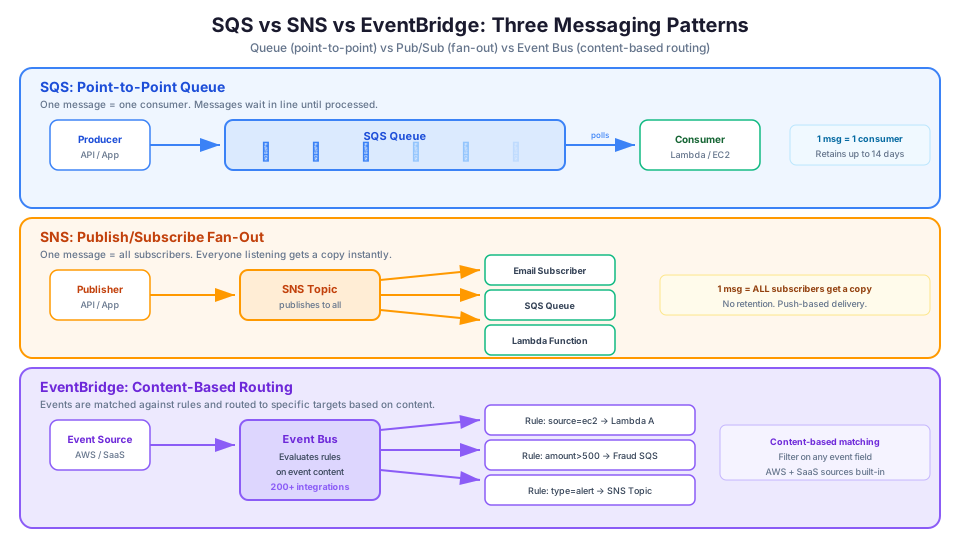
Before diving into features and pricing, let us establish three mental models that will make everything else click.
SQS: The Line at the Coffee Shop
Amazon Simple Queue Service (SQS) is a queue. Think of it like a line at a coffee shop. Customers (messages) join the line, and baristas (consumers) pull one customer at a time. If the barista is busy, customers wait in line. Nobody gets skipped, nobody gets served twice (usually), and the line absorbs surges in demand.
Key characteristics:
- One producer, one consumer per message. Each message is processed by exactly one consumer.
- Decoupling. The producer does not need to know (or care) if the consumer is running.
- Buffering. If messages arrive faster than they can be processed, the queue holds them.
SNS: The Public Address System
Amazon Simple Notification Service (SNS) is pub/sub (publish/subscribe). Think of it like a PA system in a building. When an announcement is made, everyone who is listening hears it simultaneously. The announcer does not know or care how many people are listening.
Key characteristics:
- One producer, many consumers. A single message is delivered to all subscribers.
- Fan-out. One event triggers multiple downstream actions in parallel.
- Push-based. SNS pushes messages to subscribers immediately.
EventBridge: The Smart Mail Room
Amazon EventBridge is an event bus with content-based routing. Think of it like a corporate mail room that reads each piece of mail and routes it to the right department based on its contents. A purchase order goes to finance. A job application goes to HR. A security alert goes to IT.
Key characteristics:
- Content-based routing. Rules examine the content of each event and route it to matching targets.
- Schema awareness. EventBridge understands event structure and can filter on any field.
- Native integrations. Over 200 AWS service integrations and SaaS partner sources built in.
Feature Comparison
| Feature | SQS | SNS | EventBridge |
|---|---|---|---|
| Pattern | Queue (point-to-point) | Pub/Sub (fan-out) | Event bus (content-based routing) |
| Message delivery | Pull (consumer polls) | Push (to subscribers) | Push (to targets) |
| Consumers per message | One | Many (all subscribers) | Many (matching rules) |
| Message filtering | No (consumer gets everything) | Basic attribute filtering | Advanced content-based rules |
| Message retention | Up to 14 days | No retention (deliver or fail) | Up to 24 hours for replay |
| Max message size | 256 KB | 256 KB | 256 KB |
| Ordering | FIFO queues support ordering | FIFO topics support ordering | Best effort (no strict ordering) |
| Dead letter queue | Yes | Yes | Yes |
| Pricing | Per request | Per publish + delivery | Per event |
| Free Tier | 1M requests/month | 1M publishes/month | None (pay from first event) |
When to Use SQS
Use SQS when you need to decouple a producer from a consumer and process messages one at a time.
Scenario 1: Order Processing
An e-commerce application receives orders through an API. Each order needs to be processed (validate payment, update inventory, send confirmation email). If the processing system goes down, you do not want to lose orders.
User places order -> API Gateway -> SQS Queue -> Lambda processes each order
SQS holds the orders safely until the processor is ready. If Lambda fails processing an order, the message goes back to the queue and gets retried automatically. If you are new to Lambda as a message consumer, our Lambda beginner's guide covers how event source mappings connect SQS queues to Lambda functions.
Scenario 2: Rate Limiting
Your application sends data to a third-party API that limits you to 10 requests per second. Without a queue, traffic spikes would cause failures. With SQS, messages pile up in the queue and your consumer processes them at the rate the API allows.
Scenario 3: Batch Processing
You need to process uploaded CSV files. Each file has thousands of rows. SQS lets you break the work into individual messages and process them in parallel with multiple consumers, scaling up and down based on queue depth.
SQS Standard vs FIFO
SQS comes in two flavors:
| Feature | Standard | FIFO |
|---|---|---|
| Throughput | Nearly unlimited | 300 messages/second (3,000 with batching) |
| Ordering | Best effort | Strict first-in-first-out |
| Duplicates | Possible (at-least-once) | Exactly-once processing |
| Use case | High throughput, order not critical | Financial transactions, command sequences |
| Queue name | Any name | Must end in .fifo |
Rule of thumb: Use Standard unless you specifically need ordered or exactly-once processing.
SQS Visibility Timeout
When a consumer retrieves a message, SQS makes that message invisible to other consumers for a configurable period called the visibility timeout. This prevents two consumers from processing the same message.
# Create a queue with a 60-second visibility timeout
aws sqs create-queue \
  --queue-name my-order-queue \
  --attributes '{
    "VisibilityTimeout": "60",
    "MessageRetentionPeriod": "86400",
    "ReceiveMessageWaitTimeSeconds": "20"
  }'
Key timing:
- If your consumer finishes processing within the visibility timeout, it deletes the message from the queue. Done.
- If processing takes longer than the visibility timeout, the message becomes visible again, and another consumer might pick it up (duplicate processing).
- Set the visibility timeout to at least 6x your average processing time.
SQS Long Polling
By default, SQS uses short polling (returns immediately, even if the queue is empty). Long polling waits up to 20 seconds for a message to arrive, reducing empty responses and costs:
# Receive messages with long polling (20 second wait)
aws sqs receive-message \
  --queue-url https://sqs.us-east-1.amazonaws.com/123456789012/my-order-queue \
  --wait-time-seconds 20 \
  --max-number-of-messages 10

# Process and delete the message
aws sqs delete-message \
  --queue-url https://sqs.us-east-1.amazonaws.com/123456789012/my-order-queue \
  --receipt-handle "AQEBz..."
Dead Letter Queues (DLQ)
If a message fails processing repeatedly, you do not want it stuck in an infinite retry loop. A Dead Letter Queue captures these failed messages so you can investigate them later.
# Create the dead letter queue
aws sqs create-queue --queue-name my-order-queue-dlq

# Get the DLQ ARN
DLQ_ARN=$(aws sqs get-queue-attributes \
  --queue-url https://sqs.us-east-1.amazonaws.com/123456789012/my-order-queue-dlq \
  --attribute-names QueueArn \
  --query 'Attributes.QueueArn' --output text)

# Configure the main queue to use the DLQ after 3 failed attempts
aws sqs set-queue-attributes \
  --queue-url https://sqs.us-east-1.amazonaws.com/123456789012/my-order-queue \
  --attributes "{
    \"RedrivePolicy\": \"{\\\"deadLetterTargetArn\\\":\\\"${DLQ_ARN}\\\",\\\"maxReceiveCount\\\":\\\"3\\\"}\"
  }"
After 3 failed processing attempts (maxReceiveCount=3), the message moves to the DLQ. Set up a CloudWatch alarm on the DLQ message count so you know when messages are failing.
When to Use SNS
Use SNS when a single event needs to trigger multiple downstream actions simultaneously.
Scenario 1: Fan-Out Notifications
A new user signs up for your application. You need to: send a welcome email, create a record in your CRM, notify the sales team in Slack, and add the user to a marketing list. One SNS publish triggers all four actions.
User signs up -> SNS Topic -> Email service (SQS)
                            -> CRM integration (Lambda)
                            -> Slack webhook (HTTP)
                            -> Marketing system (SQS)
Scenario 2: Cross-Account Notifications
Your security team needs to be notified when any AWS account in your organization creates a new IAM user. SNS topics can accept messages from multiple accounts and deliver to subscribers in different accounts.
Scenario 3: Mobile Push Notifications
SNS can deliver push notifications to iOS, Android, and other mobile platforms. If you need to send alerts to thousands of mobile devices simultaneously, SNS handles the fan-out and device-specific formatting.
SNS Message Filtering
Instead of every subscriber getting every message, you can filter based on message attributes. This is more efficient than having each subscriber ignore messages it does not care about.
# Create a topic
TOPIC_ARN=$(aws sns create-topic --name order-events --query 'TopicArn' --output text)

# Subscribe a queue for only "electronics" orders
aws sns subscribe \
  --topic-arn $TOPIC_ARN \
  --protocol sqs \
  --notification-endpoint arn:aws:sqs:us-east-1:123456789012:electronics-queue \
  --attributes '{
    "FilterPolicy": "{\"category\": [\"electronics\"]}"
  }'

# Subscribe a different queue for "high-value" orders
aws sns subscribe \
  --topic-arn $TOPIC_ARN \
  --protocol sqs \
  --notification-endpoint arn:aws:sqs:us-east-1:123456789012:high-value-queue \
  --attributes '{
    "FilterPolicy": "{\"amount\": [{\"numeric\": [\">\", 500]}]}"
  }'

# Publish a message with attributes
aws sns publish \
  --topic-arn $TOPIC_ARN \
  --message '{"orderId": "123", "product": "Laptop"}' \
  --message-attributes '{
    "category": {"DataType": "String", "StringValue": "electronics"},
    "amount": {"DataType": "Number", "StringValue": "999"}
  }'
The laptop order goes to BOTH the electronics queue and the high-value queue (it matches both filters). A $25 pencil order with category "office" goes to neither.
The SNS + SQS Pattern
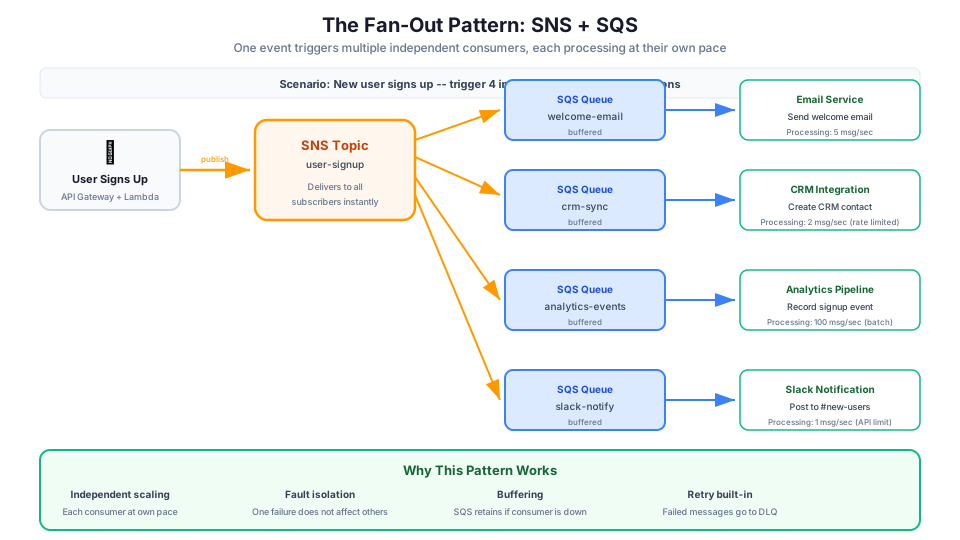
One of the most common and powerful patterns in AWS is combining SNS with SQS:
Producer -> SNS Topic -> SQS Queue A -> Consumer A
                      -> SQS Queue B -> Consumer B
                      -> SQS Queue C -> Consumer C
This gives you the best of both worlds: fan-out (SNS) plus buffering and independent processing rates (SQS). If Consumer B falls behind, its queue fills up but Consumer A and C are unaffected.
This pattern is so common it has a name: fan-out pattern. You will see it on the exam.
Building the Fan-Out Pattern with the CLI
# Create the SNS topic
TOPIC_ARN=$(aws sns create-topic --name user-signup --query 'TopicArn' --output text)

# Create three SQS queues for different consumers
aws sqs create-queue --queue-name email-queue
aws sqs create-queue --queue-name analytics-queue
aws sqs create-queue --queue-name crm-queue

# Get queue ARNs
EMAIL_ARN=$(aws sqs get-queue-attributes \
  --queue-url https://sqs.us-east-1.amazonaws.com/123456789012/email-queue \
  --attribute-names QueueArn --query 'Attributes.QueueArn' --output text)

ANALYTICS_ARN=$(aws sqs get-queue-attributes \
  --queue-url https://sqs.us-east-1.amazonaws.com/123456789012/analytics-queue \
  --attribute-names QueueArn --query 'Attributes.QueueArn' --output text)

CRM_ARN=$(aws sqs get-queue-attributes \
  --queue-url https://sqs.us-east-1.amazonaws.com/123456789012/crm-queue \
  --attribute-names QueueArn --query 'Attributes.QueueArn' --output text)

# Subscribe all three queues to the topic
aws sns subscribe --topic-arn $TOPIC_ARN --protocol sqs --notification-endpoint $EMAIL_ARN
aws sns subscribe --topic-arn $TOPIC_ARN --protocol sqs --notification-endpoint $ANALYTICS_ARN
aws sns subscribe --topic-arn $TOPIC_ARN --protocol sqs --notification-endpoint $CRM_ARN

# IMPORTANT: Set SQS queue policies to allow SNS to send messages
# (Each queue needs a policy granting sns:SendMessage to the topic ARN)

# Publish one message -- all three queues receive it
aws sns publish \
  --topic-arn $TOPIC_ARN \
  --message '{"userId": "u-123", "email": "jane@example.com", "plan": "premium"}'
When to Use EventBridge
Use EventBridge when you need intelligent routing based on event content, or when you are integrating with AWS services and SaaS applications.
Scenario 1: Intelligent Event Routing
Your application generates different types of events: user actions, payment events, inventory changes, and system alerts. Different teams own different event types, and each team only wants their events.
{
  "source": "com.myapp.orders",
  "detail-type": "OrderPlaced",
  "detail": {
    "orderId": "12345",
    "amount": 299.99,
    "category": "electronics"
  }
}
EventBridge rules can route this event based on any field:
- Route all orders over $500 to the fraud detection system
- Route electronics orders to the warehouse team
- Route all orders to the analytics pipeline
You cannot do this level of content-based routing with SNS or SQS alone.
Scenario 2: AWS Service Integration
Many AWS services publish events to EventBridge natively. When an EC2 instance changes state, when a CodePipeline deployment fails, when a GuardDuty finding is created, these all appear as EventBridge events automatically.
Want to send a Slack alert when an EC2 instance is terminated? One EventBridge rule:
{
  "source": ["aws.ec2"],
  "detail-type": ["EC2 Instance State-change Notification"],
  "detail": {
    "state": ["terminated"]
  }
}
Scenario 3: SaaS Integration
EventBridge has native integrations with partners like Zendesk, Datadog, PagerDuty, Auth0, and many others. When a support ticket is created in Zendesk, that event can flow into EventBridge and trigger your custom workflows without building any integration code.
Scenario 4: Scheduled Events
Need to run a Lambda function every day at 9 AM? EventBridge Scheduler handles cron-style scheduling. This replaced the older CloudWatch Events cron functionality.
# Create a schedule to invoke Lambda daily at 9 AM UTC
aws scheduler create-schedule \
  --name daily-report \
  --schedule-expression "cron(0 9 * * ? *)" \
  --flexible-time-window '{"Mode": "OFF"}' \
  --target '{
    "Arn": "arn:aws:lambda:us-east-1:123456789012:function:generate-report",
    "RoleArn": "arn:aws:iam::123456789012:role/scheduler-role"
  }'
EventBridge Rule Examples
# Rule 1: Route EC2 terminations to Lambda
aws events put-rule \
  --name ec2-terminated \
  --event-pattern '{
    "source": ["aws.ec2"],
    "detail-type": ["EC2 Instance State-change Notification"],
    "detail": {"state": ["terminated"]}
  }'

aws events put-targets \
  --rule ec2-terminated \
  --targets '[{
    "Id": "notify-ops",
    "Arn": "arn:aws:lambda:us-east-1:123456789012:function:ops-notify"
  }]'

# Rule 2: Route high-value orders to fraud detection
aws events put-rule \
  --name high-value-orders \
  --event-pattern '{
    "source": ["com.myapp.orders"],
    "detail-type": ["OrderPlaced"],
    "detail": {
      "amount": [{"numeric": [">", 500]}]
    }
  }'

# Rule 3: Route GuardDuty findings to SNS for alerting
aws events put-rule \
  --name security-findings \
  --event-pattern '{
    "source": ["aws.guardduty"],
    "detail-type": ["GuardDuty Finding"],
    "detail": {
      "severity": [{"numeric": [">=", 7]}]
    }
  }'

aws events put-targets \
  --rule security-findings \
  --targets '[{
    "Id": "security-alerts",
    "Arn": "arn:aws:sns:us-east-1:123456789012:security-alerts"
  }]'
EventBridge Archive and Replay
EventBridge can archive events and replay them later. This is invaluable for debugging, testing, and reprocessing:
# Create an archive of all events
aws events create-archive \
  --archive-name all-events-archive \
  --source-arn arn:aws:events:us-east-1:123456789012:event-bus/default \
  --retention-days 90

# Replay events from a specific time window
aws events start-replay \
  --replay-name fix-missing-orders \
  --event-source-arn arn:aws:events:us-east-1:123456789012:event-bus/default \
  --destination '{"Arn": "arn:aws:events:us-east-1:123456789012:event-bus/default"}' \
  --event-start-time "2026-05-10T00:00:00Z" \
  --event-end-time "2026-05-10T12:00:00Z"
Building an Event-Driven Architecture
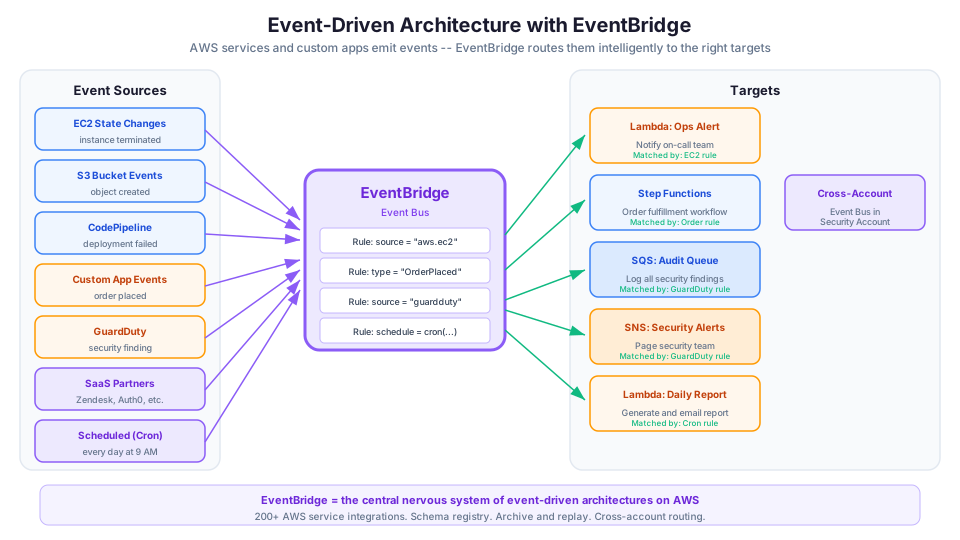
Here is how you might combine all three services in a real-world application:
Order API
  ├── EventBridge (central event bus)
  │   ├── Rule: OrderPlaced → SNS (order-notifications topic)
  │   │   ├── SQS: email-queue → Lambda: send-confirmation
  │   │   ├── SQS: inventory-queue → Lambda: update-inventory
  │   │   └── SQS: analytics-queue → Lambda: record-analytics
  │   ├── Rule: OrderPlaced + amount > 500 → SQS: fraud-queue → Lambda: fraud-check
  │   └── Rule: OrderCancelled → Lambda: process-refund
  └── Scheduled: Daily at 9 AM → Lambda: generate-daily-report
This architecture gives you:
- Content-based routing (EventBridge rules)
- Fan-out (SNS to multiple queues)
- Buffering and retry (SQS queues with DLQs)
- Independent scaling (each consumer processes at its own rate)
- Fault isolation (one consumer failing does not affect others)
This kind of event-driven design is a natural fit for microservices architectures, where each service owns a specific responsibility and communicates through messages rather than direct API calls.
The Decision Tree
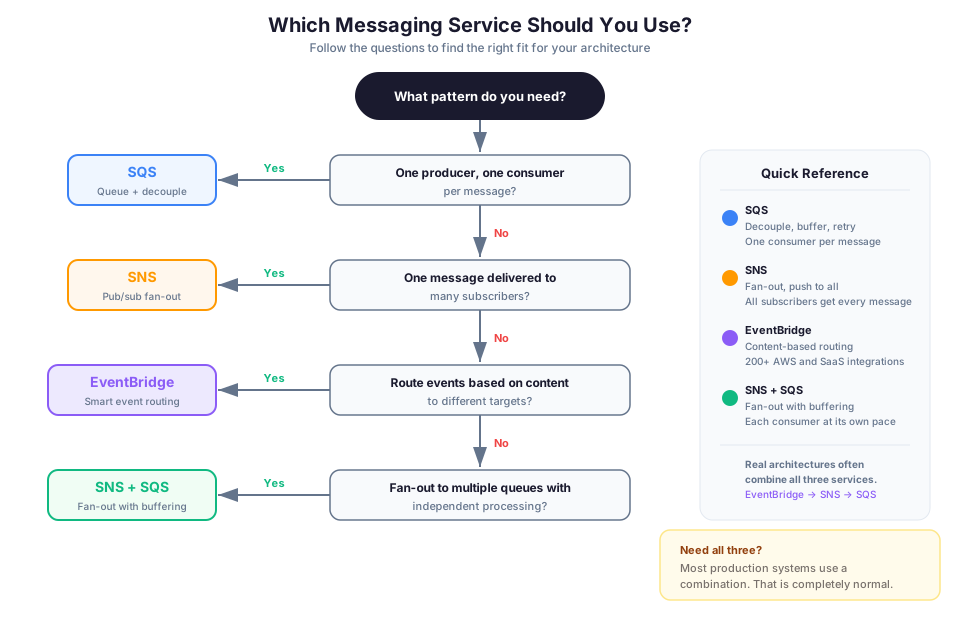
Here is a simple framework for choosing the right service:
Step 1: How many consumers need this message?
- One consumer -> Consider SQS
- Multiple consumers -> Go to Step 2
Step 2: Do consumers need the same message or different messages based on content?
- Same message to all -> Consider SNS
- Different messages based on content -> Consider EventBridge
Step 3: Do you need buffering or decoupling?
- Yes, consumers might be slow or offline -> Add SQS after SNS or EventBridge
Step 4: Are you routing AWS service events or SaaS events?
- Yes -> EventBridge (it has native integrations)
Step 5: Do you need complex content-based filtering?
- Yes -> EventBridge
- No, basic attribute filtering is enough -> SNS with message filtering
Common Combinations
In practice, you rarely use just one service. Here are the patterns you will see most often:
SNS + SQS (Fan-Out with Buffering)
Use when multiple independent systems need to process the same event at their own pace.
EventBridge + SQS (Smart Routing with Buffering)
Use when you need content-based routing AND reliable message processing.
EventBridge + SNS + SQS (Full Pipeline)
Use for complex event-driven architectures where you need routing, fan-out, AND buffering.
API Gateway + SQS (Async API)
Use when your API needs to accept requests faster than the backend can process them.
# Direct API Gateway to SQS integration (no Lambda needed!)
# This is a cost-effective way to accept async requests
# API Gateway receives the request, puts it in SQS, returns 200
Pricing Quick Reference
All three services are extremely inexpensive at low volumes:
| Service | Pricing Model | Free Tier |
|---|---|---|
| SQS | $0.40 per million requests (Standard) | 1M requests/month (always free) |
| SNS | $0.50 per million publishes | 1M publishes/month (always free) |
| EventBridge | $1.00 per million events | No free tier |
For most learning and small production workloads, your messaging costs will be under $1/month.
Detailed SQS Pricing
| Operation | Standard Queue | FIFO Queue |
|---|---|---|
| First 1M requests/month | Free | Free |
| After free tier | $0.40 per million | $0.50 per million |
| Data transfer | $0.09/GB (out to internet) | $0.09/GB |
| KMS encryption | $0.01 per 10,000 API calls | $0.01 per 10,000 |
A single SQS API call can batch up to 10 messages, so 10 million messages can cost as little as $0.40.
Pricing note: Per-request and per-publish costs cited in this article are for us-east-1 and were verified in May 2026. Check the AWS Pricing Calculator for current rates in your Region.
Quick CLI Examples
Create an SQS queue:
aws sqs create-queue --queue-name my-order-queue

# Send a message
aws sqs send-message \
  --queue-url https://sqs.us-east-1.amazonaws.com/123456789012/my-order-queue \
  --message-body '{"orderId": "123", "amount": 99.99}'

# Receive and process
aws sqs receive-message \
  --queue-url https://sqs.us-east-1.amazonaws.com/123456789012/my-order-queue \
  --wait-time-seconds 20

# Check queue depth (number of messages waiting)
aws sqs get-queue-attributes \
  --queue-url https://sqs.us-east-1.amazonaws.com/123456789012/my-order-queue \
  --attribute-names ApproximateNumberOfMessages
Create an SNS topic and subscribe an email:
aws sns create-topic --name my-notifications
aws sns subscribe \
  --topic-arn arn:aws:sns:us-east-1:123456789012:my-notifications \
  --protocol email \
  --notification-endpoint you@example.com

# Publish a message
aws sns publish \
  --topic-arn arn:aws:sns:us-east-1:123456789012:my-notifications \
  --subject "New Order Alert" \
  --message "Order #123 placed for $999.99"

# List all subscriptions on a topic
aws sns list-subscriptions-by-topic \
  --topic-arn arn:aws:sns:us-east-1:123456789012:my-notifications
Create an EventBridge rule for EC2 state changes:
aws events put-rule \
  --name ec2-state-change \
  --event-pattern '{"source":["aws.ec2"],"detail-type":["EC2 Instance State-change Notification"]}'

# Send a custom event
aws events put-events \
  --entries '[{
    "Source": "com.myapp.orders",
    "DetailType": "OrderPlaced",
    "Detail": "{\"orderId\": \"123\", \"amount\": 299.99, \"category\": \"electronics\"}"
  }]'

# List all rules on the default bus
aws events list-rules
Anti-Patterns to Avoid
Do not use SQS when you need fan-out. If multiple systems need the same message, use SNS or EventBridge first, then SQS for each consumer.
Do not use SNS as a queue. SNS does not retain messages. If no subscriber is listening when a message is published, it is gone. Always put SQS behind SNS if you need durability.
Do not use EventBridge for high-throughput, low-latency streaming. For millions of events per second with sub-millisecond latency, look at Amazon Kinesis Data Streams instead.
Do not build custom routing logic on top of SNS. If you find yourself writing Lambda functions to inspect SNS messages and route them, switch to EventBridge.
Do not use polling when you can use push. If you are polling SQS from Lambda, consider triggering Lambda directly from SNS or EventBridge for lower latency and simpler architecture (though SQS gives you retry and buffering benefits).
Do not ignore DLQs. Always configure dead letter queues for SQS queues and Lambda event sources. Without them, you will silently lose failed messages with no way to recover.
Monitoring and Troubleshooting
Key CloudWatch Metrics
| Service | Critical Metric | Alarm Threshold |
|---|---|---|
| SQS | ApproximateNumberOfMessagesVisible | Queue depth growing = consumer behind |
| SQS | ApproximateAgeOfOldestMessage | Old messages = processing stuck |
| SQS DLQ | ApproximateNumberOfMessagesVisible | Any messages = failures occurring |
| SNS | NumberOfNotificationsFailed | Delivery failures to subscribers |
| EventBridge | FailedInvocations | Target invocation failures |
| EventBridge | ThrottledRules | Rules exceeding limits |
# Set alarm when DLQ has messages (something is failing)
aws cloudwatch put-metric-alarm \
  --alarm-name dlq-has-messages \
  --metric-name ApproximateNumberOfMessagesVisible \
  --namespace AWS/SQS \
  --dimensions Name=QueueName,Value=my-order-queue-dlq \
  --statistic Sum \
  --period 300 \
  --threshold 1 \
  --comparison-operator GreaterThanOrEqualToThreshold \
  --evaluation-periods 1 \
  --alarm-actions arn:aws:sns:us-east-1:123456789012:ops-alerts
Troubleshooting Common Errors
Messages stuck in DLQ (dead letter queue keeps growing) Messages are repeatedly failing processing and landing in your DLQ. First, receive a sample message from the DLQ and inspect the body to understand what is failing. Common causes: the consumer Lambda function is throwing unhandled exceptions (check CloudWatch Logs for the Lambda), the visibility timeout is shorter than the processing time (so messages become visible again and increment the receive count without ever completing), or the message format changed and your consumer cannot parse it. Fix the root cause, then use aws sqs start-message-move-task to redrive the DLQ messages back to the source queue for reprocessing.
SNS subscription not receiving messages You published a message to an SNS topic, but one or more subscribers did not receive it. Check that the subscription is in the Confirmed state by running aws sns list-subscriptions-by-topic. Email and HTTP subscriptions require confirmation before they receive messages. If the subscription is confirmed, check the filter policy. A filter policy that does not match the message attributes will silently drop the message for that subscriber. Also verify the SQS queue policy grants sns:SendMessage permission to the topic ARN if the subscriber is an SQS queue.
EventBridge rule not triggering target Your EventBridge rule exists but the target Lambda or SQS queue never receives events. The most common cause is a mismatch between the event pattern and the actual event structure. Use the EventBridge console's event pattern tester or aws events test-event-pattern to validate your pattern against a sample event. Also check that the EventBridge service has permission to invoke the target. For Lambda targets, the function's resource-based policy must allow events.amazonaws.com to invoke it. For SQS targets, the queue policy must allow events.amazonaws.com to sqs:SendMessage.
Exam Tips
For the Solutions Architect Associate exam, remember these key points:
- SQS decouples components and absorbs traffic spikes. If a question mentions "decouple" or "buffer," think SQS.
- SNS fans out to multiple subscribers. If a question mentions "notify multiple systems," think SNS.
- EventBridge routes based on content. If a question mentions "different actions for different event types," think EventBridge.
- SNS + SQS is the fan-out pattern. This appears in almost every exam.
- SQS FIFO is required when order matters. Look for keywords like "sequential" or "exactly-once."
- EventBridge replaces CloudWatch Events. They are the same underlying service. EventBridge is the newer name and has more features.
- Kinesis is for streaming. If the question mentions "real-time streaming" of millions of records, think Kinesis, not EventBridge.
- DLQs are essential. Any architecture question about reliability should include dead letter queues.
| Exam Scenario | Answer |
|---|---|
| "Decouple frontend from backend processing" | SQS |
| "One event triggers email, SMS, and logging" | SNS |
| "Route different event types to different Lambda functions" | EventBridge |
| "Process orders in strict sequence" | SQS FIFO |
| "React to EC2 state changes automatically" | EventBridge |
| "Fan-out with independent consumer rates" | SNS + SQS |
| "Run Lambda every day at midnight" | EventBridge Scheduler |
| "High-throughput real-time data streaming" | Kinesis Data Streams |
What to Try Next
Open the AWS Console and try this 10-minute exercise:
- Create an SNS topic
- Create two SQS queues
- Subscribe both queues to the SNS topic
- Publish a message to the topic
- Check both queues and confirm they both received the message
Congratulations, you just built the fan-out pattern. Clean up the resources when you are done to stay within Free Tier.
Bonus exercise (15 minutes):
- Create an EventBridge rule for EC2 state changes
- Create an SNS topic as the target
- Subscribe your email to the SNS topic
- Stop and start an EC2 instance
- Check your email for the notification
Hands-On Challenge
Build an event-driven order processing pipeline with dead letter queue handling. When you are finished, verify you have met all of these success criteria:
- An EventBridge rule matches
OrderPlacedevents from a custom event source and routes them to an SNS topic - The SNS topic fans out to two SQS queues: one for order fulfillment and one for analytics
- Both SQS queues have dead letter queues configured with
maxReceiveCountset to 3 - A Lambda function consumes from the fulfillment queue and writes the order to a DynamoDB table
- You can publish a test
OrderPlacedevent to EventBridge and confirm it arrives in both SQS queues - A CloudWatch alarm fires when any message lands in either dead letter queue
- You can intentionally cause a processing failure (for example, by removing the Lambda function's DynamoDB permissions), confirm messages move to the DLQ after three attempts, then fix the permission and redrive the messages successfully
In practice, you will use all three. Start with SQS for decoupling, add SNS when you need fan-out, and graduate to EventBridge when routing logic gets complex. The best architectures combine these services, each doing what it does best.
Build it yourself: This topic is covered in Module 38: Amazon SQS of our free AWS Bootcamp.